
On this page
- Setup for the tutorial
- How Drupal's Simpletest works
- About the Simpletest Example module
- Figuring out what we need to test
- Building a test for simpletest_example
- Create specific test: Creating a node
- drupalPost, drupalGet, and Assertions
- Running the Simpletest web interface
- A demonstration failing test
- Unit Testing
- When to use t() in simpletests
- When to use t()
- When not to use t()
- Debugging Simpletests
- A word about Users in test and the core environment
- Where to go from here
Simpletest Testing tutorial (Drupal 7)
This is documentation for Drupal 7, which is no longer supported. Learn more and find resources for Drupal 7 sites
Note: The code for this tutorial is maintained in the Examples for Developers module. This means:
- You can grab a copy there and fiddle with it, change it, experiment with it.
- If you find problems, file an issue there and get it fixed. Patches and improvements are welcome.
This tutorial will take you through the basics of testing in Drupal 7. By the end you should be able to write your first test! For this example we will create a dummy module called "simpletest_example", which provides a content type called "simpletest_example". This content type is exactly the same as any basic Drupal node type (e.g., 'page'). The tutorial will then explain how to test this simpletest_example content type to ensure it functions properly.
For Drupal 8 test framework info, see Converting D7 SimpleTests to Drupal 8 and Simpletest Class, File, and Namespace structure (D8). More about the helping test the DrupalCI testing framework in development.
Setup for the tutorial
First, we will need to make sure that the Simpletest module is installed. In Drupal 7, Simpletest is part of Drupal core and the module is named "Testing" in the module admin UI screen. If you have not done so already, you will need to make sure the Testing module is enabled on your Drupal site.
Verbose information logging for test runs is enabled by default in Drupal 7. This option provides very detailed feedback in addition to the assertion checks that are displayed on a completed test run report. Enabling this feature is only recommended for module development and debugging work, and you can disable verbose logging at "admin/config/development/testing/settings" if you don't need it.
This tutorial makes use of the Simpletest Example module from Examples for Developers.
Before Drupal 7, Simpletest existed as a contributed module (http://drupal.org/project/simpletest). During the Drupal 7 development lifecycle, Simpletest was merged into Drupal core, and the contrib module was used for writing Drupal 6 tests and for writing Drupal 7 tests while the core version of the module was unstable. If you download the contributed module and enable it, the core Simpletest module will be overwritten. Additionally, the module.info file requires the statement testing_api = 2.x for the tests to be recognized by the contrib module. Core tests are not available to Simpletest 2.x.
How Drupal's Simpletest works
Most of Drupal is web-oriented functionality, so it's important to have a way to exercise these functions. Simpletest creates a complete Drupal installation and a virtual web browser and then uses the virtual web browser to walk the Drupal install through a series of tests, just like you would do if you were doing it by hand.
It's terribly important to realize that each test runs in a completely new Drupal instance, which is created from scratch for the test. In other words, none of your configuration and none of your users exists! None of your modules are enabled beyond the default Drupal core modules. If your test sequence requires a privileged user, you'll have to create one (just as you would if you were setting up a manual testing environment from scratch). If modules have to be enabled, you have to enable them. If something has to be configured, you'll have to use Simpletest to do it, because none of the configuration on your current site is in the magically created Drupal instance that we're testing. None of the files in your files directory are there, none of the optional modules are installed, none of the users are created.
We have magic commands to do all this within the Simpletest world, and we'll get to that in a little bit.
About the Simpletest Example module
The Simpletest Example module provides a custom node type (like 'page' or 'story'). It has a title and a body. That's it. It gives us a chance to demonstrate testing of content creation. To implement the node, we have to provide the node type to Drupal with hook_node_info() and provide a form for the node type with hook_form(). We implement permissions for the module (so that you need "create simpletest_example content" permissions to create one, or "edit own simpletest_example content" permissions to edit one.) And of course we need a simpletest_example.info.
Note that our module has a bug in it: The permissions handling is not done correctly. Even though there's a permission string for 'edit own simpletest_example', it's not handled correctly by simpletest_example_access(); when a properly privileged user tries to edit a node, s/he can't. Of course, the manual user tester was probably testing with user 1, so never saw this failure case. We'll get to this later.
This code is maintained in the Examples for Developers module. It really helps to try out the code, change it a bit, experiment with dummy code like this before trying to do something serious.
You're encouraged to grab it, enable the module, and work with the code.
Figuring out what we need to test
If you install simpletest_example, you can manually go through the steps and see what you think needs to be tested.
Visit Content > Add new content > Simpletest Example Node Type where you should see the following.
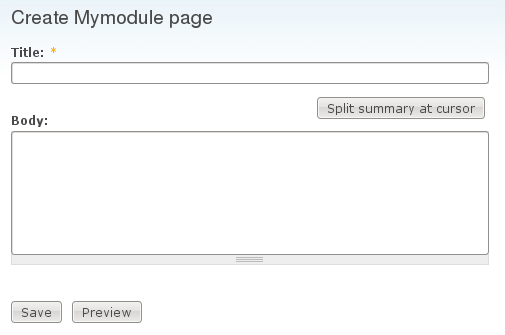
Look at the interface and identify the things that need to be tested in our node type.
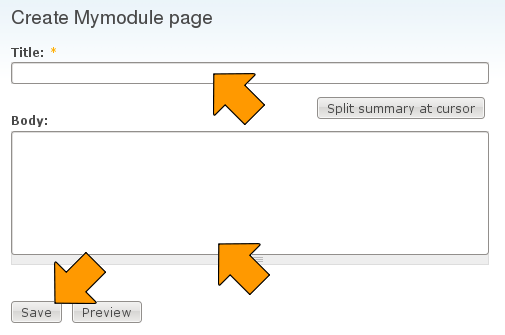
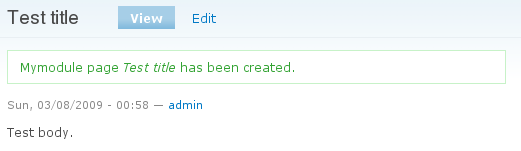
Take a tour and make sure you are familiar with how the interface works and that it functions properly in a basic case where you are manipulating it instead of simpletest. If you don't understand what it's doing or why, you can't write a workable test. In this case fill in the title and body fields and click the save button. You should see something like the following.
Building a test for simpletest_example
Now it's time to create our tests, which we'll do in the simpletest_example.test file (which you have in the complete module download).
If you are adding a new .test file to a module for Drupal 7, you will have to add it to the files[] section of the module's .info file. In our example, there is an entry for simpletest_example.test in the files[] section of the simpletest_example.info file:
files[] = simpletest_example.test
If you want to pull in dependencies that are not part of your project, you need to declare them as test dependencies. This information is only for the Drupal.org test runner and lets it know what modules must be downloaded and added that aren't already included in the project.
test_dependencies[] = context:contextIf you are using Simpletest 2.x via the contributed module (as opposed to the Simpletest core module), you'll need to add the following entry additionally to your .info file:
testing_api = 2.x
If you add a .test file to an existing module, you will probably need to rebuild Drupal's caches in order to notify Drupal of the new file. To rebuild all caches, you can go to admin/config/development/performance and click the "Clear all caches" button.
There are four basic steps involved in building a test:
- Creating the structure (just creating a class that inherits from DrupalWebTestCase)
- Initializing the test case with whatever user creation or configuration needs to be done
- Creating actual tests within the test case
- And, of course, trying desperately to figure out why our test doesn't work the way we expect, and debugging the test (and perhaps the module)
To start, we just need a bit of boilerplate extending DrupalWebTestCase.
/**
 * Tests the functionality of the Simpletest example content type.
 */
class SimpletestExampleTestCase extends DrupalWebTestCase {
  protected $privileged_user;

}
To make the test available to the Simpletest testing interface, we implement getInfo(). This just provides the user interface information that will show up on the simpletest page after clearing the cache table.
  public static function getInfo() {
    // Note: getInfo() strings are not translated with t().
    return array(
      'name' => 'Simpletest Example',
      'description' => 'Ensure that the simpletest_example content type provided functions properly.',
      'group' => 'Examples',
    );
  }
Next comes the terribly important setUp(). Here is where we must do anything that needs to be done to make this Drupal instance work the way we want to. We have to think: "What did I have to do to get from a stock Drupal install to where I can run this test?". In our case, we know that we had to:
- Enable the Simpletest Example module
- Create a user with privileges to create a simpletest_example node
- Log in the user
This work is done by the setUp() method:
  public function setUp() {
    // Enable any modules required for the test. This should be an array of
    // module names.
    parent::setUp(array('simpletest_example'));
    // Create and log in our privileged user.
    $this->privileged_user = $this->drupalCreateUser(array(
      'create simpletest_example content',
      'extra special edit any simpletest_example',
      ));
    $this->drupalLogin($this->privileged_user);
  }
Note: In Drupal 6, we had to explicitly enable every dependency our module had. Drupal 7 automatically enables all dependencies.
If you need to enable a module created by Features, you should do it after the setUp(). Example below:
module_enable(array('my_features_module'), TRUE);
Create specific test: Creating a node
Now we need to create specific tests to exercise the module. We just create member functions of our test class, each of which exercises a particular test. All member functions should start with 'test' in lower-case. Any function, with public visibility, that starts this way will automatically be recognized by Simpletest and run when requested (Note: Although it is possible to put each assertion into a separate function, testing several different assertions at once is recommended instead).
Our first test will be to create a new simpletest_example node by using the form at node/add/simpletest-example:
  /**
    * Tests creation of a Simpletest example node.
    */
  public function testSimpleTestExampleCreate() {
    // Create node to edit.
    $edit = array();
    $edit['title'] = $this->randomName(8);
    $edit["body[und][0][value]"] = $this->randomName(16);
    $this->drupalPost('node/add/simpletest-example', $edit, t('Save'));
    $this->assertText(t('Simpletest Example Node Type @title has been created.', array('@title' => $edit['title'])));
  }
Note: each test function you have will create a new set of temporary simpletest tables. This means that whatever you have created in a previous test will not be available anymore in the next.
drupalPost, drupalGet, and Assertions
The code above did a very simple form submission on the node/add/simpletest-example page. It prepares an array of fields (the $edit array, giving random values for the title and body) and then it POSTs the form and asserts that we find an appropriate text on the page.
Most tests will follow this pattern:
- Do a drupalGet() to go to a page or a drupalPost() to POST a form.
- Do one or more assertions to check that what we see on the page is what we should see.
$this->drupalGet($path) is as easy as it can be: It just goes to the named path.
$this->drupalPost($path, $edit_fields, $submit_button_name) is only slightly more complex. The $edit_fields array usually maps to the $form_state['values'] of the form you are trying to post to. If you get stuck on what your array key should be for a field, it can help to inspect the $form_state['values] array and copy the keys you see there.
And then there are dozens of possible assertions. The easiest of these is $this->assertText($text_to_find_on_page). When you get beyond this tutorial, you'll want to read about more of them.
Running the Simpletest web interface
Next we need to run the test. Here we'll use the web interface to run the test.
Go to the Configuration > Development > Testing page and find the module that you created. (For this option to be available, you will need the Testing core module or the simpletest contrib module enabled, as mentioned above). On this page you will see two tabs, Settings and List. In the List tab, you will see a list with the available tests. Select the test you just created -- it will be labelled "SimpleTest Example" in the "Examples" group -- and press the Run tests button. (You may need to clear Drupal's cache to see it in the list),
Once the test has run you should see the results, which for this test will pass.
You can also run tests from command line. More information about it can be found at Running Tests Through command-line.
A demonstration failing test
It really doesn't teach us much to just have a test that succeeds. Let's look at one that fails.
We'll work within the same class and this time try to test editing a node. Our module has a flaw in it - it doesn't handle the 'edit own simpletest_example' permission string correctly, so a user with only that permission will not be able to edit it. In this test we'll create a node and then try to edit it.
Note: There is currently an issue in which the automated tests that ensure the examples module works correctly can't tell whether the test is being run on the drupal.org testing infrastructure, or as part of this tutorial. They've had to temporarily disable this test failure to keep the module from failing drupal.org's testing. To enable this test to fail, please modify the `runningOnTestbot()` function below `testSimpleTestExampleEdit()` to return FALSE instead of TRUE.
Run the test and see the result.
  /**
    * Tests editing a Simpletest example node.
    */
  public function testSimpleTestExampleEdit() {
    $settings = array(
      'type' => 'simpletest_example',
      'title' => $this->randomName(32),
      'body' => array(LANGUAGE_NONE => array(array($this->randomName(64)))),
    );
    $node = $this->drupalCreateNode($settings);

    // For debugging, we might output the node structure with $this->verbose()
    $this->verbose('Node created: ' . var_export($node, TRUE));
    // It would only be output if the testing settings had 'verbose' set.

    // We'll run this test normally, but not on the testbot, as it would
    // indicate that the examples module was failing tests.
    if (!$this->runningOnTestbot()) {
      // The debug() statement will output information into the test results.
      // It can also be used in Drupal 7 anywhere in code and will come out
      // as a drupal_set_message().
      debug('We are not running on the PIFR testing server, so will go ahead and catch the failure.');
      $this->drupalGet("node/{$node->nid}/edit");
      // Make sure we don't get a 401 unauthorized response:
      $this->assertResponse(200, 'User is allowed to edit the content.');

      // Looking for title text in the page to determine whether we were
      // successful opening edit form. Note that the output message
      //  "Found title in edit form" is not translated with t().
      $this->assertText(t("@title", array('@title' => $settings['title'])), "Found title in edit form");
    }
  }
Unit Testing
Simpletest also provides a DrupalUnitTestCase as an alternative to the DrupalWebTestCase.
The database tables and files directory are not created for unit tests. This makes them much faster to initialize than functional tests but means that they cannot access the database or the files directory. Calling any Drupal function that needs the database will throw exceptions. These include routine functions like watchdog(), module_implements(), module_invoke_all() etc.
More information about writing unit tests for Drupal can be found at Unit Testing with Simpletest.
When to use t() in simpletests
Unlike most strings in Drupal, strings in simpletest should not always be enclosed in t(). This is for two reasons:
- Most strings used in simpletest are for testing only and not used on any website, so they are not translated.
- It is simpler to provide performant, robust test coverage when different components are decoupled as much as possible (which means not running code like
t()from other subsystems when it is not needed).
When to use t()
Use t() in your test methods in the following cases:
- When you are specifically testing functionality related to translation and localization.
- When you are testing for the presence of a string that is already translated in the user interface. For example, to check for the presence of the "Access denied" message on a 403 page, use the following code:
$this->assertText(t('Access denied'), 'Access denied message found on forbidden foo page.');Note that the first string,
'Access denied', is provided by drupal_deliver_html_page() and translated there witht(). Therefore, we also uset()when checking for the presence of this message.
When not to use t()
Do not use t() in:
- Strings in
getInfo(). - Test assertion messages. Repeating the example from above:
$this->assertText(t('Access denied'), 'Access denied message found on forbidden foo page.');The second string,
'Access denied message found on forbidden foo page.', is for the test runner's information only, and so it is not translated. - Test module and theme output, unless the test module is intended to test translation functionality.
In all the cases above, you can use format_string() if you need to format and sanitize variables for output in the string.
Debugging Simpletests
In the testing settings (admin/config/development/testing/settings) there is an option "Provide verbose information when running tests ". If you turn this on, every drupalGet() and every drupalPost() will be captured as an HTML file, which will be available for you to view in the test results. This is a tremendously important tool.
You can also use $this->verbose("some message") and the message you provide will be shown when verbose information is being displayed.
More information on debug() and $this->verbose() can be found on Boombatower's blog about debugging in Drupal 7.
A word about Users in test and the core environment
Tests run in a separate (sandbox) environment. Logging a user in with $this->drupalLogin($account) happens in the test environment. Test methods, like drupalGet and drupalPost also act in that sandbox. If you want to call core API functions (eg: user_access) it's highly recommended to assign the test user to the core environment:
$account = $this->drupalCreateUser(array('access content'));
$this->drupalLogin($account);
global $user;
$user = user_load($account->uid);
$this->assertFalse(user_access('access content'));
Simpletest switches the user to uid 1 during testing and takes care of restoring the user so we can change the user without security concerns.
Where to go from here
- Several of the API functions and assertions are documented in this section.
- Reading through drupal_web_test_case.php is instructive
Note: A Google Docs presentation to go with this material is maintained by rfay.
Help improve this page
You can:
- Log in, click Edit, and edit this page
- Log in, click Discuss, update the Page status value, and suggest an improvement
- Log in and create a Documentation issue with your suggestion
