
 The 2026 Drupal Business Survey is open. Your response will help shape the future of the Drupal business ecosystem.
Blocks
You are browsing documentation for an older version of Drupal, which is not supported any longer, and the information may not be correct. See current documentation for Contributed modules
The Domain Access module provides two blocks, which can be used to help you debug your use of the module.
Block -- Domain Switcher
The Domain Switcher block presents a list of all active domains. Clicking on one of the links will take you from your current URL to the same URL on the selected domain.
For example, if you are looking at example.com/?q=node and click on another domain, the link will take you to one.example.com/?q=node.
In the Domain Switcher block, domains are listed using their human-readable site-name variables.
NOTE: This block is for debugging purposes. The included Domain Navigation module provides block and menu items intended for end users.
Block -- Domain Access Information
The Domain Access Information block lets you view node access rules for any node when you are viewing that node. This block can help you debug the module for user accounts that do not have the 'Set domain access status for all content' permission.
Fixed typos as suggested in http://drupal.org/node/1232824.
jwilson3
NOTE: By design, this block is viewable by all users. However, its content should only be shown to site developers or during debugging. You should use the normal block visibility settings as appropriate to your site.
Block -- Domain Access Server Information
This feature is pending release as of 6-NOV-2011. See the feature patch.
Provides a block of information related to the current page request. Use this block to help determine how a server request is being handled by Domain Access.
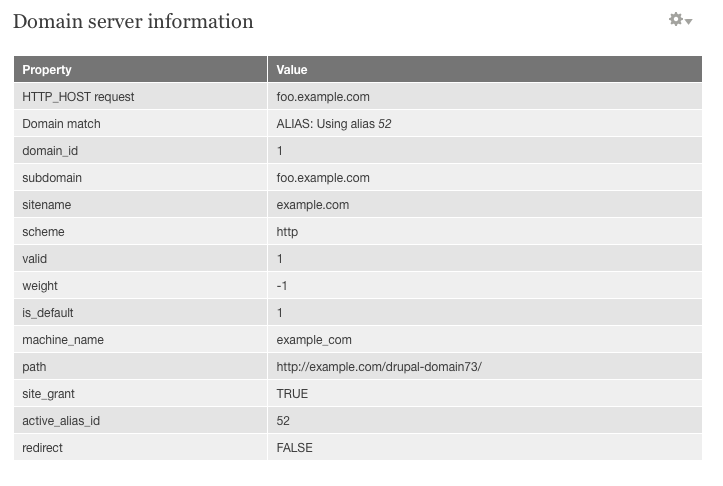
If you are having trouble with domains not resolving correctly, this block can help you pinpoint the problem. In particular, note the first two lines of the output:
  HTTP_HOST request     foo.example.com
  Domain match          ALIAS: Using alias 52
The first line tells you what HTTP_HOST (i.e. the domain string) was passed by the server to Drupal. The second line indicates how Domain Access reads that value.
Possible replies for the 'Domain match' value are:
- TRUE
Indicates a matching domain record. - FALSE: Using default domain
Indicates a non-matching domain, and that Domain Access is using the default domain as a fallback. - ALIAS: Active id #
Used when Domain Alias is installed. Indicates that the request matched a known alias of the active domain.
Below the Domain match line, you will see additional information about the current $_domain global object.
NOTE: By design, this block is viewable by all users. However, its content should only be shown to site developers or during debugging. You should use the normal block visiblity settings as appropriate to your site.
Help improve this page
You can:
- Log in, click Edit, and edit this page
- Log in, click Discuss, update the Page status value, and suggest an improvement
- Log in and create a Documentation issue with your suggestion
