
On this page
Organic Groups (OG) Migration from Earlier Versions
Last updated on
17 May 2024
This is documentation for Drupal 7, which is no longer supported. Learn more and find resources for Drupal 7 sites
Database Issues
If your database has a hyphen(-) in it, please make sure #1926418: OG Migrate fails if database name contains hyphen is resolved before reporting any new issues.
Setup
In order to upgrade Organic Groups from Drupal 6 or from OG 7.x-1.x to 7.x-2.x, the following modules must be installed and enabled:
- Migrate 7.x-2.5, including the UI
(newer versions not working for the time being, see comments) - Entity API
- Entity Reference
- Views
- *if using OG UI* VBO
Execution
Once the required modules have been enabled
- Make a backup of both your files and database.
- Remove orphaned nodes from your existing version as per the instructions here
https://www.drupal.org/node/1355086#comment-8874943
This will save you lot of headaches later. - Download the latest version of OG 7.x-2.x (this can done via drush or ftp).
- Run update.php. If you're unsure what this means, go to the following URL and follow the instructions:
http://yoursite.com/update.php
After running the update script, you may get the message "The content access permissions need to be rebuilt. Rebuild permissions." Wait to rebuild permissions until after running the migrate scripts. - Navigate to:
http://yoursite.com/admin/content/migrate - You should see the migrates that are still pending:
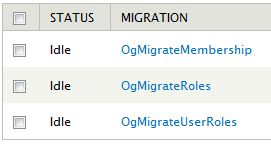
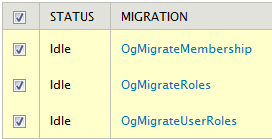
- Check All of the new Migrate Classes for OG, select Import, then click on Execute.
- You should now see information regarding how many records were updated and when:

- If some of your items are not migrated over, or there is an issue after migrating, try the latest dev version of OG. You can also look at:
- Once you are happy your migration is complete you are free to delete the now deprecated `og` table per #2226945: is the `og` table really deprecated
Help improve this page
Page status: No known problems
You can:
You can:
- Log in, click Edit, and edit this page
- Log in, click Discuss, update the Page status value, and suggest an improvement
- Log in and create a Documentation issue with your suggestion
