
Add a breakpoint group through the UI
You are browsing documentation for an older version of Drupal, which is not supported any longer, and the information may not be correct. See current documentation for Contributed modules
This article is for Drupal 7.x. For Drupal 8.x see Working with breakpoints in Drupal 8.
The Breakpoints module allows you to group breakpoints together. This way other modules can use these groups. The Picture module, for example, allows you to select a breakpoint group when you select the Picture display formatter for a field. The formatter will determine the size of the image to display based on the breakpoints in the selected group.
Following these steps you can create your own groups:
Navigate to the breakpoints configurations page
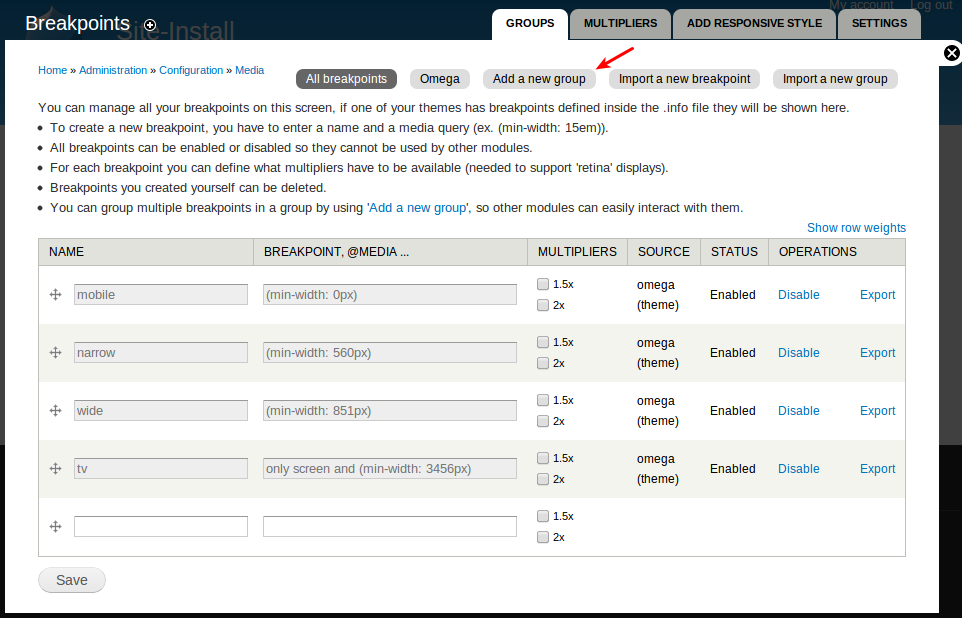
Go to Configuration » Media » Breakpoints. You will notice you can add your own breakpoints on this page.
Please read this important warning before creating your first group.
Click on "Add a new group":
Configure the breakpoints group
Enter a name for the new breakpoints group and select the breakpoints to include in this group:
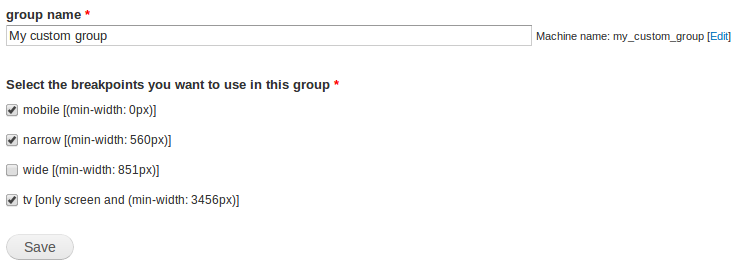
Save the form and your new group should show up at the top of the page. You should also see the breakpoints selected on the previous step in this group:

Warning (check update)
It is incredibly important to order the Breakpoints correctly before creating any Breakpoint groups.
- Breakpoints need to be arranged from smallest to largest (from top to bottom). E.g. "mobile" at the top and "wide" below it.
- If you create a Breakpoint group with the Breakpoints in the wrong order, the group becomes "locked" to the order that the Breakpoints were set in at its creation and your responsive images will not render properly.
- If you find yourself in this situation, you should delete the broken Breakpoint group and re-create it after you've set your Breakpoints to the proper weighted order.
UPDATE: If you're using Picture 7.x-2.0, you have to arrange the breakpoints from largest to smallest.
Help improve this page
You can:
- Log in, click Edit, and edit this page
- Log in, click Discuss, update the Page status value, and suggest an improvement
- Log in and create a Documentation issue with your suggestion
