
 The 2026 Drupal Business Survey is open. Your response will help shape the future of the Drupal business ecosystem.
On this page
User Points Limit
You are browsing documentation for an older version of Drupal, which is not supported any longer, and the information may not be correct. See current documentation for Contributed modules
The User Point Limit module allows an admin to configure a limit on User Points
for a certain defined window. For example this module allow user to get certain points only per day.
Requirements
The module requires User Points for Drupal 7.
Future:
To be able to configure limits based on user points categorization for a defined window.
Other modules:
userpoints_cap which is a part of User Points Contributed modules provides a similar functionality. But here the limit can be set only per user and there is no option to set a limit for all users based on a certain duration. Also the module is in development for 7.
Use of Userpoints limit
- Enable the module
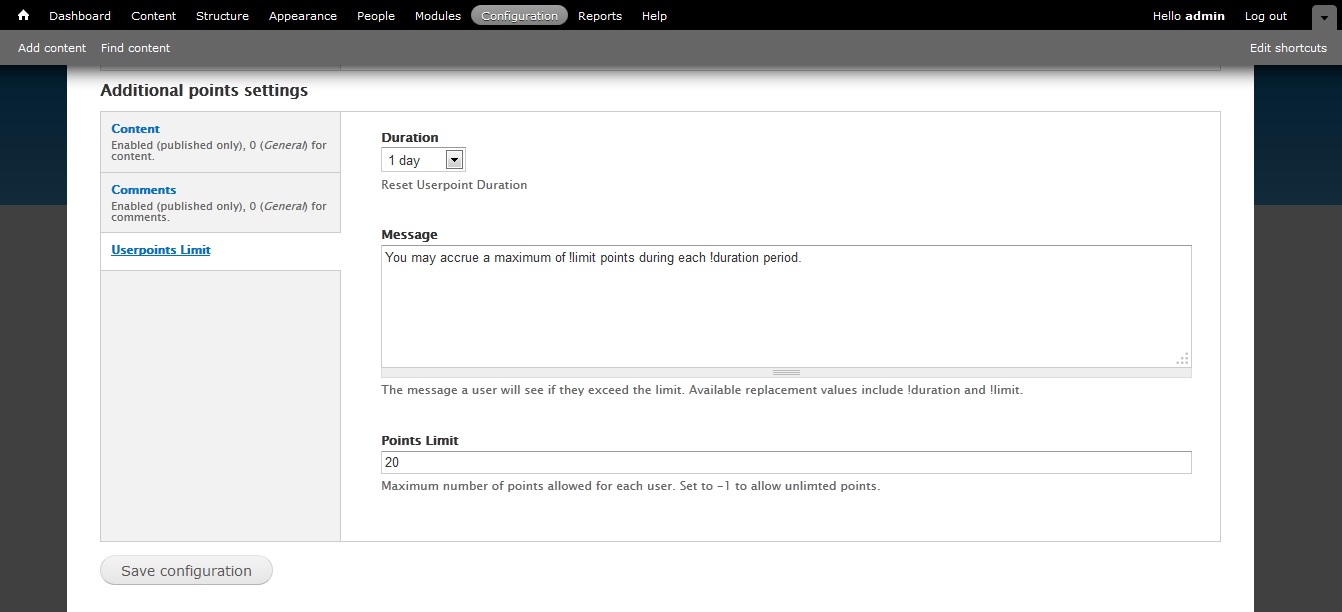
- Go to Configuration -> points -> points settings
URL: admin/config/people/userpoints/settings - Under Additional points settings -> userpoints limit -> Configure duration, Message and limit
Help improve this page
You can:
- Log in, click Edit, and edit this page
- Log in, click Discuss, update the Page status value, and suggest an improvement
- Log in and create a Documentation issue with your suggestion
