
Sending custom events to Mixpanel using Rules
Last updated on
30 April 2025
You are browsing documentation for an older version of Drupal, which is not supported any longer, and the information may not be correct. See current documentation for Contributed modules
If you know PHP and/or Javascript and can create your own modules, that is the preferred way to send events to Mixpanel. Please see Sending custom events to Mixpanel in a custom module for more details.
However, if you can't write code, sending events to Mixpanel via Rules is best option!
Step 1: Install the required modules
You'll need to install:
- Rules UI - comes with the Rules module
- Mixpanel Rules - come with the Mixpanel module
If you don't know how to install modules, please see Installing contributed modules (Drupal 7).
Step 2: Create a new Rule
- Go to: Configuration -> Workflow -> Rules
- Click on: Add new rule
- Give it a name (for example: "Send event to Mixpanel when node is created")
- Select the event you want to react on (for example: Node -> "After saving new content")
- Click "Save"

Step 3: Add a "Track event on Mixpanel" action
- Click "Add action" below the "Actions" table
- Select "Track event on Mixpanel" from the list
- Give the event a name in the "Event name" field (for example: "node-created")
- Add some properties from the node to the properties table (for example, put the node:title in a property called "node-title")
- Click "Save"
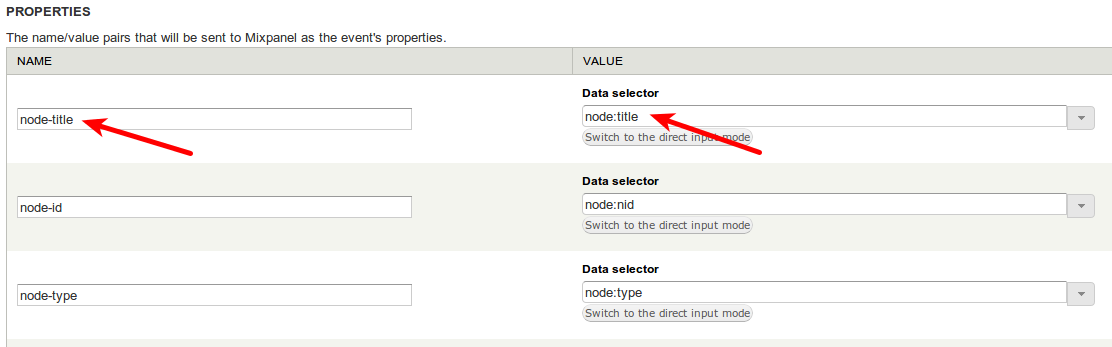
Now whenever a new node is created, a "node-created" event will be sent to Mixpanel!
Help improve this page
Page status: Not set
You can:
You can:
- Log in, click Edit, and edit this page
- Log in, click Discuss, update the Page status value, and suggest an improvement
- Log in and create a Documentation issue with your suggestion
