
 The 2026 Drupal Business Survey is open. Your response will help shape the future of the Drupal business ecosystem.
Isotopia Documentation
Drupal 7 will no longer be supported after January 5, 2025. Learn more and find resources for Drupal 7 sites
Module is at https://www.drupal.org/sandbox/nyariv/2223945
UI
Settings

jQuery Source - the source of jquery to use. Isotope requires jQuery 1.7.1 or higher, thus requiring a separate source of jQuery than the one provided with Drupal 7. Currently supports either jQuery Update or jQuery Multi as sources, this can easily be extended with API that comes with the module, see example:
/*
 * Hook for adding custom jquery sources to use with Isotopia.
 *
 * The value of 'js_object' is the name of the global jquery object to be used
 * with isotopia js. Module makers are responsible for making the actual isotope
 * library to be included with with their custom included jquery library.
 */
function hook_isotopia_jquery_source_info() {
  $sources = array();

  $sources['jquery20'] = array(
      'title' => t('Custom jQuery Source: 2.0'),
      'js_ojbect' => 'jq20',
  );

  return $sources;
}
js_object is the global jQuery object to use with Isotope.
If there are no sources available, Isotopia will not work.
Isotope Instance Setup
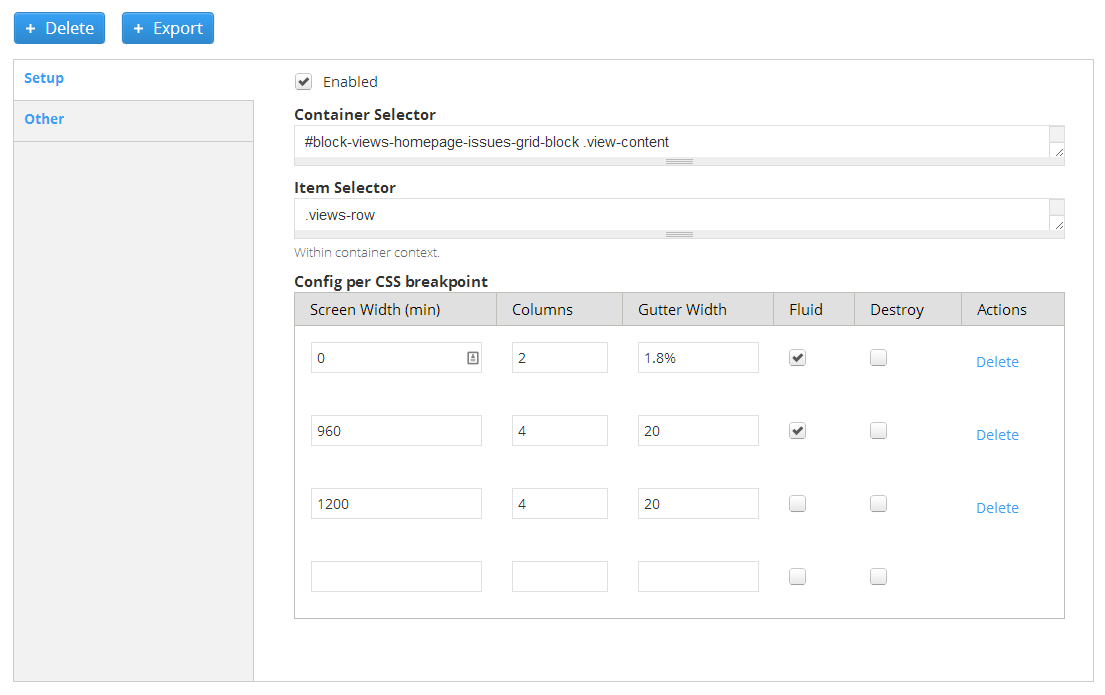
A container selector and item selector must be declared for the elements to apply the isotope to. Then the configuration for each css breakpoint (responsive design) must be defined. The parameters for each breakpoint include:
- Screen Width - the screen width of the breakpoint (minimum). If there are no breakpoints then only one breakpoint should be defined with screen width 0
- Columns - the number of columns in the isotope. This will adjust width width of columns based on container width and number of columns. Double column tiles can be defined by setting their appropriate width with css.
- Gutter Width - The spaces between tiles. Can be in percentages for fluid designs.
Other Isotope Settings
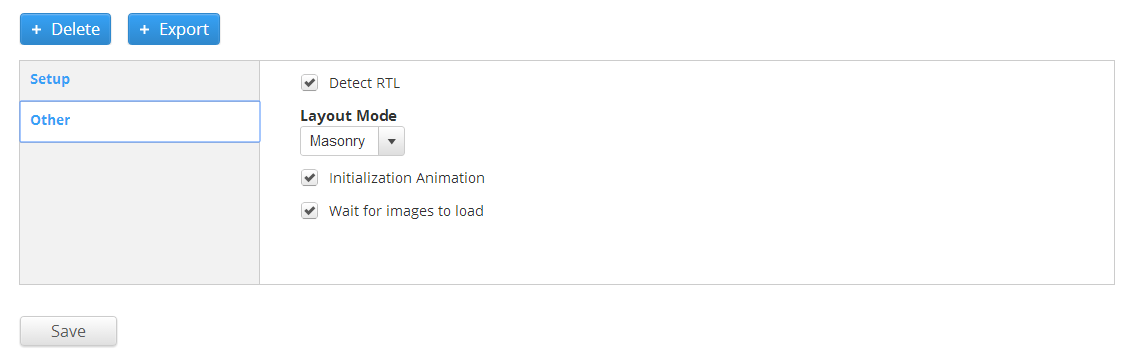
- On/off RTL detection
- On/off Initial elements insertion animation
- On/off Wait for images to load (necessary for none fixed height of tiles based on images)
- Layout mode - currently only one option
Extending functionality with JS
Isotope pre-init event
$(document).bind('isotopiaPreprocess', function(instance_id, instance){
  // Make any changes here to instance before it is implemented into isoptope
});
or for more specific event:
$(document).bind('isotopiaPreprocess_INSTANCE_NAME', function(instance_id, instance){
  // Make any changes here to instance before it is implemented into isoptope
});
Isotope post-init event
$(document).bind('isotopiaInitComplete', function(instance_id, instance){
  // Write code to run at init complete
});
or for more specific event:
$(document).bind('isotopiaInitComplete_INSTANCE_NAME', function(instance_id, instance){
  // Write code to run at init complete
});
Isotope process event / Adding sorting
This event is fired during every refresh of the isotope (such as resizing) and provides the options object which is used in the isotope definition. Useful for declaring the different sorting functions.
$(document).bind('isotopiaProcess', function(instance_id, instance, options){
  // Make any changes here to options which were generated based on instance configuration
  options.getSortData = {
    mySort : function($elem) {
      return $elem.find('.text').text();
    }
  };
});
Or for more specific event:
$(document).bind('isotopiaProcess_INSTANCE_NAME', function(instance_id, instance, options){
  // Make any changes here to options which were generated based on instance configuration
  options.getSortData = {
    mySort : function($elem) {
      return $elem.find('.text').text();
    }
  };
});
Trigger Filter/Sort
Drupal.behaviors.yourBehaviorNameHere = {
  attach: function (context, settings) {
    $(a.some-filter-button, context).click(function(e){
      var $container = settings.isotopia.instances.homepage_tiles.$container; // hompage_tiles is the isotope instance machine name
      $container.isotope({filter: '.my-filter'});
    });
  }
};
Similarly applied to triggering sorting as well.
Module API
Declaring Isotope Instance Through Code
/*
 * Hook for adding isotope instances programmatically
 */
function hook_isotopia_info() {
  $instances = array();

  $instances['test_instance'] = array (
    'enabled' => 1,
    'container_selector' => '#block-views-tiles-block .view-content',
    'item_selector' => '.views-row',
    'breakpoints' => array (
      0 => array (
        'screen_width' => 0,
        'number_of_columns' => 5,
        'gutter_width' => 15,
        'fluid' => 0,
        'disable' => 0,
      ),
    ),
    'detect_rtl' => 1,
    'layout_mode' => 'masonry',
    'init_animation' => 1,
    'wait_for_images' => 1,
  );

  return $instances;
}
hook_isotopia_info_alter alters all instances.
Help improve this page
You can:
- Log in, click Edit, and edit this page
- Log in, click Discuss, update the Page status value, and suggest an improvement
- Log in and create a Documentation issue with your suggestion
