

myDropWizard is closing down. Our last day of normal operation will be February 25th, 2022. Some time after that date the data source that this module uses will go offline, and it will no longer work.
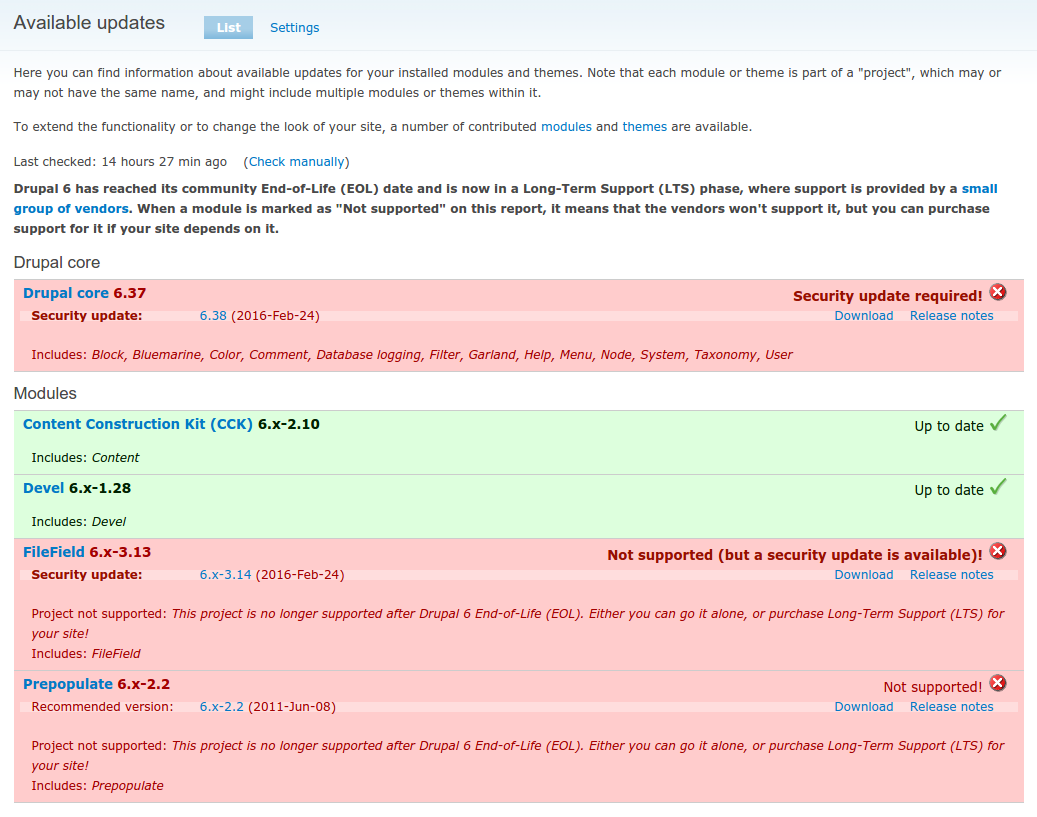
Reports accurate update status for Drupal 6 modules now that Drupal 6 is End-of-Lifed and most contrib modules are unsupported by the community.
It does four main things:
- It still shows security updates if a module is unsupported, so you'll know about security updates you haven't applied, regardless, and
- It uses an alternate data source that reports whether a module is supported by the Drupal 6 Long-Term Support (LTS) vendors, so you'll know if it'll be getting security updates going foward
- It will let you know about additional security updates made by the D6 LTS vendors! The LTS vendors are required to post their patches publicly, but there won't be any Security Advisories going out to let people know, and it won't be in the normal Drupal.org update status data. We create special security releases for the patches released by the LTS vendors, which appear in our data
- It integrates with Drush 7 or later. See "Drush integration" section below for more information!
While it uses a different data source, it continues to report usage information back to Drupal.org, so the community won't lose that valuable resource. This will let us know how many people are still using Drupal 6 in the next months and years!
And you don't have to be a myDropWizard customer to use this module! It's free to use by anyone!
Want more details about why we made this module the way we did? Check out our blog post announcing it!
Drush integration
If you use Drush 7 (works with PHP 5.3) or later, and have this module installed, then the drush up, drush ups and drush dl commands will use our alternate update status data too!
(Note: drush dl will only use our data if Drush is able to bootstrap Drupal, so you need to run it from inside your Drupal root or site directory or with the necessary alias.)
Starting with mydropwizard 1.4, we also support integration with drush make. Since drush make doesn't work with a bootstrapped Drupal site, there are some additional instructions:
- Place the 'mydropwizard' module in your ~/.drush directory
- Run
drush cc drush - When you use
drush make, add the--release-backend=mydropwizardoption to tell it to use our data
Hacked! module integration
We've released an alternate version of the Hacked! module (original) that uses 'mydropwizard' rather than the core 'update' module on GitHub:
https://github.com/d6lts/hacked/releases/tag/6.x-2.0-beta9
Without this, the hacked module will be unable to report on any of the module versions that come from the D6 LTS.
Project information
 Minimally maintained
Maintainers monitor issues, but fast responses are not guaranteed. No further development
No longer developed by its maintainers.- Project categories: Security, Developer tools
 21 sites report using this module
- Created by dsnopek on , updated
 Stable releases for this project are covered by the security advisory policy.
There are currently no supported stable releases.

