Last updated June 9, 2012. Created by emmajane on April 25, 2008.
Edited by markewhite@me.com, Carolyn, arianek, Shai. Log in to edit this page.
For Drupal 7
To run the Drupal install script, point your browser to the base URL of your web site.
The "base URL" means the document root (directory) where you placed your Drupal files (and is defined in your web server configuration file). If you have installed Drupal on a web host this will likely be a domain name such as http://www.example.com. If you installed Drupal in a subfolder, then you should point your browser to the subfolder (e.g. http://example.com/subfolder). If you have installed Drupal on your desktop machine this URL might be http://localhost/drupal.
If the installation process does not simply appear by entering the base URL of your site, add the file name "install.php" (for example http://www.example.com/install.php).
You will be guided through several screens:
- Choose which profile to use for the installation (standard or minimal).
Most people should select the "standard" option. The standard option comes with default content types already enabled, such as Article and Page, and with appropriate publishing options already set. (Of course you can later edit these default content types and their settings, or add additional ones.) The standard profile also has a useful collection of modules pre-enabled for you.The "minimal" option is targeted toward more experienced Drupal site creators who wish to set up their own content types with associated publishing options. The minimal profile has only three modules enabled: Block, Database logging, and Update status.

- Select a language
If you want to install using a language other than the default English, click the Learn how to install Drupal in other languages link.
- Verify requirements
If your installation directory is not yet configured properly, you will be informed at this step. You can correct the settings individually and either refresh the browser screen or click 'Try again' to see whether there are any errors left.
Possible errors include:
- Missing directories and/or incorrect permissions
The installer will attempt to automatically set up a number of directories, but this may fail due to permission settings. In this case you will find the missing directories listed.sites/default/filessites/default/privatesites/default/private/files
These directories should be set to the following permissions
chmod o+w sites/default/filesORchmod 777 sites/default/files - Missing settings.php or incorrect permissions
Ifsettings.phpis missing or not accessible, follow the instructions in Step 3: The settings.php file. Note that you will need both the default.settings.php and settings.php files.
- Missing directories and/or incorrect permissions
- Set up database
Enter the database name as well as the username and password for the database that you created in Step 2: Create the database. This username and password information allows Drupal to access your database, so the install script can create tables. Note that this is not the username and password for administering Drupal; these will be created in the next step.
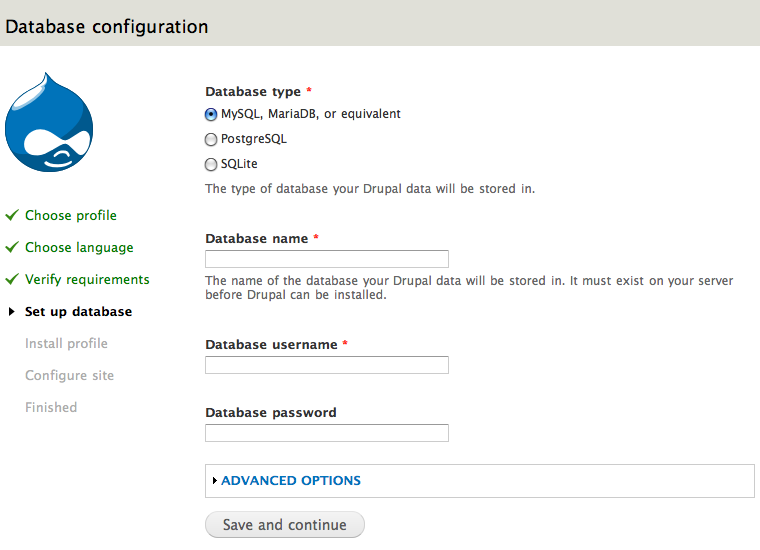
The Advanced options will allow you to change the database host ('localhost' is usually used in this entry:
wamp/bin/apache/Apache2.2.11/bin/php.inias an example of the location on a Windows box running WAMP). You can also change the port and the table prefix. You only need to change the port if you are using a non-standard port number. The table prefix is useful if you are installing multiple instances of Drupal tables that share the same database.Click Save and continue at the bottom of the page.
- Install profile
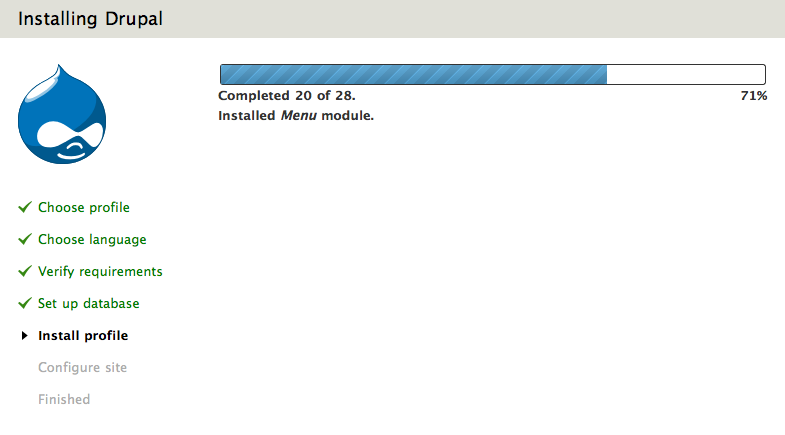
A progress bar will appear and display notes from the installer regarding the progress of the installation. If no errors are encountered, the next page will automatically load in your browser. - Configure site
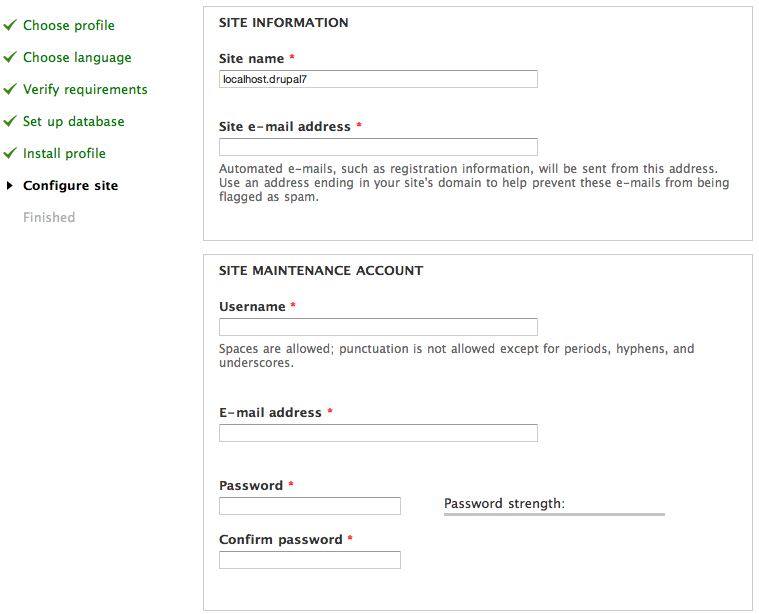
Input the information for the first user account (which will be automatically assigned full administration permissions) and provide basic web site settings.- In the Site name field enter the name you wish to use for the site. You can also edit it later through the administration interface.
- In the Site e-mail address field, enter the e-mail address that will be used by Drupal when it sends out notifications such as registration information.
- In the Site maintenance account field, enter the Username, E-mail address, and password for the main administration account.
Note that there is a distinction, as of Drupal 7, between the main administration account that you set up on this page, and the "Administrator" site administrator user role that you will see when you visit the "Roles" and "Permissions" pages in the administration interface. The account you set up in the Site maintenance account section during installation is a super-user who has overall control over every aspect of the management and configuration of the site. (This will be
http://www.example.com/user/1, for those of you familiar with that account from earlier versions of Drupal.)
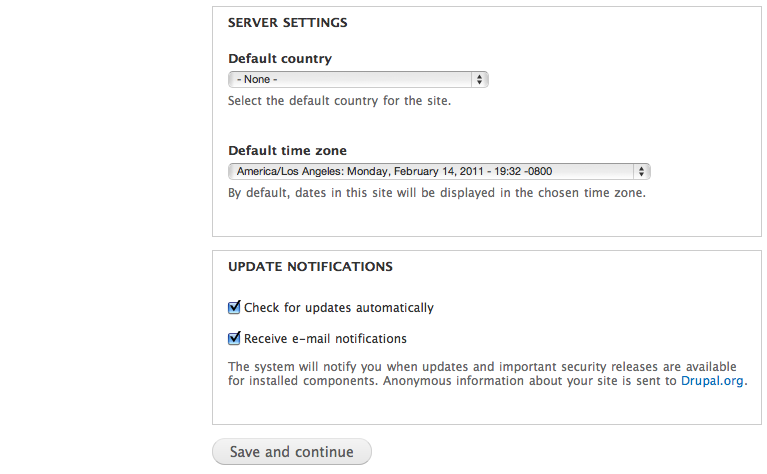
- In the Server settings field, select your Default country and Default time zone.
- In the Update notifications field leave both boxes checked if you want your Drupal server to alert you when updates are required. Often updates relate to security issues and are important to perform. However, if you have restricted Internet connectivity (for example if you are behind a corporate firewall) you may want to leave these settings unchecked and test them later.

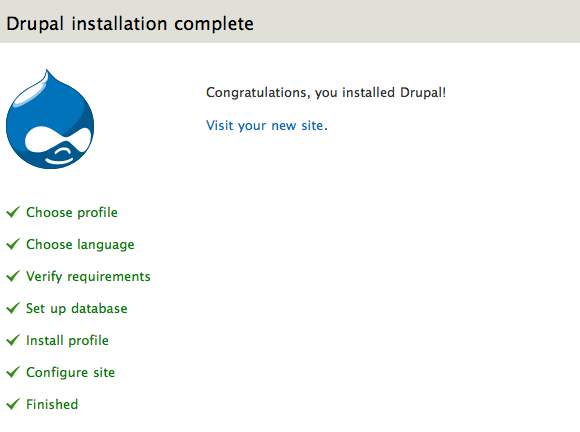
Click "Save and continue". On success you will see the Drupal installation complete screen. If there are any error messages, review and correct them now.

Secure your site
After the installation is complete, you will want to change the permissions on the settings.php file back so that it is protected:
chmod u=rw,o=r,a=r sites/default/settings.php OR chmod 644 sites/default/settings.php
If you make manual changes to the settings.php file later, be sure to protect it again after making your modifications.
Failure to remove write permissions to that file is a security risk. (Although the default location for the settings.php file is at sites/default/settings.php, it may be in another location if you use the multi-site setup.)
For Drupal 6
To run the install script point your browser to the base URL of your website.
The base URL is defined in your Web server configuration file and is specific to the document root where you placed your Drupal files. If you have installed Drupal on a Web server this will likely be a domain name such as http://example.com. If you have installed Drupal on your desktop machine this URL might be http://localhost.

You will be guided through several screens to set up the database, create tables,

add the first user account and provide basic web site settings.

If you get any errors regarding the files directory and its permissions, read more information about the Files directory.
| Attachment | Size |
|---|---|
| 02-database-configuration_sm.jpg | 20.79 KB |
| 03-configure_site_sm.jpg | 35.24 KB |
| profiles.png | 41.6 KB |
| language.png | 37.14 KB |
| requirements.png | 101.63 KB |
| dbconfig.png | 62.94 KB |
| installer.png | 36.6 KB |
| siteinfo.png | 59.79 KB |
| complete.png | 35.67 KB |
| siteinfo2.png | 54.23 KB |
Comments
Localhost error on IIS 7 with PHP 5.3
When using PHP 5.3 to connect to "localhost", the database script will time out when attempting to make a test connection to the database as documented at PHP's mysql_connect page.
This is because the mysql native driver now used by PHP cannot properly handle two addresses being returned for localhost.
To avoid this problem, either use 127.0.0.1, or comment out or remove the IPv6 entry for "::1 localhost" in your windows\system32\drivers\etc\hosts file (leave the other "localhost" setting).
Laurence "GreenReaper" Parry
Flayrah - Flickr - WikiFur -
Error 500
I received "Server Error 500" untill I commented out following lines in file '.htaccess' :
# Don't show directory listings for URLs which map to a directory.
# Options -Indexes
# Follow symbolic links in this directory.
# Options +FollowSymLinks
My provider : One.com
I did check that I have both
I did check that I have both files default.settings.php and settings.php cretated via copy and still same problem... :(
It happened to be a problem
It happened to be a problem with db connectivity. I was installing on Vista 64 Home Premium. Namely problem was with "localhost". I wrote simple php script to check how I can connect to db and got the same result: no error messages, no nothing. So i started searching and found that problem was with localhost used in mysql_connect as soon it was replaced with 127.0.0.1 my script worked. So the hosts file contained line '::1 localhost'. The info i found was suggesting to comment that line out. I did so and installation script now passes the db info screen to the next one with no problem. I hope it helps...
same here
Any one found the secret sauce on this one yet? I am in need as well. I tried editing the options lines & override lines in /etc/http/conf/httpd.conf as well as the conf file for the vhost as well as the .htaccess file for Drupal in the site. None seem to be quite right. I ended up renaming the .htaccess file in the Drupal site to get it to work, however I REALLY do not like this, since that exposes a lot of the Drupal guts to the wild wild wild WAN. I can not quite get the correct combinations in place for the .htaccess file un-edited to live inside the Drupal directory (the ultimate goal). This box is ours & we host a few dozen sites on it & I can do anything I need to. I prefer to maintain all these types of things inside the conf file for each separate vhost file for each site.
Any & all advice greatly appreciated.
Cheers all!
Thanks.
Peace.
Jason Sjobeck
Sjobeck Integration Professionals
www.sjobeck.com
www.sjobeck.com
I wouldn't say I've found the
I wouldn't say I've found the secret sauce, but I've found a solution that worked for me:
1. Place a copy of default_settings.php into your new site's directory. Make a copy of this and call it settings.php
2. Ensure the files have appropriate write permissions
3. Edit your new settings.php file so that the Database URL format is in the correct format for you - see http://drupal.org/node/172885#comment-1017698
Then enter the database details on the install page again.
Jonny
Where on the install page?
I presume that you mean the install.php file? This file appears to have 1180 lines in it, so it would be helpful to know where you entered the database details. Thanks.
Parse error
If you get an error like this:
Parse error: syntax error, unexpected '{' in includes/bootstrap.inc on line 690
it's because you're not using PHP5 (it's bombing on a 'try' statement).
You can usually fix this by adding a line like this to the .htaccess file in the Drupal folder:
AddType x-mapp-php5 .php
HTTP 500 Internal Server Error - While installation in Windows
As pre-requisites to Drupal installation, have installed
Apache 2.2 - Found to be starting the services and displaying the localhost home page
PHP 5.3.3
MySQLServer 5.1
When I am trying to install Drupal, once I entered all the data in "Database configuration" page, it gives "HTTP 500 Internal Server Error".
Can somebody guide, as to how to refer to the error logs (if any) to find out where the issue is?
The error log of Apache give the following as last lines:
--
** (httpd.exe:2656): WARNING **: Error loading plugin: `E:\dev\php\ssleay32.dll': The operating system cannot run %1.
[Sun Sep 05 10:19:05 2010] [error] [client 127.0.0.1] File does not exist: E:/dev/apache/htdocs/favicon.ico
--
I have the same issue ,,, did
I have the same issue ,,, did you find the solution?
e-mail site
Configuration of site is demanding an e-mail site for registration information even though it is installed as http://localhost/drupal-7.0. I'm using MAMP as the server on my Mac OS X 10.5.8.
Cancel: It apparently likes webmaster@localhost.
After install no default drupal site comes up.
I have installed drupal on my site samuelbarton.net and as you will see when you look at the site, its just a list of the files in that directory of my hosting account. I want to know why the default drupal site doesn't come up? And why I can't make it come up by clicking on any of the .php files on page?
Please let me know.
Same problem. When I click on
Same problem. When I click on the link "your new site" i get the list of drupal files...
same
Have you solved the problem? Please tell us how.
Apache DirectoryIndex directive
Hi,
Simply add or edit the DirectoryIndex directive to your httpd.conf file:
<IfModule dir_module>
DirectoryIndex index.php index.html
</IfModule>
Specifying that apache must serve index.php when a directory is requested.
Thank you
You just give me the right answer...thank you very much
Lina Marcela
oops
moved to child page.
Installing Drupal Commons
Have followed instructions to the letter.
Extracted files on hosting, so no files 'lost' in ftp transfer.
After starting install, get this error:
Fatal error: Class 'ctools_export_ui' not found in /home/wowuk/public_html/drpc/profiles/drupal_commons/modules/contrib/panels/plugins/export_ui/panels_layouts_ui.class.php on line 4
What do I do next?
Wrong Link in the Site
Hi ,
Can you please update the link under
Point 4 , Set up database which has link for Step 2 : Create the database
It should be pointing to right page :http://drupal.org/documentation/install/create-database
instead of : http://drupal.org/documentation/install/create-database4
Regards,
Puneet
Drupal 7 Installer Fails
I am trying to install on a 64-bit PC running Apache 2.2 (localhost) under Zend Community Server with PHP 5.3.3. The installation root is a standalone vhost. The DB is setup in MySQL and the user access privileges are confirmed. The installer launches fine. After completing the DB configuration form and hitting 'save and continue,' the installer sends the following request 'http://drup7/install.php?profile=standard&locale=en&op=start&id=1' then silently dies--the so called WSOD. No code is ever executed and no error is returned. This is not particularly useful.
Error reporting is turned on. There are no relevant errors reported in PHP or server logs. The WSOD troubleshooting document does not seem to contain any relevant information other than turning off Zend compatibility in Apache config. That does not make any sense in this environment. Do I have to hack the installer to get this to work?
FYI. Joomla and other frameworks install and run without a hitch.
Does anyone have words of wisdom to share on this topic? Thanks.
BGM
Drupal 7 Installer Fails
Hi BGM,
I also faced the same issue i.e Drupal 7 Installer Fails on the Install Profile step. Dont know the reason for it but what i marked is that this generally happens when i tried to install drupal using Google Chrome. When i tried to install it using Firefox it worked well. So may be its a browser issue but not sure.
Hope this can help anyone..
Thanks.
chmod of default folder is missing as reminder
Step 3 (the settings.php file) of the install guide reminds us twice to "Do not forget to change permissions back after you have run the installation script" for the settings.php file and its default folder.
On this page of the guide, in the "Secure your site" section, it writes about chmod the settings.php file. What is missing is the reminder to chmod the default folder. I recommend the text be expanded here to include a reminder for the default folder. I also recommend adding (or moving) this reminder to the "After Installation" page of the setup guide.
D7 + Localhost + Snow Leopard = won't connect to database server
In order to complete Step 4 (Set up database), I needed to go into Terminal and run the following commands:
sudo mkdir /var/mysqlsudo ln -s /tmp/mysql.sock /var/mysql/mysql.sockSince it was looking for mysql.sock in the wrong place, it was unable to find the database I had created and gave me the following error:
Failed to connect to your MySQL database server. MySQL reports the following message: No such file or directory.
- Are you sure you have the correct username and password?
- Are you sure that you have typed the correct database hostname?
- Are you sure that the database server is running?
For more help, see the Installation and upgrading handbook. If you are unsure what these terms mean you should probably contact your hosting provider.
Running those commands in Terminal fixed it.
and what did you do? you have
and what did you do? you have solved the problem?
I also have this problem ....
Can not complete set up error "Table variable already exist"
I am installing Drupal 7 on a windows laptop using xamp. I can not finish the last step of installation I get the error "Table variable already exist" I tried dropping my data base uninstalling drupal and setting up a new data base and Drupal 3 times and no luck. I even uninstalled Xamp and started over. What do I do?
400 - Bad Request on /install.php
I ran into the following problem installing Drupal. I didn't find a clear answer or documentation, so I thought I would leave a note for whoever makes the same mistakes I did.
If .htaccess files are disabled on your server then you will have to move the contents of the .htaccess file into the Apache config file. Exactly which file that is will vary based upon your *nix flavor. Whichever file that is, just copy and paste the whole .htaccess file contents into the directory statement for the root website where Drupal is installed.
It could be the apache2.conf file, or the httpd.conf file. I'm running Apache2 on Ubuntu with named virtual hosts. So my Apache config files are in /etc/apache2/sites-available/, and there is a separate file for each named site. Then the file looks like this (greatly simplified)
ServerName blah.domain.com
ServerAdmin support@domain.com
DocumentRoot /home/marketing/www
(various directives)
(.htaccess file contents go here)
(other directories and random apache directives are down here)
If you get this in the wrong place you are likely to get 400 - Bad Request errors when you try to open up the install.php file.
Cheers!
Doublehorn Communications Drupal Team
drupaladmin (at) doublehorn.com
I get the errors in the photo
I get the errors in the photo above (sites/default/files not writeable and sites/default/settings.php not writeable) but both are set to 777. Is there a way to fix this odd occurance?
The CHMOD can be different in
The CHMOD can be different in some servers. For example in some servers you can use 755 instead of 777 or etc that your files work true and you don't face problem and can access them. I recommend you to try installing Drupal without changing any CHMOD of your files and folders to see if it works true. For example in one of the servers i use, i didn't change CMHOD of any file or folder and the values are like this:
Sites folder is :755
default folder ( which is inside Sites folder) is: 555
settings.php is: 444
and it works true without any problem and as i said, i didn't change any permission before/after instillation. So please try installing Drupal once again without changing file permissions.
Also if your server is Linus based and it uses cPanel with Fantastico , you can install Drupal almost automated through it.
Doubt is the father of invention..... Hubmesh
Text field not getting pulled
I keep getting the same error below no matter what database username and database host I put in the text fields for the database configuration screen. The database is created and have all the correct privileges. I have tried both with a user I created and for the root user.
Database username field is required.
In order for Drupal to work, and to continue with the installation process, you must resolve all issues reported below. For more help with configuring your database server, see the installation handbook. If you are unsure what any of this means you should probably contact your hosting provider.
Failed to connect to your database server. The server reports the following message: SQLSTATE[42000] [1044] Access denied for user ''@'localhost' to database 'drupal7'.
Is the database server running?
Does the database exist, and have you entered the correct database name?
Have you entered the correct username and password?
Have you entered the correct database hostname?
Nothing
Hi, I have followed the steps in the guide but I cannot see anything at my web address. Yesterday I changed the nameservers to point to my hosting account (another company). Do you think perhaps it's because the change has not fully propagated on all servers? I am going to mywebsite.net and I've tried with /install.php to no success. Thank you.
Update: my website working fine now. Thank you. Yes, you have to wait for the servers to fully propagate any changes before you can do the installation.
http://www.futuredigitalmedia.net -
http://creativevisualart.com - my art & design blog
cant get the drupal/install.php to load - 404 error
I have tried :-
http://localhost
http://localhost/drupal
http://localhost/drupal/install.php
http://
http:///install.php
all of them give me a 404 error
I am running 64 bit Windows 7 and have installed:-
-Apache v2.4.4
-PHP v5.4.13
-MySql v5.6.10.1
following all the install steps on this site.
I am attempting to install drupal 7.22
I can get to http://localhost/info.php and it displays all my php info, so I believe my web server is working ok.
My apache web server is running and no errors appear in the apache log.
I was getting an error earlier in my log when attempting to get to the urls above but resolved it by adding the following to the bottom of my httpd.conf:-
AcceptFilter https none
AcceptFilter http none
EnableSendfile Off
EnableMMAP off
The error was 'Apache 2.4 => winnt_accept: Asynchronous AcceptEx failed.'
but like I say that error no longer appears in my log.
Apache is installed in c:\Apache24 and Drupal was copied to c:\Apache24\drupal.
Any ideas why I cant get the installation screen and get a 404 error instead???
Regards Anthony