

 Come together with the global Drupal community in Rotterdam, 28 Sept – 1 Oct 2026. Sessions, contribution, connection, and Early Bird savings until 8 June.
I am working on writing some SimpleTest scripts to test validation of various content creation forms for a complex project and happened upon some issues with validation of dates.
Following is our use case:
Date / Date API / Javascript Calendar Widget modules active (sometimes testing with JS disabled)
From and To date are both required (Date range in the future)
Default value (from): Now
Default value (from): Blank
Date input format: 17.12.2010 - 13:39:28
Years back/forward: -0:+5
Number of values: 1
To date: Required
Granularity: Year, Month, Day
We have found that if dates are entered in an incorrect format, they are accepted and stored incorrectly:
E.g. Enter "From" 12.18.2010 (incorrect, per config: U.S. format date, 18th of December)
"To" 22.12.2011 (E.U. format, as it is configured)
The from date is accepted and stored as Sun, 06/12/2011 (instead of the 18th of December).
The same is true if the incorrect date is entered in the "To" field.
Things get especially weird if you enter in m.d.y format (should be d.m.Y):
Example entry for "From": 12.18.10
"To": 22.12.11
Which yields content with the following values stored:
06/12/0011 - 12/22/0011
(Note that here, the to date is not even stored in a way that makes sense for dd/mm/yyyy date-format.)
Results seem a bit bizarre as it will accept dates that make no sense:
From: 12.31.10
To: 22.31.11 <---- This date shouldn't exist in any format.
Which yields stored values of:
07/12/0012 - 07/22/0013
Of course we'd like to see a message that "The date entered appears to be incorrectly formatted. Dates should be entered in dd.mm.yyyy -format." (or something like that).
I've noticed, now (and this could be running into a core issue), that even when I correctly configure our default "short" date format to (Fri, 17.12.2010), and select "short" as our "default display" in the Date module (for the field's settings), what is displayed for the content is now our long-format date:
Thursday, 12 July, 0012 - Monday, 22 July, 0013
Perhaps this part of my observations is actually a different issue to report? If "short" display format is selected, "long" may be displayed when looking at content? Before we correctly configured the "short", "medium", and "long" formats, the U.S. format (short) was being displayed. Now that we have EU short, medium, and long date displays formatted, the U.S. long is being shown. Odd.
By the way, the place to select which format to display for "short", "medium" and "long" is on:
admin/config/regional/date-time ,
It's not on: admin/config/regional/date-time/formats, where you can create a custom date/time format which is stored only with it's PHP-"format string" (e.g. "D, d.m.Y" - with no "alias" like "short", etc). I found that when I set up a custom format there, it was not available in the settings for the date field in our content; we could still only select "short", "medium", or "long", even after refreshing the page (even if cache is cleared, etc). Ideally, this should also be improved, but perhaps this issue already exists and/or should be reported as a separate issue?
I may come back and add additional information as I continue to observe validation issues for the date fields.
In closing: I feel like I should say I really appreciate the immense task you've done in getting the Date and Calendar modules as awesome as they are, KarenS and I appreciate the early start you've got on getting things working well in D7, too. I hope this bug report helps that process along. :-)
| Comment | File | Size | Author |
|---|---|---|---|
| #12 | date-1001186-testpatch.patch | 2.33 KB | lomo |
| #12 | TwoDigitDateValidation.png | 48.6 KB | lomo |
| #8 | Date-Module-Screenshot01.png | 83.28 KB | lomo |
| #8 | date-1001186-testpatch.patch | 2.52 KB | lomo |


Comments
Comment #1
lomo commentedAdditional note (since I can't edit the original issue to clarify): In case this isn't clear, for the first few observations, the output was short U.S. format since we hadn't configured our default time formats in date/time settings. Even so, there are issues with what is stored, regardless of output format used for display (and there are additional issues with regard proper default output, once settings are made).
Comment #2
enikola commentedsubscribing
Comment #3
lomo commentedTitle of issue changed to be a bit more clear. It's really an issue of date input formats not being fully validated.
Comment #4
karens commentedI got lost trying to figure exactly how to reproduce the problem you're seeing. Could you reduce this to something like:
- Create a date (of XX field type using a XX widget) that has an input format set to XXXX
- Try to create a date with an input value of XXX, which should be invalid, and see that it is incorrectly saved as XXX.
The way that dates are displayed is a totally different part of the code than the way they are input, so please create a separate issue for that, again providing information on exactly how to reproduce something that is not working right.
Comment #5
lomo commentedThanks for looking into this, KarenS
I'll work on creating a SimpleTest environment to streamline the process for you and make sure things are clear. It won't provide exhaustive tests, but should "fail" to reject input that isn't valid for the date format selected, at least to reproduce the most basic parts of the environment I was testing. Since our use case only includes EU-formatted dates, I didn't test whether bad values might also be accepted for U.S.-format, but I can start by checking that.
Short version of the issue I observed:
- Use EU date format (day/month/year)
- Enter a date with a too-high "month" and watch it get accepted as valid (and stored in strange ways).
Currently there appears to be no validation to reject a "month" higher than 12, so the months "roll over" and the date is stored as the next year. That's a PHP feature which can be useful, but I don't think we want users to be able to input dates that aren't validly formatted and have them re-interpreted in this manner.
Comment #6
enikola commentedThank you for contributing KarenS. I just to add some more information to LoMo's clarifications to reproduce the issue.
1) add a new field of widget type textfield with JS pop-up
2) select input format dd.mm.yyyy - hh:mm:ss but set the granularity to dd.mm.yyyy
3) create a new node and put "31.19.2010" in the field - obviously an invalid date
expected result: error message noting the date is invalid
actual result: the invalid date is transformed to 31.07.2011
Nice holidays.
Cheers
Comment #7
lomo commentedThanks, weboholic... I don't think the JS popup is needed. Or at least this happens when JS is disabled, too.
The JS widget is nice since it ensures dates get entered properly, but if JS is disabled or the user can't make use of the widget for some reason, entry mistakes could happen, so it would be good to improve validation of date strings entered.
Comment #8
lomo commentedUpdate: I poked around and found that it doesn't matter what the specified date format is, the module isn't performing checks to ensure the month and day values are within expected ranges.
I added a "malFormedDate()" method (a small variation on the existing "formDate" method) to the date.test file and inserted a call to it at the end of the testFieldUI() function.
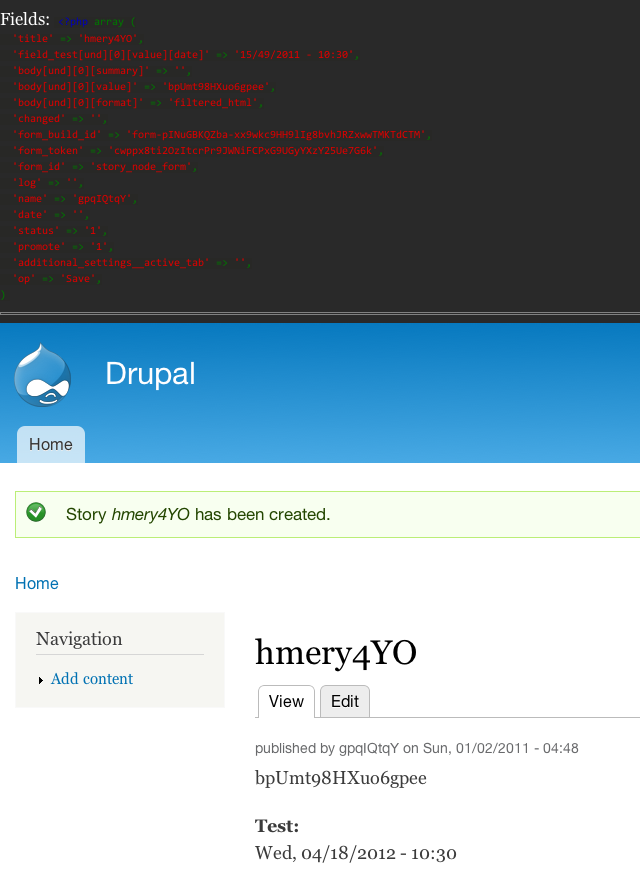
In my example date, both the day and the month are "out of range" and get "rolled over" to the next month and year. The date format is mm/dd/yyyy and what is entered is 15/49/2011, which gets interpreted, quite sensibly, as 04/18/2012 (the 15th month of 2011 would be the third month of 2012. And the 49th day of that month, would be the 18th of the next month. It all makes perfect sense, but I don't think we want to accept such dates from users. ;-)
You can see the relevant part of the "verbose text" test results in the attached screenshot and the attached patch adds the following to the test:
Comment #9
lomo commentedForgot to change the status back to "active".
BTW (just to be clear) the "patch" file does not "fix" anything, but simply adds a basic test to demonstrate the primary issue described here.
Comment #10
karens commentedI moved the test into a separate file so we can add more validation tests later and did a bunch of cleanup of the way that validation is handled. It passes the test now and my initial attempts to enter invalid values. More tests would be nice, but this is a good start.
Thanks!
Comment #11
lomo commentedGreat, KarenS, and thank YOU. I just realized that hours and minutes also "roll over". 28:95 gets interpreted as 05:35 (the next day). I hadn't tested hours and minutes since they fall outside the granularity of our current use case (what we were initially testing), but just thought to add that to the date.test, too. I don't know if you've also improved validation for the "time" part?
Anyway... If you've committed a new test file to the module, I can see if I can find a way to break it tomorrow night when I get back from work (time to sleep now).
Oh... The other thing I noticed is that even if YYYY is specified for the year part, it accepts 2-digit entry for the year, but '11 is interpreted as 0011, which might not be what a user had in mind.
Comment #12
lomo commentedHi Karen. Things seem to be working great now -- also with our local tests for our use case involving DD/MM/YYYY-format dates.
I've added a couple more test cases to your validation. One passes (you already have appropriate validation for the hour/minute values). The other, involving 2-digit entry for the year, does not yet pass (PHP seems to left-fill with zeros, which for most use cases would not be what the user has in mind, I'd think.) In any case, if the user doesn't enter 4 digits when that is the expected format, the module's validation should probably reject the entry, right?
I've attached a patch to add those tests. :-) (And a screenshot to give you a quick preview of the verbose message for the 2-digit year issue).
Comment #13
karens commentedMarking back to active until this gets fixed.
Comment #14
karens commentedAnd this is now fixed.