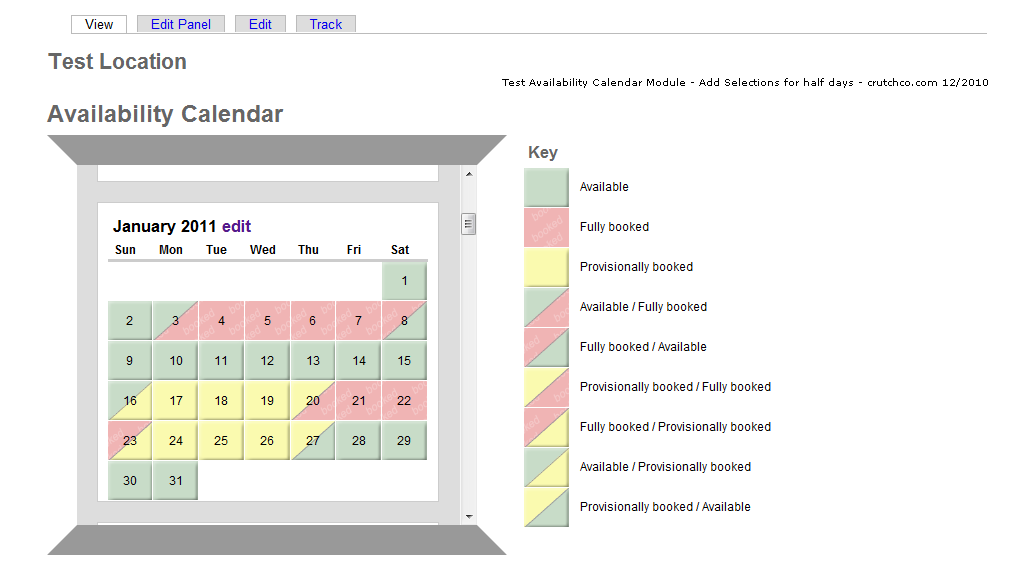
Ref. http://drupal.org/node/721762#comment-3881694 Partially booked day
Add selections and css. Needs review.
availability_calendar.module

    array(array('data' => ' ', 'class' => 'calavailable'),
             array('data' => t('Available'), 'class' => 'keystatus')),
    array(array('data' => ' ', 'class' => 'calnotavailable'),
-             array('data' => t('Fully booked'), 'class' => 'keystatus'))
+             array('data' => t('Fully booked'), 'class' => 'keystatus')),
+    array(array('data' => ' ', 'class' => 'calavailfullbook'),
+             array('data' => t('Available / Fully booked'), 'class' => 'keystatus')),
+    array(array('data' => ' ', 'class' => 'calfullbookavail'),
+             array('data' => t('Fully booked / Available'), 'class' => 'keystatus')),
+    array(array('data' => ' ', 'class' => 'calprobookfullbook'),
+             array('data' => t('Provisionally booked/Fully booked'), 'class' => 'keystatus')),
+    array(array('data' => ' ', 'class' => 'calfullbookprobook'),
+             array('data' => t('Fully booked / Provisionally booked'), 'class' => 'keystatus')),
+    array(array('data' => ' ', 'class' => 'calavailprobook'),
+             array('data' => t('Available / Provisionally booked'), 'class' => 'keystatus')),
+    array(array('data' => ' ', 'class' => 'calprobookavail'),
+             array('data' => t('Provisionally booked / Available'), 'class' => 'keystatus'))


availability_calendar.module

  $cells = array(); // our container for cells
  foreach ($week as $key => $val) {
    $weeknumber = $key + 1;
   array_push($cells, array('data' => $notes[$weeknumber], 'class' => 'calnote')); // add the note cell to the cells array
    for ($i=0; $i<7; $i++) {
      // if there's a date, it's part of this month
      if ($week[$key][$i]) {
        $todayclass = '';
        if ( $today == $week[$key][$i] . ',' . $month . ',' . $year) {
          $todayclass = 'caltoday';
        }
        if ($day_status[$week[$key][$i]] == 1) { // booked
          array_push($cells, array('data' => $week[$key][$i], 'class' => "calnotavailable $todayclass"));
        }
        elseif ($day_status[$week[$key][$i]] == 2) { // provisionally booked
          array_push($cells, array('data' => $week[$key][$i], 'class' => "calnotavailableprov $todayclass"));
        }
+        /* Day Multi-Status (A) */
+        elseif ($day_status[$week[$key][$i]] == 3) { // available-fully booked
+          array_push($cells, array('data' => $week[$key][$i], 'class' => "calavailfullbook $todayclass"));
+        }
+        elseif ($day_status[$week[$key][$i]] == 4) { // fully booked-available
+          array_push($cells, array('data' => $week[$key][$i], 'class' => "calfullbookavail $todayclass"));
+        }
+        /* Day Multi-Status (B) */
+        elseif ($day_status[$week[$key][$i]] == 5) { // provisionally booked-fully booked
+          array_push($cells, array('data' => $week[$key][$i], 'class' => "calprobookfullbook $todayclass"));
+        }
+        elseif ($day_status[$week[$key][$i]] == 6) { // fully booked-provisionally booked
+          array_push($cells, array('data' => $week[$key][$i], 'class' => "calfullbookprobook $todayclass"));
+        }
+        /* Day Multi-Status (C) */
+        elseif ($day_status[$week[$key][$i]] == 7) { // available-provisionally booked
+          array_push($cells, array('data' => $week[$key][$i], 'class' => "calavailprobook $todayclass"));
+        }
+        elseif ($day_status[$week[$key][$i]] == 8) { // provisionally booked-available
+          array_push($cells, array('data' => $week[$key][$i], 'class' => "calprobookavail $todayclass"));
+        }
        else { // available
          array_push($cells, array('data' => $week[$key][$i], 'class' => "calavailable $todayclass"));
        }


availability_calendar.module

/**
 * availability_calendars status options.
 */
function availability_calendars_options() {
  // TODO: make these configurable
  return array(
    0 => t('Available'),
    1 => t('Fully booked'),
-    2 => t('Provisionally booked')
+    2 => t('Provisionally booked'),
+    3 => t('Available/Fully booked'),
+    4 => t('Fully booked/Available'),
+    5 => t('Provisionally booked/Fully booked'),
+    6 => t('Fully booked/Provisionally booked'),
+    7 => t('Available/Provisionally booked'),
+    8 => t('Provisionally booked/Available')
  );
}


availability_calendars.css


table.cal tr td.calnotavailable {
  color: #fff;
  text-align: center;
  background: lightpink;
}
+
+ /* Day Multi-Status (A) */
+ table.cal tr td.calavailfullbook {
+   color: #ccc;
+   text-align: center;
+   background: gray;
+ }
+
+ table.cal tr td.calfullbookavail {
+   color: #ccc;
+   text-align: center;
+   background: silver;
+ }
+
+ /* Day Multi-Status (B) */
+ table.cal tr td.calprobookfullbook {
+   color: #ccc;
+   text-align: center;
+   background: lime;
+ }
+
+ table.cal tr td.calfullbookprobook {
+   color: #ccc;
+   text-align: center;
+   background: olive;
+ }
+
+ /* Day Multi-Status (C) */
+ table.cal tr td.calavailprobook {
+   color: #ccc;
+   text-align: center;
+   background: teal;
+ }
+
+ table.cal tr td.calprobookavail {
+   color: #ccc;
+   text-align: center;
+   background: aqua;
+ }

td.keystatus {
  padding-left: 2px;
}






Comments
Comment #1
crutch commentedupdated
Comment #2
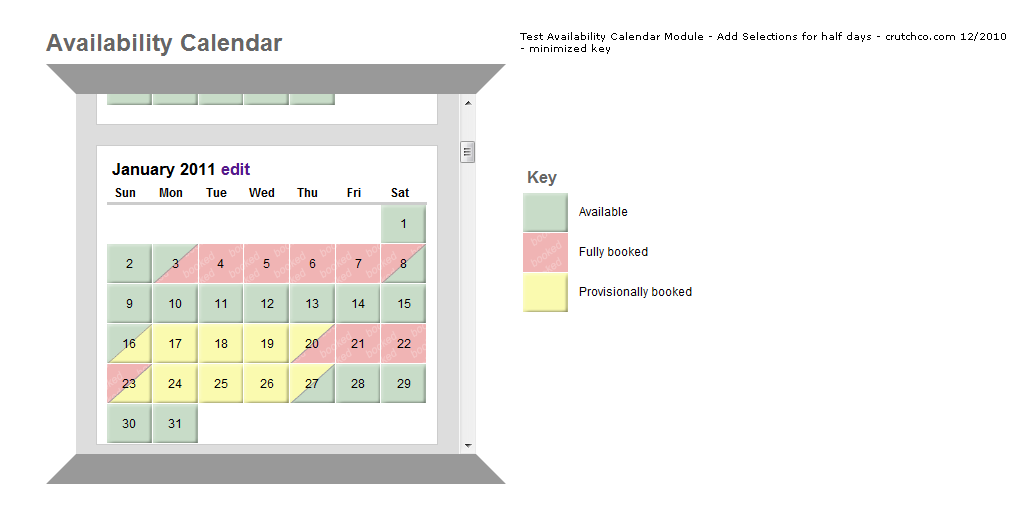
crutch commentedcapture of test case (ref capture: http://drupal.org/node/875546#comment-3882602)
Comment #3
crutch commentedupdate - if using css background images - remove key status from previous. Key status is defined by the original 3 keys and the extras are not needed.
Comment #4
crutch commentedagain, I made another error. Need to remove extra 'else' statement from dev_2.txt
Comment #5
nicholas.alipaz commentedcrutch you should definitely look at the way things are done in the latest release, a lot of changes were made that this code would not necessarily work with.
This could conflict with the work aacraig is doing on configurable status'. We may need to do one or the other first.
I think we should think of a way to do the diagonal box with either css or jQuery rather than images. Reason being that images are more difficult for people to customize and if we ever move configuration of colors into the administration area they wouldn't work.
Let me know if you have questions about how things are changed in latest dev.
Comment #6
crutch commentedThanks nicholas, I'll take a look! I had a little time this week to dabble with it. I'll review latest dev.
...maybe split day in half vertically would be better for css without image.
---
...checked it out. okay yea, probably need to wait for split days until finished with latest development. My edits only work on previous development and I see things are much improved in latest. I think it would be fairly simple to add afterward with same concept.
---
...tested vertical line and just doesn't look right. I'll try to test some day display options while module work is begin done.
Comment #7
nicholas.alipaz commentedI invested a little time into searching for css solutions to diagonally sliced colors and found this:
http://www.infimum.dk/HTML/slantinfo.html
which is ultimately from Eric Meyers (the css god):
http://meyerweb.com/eric/css/edge/slantastic/demo.html
It seems like a solution to a diagonally colored box, but I am not completely sure about positioning text within it. The colored div would likely have to be positioned via relative positioning and a z-index to place it behind the text. I will see if I can get a working example.
Other ideas are welcome.
Comment #8
nicholas.alipaz commentedI was able to accomplish what we need, in testing, with the following:
Example HTML:
Example CSS:
Works for me and should be cross-browser compliant as well as easily added to the module.
Comment #9
crutch commentedGreat, thanks! I had started with looking at how borders were displayed around the test calendar above because it showed an angle that we needed. I set it down and just now returned to find solution posted :) I think I can do the multi-status/split day effort based on latest dev but let me know if you want to do it, either way is good.
Comment #10
nicholas.alipaz commentedI have added an initial commit of this feature: http://drupal.org/cvs?commit=473522
It needs to be reviewed and css tested across browsers. The latest dev is stable but definitely requires a run of update.php when upgrading. I do not suggest running the update on a live site since I am the only one who has tested the upgrade path. Please let me know your findings.
Comment #11
crutch commentedUsing Dev version from December 31, I tried patching for a few hours with no luck. Kept getting error see attached. I couldn't rule out user error though.
Attempted manual patches with no luck, no split day options available in dropdowns. Got error after update.php
* user warning: You have an error in your SQL syntax; check the manual that corresponds to your MySQL server version for the right syntax to use near ')' at line 1 query: SELECT COUNT(DISTINCT nid) FROM node WHERE type IN () in C:\TWAMPd\htdocs\sites\all\modules\availability_calendars\availability_calendars.install on line 225.
* user warning: You have an error in your SQL syntax; check the manual that corresponds to your MySQL server version for the right syntax to use near ') ORDER BY nid ASC LIMIT 0, 1' at line 1 query: SELECT nid FROM node WHERE nid > 0 AND type IN () ORDER BY nid ASC LIMIT 0, 1 in C:\TWAMPd\htdocs\sites\all\modules\availability_calendars\availability_calendars.install on line 229.
Comment #12
nicholas.alipaz commentedJust use dev from Jan 03. That has all my changes. If you are using this on a fresh installation, no availability calendar data has been saved yet you will not need to run update.php.
You will also need to enable the checkbox under admin/settings/availability_calendars to get the extra options.
Comment #13
crutch commentedah yes thanks. Tested on various browsers but I don't have IE8 on dev machine. Everything looks good to me. Maybe a minor css tweak below. IE7 may need a little work. Operation is great!
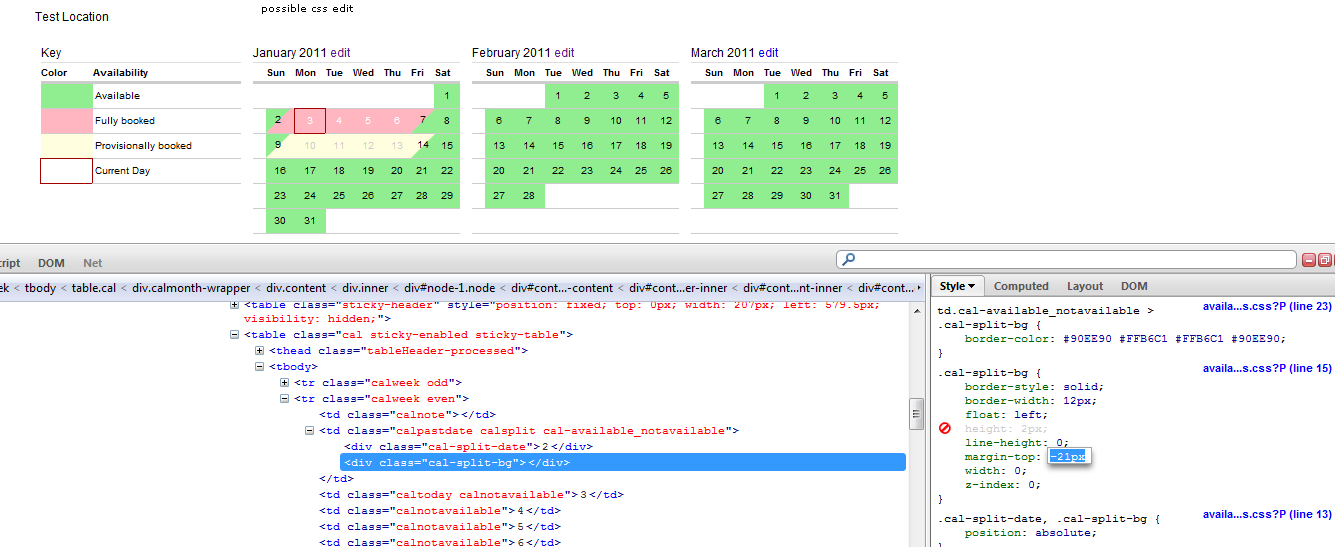
From what I can see if I change css to this, it fixes an issue I have with split days being 2px moved up compared to normal days. The difference may because I am using Fusion base theme. When I switch to garland it is correct in FF. Google and Safari moves down 1px at top and moves down 1px at bottom in Garland. Basically, 2px too tall for those two browsers.
Comment #14
nicholas.alipaz commentedI fixed the error in the sql statement.http://drupal.org/cvs?commit=474124
For the CSS, I want to attempt to stay only using CSS but this may call for some jQuery to determine the width/height of the surrounding cell. Either that or possibly just doing some aggressive resets on our table's elements. I will have to think about it and look into some possible fixes for the css.
Comment #15
nicholas.alipaz commentedFound a few more things that I didn't consider in the upgrade path, those are fixed now too.
http://drupal.org/cvs?commit=474144
Comment #16
crutch commentedThe css adjustments in #13 for Fusion based theme made it correct across every browser except IE7 which is a different bird anyway.
I think if we make correct across most browsers, for Garland base theme, then it should be fine. If we build for the default Garland then folks can make needed adjustments for different themes. IE7 may need a separate style sheet.
Maybe start with that idea and table it knowing that we may have to come back and do more css/jquery work for subsequent release(s) if there is a large outcry that it is an issue?
Comment #17
nicholas.alipaz commentedcrutch, I think what I would like to do is to do some general theming for some popular base themes and core themes. I am thinking of doing the following since these css changes really are very dependent on the different themes' loaded stylesheets.
Load different css dependent on the theme:
Then we can just load up different css dependent on the theme.
Comment #18
nicholas.alipaz commentedHadn't actually tested the above code before posting, just worked it out in my head. Here is some more definite working code.
Comment #19
nicholas.alipaz commentedOk, I have done some testing in multiple themes. I have made a series of commits that should get this styling looking pretty decent in a majority of core and popular base themes.
http://drupal.org/cvs?commit=478886
http://drupal.org/cvs?commit=478888
http://drupal.org/cvs?commit=478890
http://drupal.org/cvs?commit=478892
Please give the changes a try through a cvs checkout of the dev or using latest dev (Jan 10 or later) once it is generated.
Comment #20
crutch commentedThanks nicholas. Code functions well.
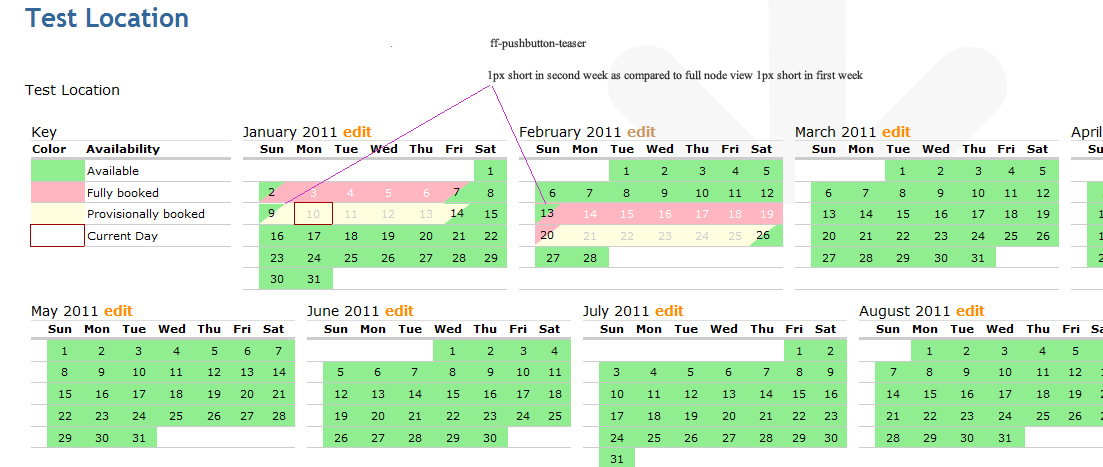
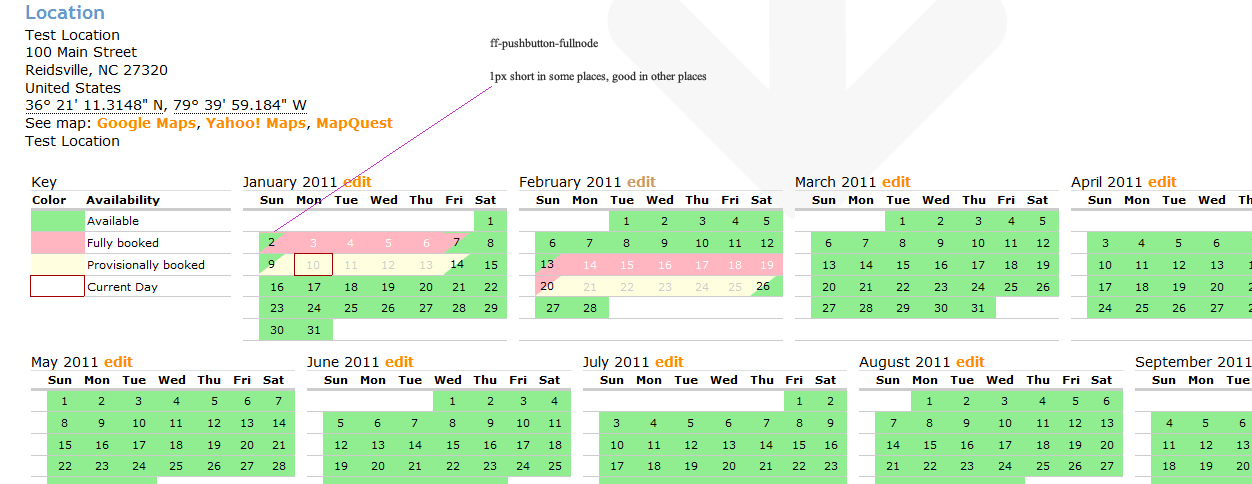
I'm seeing some 1px movement. I'll try to look further into it today to see what may be moving things around. Only tested FF so far and stopped when seeing movement in pushbutton.
--
In some days there is some extra right-margin like on this image at March 20. This may because of the width of the theme so it's spreading 100%, but day cells aren't, or something similar?
http://drupal.org/files/issues/ff-pushbutton-node2.jpg
Comment #21
nicholas.alipaz commentedGive the latest dev as of today (or cvs checkout) a try.
http://drupal.org/cvs?commit=484022
I think I pinpointed the issues.
Comment #22
nicholas.alipaz commentedmarking as fixed and moving my changes into 6.x-1.5
Comment #23
nicholas.alipaz commentedThis is going into 6.x-1.5. There will still be some css tweaks in the future, but not enough issues to keep it from releasing.
Comment #24
crutch commentedIt functions well from previous tests. Thanks for taking time to work on this. Hopefully I can take a peak at it this week.
Comment #26
feldmarv commentedDay Multi-Status in 7.x version possible? Is there an ability to use this css and configuration in 7.x version of the module?
Comment #27
fietserwinNo, this module is whole day or whole night booking only.