Problem/Motivation
Events with dates on the last day of the month display on the first day of the next month.
Steps to reproduce:
- Install D7 core
- set site time zone to Pacific (-7:00)
- install date and calendar modules
- Add a date field to the article type. Use default field settings
- edit the default calendar view to use the date field
- Create a node, and set the date field to 09/30/2011 - 20:00
- Visit
/calendar/month
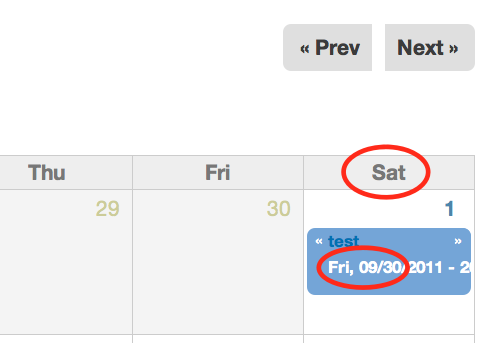
Proposed resolution
Use the field's offset in the query.
Remaining tasks
Patch #32 is awaiting review
User interface changes
N/A
API changes
N/A
Original report
Stop me if this is duplicate or fixed.
I want to create a Birthday field, and create a "Date" or "Datetime" type, not Datestamp (that generates some sort of error with my webserver). I set granularity to Year Month Day, I am told I have to use "No Time Zone Conversion" with this option.
I add the field to a Profile Entity and enter a date. Today's date is saved as yesterday's date, July 18 is saved as July 17, etc. Very consistently... eh?
Every time you save, the date rolls back one more day.


Comments
Comment #1
karens commentedI cannot reproduce this in the latest code.
Comment #2
kgrigsby@mac.com commentedI'm having a similar problem. The data type is Datetime. The granularity is Year/Month. When the widget type is "Select List" the displayed month is one less than what was set. For example if the date is set as April 2009 it will display as March 2009. If I change the widget type to "Text Field with custom input format" it works correctly. I'm using the dev build of 1/16/2011.
Comment #3
jelo commentedI just experienced something similar, although with a different setup. Can you try to set the time zone handling to "site's time zone" instead of "no time zone conversion"?
Here is what happened to me. I recently upgraded date from 6.x-2.3 to 6.x-2.4 and at the same time updated core to 6.20 and token to 6.x-1.15. CCK is version 6.x-2.4. My time zone is set to America/Vancouver.
In my configuration I use a content type that has a date field defined, granularity year month date, no time zone conversion. The module automatic_nodetitle is used to hide the node title field and to use a token to populate the title automatically. The pattern is
[field_report_date-month] [field_report_date-d], [field_report_date-yyyy]
However, when I create the node, the report date is correct in the node and the database, but the title that gets created is one day prior (as others have described here). If I go back to edit the node, the date field shows the correct date in the date field.
In contrast to the other posts, when I edit the node again and again, the date stays 1 day prior. As soon as I change the date in the field to one day prior, the title gets changed as well to another day prior. I do not see any difference in this behavior based on the widget type. I tried all of them and the pattern is always the same.
However, when I checked the database table content_type_report I could see that the date value was stored as 2011-04-01T00:00:00 (because my granularity did not require hours, minutes or seconds).
Now, I added the granularity hours and minutes and the problem is indeed the time zone handling. For some reason the token interprets 2011-04-01T00:00:00 with "no time zone conversion" and time zone set to America/Vancouver as March 31. When I change it to 2011-04-01T18:00:00 the token is April 1. When I changed the time zone handling to site's time zone, the problem disappeared.
It would be great if someone with more knowledge about how these modules work together could comment if this is desired behavior or not and which module causes this (token, date, ?). As this issue did not happen to me before, something definitely changed, either intentionally or unintentionally...
Comment #4
jelo commentedI just discovered that I cannot change the time zone handling to "site's time zone" without using granularity for at least hours. The message from Drupal is "Dates without hours granularity must not use any timezone handling."
Well that indicates to me that this is a bug, probably with token? I found rather old issues which seem similar:
http://drupal.org/node/311575
http://drupal.org/node/323441
Any ideas, comments?
Thanks, J.
Comment #5
pglatz commentedComment #6
pglatz commentedsimilar problem; granularity of year, but the previous year's value is shown
Comment #7
jelo commentedPhil, did you manage to figure you problem out?
Comment #8
wcndave commentedI also have this, date is saved as previous day when using granularity level day.
I notice however that when the date is displayed anywhere, it's ok, it's only when stored that it loses a day, so is messing up any custom php that is done.
Comment #9
wcndave commentedI would have to say this seems to be a fairly serious bug. The data stored is not the data entered. This is now starting to cause serious problems for me, and having to rewrite all content pages with php code to contain custom SQL to add one to the date does not seem like a right solution.
Is anything going to happen with this?
Comment #10
jelo commentedTo me it seems there are different issues described here. "The data stored is not the data entered." that is not the case for me. The date I pick when editing gets stored correctly in the database, it just gets displayed the wrong way (one day prior) on the page. From what you describe, the data in the database is indeed wrong.
Comment #11
jason89s commentedI can confirm that this problem still exists in the latest dev release. I believe that I'm having the same issue as in #3. The times are stored into the database assuming no timezone handling, but are retrieved assuming that a timezone offset needs to be applied. In my example, I have a custom content type storing a datetime with a granularity of Year. When I put 2011 as the year, it is stored as January 1st, 2011 at midnight in the database. When it is retrieved, the View sees it as December 31st, 2010 at 8:00PM (My timezone is UTC-4). This causes my view's Contextual Filters to not function since it always pulls the previous year instead of the correct year.
Comment #12
jason89s commentedIn particular, I believe the problem code can be seen here in the SQL generated by the view. Although every setting is set to year granularity, it still tries to use a fully qualified time before converting it to a year granularity:
Comment #13
jason89s commentedWhile this is a terrible way to "fix" the problem, it'll get me by until somebody with real knowledge of the Date API can fix this problem. It replaces the applied timezone offset before the query is executed with no timezone offset when the granularity is too broad to include a timezone offset. I consider this more of a hack than a fix, and hasn't been tested in many scenarios, but I figure it might help out other people so I'm sharing it with the masses.
Insert this at line 209 of date_views_argument_handler_simple.inc right above
Comment #14
jelo commentedDear Jason,
Thank you for posting your insights. I was starting to think only a few people experience this bug. I would think this is a reasonably major problem because it can corrupt quite a lot of things, as you said views and contextual filters will just not work in certain cases.
Priority is already set to major, but are we in the right place? Date seems to store the value correctly. Should we move this into views if that module is the culprit that applies the time zone offset?
Regards, Jens
Comment #15
jason89s commentedSince other people made no mention of this problem happening when Views was used, I'm inclined to think that this is a module wide problem and I've only experienced the bug in the Views component. I only happened to notice the problem that others are experiencing by using and troubleshooting Views.
As stated, in the database dates are being stored in UTC. When dates are retrieved, a timezone offset is always applied. The timezone offset should only be applied when the granularity is more specific than "day", and that is not the case. It looks like this is a logic problem in the code, but unfortunately I don't know where all of the query strings are made in Date. There are potentially several places in different components where this would need to be fixed. My workaround only fixed the one that I've specifically run into.
Ideally, the timezone offset shouldn't be applied in the first place in these granularities, but I didn't see the granularity being passed into the function that actually generates the queries.
Comment #16
jason89s commentedI'm suspecting that this issue is related to this one as well:
#1038954: Date fields migrated from D6 to D7 are offset by one day on output
In that issue, entering dates from scratch rather than through an upgrade path sometimes solved the problem. In my situation, I'm using a fresh install of Drupal and newly entered dates and having the same problem.
Comment #17
jason89s commentedMore related issues:
In this one, 'January' is missing presumably because its showing up in the year before, but is blamed on other reasons. It would seem that this problem has been around a lot longer than first thought:
#374861: Exposed date filters not filtering properly when granularity is set to "month"
And here is a potential fix for another views timezone bug, but only fixes the filter handler but not the argument handler:
#1181036: Views filter should use the same timezone in which the field value is saved
Comment #18
jason89s commentedI think I've finally found a workable solution to this problem. I've attached a patch which I believe fixes the problem. It's my first patch so I wouldn't be too surprised if it fails. It checks to see what the granularity of the date is and returns no offset if the date doesn't warrant one.
Edit: Noob mistake found. The conditional statement in the patch should have and's instead of or's.
Comment #19
karens commentedThis issue is a mess. It has been switched back and forth between the D6 and D7 versions and seems to be reporting different issues. Plus I still don't see steps to reproduce, which is the first thing I need. The only thing close to a 'steps to reproduce' was when this was set to a D6 issue. The D6 code is totally and completely different from the D7 code, they don't have the same bugs or the same fixes.
Please don't start telling me how to solve the problem until you have told me how to *see* the problem.
Comment #20
jason89s commentedKarenS,
primerg posted a very concise summary and steps to see the problem over in this issue: #1211072: adding timezone even if the field has no timezone
Comment #21
jelo commentedKarenS, it would be helpful to know what information we can provide to help solve this issue? I tried to explain as best as I could, but apparently you could not reproduce the problem. What do you need from me or the others? I unfortunately am not at a stage with Drupal which would allow me to come up with a solution myself, but I am willing to help however I can...
There have been various reports of this issue in D6 and D7 (despite the different code) and it seems to be a major issue to me. I am still new to issue tracking and proper protocol and I would like to find out how to move this forward in the best way?
Thanks, Jens
Comment #22
karlsheaI'm also seeing this behavior with the views filter, and the issue in #20 has the same query I'm seeing.
Is there any other information I could provide?
Comment #23
karens commentedOK, I finally understand the issue. Fixed it differently, but using the same concept. I will also apply this to the D6 branch.
Comment #25
c4rl commentedI'm using the 6.x version. I'm not quite certain the changes made in the commit are correct. Just because the views argument granularity of the argument does not respect day, minute, or hour doesn't necessarily mean that timezone offset is irrelevant.
For example: I may want the argument to show me all events on a given day even though those events could occur at any time on that day. Thus, the *views argument granularity* will be per-day, but the *date field granularity* will be per-minute.
As a band-aid fix, I commented out line 297 of date_api_argument_handler.inc, shown below:
@KarenS, do you have any thoughts regarding this? I'm guessing the determinant on argument timezone handling should respect the *field* settings, not the *argument* settings.
Comment #26
c4rl commentedIn addition to the argument handler, I commented out a similar line in date_api_filter_handler.inc, line 430.
Comment #27
paulmckibbenI am having a similar issue in 7.x-2.0-alpha4.
I have a content type called "event" that uses a date field with "minute" granularity.
I have a view that uses a contextual filter that uses "day" granularity to select all events on a particular day.
My site timezone is America/Los Angeles.
Dates are stored in the database as UTC (8 hours ahead of Los Angeles).
The result is that if an event occurs on March 7, 7:00pm in Los Angeles (March 8, 3:00 AM UTC), the view does not select this event if the contextual filter is set to 2012-03-07. However, the view DOES select it if the contextual filter is set to 2012-03-08.
Expected behavior: the contextual filter should behave according to the site timezone. Events that occur on March 7 in the site time zone should be selected with a contextual filter of 2012-03-07.
Comment #28
paulmckibbenFollowing up to my previous comment (Again, this applies to version 7.x-2.0-alpha4):
If I comment out line 192 of date_views_argument_handler_simple.inc (see below), my view behaves as expected. All events in the site's timezone for the specified day are selected by the view.
I think timezone adjustments are required regardless of granularity.
Comment #29
stella commentedI have the same problem with the date filter. My setup is described as follows:
DATE_FORMAT(FROM_UNIXTIME(field_data_field_local_event_date.field_local_event_date_value), '%Y-%m-%d') = '2011-09-30').DATE_FORMAT(ADDTIME(FROM_UNIXTIME(field_data_field_local_event_date.field_local_event_date_value), SEC_TO_TIME(3600)), '%Y-%m-%d') = '2011-09-30'). However, I'm guessing this isn't the correct solution (?).If you need any more info, let me know - can provide views export, content type definition and data if you need it.
Comment #30
ki commentedI have a similar problem.
* I create a content type "session" with a Date field with hour granularity
* I set "Time zone handling" for the date field to "No time zone conversion"
* I create a View with exposed filter on the date field with "between" operator (it does not matter which selection method; Select, Text, or Popup)
* I search by the date/time and the result is wrong. The result shows sessions with hours off. It seems to calculate offset of the site's timezone, when there should not be offset calculation.
If I change the line 109 of date_views/includes/date_views_filter_handler_simple.inc,
search result is correct.
Unfortunately, $this object does not seem to have information on the Date field of the content type to determine what value should be used for $this->offset.
Inserting this before line 109 also worked for my case,
However, again, there should be a conditional to determine "Time zone handling" of the content type's date field.
Comment #31
jorrant commentedI was having the problem of dates on the last day of the month displaying a day forward on the Calendar module. I fixed it (starting with the clues on this page) by changing pre_query() in date_views_filter_handler_simple.inc and date_views_argument_handler_simple.inc to:
Comment #32
grendzy commentedComment #33
grendzy commentedComment #33.0
grendzy commentedadd summary
Comment #33.1
grendzy commentedadd screenshot
Comment #33.2
grendzy commentedclarify date field
Comment #34
dboulet commentedPatch in #32 seems to have fixed the problem for me: dates are now properly displayed in my calendar. Thank you grendzy.
Comment #35
karens commentedOK, I fixed this in a different way, to make sure the date_handler knows the right way to manage timezones for the field being queried.
Comment #37
jelo commentedThanks KarenS, any chance that this will be backported to version 6?
Comment #38
ericclaeren commentedHi KarenS, thanks for addressing this issue, how have to fixed this? I'm still having problems with the latest alpha5 version.
In my view, I have an exposed date filter with a granularity of Year/Month.
When I select the date [ 2009 ] - [ Jul ], content is displayed from [ 2009 ] - [ Jun ].
This part in the query isn't correct
It should be 2009-07, i'm guessing this has to do with the daylight savings, which sets day 2009-07-0 back to the last day of june.
Comment #39
ericclaeren commentedInstalled 7.x-2.x-dev and this fixed the problem for me.
I read in the status of alpha5, that this Issue "#1017866, Fix miscellaneous problems where filter/argument incorrectly do timezone adjustment." But seems that's not the case?
Thanks! Great work!
Comment #40
tangent commentedThis issue seems to still exist in D6 even though the solution was backported. Please see issue #772082 for details.
Comment #41
RealGecko commentedI`m using Date 7.x-2.6 and when I try to edit any parameter of date field which has granularity to year, month and day I get
Dates without hours granularity must not use any timezone handling.Any way to resolve this? I don`t want to delete this field and recreate it as I already have lot of nodes with this field and deleting it will cause huge data loss.
Comment #42
petebarnett commentedThere needs to be a way to collect dates with a "Day" granularity, yet still know the timezone.
In code, for example I can create a DateObject and limit granularity of Year Month Day, but still format this as a UNIX timestamp, and know that the timestamp is represented in UTC. When using Date fields, this is not the case - we have no knowledge of the timezone after it's stored, meaning it's impossible to reliably act upon those dates in cron tasks for example.
Comment #43
junaidpvOne solution to avoid this problem is to use date field of type 'Date (ISO format)' instead of 'Date (Unix timestamp)' when you create the field.
Comment #44
joachim commented> When using Date fields, this is not the case - we have no knowledge of the timezone after it's stored, meaning it's impossible to reliably act upon those dates in cron tasks for example.
On the other hand, sometimes you want to treat the date as just a date, for example if it's a date of birth: #2123039: Default timezone setting mismatch in metadata wrapper integration.
Comment #44.0
joachim commentedadd URL
Comment #45
redeight commentedSo here is what I'm experiencing. It is the same as the original poster's issue with the exception that I have the field display correctly but the query selects the wrong day. I have imported the dates from a calendar using feeds. The feed reads the timezone info on the import and converts the date GMT and stores a UNIX timestamp into the field, Date (Unix timestamp). The Date field is set to not perform any timezone correcting as it is receiving a Unix timestamp. The timestamp correctly matches the local time as displayed in the import file when converted to local time. In views, I have created a views calendar with 3 views: day, week, and month.
Month appears to display correctly with each item correctly positioned on its day.Week displays most items correctly except when the GMT time is on a different week than the local date. Example: There is an event on Nov 16th 2013 at 6:30pm - 9:30pm PST (Los Angeles/local/server time). This event will NOT be displayed in the week ending with the 16th and will show up erroneously in the week beginning on the 17th. Here is the relavent query code for the week beginning Nov 17th 2013
As you can see, it makes a comparison directly to the unix timestamp with no adjustment to local time for the bounding datetimes. This means that while the date is rendered timezone adjusted in the field, the actual query is not capturing the data that the user expects.
The same issue occurs with the day view with the obvious exception that it now occurs when the GMT is on the next day rather than the next week.
The issue is not specifically with the Date API or with calendars, nor is it a bug per se. Suggested "fix" would be to add a field to the filter that allows us to offset the query to a GMT unix timestamp so that the query will select the nodes that the user expects it to.
EDIT: The same issue occurs with month as well. If the UTC (GMT) timestamp would cause an item to appear on the next month it will be displayed in the wrong month with correct dates and times. Please note that this is not due to the importing with feeds. I tested this by creating an event that occurred on the 30th of November with the time being 6PM Los angeles time. This field displays in the calendar view with the correct date and time (11-30-2013 6:00pm) but only shows up on December's month view, the week view of Dec 1st, and the day view for Dec 1st. Each and every one of these displays seems to treat the item as an all day or multiday event.
Summary: If a user in a GMT -X timezone saves a date field (Date unix timestamp with no timezone conversion) in local time that is X or less hours away from the end of the day, the sql query constructed for the view will treat it as occurring on the following day. The opposite will theoretically occur if the server local time is a GMT +X timezone. In these cases, the dates will jump backwards if they are X or less hours away from the beginning of the day.
Comment #46
redeight commentedImage displaying the issue with UNIX timestamp query not selecting what the user expects.
Comment #47
redeight commentedThe latest dev version of Date (7.x-2.6+32-dev) seems to allow the user to change the timezone handling on the field after creating content. I'm assuming this means a timezone offset field of some sort was added to all date field types. Regardless, this allowed me to adjust the settings on the date field until my problem was fixed.
Comment #48
azovsky commentedA possible solution for this issue see here https://www.drupal.org/node/1885270#comment-9242563