

Closed (fixed)
Project:
Marinelli
Version:
7.x-3.0-beta6
Component:
Code
Priority:
Normal
Category:
Support request
Assigned:
Unassigned
Reporter:
Created:
25 Jan 2011 at 18:02 UTC
Updated:
16 Aug 2012 at 04:03 UTC
Jump to comment: Most recent file


Comments
Comment #1
Lioz commentedHi, can you post a screenshot of your menu configuration?
Comment #2
shinz83 commentedThe issue I was having was resolved by reading the Mega Menu information posted at http://drupal.org/node/1000286
Thanks for your response.
Comment #3
shinz83 commentedComment #4
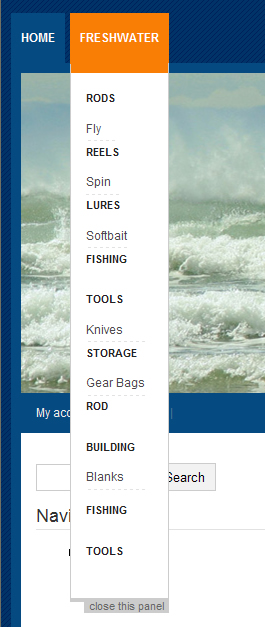
avoura commentedHow did you resolve it from that information? I am having the exact same problem but cannot figure out what to do from reading that page. If you managed to resolve the problem, at least specify just what you did (other than read a page about it) to get it fixed, as I really would like to know (and maybe others do too).
Comment #5
avoura commentedI eventually found the answer on another page on drupal.org ( http://drupal.org/node/1268794 ), which is to edit the file primary-links.css
in the .mega section add these 2 lines:
I did this and it solved the problem
Comment #6
moosie commentedHi tried editing the primary-links.css in the .mega section also with :
And all it did was allow six 2nd-level items. If I add any more than 6, the panel turns into a long skinny column and doesn't display properly. Any other suggestions please.