Hello. So, I created a node "Gallerific Image" and had a successful one image gallery (oxymoron?). Cool. So I created another node of my custom Gallerific Image type and added two images to it instead of one.
I go to my page (mysite.com/photos) and it shows the image from the first node, and the first image from the second node. The second image from the second node does not show up.
I don't understand how this works apparently. I am testing now, but eventually want a gallery for each node. I tried using Arguments, but I really don't know what I'm doing. A tutorial would be very much appreciated. I've been using Drupal for over 2 years, not a beginner, so if you can get me moving in the right direction I hope I can figure out without too much trouble.
Thanks for your time! This seems to be the only image gallery currently working (let me emphasize WORKING) with Drupal 7. Kudos!


Comments
Comment #1
Branjawn commentedBeen spending more time on this. All images show up as long as I'm not using Gallerific. Once I enable that, it only shows the first image from each node (page). Has anyone successfully created image galleries by using a custom content type with multiple attachments to hold the images?
Comment #2
Branjawn commentedThe home page for this project states: "If you want to use Fields for images you will create a 'Gallery' node and attach images to that node. You can still have information such as title and description for each image. However each image won't have it's own 'page' (ie node) for comments etc. "
I think this is exactly what I'm trying to do right?
Comment #3
tax14 commentedLooks like I am also having the same issue. (Drupal 7)
I started from scratch. Created a content type and view for Views_Gallerific.
After carefully following all steps, I was able to create a Page View without any errors displayed by Drupal. (Used default Thumbnail and Large image styles). I defined the path "gallerific" for the page view.
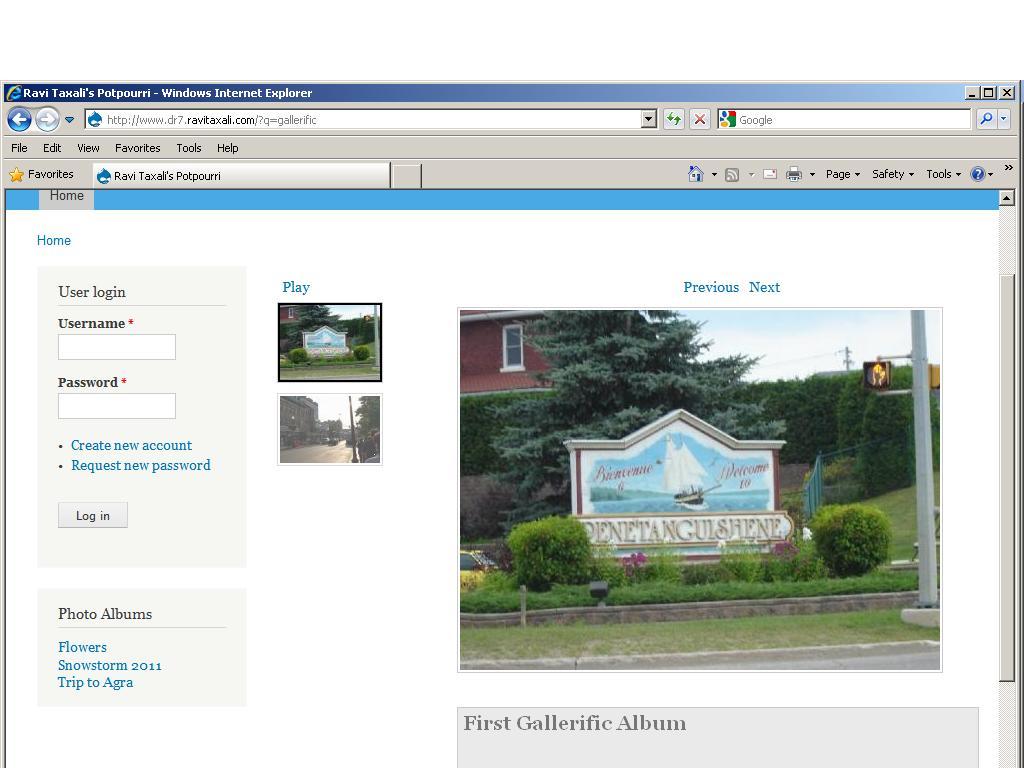
I created two image galleries. When I view the gallerific view path, I see two thumbnails on the left (one for each gallery) and a larger image on the right with the description below the image. There is a Play button above the thumbnails, and Prev and Next buttons above the larger slide. When I click the Prev/Next buttons, the slide on the page is refreshed from the Prev/next album, but I don't see all slide from the selected album. The same phenomenon happens when I click the Play button. (Please see the attached screen image)
I am also not sure about the user of the history.js mentioned in the documentation. Is it required for the basic operation of the view?
However, after I placed the history file from http://galleriffic.googlecode.com/svn/trunk/example/js/jquery.history.js and copied in the sites\all\modules\views_galleriffic\js folder. and enabled the libraries API. I start getting the error:
Fatal error: Call to undefined function libraries_load() in C:\xampp\htdocs\drupal7\sites\all\modules\views_galleriffic\views-galleriffic-view.tpl.php on line 15. The error message disappears when I disable the Libraries module.
Comment #4
Branjawn commentedMarking as major as this is shown to be a problem for someone else and definitely keeps the module from functioning as it should.
Comment #5
kueblert commentedHi,
i Have Drupal 7 and downloaded the modules Librarys and Views_Galleriffic.
As in the Docu of Views_Galleriffic i downloaded Librarys and Created the Folder history under sites/all/libraries. Then i downloaded the File jquery.history.js and placed it in sites/all/libraries/history
I activaded Librarys and Galleriffic.
Then i created a View. Added Image Felds.
But if i change the style of the View to Galleriffic and save this Error Ocurs:
Ein AJAX-HTTP-Fehler ist aufgetreten
HTTP-Rückgabe-Code: 200
Im Folgenden finden Sie Debugging-Informationen.
Pfad: /admin/structure/views/ajax/preview/tset
Statustext: parsererror
Antworttext:
Fatal error: Call to undefined function libraries_load() in
/var/www/html/web1111/html/cge/sites/all/modules/views_galleriffic/views-galleriffic-view.tpl.php on line 15
German System :-D
I Hope this Problem will solved soon.
I am a littlebit sad about Drupal 7 its nice looking but i am wondering how long it will take until the good Moduls will be Bug Free.
- no Massupload (Image) possible !!! This is realy sad 4 me.
- no Bug free Calendar
i love Drupal but this Things made me MAD ^_^
Comment #6
jonraedeke commentedI'm having the same issue with Views Galleriffic and Drupal 7.
I enabled Views Galleriffic and set up a content type with image fields. After setting up a custom view using galleriffic, the views page looks fine, but it shows several of the following errors:
* Notice: Undefined property: stdClass::$option in template_preprocess_views_galleriffic_view_gallerifficrows() (line 68 of /Users/jraedeke/Sites/drupal-7.0/sites/all/modules/views_galleriffic/views_galleriffic.module).
I enabled the Library module and placed the jquery.history.js file into 'sites/all/libraries/history' and I'm getting the following error when I try to visit the view page:
Fatal error: Call to undefined function libraries_load() in /Users/jraedeke/Sites/drupal-7.0/sites/all/modules/views_galleriffic/views-galleriffic-view.tpl.php on line 15
I am currently running the site locally.
Comment #7
KirstenLangholz commentedI have the same problem. Has anybody been able to solve this issue in the meantime?
No error messages, but only one picture is displayed instead of the 10 attached to the node.
Comment #8
knalstaaf commentedSubscribing.
Comment #9
dmsmidtSubscribe
Comment #10
dozenson commentedFor those who get Fatal error: Call to undefined function libraries_load() updating to Libraries 7.x-2.x-dev solves the problem. However this doesn't solve the original issue of only the first image displayed
Comment #11
itrain commentedI am also getting this notice warning, but I do not get fatal error. I have libraries and history installed. How can I get rid of this?
Notice: Undefined property: stdClass::$option in template_preprocess_views_galleriffic_view_gallerifficrows() (line 81 of C:\wamp\www\itrainrooms.co.uk\sites\all\modules\views_galleriffic\views_galleriffic.module).
Comment #12
dmsmidtI fixed this issue by a views setting. (Vies 7.x-3.x-dev > march 25)
Just go to your Galleriffic view and select the field you use for the slide;
In the settings of this field go to the "Show Multiple field settings";
Then disable this setting: "Display all values in the same row";
Do the same for your thumbnail field and it works!
Comment #13
Daniel S. Jackson commentedMrDamasajaga: I can't get it to work, when I change it to "display all values in the same row" for both image fields it just returns blank (no errors, but no content either).
Could other people try to test it and report if it works? I might do something else wrong.
Comment #14
dmsmidtYou can see it in action over here: http://www.speedcartooning.nl
I attached an export of my view. As you can see I use the media field, provided by the media module, for my images (multiple values).
So there are multiple images in that field, not different fields per image. That way my trick wouldn't work.
Working setup:
- media 7.x-1.0-beta3
- Plupload integration module -dev 11/2010
- Styles 7.x-2.0-alpha5
- Views 7.x-3.x-dev
- Views Galleriffic 7.x-1.0-beta2
Edit: Updated url again!
Comment #15
Daniel S. Jackson commentedThank you MrDamasajaga. It now works, but only if I have images from the media module. If I supply images from the Image module it does not work.
Comment #16
Gemini Lights commented#12 works. Thank you MrDamasaja.
I also use one node with multiple images uploaded to it. Currently using it for a product node in ubercart. Works beautifully.
Here's my working setup:
Drupal 7.4
Chaos tool suite 7.x-1.0-beta1
Libraries API 7.x-1.0
Views 7.x-3.0-rc1
Views Galleriffic 7.x-1.0-beta3
I have attached the Views screenshot and also the field settings for the image field. The two image fields have the same settings except one has a smaller image style preset to represent the thumbnails.
Comment #17
puddyglumI'm having the same issue. I have a Photo album content type with a photo field that can have multiple values. When I use this it simply shows one photo from each of the photo albums instead of all of the photos in a particular node.
I disabled the "Display multiple values in one row" for the Photo and Thumbnail, but that didn't help. I don't get anything in the preview now.
Also, I added an argument to limit it to one node at a time, and that didn't work either. Set the view to display 1 item, still doesn't work.
Comment #18
puddyglumHere is an export of my view, nothing raises any eyebrows to me except that MrDamasajaga is using the media module, whereas mine is just using an Image field for a normal node type.
Can somebody please help me with this?
Comment #19
puddyglumQuery Views tried to use:
SELECT node.nid AS nid, node.title AS node_title, node.language AS node_language, field_data_field_photo.delta AS field_data_field_photo_delta, field_data_field_photo.language AS field_data_field_photo_language, field_data_field_photo.bundle AS field_data_field_photo_bundle, field_data_field_photo.field_photo_fid AS field_data_field_photo_field_photo_fid, field_data_field_photo.field_photo_alt AS field_data_field_photo_field_photo_alt, field_data_field_photo.field_photo_title AS field_data_field_photo_field_photo_title, node.created AS node_created, 'node' AS field_data_body_node_entity_type, 'node' AS field_data_field_photo_node_entity_type
FROM
ag_node node
LEFT JOIN ag_field_data_field_photo field_data_field_photo ON node.nid = field_data_field_photo.entity_id AND (field_data_field_photo.entity_type = node AND field_data_field_photo.deleted = 0)
WHERE (( (node.type IN ('photo_album')) AND (node.nid = '150' ) AND (field_data_field_photo.language = 'en') AND (field_data_field_photo.language = 'en') ))
ORDER BY node_created DESC
The problem is that it's using: field_data_field_photo.entity_type = node instead of field_data_field_photo.entity_type = 'node'
I modified the query in phpMyAdmin to see if it works and I didn't get any results, but at least didn't throw an error this time.
Comment #20
puddyglum[SOLVED]
I upgraded from Views 7.x-3.0-rc1 to the July 20th 7.x-3.x-dev build and it works great now.
Woohoo!
Comment #21
acouch commentedI have updated the documentation as well as made a feature available for the 7.x version.
Documentation: http://drupal.org/node/758724
Feature: http://aaroncouch.info/fserver
Comment #22
joe huggansI am having the same issue with no images displaying... This happened after I updated to newer version of core and views.
I have deselected 'Display all values in the same row' as per usual and this normally works for images of the same node. But Nothing displays at all.
I really need a solution for this.
My version of views is 7.x-3.3
Comment #23
puddyglumTry Views 7.x-3.0 and see if that solves it? If so, you could then post the problem in the Views issue queue and see if somebody there can help. Or rather, try Views 7.x-3.x-dev if you're not on a production box.
Comment #24
puddyglumOkay, I'm using Views 7.x-3.3 and it's still working fine for me
Comment #25
joe huggansCan I safely go back to an earlier version of views? The site I am working on is live so I need to be extra careful.
Thanks for the fast reply
Comment #26
joe huggansThe actual view is not loading at all if that sheds any more light on the matter...
Comment #27
puddyglumAh, that's a glitch which I ran into as well when I upped to 7.x-3.3: made this change to fix it:
http://drupal.org/node/1450268#comment-5652592
Comment #20 has a link which shows a code change that needs to be made to fix the problem.