

Needs review
Project:
Ubercart Discounts (Alternative)
Version:
6.x-2.4
Component:
Code
Priority:
Critical
Category:
Bug report
Assigned:
Unassigned
Reporter:
Created:
20 Feb 2011 at 17:45 UTC
Updated:
5 May 2016 at 07:16 UTC
Jump to comment: Most recent, Most recent file


Comments
Comment #1
bpgoldsb commentedI am also experiencing this problem.
Comment #2
Firetracker commentedI am having this issue as well. Any suggestions?
Comment #3
detonator94 commentedConfirm. Have the same problem
Comment #4
jrust commentedI'm not sure what can be done about this one because uc_discounts_alt has to hook into the review page in order to calculate discounts for the order. The only place I know of to hook into the order review page is through the "process" checkout pane callback, which is where discounts are added to the order. If someone knows of another place or another way I'm open to it.
Comment #5
Luki_be commentedSubscibing using 6.x-2.x-dev
Comment #6
massimoi commentedSubscribing!
at the moment I have "pseudo" solved putting
#uc_discounts-pane {display: none}
in my style.css ... but :-)
Comment #7
cminnick commentedI'm having the same problem, except that enabling the discounts pane didn't fix it.
Ubercart 6.x-2.4
uc_discounts_alt 6.x-2.x-dev
Attaching a screenshot.
Comment #8
janton commentedWOehoee... i had this problem on a live site~!
MMhh.. i also have it now with css display none.
I hope there are no disadvantages from this...
Comment #9
laraz commentedI have the same problem.
Subscibing.
Comment #10
cholden commentedI have the same issues
Subscribing.
Comment #11
jeff h commentedThis has been a problem for quite a while now; if comment #4 is correct, then could I suggest you do a form_alter() of the "Checkout settings" form and have the "Enter discount codes" pane selected by default and disabled so it can't be deselected? At least this way the problem won't get into live production sites, and anyone wondering why they can't turn off the pane in that form would go looking for answers.
Comment #12
bruiseviolet commented.
Comment #13
bruiseviolet commentedSubscribing. Really need this fixed. Please tell me what I can send to help?
This is my problem. Using the module on a live site. It tested well- (except the tax being applied to discounted items- but got the patch to fix that) however clients got in contact with me today because it's not giving the discount to ANY of their customers.
I cannot replicate it- I have tried signing in at every user level on their site, and tried checking out anonymously, and it ALWAYS applies the discounts all the way to check out.
Current promotion is Buy any 2 products on their site, get the 3rd of equal or lesser value FREE. It is supposed to be fully automated, and they chose/wanted to not have a discount code that needed to be applied- so that feature is NOT selected. Customers are complaining that at the checkout screen, it's charging them for all 3 products and they are abandoning the cart because they don't want to be charged for all 3 products.
Attaching screen shots-
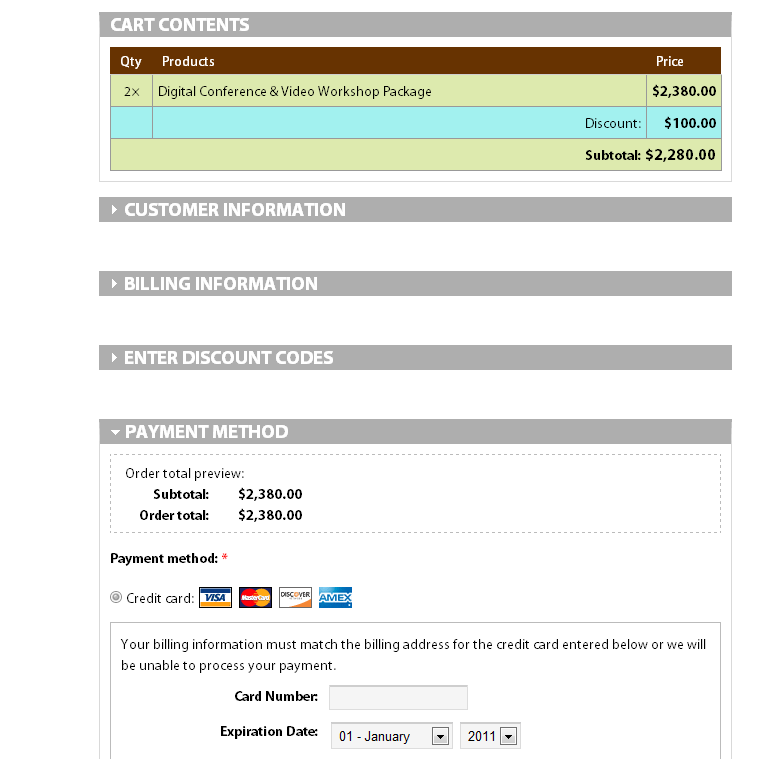
(1) Is a screen shot of the Review Cart screen & Final checkout screen- this is what I can see no matter I am logged or not logged in as on their website.
(2) Is a copy of one of their customers orders who tried to go through checkout and obviously the discount was not applied- so like many of their other customers- they abandoned their cart.
Comment #14
kenheim commentedYou have to go go all the way through the order process. I thought it was applied to my test orders because it showed in the checkout (like yours), but when I went to review the actual orders, the discount wasn't applied. Then I looked at my emailed invoice and sure enough, no discount. Glad that I'm still in dev. and not production. I can see how this would piss some people off.
Comment #15
stockliasteroid commentedThe issue is that the discount won't apply until you click "calculate discounts" on the discount pane. Seems this is an issue with "code-less" discounts only. And yes, it will show the discount on the checkout screen, and it will ALSO show it on the "review order" screen at the top of the order. But it doesn't add it in down at the bottom, so the total of the order is still calculated as if there is no discount.
This is really frustrating... I've got one customer who's had two issues with this module now on a Christmas promo he's running. Sooo... I'm going to look into fixing this tonight. The simple fix for now would be to have jQuery click the button for them once the checkout page loads, and that's probably where I'll start.
Comment #16
bruiseviolet commentedPlease please please let me know if you find a fix. We were using this on a live site- but like I stated before, when the customer clicks the final check-out button, they are charged the full amount with no discount. Since implementing a Buy 2 get 1 free special- their sales have more than tripled, so they would like to continue offering this- HOWEVER this module isn't working and we haven't found anything else to work (because they need lowest price item given free- and all of their products are at various price points). Right now we have customers just putting what product they want free in the comments section- which was fine when they were slow, but now that sales have really picked up, the customer honor system isn't working- and many customers are placing orders and then putting in the highest priced item as their free item- and then they are stucking sending emails to customers saying they have to pick soemthing else- or else screwing around with charging different prices and re-running credit cards through their processor. I am completely desperate to find a way to get this module to work.
Comment #17
loparr commentedComment #18
willowmedia commentedI'm not sure whether this is going to be considered a 'hack' or not - but I'm using hook_order ('total'..) as a place to calculate the discounts which is called even if the discount checkout pane isn't displayed..
Comment #19
loparr commentedHi,
I simply used css to hide the checkout pane.
Comment #20
bruiseviolet commentedSorry for the "silly" question- but will this make it so that ANYONE who "qualifies" will get the discount? I had problems doing this with codeless discounts- about to try again only using a code. Hoping this patch fixes the problem!
Comment #21
bruiseviolet commentedAfter searching for months, and experiencing the same issues as above (not using a discount code- the discount would "vanish" at the last moment, and customers were charged the FULL amount- even though the discount was showing on the order summary screen). After some research, realized the bug is with NOT having a discount code for the coupon/discount/promotion. So we just started having customers use a discount code to get the promotion (buy 2 items, get the 3rd free). It's worked fabulous since this and we haven't had any issues like we did with the codeless discount.
Sorry, I don't have a fix for the codeless discount- just wanted to share what works.
Comment #22
hzoet commentedThank you Willowmedia.
It work's;)
Comment #23
Anonymous (not verified) commentedI confirm that patch #18 is working. Huge thanks to @willowmedia !!!
Comment #24
jvieille commented#18 works, thanks
This is critical, as Discount does not work at all without this change
Comment #25
jvieille commentedThis patch works fine when on codeless discounts are used in an order.
However, it does not work if there are code base discounts in an order.
Processing again the checkout empties the code discount (but keeps the codeless discount).
So,
- if you are using only codeless discounts, you must use this patch
- if you are using code based discounts or mixed code/codeless discounts, you must not use this patch
Comment #26
jvieille commentedUpdate:
#18 is OK.
I had another issue http://drupal.org/node/476348
Actually, the patch in #18 explicitly forgets code based discounts.
This means that nobody until now had to create manual orders with code based discounts..
The correct code is the following
uc_discounts_order_codes_delete($arg1->order_id);
//TO DO: determine if uses should be deleted or put global setting in for user to decide
break;
+ case 'total':
+ // 'Trigger' the checkout pane processing so that discounts are calculated even when the checkout pane is hidden
+ $arg2 = uc_discounts_get_codes_for_order($arg1->order_id);
+ uc_checkout_pane_discounts ('process', $arg1, $arg2);
+ break;
}
}
Comment #27
palllas commentedI as well can confirm that patch #18 is working. Many thanks to @willowmedia !!!
Comment #28
sumitmadan commentedIn #18 $arg2 is missing i think.
Check this Discount not Apply when i change the payment order and proceeds. This is an issue for me. Check if you faced this issue, Or am i missing some configuration?
Comment #29
jvieille commentedI also thought that this argument was missing.
I tried to replace
uc_checkout_pane_discounts ('process', $arg1, NULL);
by
$arg1->uc_discounts_codes = $existing_codes;
uc_checkout_pane_discounts ('process', $arg1, $existing_codes);
Though I did not seem to need it and kept the #18 patch for the time being.
I don't like this approach very much as "total" is called 5 times before and 5 times after "save".
This could certainly be optimized.
Comment #30
willowmedia commentedThanks jvieille for testing & reporting the bug with patch 18 - I can confirm it doesn't work if you use code based discounts. I got caught by it as I now need to use code based discounts!
Anyway, I tried and couldn't get the solutions in #26 or #29 working, so to make it work for me, I've modified patch 18 so that it is only used when the discount pane is disabled (because when the pane is enabled, the patch isn't required).
I've shown the code below but also attached an additional patch that should be applied after applying patch #18.
Comment #31
jvieille commented18+30 is OK!
Thanks