

Active
Project:
Ubercart Discounts (Alternative)
Version:
6.x-2.x-dev
Component:
Miscellaneous
Priority:
Major
Category:
Bug report
Assigned:
Unassigned
Reporter:
Created:
29 May 2009 at 10:30 UTC
Updated:
15 Dec 2014 at 13:48 UTC
Jump to comment: Most recent, Most recent file





Comments
Comment #1
longwaveuc_discounts_alt should be calling uc_price() rather than uc_currency_format() to ensure the VAT alterer modifies the price correctly. But I'm not currently sure what context you should be calling uc_price() with, and this will have to be done carefully as tax may need to be calculated differently depending on whether the discount applies to an individual product or the full order - see #475474: Price alterer contexts and VAT support for the current discussion on this in Ubercart core.
Comment #2
ryangroe commentedHi attiks,
I'm unfamiliar with VAT. It works like a tax, correct? Can you give me an example of what the you are getting and what you should get for the following screens?
-cart page
-checkout page
-review page
-product page (if using the product_price_alterer_field submodule of uc_discounts_alt)
I see I'm using $product->price in some areas and $product->sell_price in others. This may be a problem.
This module may doesn't call uc_currency_format() on product fields, only on its own discount amounts. So it may need to get a decimal price using uc_price. We'll see what needs to be done once we have a little more information. Thanks.
Comment #3
attiks commented@ryan, VAT works the same as taxes, this is what i did:
1/ created a tax rule for all products, add 21%
2/ created a discount buy 2 one for free ('2 + 1 gratis')
3/ created a product with sell price 10
4/ product page shows 12,10 as price (dev load shows 10), so VAT is added
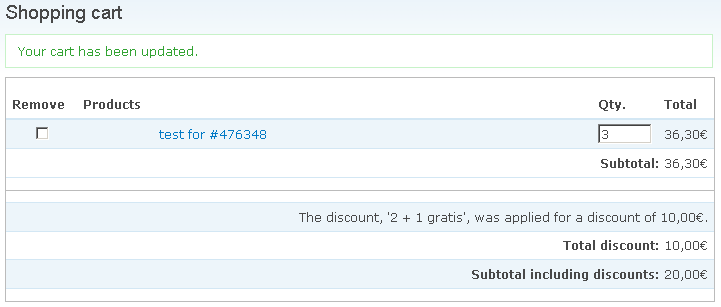
5/ added 3 items to cart, the cart shows The discount, '2 + 1 gratis', was applied for a discount of 10,00€. (should be 12,10) while the cart line shows the price including VAT
6/ checkout
- shows price = 30, vat = 6,30, total = 36,30
- enter discount codes pane shows The discount, '2 + 1 gratis', was applied for a discount of 10,00€. (should be 12,10)
- order total preview pane shows
Order total preview:
Subtotal: 30,00€
Afhalen: 0,00€
Total discount: -10,00€
Subtotal excluding taxes: 20,00€
21% BTW: 6,30€ (should be 4,20)
Order total: 26,30€ (should be 24,20)
7/ checkout review shows
Subtotal: 30,00€
2 + 1 gratis: -10,00€
Afhalen: 0,00€
Subtotal excluding taxes: 20,00€
21% BTW: 6,30€ (should be 4,20)
Total: 26,30€ (should be 24,20)
8/ same results on store/orders/nid
I hope it helps, if not let me know
Comment #4
attiks commentedscreenies
Comment #5
ryangroe commentedSo the discount calculated by uc_discounts_alt is consistent, it just doesn't take into account VAT.
Since VAT is a tax, it seems like the VAT module should work like uc_taxes. In uc_taxes you can specify which line items each tax is applies to (it's a setting in each tax rule as "Taxed line items"). If the VAT module worked like uc_taxes, you would tell the VAT module to include "Discounts" line items in its calculations. Then VAT would be correctly calculate at 4,20 because it would add 21% to 20 (30 + -10).
Ask Longwave what he thinks about this. Thanks!
Comment #6
longwaveThe VAT module requires uc_taxes and uses the same calculations. However, the problem is that in European stores, the site must show tax-inclusive prices to the customer before checkout, so tax calculations have to be performed every time a product price is displayed. This means that any product discounts displayed on product pages or in the cart need to incorporate this same calculation.
As I said in #1, your module should call uc_price() instead of uc_currency_format() whenever it displays a price, which will do this calculation for you. This function was introduced in Ubercart 6.x-2.x-rc1. However, this function is more complex as it requires a 'context' parameter describing what the price is for, and the exact format of this is still being worked out in #475474: Price alterer contexts and VAT support. At present this will also require specific support in uc_vat depending on the 'location' contexts you use for discount prices, though I am hoping to avoid this by standardising the context parameter if possible.
Comment #7
longwaveActually, I'm not sure how this will work when discounts apply to multiple products. If you have a taxed product at $10 and an untaxed product at $10, then you give a $10 discount when both are purchased together, I'm not sure what the correct tax calculation would be in this case - if the discount is"buy X get Y free" then this is a different calculation to "$5 off each product". How does uc_discounts_alt currently handle this?
Comment #8
ryangroe commentedAs mentioned uc_discounts_alt doesn't call uc_currency_format or uc_price on an item's price because it never displays the price of an item.
With this module, discounts are applied to carts as a whole and not to individual products. This is the case even if the discount applies to a single product. This module adds a separate discount line item for each discount to adjust the total for the cart. So uc_discounts_alt will never change the price, sell_price, etc. of a product. This module may need to perform its calculations using an altered price in some future version but that's not what uc_price provides, right? Isn't uc_price is for showing strings to the user not for getting float price values?
Comment #9
a_lawry commentedHi,
I have this problem as well. I'm trying to use the VAT module for Australian GST.
I'm going to try and hack the module to get it to work for me. Has any work been done on this problem before I start?
It also shows as a problem on the product page. The discounted price shown for the product uses the price without GST as a starting point. Also I notice from a brief look at the code sometimes $product->price is used and sometimes $product->sell_price is this meant to be that way?
Thanks for your help. I'll let you know how I go.
Andrew
Comment #10
Poetro commentedI've created a patch that fixes the issues on the cart pane.
Comment #11
Poetro commentedUpdated patches to match 6.x-1.0-beta36.
Comment #12
ezra-g commentedWe should definitely be vat-compatible.
Thanks for the re-roll. This no longer applies to 6.x-2.x. Could you please re-roll against the end of this branch, without the "patched_uc_discounts_alt" directory?
Thanks!
Comment #13
Poetro commentedUpdated patches for 6.x-2.x-dev
Comment #14
ezra-g commentedThanks for the re-roll. This looks generally good though I'd like to do a bit of testing this week before committing.
Comment #15
DrupalYedi commentedThe Patch works for me - but there ist another problem with VAT for European Stores into the cart pane:
If you activate a percentage discount for the total order - the discount is calculated in the cart pane by subtotal without VAT.
In germany - like European Stores to - we need to calculate the discount for customers from the subtotal with VAT.
This example show what I mean:
you have a percent discount of 10% of Total Order.
The VAT for each product ist also 10%.
Product A and B costs each 10,- EUR without VAT and 11,-EUR incl. VAT
The customer see on the cart pane:
Product A 11,- EUR (incl. VAT)
Product B 11,- EUR (incl. VAT
Subtotal = 22,- EUR (incl. VAT)
If I activate a 10% discount to subtotal actually is following cart pane shown:
Product A 11,- EUR (incl. VAT)
Product B 11,- EUR (incl. VAT)
Subtotal = 22,- EUR (incl. VAT)
Discount= 2,- EUR (=> The Problem: The Discount is calculated from Subtotal without VAT)
Subtotal incl. Disount=20,- EUR (incl. VAT)
The correct Cart pane would be:
Product A 11,- EUR (incl. VAT)
Product B 11,- EUR (incl. VAT)
Subtotal = 22,- EUR (incl. VAT)
Discount= 2,20- EUR (=> 10% from Subtotal incl. VAT)
Subtotal incl. Disount=19,80 EUR
The checkout pane works correct and calculate the discount from the subtotal incl. VAT - if you apply VAT to discounts in the UC VAT Module.
Comment #16
ezra-g commentedThanks for the re-roll.
Based on the comment in #15, it seems like this needs work.
Comment #17
miguel_angel commentedThere's another problem with the calculations when there're products in the order with different vat rates.
There's an option in the vat rate configuration form to include the discount line in that rate calculation. This is correct.
An example:
Price without vat: 100
vat 16%: 16
Price with vat: 116
Applying a 10% discount ->
Price without vat: 90
discount without vat: 10
vat 16%: 14,4
discount with vat: 11,6
Price with vat: 104,4
So, 116 - 11,6 = 104,4 that's correct
But, to include the calculations of the other vat rates in the discount line I need to check that option in the corresponding vat rate configuration form and then the module calculates the vat amount over the discount though there isn't any item of that kind in the order.
In a try to solve this with ca, I've added conditions to every vat rate that limits the product classes this calculation applies but it doesn't work as expected.
Example:
vat rate: 16% applied to products class A and discount line.
Conditional actions for 16%:
Conditions: Product is class A
Actions: Apply 16%
vat rate: 7% applied to products class B and discount line.
Conditional actions for 7%:
Conditions: Product is class B
Actions: Apply 7%
Order with:
1 x Product class A
Price without vat: 100
discount 10%: 10
New price without vat: 90
vat 16%: 14,4
Discount with vat: 11,6
Price with vat: 104,4
1 x Product class B
Price without vat: 2
No discount
vat 7%: 0,14
Price with vat: 2,14
Checkout:
Must be:
Subtotal: 118,14€ (vat incl.)
Total discount: -11,60€ (vat incl.)
Subtotal vat excl.: 92,00€
VAT 16%: 14,40€
VAT 7%: 0,14€
Order total: 106,54€
But, it shows:
Subtotal: 118,14€ (vat incl.)
Total discount: -12,30€ (vat incl.) (wrong!)
Subtotal vat excl.: 92,00€
VAT 16%: 14,40€
VAT 7%: -0,56€ (wrong!)
Order total: 105,84€ (wrong!)
Because it was calculating the 7% vat rate over the 10 € discount of product class A (0.7), too and substracting it from vat 7% (0.14) (0.14 - 0.7 = -0.56) and adding the 0,7 to the real discount of 11,6 (11,6 + 0,7 = 12,30)
The conditions in vat 7% conditional actions says that only must be calculated if product belongs to class B but this isn't taken into account.
Comment #18
celia_ccs commentedHi,
Hi,
UC_discount_alt calculate the discount based on the Price exclusive of VAT .. instead to calculate on the price VAT inclusive.
Ex : I apply a 20% discount on the products.
Standard Price (16% of VAT included) : 100
Discounted price from uc_dicount_alt : 68,97€
REAL discounted price : 80 => that's what it should be.
Is there any patch to solve this? I did apply the patches #13, but I'm still facing the same problem.
Ubercart 2.2
UC_discount_alt 6.x-2.x-dev
UC_vat 6x-1.0
Comment #19
iernst commentedHi,
is there something new regarding this patch? It would be really great to have UC_discount_alt working correctly with VAT like in #17 from miguel_angel described.
Thank you in advance.
yours
ingolf
Comment #20
pauljb commentedsubscribe
Comment #21
gapa commentedHi,
I also run into this problem. Has anything been made on this.
br,
gapa
Comment #22
leon kessler commentedJust discovered this problem and have been working on it.
As far as I can see, the two remaining issues are:
1) The cart page discount total is incorrect (as it's still calculating before VAT is added) - but the checkout page has correct discount rates
2) Having multiple tax rates causes incorrect discount calculations. I replicated this problem, but haven't quite yet understood what is going wrong there.
Well I've fixed problem 1, I think. It basically needed a few changes to the get_discounts_for_order() function (just adding uc_price function where it was taking the sell price value).
I'm going to look into issue 2 tomorrow and hopefully fix that.
I'll come back soon with a patch, will need a bit of testing.
Thanks
Leon
Comment #23
leon kessler commentedRight, I've got a patch which seems to be working okay for me for both issues.
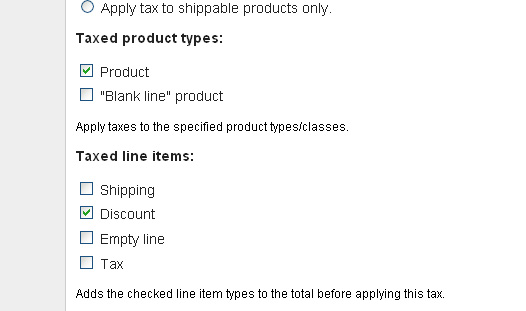
One thing to note is that you need to de-select the discount line item on the tax rate page.
The reason for this is we don't want tax to be added to our discount, as we've already included the tax using the uc_price() function.
I've tested it with an order consisting of two items with different tax rates and discount rates applied.
ITEM 1
PRICE £6.04
TAX 17.5%
DISCOUNT 6%
QUANTITY 5
5 * (6.04 + 17.5%) = 35.49
Discount: 35.49 * 0.06 = 2.13
ITEM 2
PRICE £20
TAX 10%
DISCOUNT 50%
QUANTITY 3
3 * (£20 + 10%) = £66
Discount: 66 * 0.5 = £33
Subtotal: 35.5 + 66 = 101.5
Discount: 2.13 + 33 = 35.13
Order total: 101.5 - 35.13 = 66.37
This works for me.
Let me know if there's any probs. Also, I havent tested this out without using the vat module. It should work the same as uc_price() will then get the price exc tax, and you could tax the discount by selecting this line item on the tax admin page.
Thanks
Leon
Comment #24
gapa commentedHi,
Thank you so so much for this!
I had to manually patch this thing (probably because of different module version). I attached my patch if someone else will have this problem.
As far as I could test it it really works. :)
Do you maybe also know how to get products discounted prices into invoice? Couse products on invoice are displayed without discounted price.
thanks again and br,
gapa
Comment #25
leon kessler commentedhi gapa,
On the invoice you get the items price and then the total discount below it, the same as on the cart and checkout review pages.
You want the item price to include the discount rather than listing them separately? Isn't that a bit misleading as you're not showing what the normal cost of the product was (plus losing the opportunity to show what the customer saved in discounts).
Anyway, the invoices are php files so I guess you could use the uc_price() method inside them to work out the discounted price.
Comment #26
gapa commentedMaybe I forgot to mention that I would like to display both prices of a product. Original, and new discounted. So that customers could see on product basics how much they saved. And also if it is possible to calculate the difference between original and discounted price (you saved: price - discounted price).
This kind of functionality would also be great in product node. So the customers can see right away how much they would save if they bought the product. Also maybe with % display. So that they don't have to do the calculations for them self.
I will try to implement your idea into invoice. Is it also possible to use this idea (using uc_price) in template files node-product.tpl.php?
br,
gapa
Comment #27
pauljb commentedThanks for the patches but, with both patches #23 and #24, I got the message:
patching file uc_discounts.module
Hunk #2 succeeded at 955 (offset 15 lines).
patch: **** malformed patch at line 56: @@ -1387,25 +1422,25 @@
Thanks
Comment #28
gapa commentedI checked again my patch and i think i made a reverse. try again with this one.
Comment #29
pauljb commentedgapa,
this one worked
you saved my day, thank you!
Comment #30
gapa commentedI found another error and I applied another patch. This should also correct "Subtotal including discounts:". Now it is displayed with VAT.
br,
gapa
Comment #31
pauljb commentedHi Gapa,
Thanks for your update.
Can't imagine it has to do with the patch but for some reason the field discounted price disappeared.
Comment #32
joachim desarmenien commentedhello,
i'm having the same issues with VAT + uc_discount_alt
do i have to aplly all the patches, or just #30
is there a way someone could send me a patched version of the module that would work with VAT
i never could patch a module it always fails ...
thanks to all
Comment #33
pauljb commentedHi Joachim
I attached the patched versions of uc_vat and uc_discount_alt.
As far as I can see so far it works as aspected.
Paul
Comment #34
joachim desarmenien commentedHello,
thanks for the file
i updated the module (i sites/default/modules)with the ones you sent me
created a buy one get one free rule
ran cron, emptied caches
and it still calculates discount on VAT non inclusive price
did i forget something ?
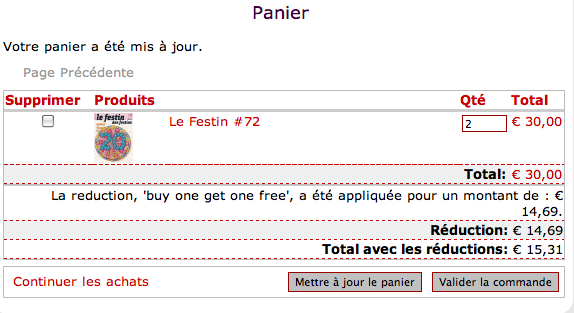
see attached file
the website is here http://newsite.lefestin.net/node/802
you can try putting two items in the cart ....
is there a way to output something to see if it works ?
thanks
Comment #35
joachim desarmenien commentedi tried uninstalling the module
unchecked it in the module section, deleted the files, ran update.php
reinstalling it
upped the files you gave me, checked discount box in modules section.
my discount rules are still there
and it still isn't working :((((
Comment #36
joachim desarmenien commentedBTW : i'm working with three different taxe rate i don't know if this is what makes it uneffective
Comment #37
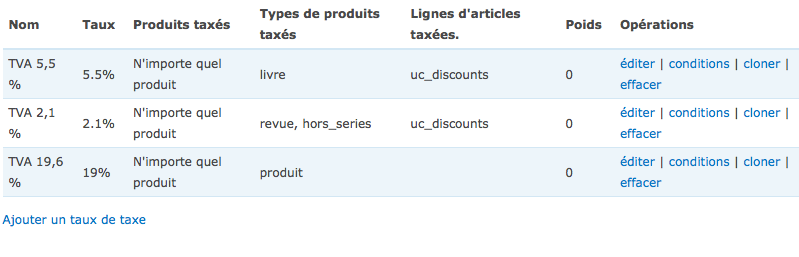
joachim desarmenien commentedi tried searching in the admin/store/settings/taxes page
i have three taxe rates one for books, one for magazines, and one for normal product
when in one taxe rate i check the taxable line item option "discount"
it works on checkout but not in the cart
if i check the taxable line item option "discount" on the second taxe rate
on checkout it outputs two taxes (see pic for discount checkboxes)
can anybody tell me what does the "taxable line item" do ? what are "empty line" and "taxe" options for ?
Is there a way to make this work ?
I feel i'm missing something
thanks to all
Comment #38
gapa commentedTry deselecting the discount line item on the tax rate page. It is already mentioned in post #23. I don't have discount line in my setup and for me it works. Haven't yet tried your type of discount rule thou.
br,
Gapa
Comment #39
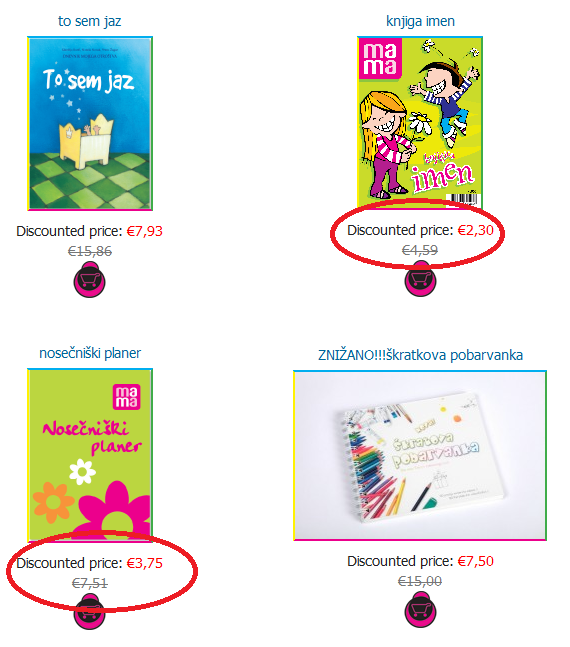
gapa commentedFound another issue. In the attached picture you can see two product with same discount (50% off). Why are this two products rounded differently? If I divide original price (this is VAT inclusive) I get 2,295 and 3,755. As I can see this two are rounded differently. I also tried to do this calculation without VAT inclusive prices and I still get to same result.
I also am trying to get discounted price into invoice template. And as far as I could do I used this code to pass another parameter into ordered products. And "discounted_price" is 2.29 and 3.76. Why is this different than in product display page? I just can't figure it out. To be honest, I am not a coder so I don't understand completely how things works. Any help is welcome.
Comment #40
leon kessler commentedhi gapa,
Sorry I havent been helping out with this that much since uploading the patch. I've had to stop work on it because it turns out the project I'm on never required the vat module anyway.
With the rounded prices, have you checked the original sell price? I think I saw this issue before, but found it was calculating the discount from the actual sell price, which is also rounded (separately) for the store. Does that make sense?
So say your second product that was rounding down (.5 should always be rounded up), the original sell price could have been 7.508, which would round correctly to 7.51 for the store and 3.75 for the discount.
As for the discounted prices showing on invoices, this should really be done with tokens. It's something I'm going to have to do myself pretty soon, when I do I'll submit a patch. If you want to do it yourself I would look into using hook_token_values(), or carry on using the code in the template (bit messy) as that seems to round correctly.
Thanks
Leon
Comment #41
gapa commentedThanks for answer leon.nk.
I will check rounding problem and report back what I will found.
As for invoice template. I don't know if tokens are meant to be used this way. Cause every product that would have discounted price should also have it's own token. Or did you have any other idea implementing this?
That's why I thought it would be best to attach discounted price to products that are in order. So I could go through order->products array and display original sell price and discounted price (if product has discounted price). And also total price without discount and total price with discounted price.
br,
gapa
Comment #42
nicolasb_cdip commentedHello,
I was reading this topic and I used your patches to correct the vat problems. I ran some tests for each kind of possible discounts.
So basically there are two categories : Qualif type = Price or Number and Discount Type = Percent Off, Fixed Amount Off, Fixed Amount Per Qualifying Item, Percent Per Qualifying Item and Free Items.
After testing, I understood what your patches fix but I found new issues which are :
- wrong discount calculation when Qualif type = Price and Discount Type = Fixed Amount Per Qualifying Item
instead of
explanation : discount amount was calculated too quickly, should be $discount->discount_amount * the number of qualified items
- wrong discount calculation when Discount Type = Percent Off Per Qualifying Item
instead of
explanation : not using get_uc_price function
- not including VAT in price of free item(s) when Type = Free Items
instead of
explanation : not using the get_uc_price technique to calculate the price of the free item(s) discounted
So I provide a patch which include all the previous modifications on the uc_discounts.module file (of this topic) and adding mines.
If I'm not wrong, only the change made in #13 have to be added, because not in the same module.
I would appreciate having feedback about this contrib because I'm not sure it's completely tested.
Comment #43
gapa commentedI have looked at your patch and I think that it doesn't include your new patches. Could you please have another look at this?
br,
gapa
Comment #44
nicolasb_cdip commentedYou're right, my bad !
I changed it a little bit, using an .inc file containing the function get_uc_price() and allowing to use it with a quantity of 1.
So the functions.txt should be renamed in functions.inc and placed in sites/all/modules/includes/ (create it before).
I did that because a lot of modules don't handle the VAT issue and so need to call this function.
What do you think about that ?
I re attached the patch file, and this one should be complete.
Comment #45
nicolasb_cdip commentedComment #46
gapa commentedDon't know why but the file uc_discounts.module.patch is missing (wrong link to file).
But don't know about functions.inc file. I have a feeling that this is not "drupal" way of handling things. But I am not an experienced drupaler so I will let others decide. My personal opinion is that it should stay in module itself. Other modules maybe want to calculate things differently.
br,
gapa
p.s.: do you maybe have an answer to my other problems discussed in posts #39,#40,#41
Comment #47
nicolasb_cdip commentedRe uploading this *** patch :p
I don't know if it's the best way to share this function, I think the Drupal way is to create a module for this. But as it's a very basic function, I used this.
About your issues, I didn't get this problem yet but I will let you know...
Comment #48
gapa commentedI have tested few examples (not all), and it works for me. I have also discovered what is with my question in post #39. I have found out how discounts get calculated. It is original price - discount. And if I calculate my numbers this way the results are correct.
br,
gapa
Comment #49
mrandy commentedHi,
Sorry to be a pain but any chance somebody could post a patched version of this module. Having spent a few hours (as a non programmer) trying to work out how to apply a patch under windows (yep I should probably be running Linux, I'll get there one day) frustration is kicking in and i am getting no where. This might be a simple process for most people but not here, it would be a big help if I could just grab the already patched mod from somewhere and upload it.
Thanks a lot to anybody that can help, and to everybody for solving these issues.
Andy
Comment #50
mrandy commentedfor anybody else wanting to apply a patch, using windows and not having a clue where to start, try using Tortoise SVN, it makes it very simple and is available here:
http://tortoisesvn.net/
and the instructions here meant even I managed to do it:
http://tortoisesvn.net/docs/release/TortoiseSVN_en/tsvn-dug-patch.html
hope this helps somebody else.
Andy
Comment #51
klavs commentedI see these get_ucprice patches has been applied to the latest dev version of uc_discounts_alt - also VAT support "almost" works.
I tested on a test site - purchasing 3 items costing a 100 kr. (80 kr. without VAT) and a discount of 30 kr. if 3 is purchased.
The total became 270 - so that was correct, but the VAT amount was still 60 - it should have been 54 (the 6 deducted as the discount amount (30) is 24 + 6 in VAT).
Comment #52
klavs commentedif I enable taxes on discount line item the VAT is correct - and the entered discount amount is taken as being excl. VAT (ie. to get a discount of 30 incl. VAT I need to enter 24).
Only issue is the places where it says what your discount is - it states this without VAT - (ie. 24) where it should say 30 - as that is what the customer actually saves.
I'm guessing the "your discount is" output is not run through uc_price ? (I'll have a look at the code and see).
Comment #53
klavs commentedthe patches with get_uc_price returns a price of 0.
I tried to fix it up - and the below works, except VAT is NOT applied. I can't seem to figure out why :(
function get_uc_price($item) {
$price_info = array(
'price' => $item->price,
'qty' => $item->qty,
);
$context = array(
'type' => 'cart_item',
'revision' => 'altered',
'field' => 'price',
'subject' => array(
'cart_item' => $item,
'node' => node_load($item->nid),
),
);
return uc_price($price_info, $context);
}
Comment #54
klavs commentedbtw. this is only needed in the cart pane - VAT is correctly done in the checkout section.
Comment #55
klavs commentedI fixed it - you need to feed it a proper item - or perhaps try to change from cart_item to line_item - I haven't gotten line_item working yet though.
Comment #56
klavs commentedI tried to get get_uc_price to check for an $item->nid, so that calls to get_uc_price with an $item object which has ONLY price and quantity (ie. discounts - ergo line_items) could be calculated as well.
But it doesn't add VAT to line_items and I can't seem to figure out what's missing from the line_item item (and yes - I have selected that Discounts (uc_discounts) be taxed in my tax rule.
If you have ideas - pls. put'em forward - otherwise you can just clone the last $item from the shopping cart and use that - that's what I do now. It is flawed though, as you might have a case where an $item is untaxable (or has a different tax - like books in Sweden, childrens clothing in UK etc.) and the line_item discount still should be taxed.
if ($item->nid) {
$context = array(
'type' => 'cart_item',
'revision' => 'altered',
'field' => 'price',
'subject' => array(
'cart_item' => $item,
'node' => node_load($item->nid),
),
);
}
else {
//This doesn't work - it is however how tax on discount line_items should be calculated
$line_item = new stdClass();
$line_item->type = 'uc_discounts';
$line_item->amount = $item->price;
global $user;
$order = new stdClass();
$order->uid = $user->uid;
$order->line_items[] = array( 'type' => $line_item->type, 'amount' => $line_item->amount);
$context = array(
'type' => 'line_item',
'revision' => 'altered',
'field' => 'price',
'subject' => array(
'order' => $order,
'line_item' => $line_item,
),
);
}
Comment #57
jazzitup commented+1 subscribing
Can we port a final version of all working patches from above that work with the current uc_vat dev, please?
Comment #58
secretuser commentedFrom this entire thread, I am under the impression that there is a version that actually solves the problem. But there is somehow no combined version available for download. So I assume that the problem isn't solved yet and that the patches are incomplete?
Comment #59
miguel_angel commentedThe discounts and VAT support are a difficult problem to solve for all cases of use (and all countries).
Perhaps the solution is that any module that alters prices must have a price alterer function and find the right order to apply them.
Meanwhile, I've wrote a patch to uc_discounts_alt (6.x-2.x-dev 2010-Aug-24) that handles discounts in orders with mixed VAT rates.
The solution calling uc_price contributed in this thread doesn't work for me.
This patch creates a different line item per vat rate, so you can assign in VAT settings the right discount line item to each vat rate.
For this to work, the discounts created must no mix products of different vat rates.
You can have a vat rate for products class: A, B, C and discount line item "VAT rate 1"
other for products class: D, E and discount line item "VAT rate 2"
and a discount that qualify for products class A, B or C
other discount that qualify for products class D or E
but not discounts that qualify for products B or D, for example (due to different vat rates of B and D classes)
I've tested the patch with modules:
uc_vat, uc_taxes, uc_discounts_alt enabled
uc_vat, uc_taxes disabled and uc_discounts_alt enabled
uc_vat, uc_taxes enabled and uc_discounts_alt disabled
This isn't an elegant solution, but it works.
Please, feel free to try the patch and your feedback is welcome.
Comment #60
Peter76 commentedHi,
Can anyone please send me already patched files (uc_discounts.js and uc_discounts.module)?
It give me an error.
Comment #61
jazzitup commented@Peter76: Why would anyone send those patched files to you? Think broader, think about the community and ask to port those patches to dev. That way you will get your patched files, the rest of the community could test it and the maintainer will get more feedback.
Comment #62
Peter76 commentedmadjoe;
Yes you are right.
Can anyone port these parches to dev?
Comment #63
davidburns@Peter76 I believe what @madjoe was getting at, is that this is a community project and the efforts of people like yourself could benefit everyone else.
So instead of waiting around for someone to make the patch for you. You could have taken the time to understand how to manually apply a patch. These patches were relatively small and would have been good experience for you. However, me being the nice guy that I am. I went ahead and created a new patch file for you.
I even took an extra step and hunted down a post here on Drupal.org that explains how you can help out by reapplying patches manually. Then all you would have to do is create a new patch file for everyone else to use.
Apply a patch file manually
Create a patch file
Apply a patch file
Comment #64
Peter76 commenteddavexoxide thank you very much.
Comment #65
sittard commentedFor testing, I've just checked out the latest release from the CVS head which appears to incorporate the above changes but I'm getting the following error code:
It would appear that 'uc_discounts.module' around line 1950 has some code which looks out of place and is effecting the function 'uc_discounts_add_discount_rate_id'.
I'm happy to post my copy 'uc_discounts.module' if that would help.
Comment #66
Rob B commentedAny help will be great, I tried to apply the patch above but realised that it was for an older version of the module - having issues myself with the discount calculating the pre-tax value, and also showing the subtotal excluding VAT on the shopping cart page.
Thanks!
Comment #67
mandreato commentedHi all, I've just downloaded the 6.x-2.x-dev version of Ubercart Discounts (Alternative) and tried to manage a term based discount but occurred in the problem described here: the discount is applied before taxes, which is not correct here in Italy. Actually the taxes are managed correctly by Ubercart 2 VAT support module.
I've read the whole thread, even the links posted by davexoxide about patches, then tried to apply patches both manually and using the Eclipse tool, but it seems to me (consider that I'm not an expert), that the patches aren't suitable for current 6.x-2.x-dev release (like stated in the previous post too).
Is there any chance to port the fixes in the -dev version ?
Comment #68
joachim desarmenien commentedHello,
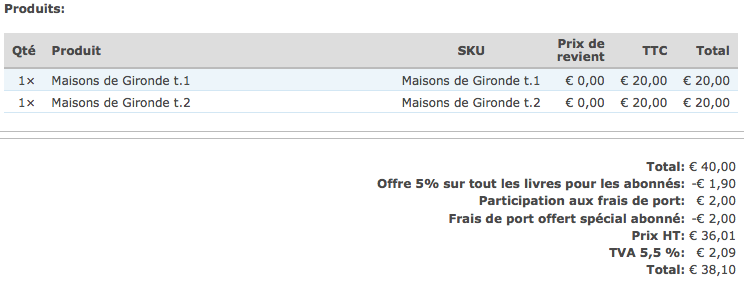
i have a problem with a french site that is online and "working" :(
an acountant told me that the vat is not applied where it should be.
they sell magazine with a vat rate of 5,5%
in this example we have 2 discounts applied using uc_discount_alt, free shipping and 5% off
if i buy 2 magazines at 20 each i should have
total : 40
total HT excluded : 37,92
5% discount : 36,02
vat : 1,98
total to pay : 38
++
shipping : 2
free shipping : - 2
shipping has no vat in France
this is what i get on the site (attached file)
total : 40
5 % discount : - 1,90
shipping : 2
free shiping : - 2
total HT excluded : 36,01
vat : 2,09
total to pay :38,10
I first noticed that the rounding is not done on each articles but on both (36,02 - 36,01)
and the VAT is not correct, customer pay 10 cents more, because it has to be effective once the discounts have been applied (on the vat excluded price)
Is there a way i could change the workflow to have a correct sum ?
do i have to change something in the uc_vat module or in the uc_discount_alt module ?
Thanks to all for all the work
Comment #69
helltae commentedTo #68
Doing a manual patch (manual for search the strings to change) of uc_discounts.module and using code from #30 works for me.
uc_discounts.module is at: sites/all/modules/uc_discounts_alt/uc_discounts
Using 6.x-2.x-dev
Comment #70
Bronislovas commentedThe same. #30 manualy applied patch works so far so good. And for product price altered field to display correct price it seems to help the following fix:
After applying the patch in uc_discounts.module in uc_discounts_get_discounted_price_for_product function
REPLACE: return $product->sell_price - $total_discount_amount;
WITH: return get_uc_price($product) - $total_discount_amount;
Comment #71
root66 commentedThere's still a problem with patch #30. The sub-total and total price is correct now, but if you enable "Show VAT amounts in separate columns at checkout." (admin/store/settings/taxes/vat) the VAT amounts ignore the discount(s).
Example and difference between uc_discounts_alt and uc_coupon (which has a special fix for uc_vat):
1 x Product (incl. 19% VAT) - 4,99 €
uc_coupon:
Sub-total: 4,99€
Coupon (20%): -1,00€
Shipping (incl. 19%): 5,95€
Total: 9,94€
incl. 19%: 1,59€
uc_discounts_alt:
Sub-total: 4,99€
20% discount: -1,00€
Shipping (incl. 19%): 5,95€
Total: 9,94€
incl. 19%: 1,75€
Now an example with two products and two different VATs:
Product-A (incl. 19% VAT) - 4,99 €
Product-B (incl. 7% VAT) - 29,00 €
uc_coupon:
Sub-total: 33,99€
Coupon (20%): -6,80€
Shipping (incl. 19% VAT): 5,95€
Total: 33,14€
incl. 7%: 1,52€
incl. 19%: 1,59€
uc_discounts_alt:
Sub-total: 33,99€
20% Discount: -6,80€
Shipping (incl. 19%): 5,95€
Total: 33,14€
incl. 7%: 1,90€
incl. 19%: 1,75€
As you can see everything except the VAT amounts are identical. The VAT amounts ignore the discounts in uc_discounts_alt. I think the solution can be found by looking in the last changes of uc_coupon, because they had the same problems before.
Update:
uc_vat supports a 'tax_adjustment' callback. Take a look into the 'uc_vat_line_item_price_alter' (uc_vat.module) function: $callback = _line_item_data($line_item['type'], 'tax_adjustment');
and uc_coupon registers that callback:
/**
* Implementation of hook_line_item().
*/
function uc_coupon_line_item() {
$items[] = array(
'id' => 'coupon',
'title' => t('Coupon discount'),
'tax_adjustment' => 'uc_coupon_tax_adjustment',
'weight' => 0,
'default' => FALSE,
'stored' => TRUE,
'add_list' => TRUE,
'calculated' => TRUE,
);
return $items;
}
Comment #72
nitebreedSubscribing
Comment #73
celia_ccs commentedhello,
I have tried many configuration, patches, modules versions ..etc and i just cannot get to the right calculations in the checkout. It's a shame because discounts are actually not usuable for European shops right now. At least I haven't found a solution.
I would be happy to sponsor a development to solve the problems between uc_vat and uc_discounts_alt
Contact me if you are interested.
Comment #74
nitebreedSame for me... unfortunately none of the solutions posted seem to work
Comment #75
miguel_angel commentedHi!
This message is for all of you that say "it doesn't work".
My solution at #59 works for my particular case.
If it doesn't work for yours, please, give us information about your problem.
With more detailed information we can get an almost optimal solution.
Thank you.
Comment #76
bartezz commentedA three year old issue that has never been solved... such a shame!
@miguel_angel your patch in #59 ofcourse doesn't run against latest dev anymore. Have you ever updated to latest and do you have a new patch?
I'm also marking this as major. One of the reasons is mentioned by longwave in #6 and others after this, incorrect calculations make this module unusable for EU (and possibly other countries) web shops.
Pointed http://drupal.org/node/1330476 and http://drupal.org/node/824510 to this issue as I believe these are similar issues.
Cheers
Comment #77
bartezz commented@Gapa, have tried your patch in #30 and it fixes part of it, but am still having some troubles;
My setup:
First I had some troubles with incorrect VAT calculations, possibly due to change in Ubercart 6.x-2.6, this was solved here http://drupal.org/node/1170992#comment-5536898
Then I noticed that discounts on both cart and checkout page were calculated based on sell price exclusive of VAT. Tried many things mentioned in this and other issues and many different settings but nothing worked.
/cart/checkout before patch:
I have applied #30 by hand to UC Discounts Alt (6.x-2.4) and since then the discounts are correctly calculated after VAT has been applied. Yet the patch causes the subtotal exclusive of VAT and the VAT line to be incorrect. Seems like they don't know about the discounted prices.
So partially there but no complete fix. Tried manually applying patches in #59 but they are based on the dev release from sept 2009 I believe so that's not really working out well.
Back to square one? Can't believe there isn't a live webshop out there that doesn't have uc_vat and uc_discount_alt combined which is working... can anyone who's got this working share a bit more info?!
Cheers
Comment #78
bartezz commentedSorry, I changed to incorrect status.
Have done some more dubugging. I converted to UC Discounts Alt (6.x-2.4) without patch in #30 and I'm back to the results in the first code block in #77.
Now I went to my VAT setting admin/store/settings/taxes/1/edit and checked the 'discount' as a taxed line item. This resulted in a perfect calculation in the Order Total Preview pane on the checkout form;
The only issues remaining are the /cart page and the Cart Contents pane on the /cart/checkout page. The discount here is calculated based upon the sell price ex vat which is incorrect. Back to the drawing board!
For now I'm using uc_coupon which works fine but I'd like to switch to uc_discounts_alt!
Cheers
Comment #79
jvieille commentedI had related problems mentioned there :
http://drupal.org/node/1909316
http://drupal.org/node/1909052
For me, this module works perfectly without any patch until several tax rates are applied to the discounts line item.
then, taxes are calculated and accrued from each tax rate.
I tried to manually apply #30 method - this does not work at all.
The best I got was with #59 which definitely makes sense - handling every discount as a separate line item.
Together with http://drupal.org/node/1170992 I got the right calculation
Thanks!
Comment #80
jvieille commented#59 is really the way to go.
To make it working with the latest Ubercart and UC Discount:
Apply the #59 patches manually, and :
in uc_discounts.js, as the patch does not totally matches the current code - theer is no more a uc_discountsRemoveDiscountLineItems(updateLineItems) funtion :
Do not alter this unexisting function and replace
by
in UC order, in uc_order.line_item.inc
replace
by
This discounts module is now a killer!!!
Still need works to provide a patch...
Comment #81
jvieille commentedThere had some other changes needed for making this working smoothly, specifically from the order pane.
I attached the modified uc_discounts.module from 2.4 version.
this file includes 2 other fixes
http://drupal.org/node/1931864
http://drupal.org/node/1067440
This also needed some changes in Ubercart uc_order.lien_item.inc.
Comment #82
robert.koza commentededit..
Comment #83
grabby commented@jvieille I think the reason this issue is still under review is that it’s unclear what exactly is being reviewed. Any chance you could post what your uc_discounts.js ended up being for example? I couldn’t follow all the changes. Thanks.
Comment #84
jvieille commentedThe issue is about 2 problems
1) getting this module working with VAT: prices are set included VAT, which is a different logic of the standard Ubercart design where product prices are displayed without taxes.
2) Handling multiple tax rates : if you apply a discount to a product, the corresponding tax has to be altered. The module did not care.
The second issue makes this module unusable unless you accept fancy tax amounts when applying a discount to a multi taxes order
I did many changes before getting this module really working.
No patch, just hand changes noted // JV... // end JV...
My working module based on 6.x-2.4 is attached
Also the modified Ubercart file uc_order.line_item.inc
You'll have to remove _.test at the end of these files.
Hope this helps
Comment #85
grabby commentedThanks for that! I am mainly interested in a percentage discount. I set a discount of 10% for a particular product. On the cart and at the top of the checkout page the discount and subtotal including discounts are shown exclusive of VAT, but in the order summary on the checkout page it is shown correctly. Actually the order summary isn’t perfect either, because the line showing discounts exclusive of VAT includes it and the line showing subtotal excluding VAT includes it also. The last two lines, VAT and order total, are correct.
To illustrate, for a product price of 1,000, a VAT of 25% and a discount of 10% the cart shows
Subtotal: 1,000
Total discount: 80
Subtotal incl discounts: 720
The top of the checkout page shows
Price: 1,000
Discount: 80
and the Order Summary shows
Subtotal: 1,000
Total discount - VAT: -100
Subtotal excluding VAT: 800
VAT: 180
Order total: 900
For the above I set “Discount VAT” as a taxed line item on the VAT page. Since there is only one VAT rate there are no issues related to multiple rates.
I’m not sure what I’m doing wrong if this works for you @jvieille or where we go from here. I’m all too happy to help with moving this forward in any way I can!
Comment #86
jvieille commentedDid you got this using my code, or the unchanged module?
Comment #87
grabby commentedI got it with your attachments, both of them. To use my previous example, with only your modified uc_discounts_alt module but not your uc_order.line_item.inc file – i.e. with the original (6.x-2.12) uc_order.line_item.inc file – I get the following for the cart
Subtotal: 1,000
Total discount: 80
Subtotal incl discounts: 720
The top of the checkout page shows
Price: 1,000
Discount: 80
and the Order Summary shows
Subtotal: 1,000
Total discount - VAT: -100
Subtotal excluding VAT: 720
VAT: 180
Order total: 900
And then going completely back to the original 6.x-2.4 uc_discounts_alt module and original 6.x-2.12 uc_order.line_item.inc file I get the following
Subtotal: 1,000
Total discount: 80
Subtotal incl discounts: 720
The top of the checkout page shows
Price: 1,000
Discount: 80
and the Order Summary shows
Subtotal: 1,000
Total discount - VAT: -80
Subtotal excluding VAT: 720
VAT: 200
Order total: 920
Just to be safe I flushed caches between all variations. Any ideas?
Comment #88
jvieille commentedThis is what I get - in this case, the discount is a fixed amount per item if above a certain quantity, similar result with percentage or when using codes.
I put the number I got and indicated in parenthesis what you should get using your example. This seems to be very different
CART
Line item:
unit price : 12
Quantity 10
Total 120
Subtotal
Excluded VAT 2.1% 117.53 (800)
VAT 2.47 (200)
Subtotal 120 (1000)
(Note : no discount taken in account at this stage)
Discount (2 * 10 € - VAT): 19,59 (80)
Subtotal excluded VAT, including discount : 97.94 (720)
(Note : the discount is correctly calculated excluded VAT as indicated)
CHECKOUT
Cart content
Excluded VAT : 117.53 (800)
VAT : 2.47 (200)
Price 120 (1000)
(Note : yes, this indication is misleading, as it does not take the discount into account)
Command preview
Excluded VAT / VAT / Total
sub-total: 117.53 € / 2.47 € / 120.00 € (800 / 200 / 1000)
Total discount on VAT 2.1% : -19.59 € / -0.41 € / -20.00 € (-80/ -20 / -100)
Total order : 97.94 € / 2.06 € / 100.00 € (720/ 180 / 900)
Just thinking about it, the UC_VAT module was crappy either. I made significant changes to get it calculating correctly.
I am attaching the modified uc_vat.module file.
Comment #89
grabby commentedI agree, you’re getting different results than I do, but the results you get aren’t correct for my example either. With the uc_vat.module you attached my results are almost exactly the same as without, namely the cart shows
Subtotal: 1,000
Total discount: 80
Subtotal incl discounts: 720
The top of the checkout page shows
Price: 1,000
Discount: 80
and the Order Summary shows
Subtotal: 1,000
Total discount - VAT: -100
Subtotal excluding VAT: 720
VAT: 180
Order total: 900
The only difference is that the Subtotal excluding VAT on the Order Summary is now correct.
The results you get for my example are incorrect as follows (I am putting the correct results in parentheses)
CART
Subtotal excluding VAT: 750 (800)
VAT: 225 (200)
Subtotal: 1000 (correct)
Discount excluding VAT: 75 (80)
Subtotal excluding VAT including discount: 675 (720)
CHECKOUT
Cart content excluding VAT: 750 (720)
VAT: 250 (180)
Price: 1000 (900)
What I am after is the following result
CART
Subtotal: 1000
Total discount: 100
Subtotal incl discounts: 900
CHECKOUT - top
Price: 1,000
Discount: 100
CHECKOUT – Order Summary
Subtotal: 1,000
Total discount - VAT: -80
Subtotal excluding VAT: 720
VAT: 180
Order total: 900
To summarize the problem, all prices and discounts should include VAT, with VAT and final price not including VAT broken out on the order summary and the payment page. I have yet to find a way to do this. Thanks for your effort, though!
Comment #90
jvieille commentedI just guessed the number, did not tried them, so I might have mistaken.
But your data are probably incorrect. VAT is 20%, not 25% - I think I would have put these values if calculated on that basis.
Try replacing the attached file in UC_VAT.
Comment #91
grabby commentedAs I mentioned, I DID use your attached uc_vat.module. Just to be clear, with an original price of 1000, a VAT of 25% and a discount of 10%, the original VAT is 200 (800 x 1.25 = 1000), the discounted price is 900 (1000 x 0.9 = 900) and the discounted VAT is 180 (720 x 1.25 = 900). The original price of 1000 includes the 25% VAT, as does the discounted price of 900. This is the simplest example I can think of, and one that applies to most VAT countries.
Comment #92
jvieille commentedYou are correct, I mistaken the VAT calculation.
I edit my post #88 above, hopefully correct now. Is it what you expect / get or not?
The numbers at the top of the checkout page are misleading, as they do not take the discount into account. Maybe it would be better to hide this pane as everything is fine at the bottom of the form.
Comment #93
grabby commentedYou know, if the cart was accurate and gave the customer an actual idea of how much things cost and how much they were expected to pay, I’d say sure, let’s hide the cart pane at the top of the checkout page. That’s not the case, however. And since the Order Summary isn’t 100% correct there’s not much point in hiding things. Your edit of #88 is closer to what I’m expecting, but I wrote exactly what I’m expecting in #89. If it was up to me I’d change the status of this issue to “active”.
Comment #94
jvieille commentedI have to study your numbers closer, but sure, this issue is "active". There is much room for improvement.
The point is for me that it is good enough for a production system. I live with that since 9 months, 1000 orders and nobody complained to date...
Comment #95
grabby commentedThe French must be more forgiving than the Hungarians : - )
I’ll change the status to active and see if anyone complains.
Comment #96
dunx commentedAfter 5 days I have this working (for me at least).
Scenario is I'm in the UK and charging 20% VAT. I've created a 10% discount when multiple products are purchased. The product costs £15 (including VAT).
Expected result is if I purchase 2 products for a normal price of £30.00, I should see a £3.00 discount made up of £2.50 on the product and £0.50 on the VAT, for a final price of £27.00.
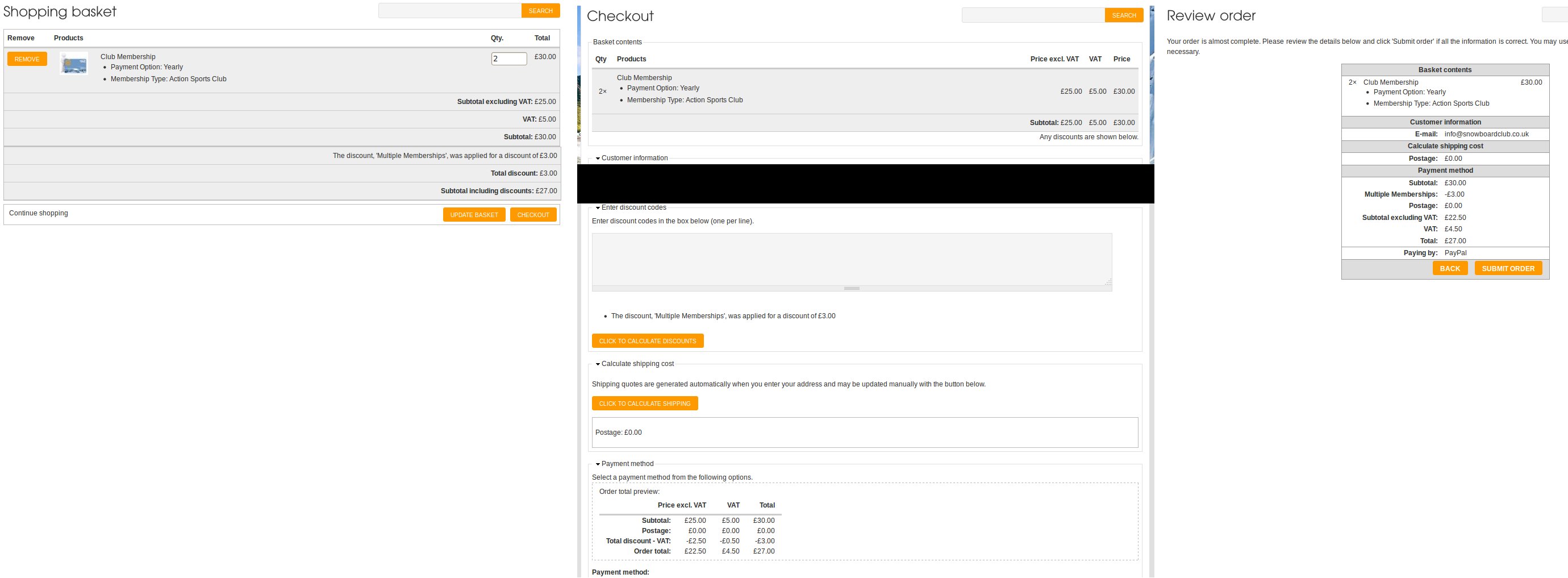
I used the solutions given in #30, #59, #80 and #81, plus additional tweaks of my own. I've attached the 4 files I'm using, plus a screenshot showing the Baskets, Checkout (top and bottom) and Review pages. I have uc_order v2.14, uc_discounts (alt) v2.4 and uc_vat v1.2 installed, but with some of the files being overwritten entirely from other contributions above, I'm not 100% sure what I've ended up with! Use at your own risk.
Under VAT settings /admin/store/settings/taxes the "Discount VAT" item is checked. Yours may not be called that until you've placed the new file versions.
I've used hook_form_alter to add the "Any discounts are shown below." to the top Checkout panel, which is floated right using CSS.
Drupal 6 seems seems to be too near end of life to spend the effort of turning these 4 file changes in to patches for 3 different modules controlled by 3 different authors and have any hope they'd be released synchronously in any useful fashion. Hopefully this solution is useful for somebody who isn't yet moving to Drupal 7.
Comment #97
dunx commentedTweak for VAT rounding.
In uc_discounts.module remove the code to round the discounts:
In uc_vat.module add code to round VAT down:
This is fine for UK HMRC rules (round 0.5p or more up to 1p, else round down) as we are rounding the VAT discount for display purposes. The total amount of VAT on the order total is still calculated and displayed correctly.