Hey
i've noticed a big problem, but im not sure that it's due to Ubercart (6.x-2.x-dev) or UC VAT support (6.x-1.2).
The problem is as follows:
while in checkout, when viewing cart contents, we get a list of items.
Ubercart outputs the totals for each product and then the subtotal, with taxes included.
given the right options in UC VAT support, it will also show the subtotal without VAT, and the amount of VAT.
so far, so good, as given with this example - cart contents:
2× teste1 14,76€
1× teste2 11,07€
Subtotal excluding VAT: 21,00€
IVA / VAT 23%: 4,83€
Subtotal: 25,83€
VAT is 23% (price x 1,23)
teste1 is 6€ without VAT, so 6x2= 12x1.23 = 14,76€
teste2 is 9€ without VAT, and 9x1.23 = 11,07€
14,76 + 11,07 = 25,83€ (as shown in the Subtotal (with VAT))
and 25,83 - 21,00 = 4,83€ (as shown in IVA / VAT 23%)
so as said before, all okay here.
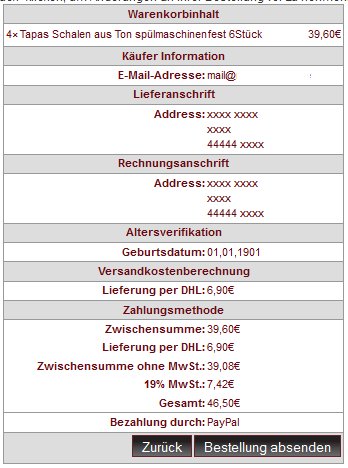
the problem occurs later, at payment method - WITH or WITHOUT calculating shipping.
without calculating shipping:
Subtotal: 25,83€
Subtotal excluding VAT: 21,00€
IVA / VAT 23%: 5,94€
Order total: 25,83€
25,83 - 21,00 = 4,83€
4,83€ <> 5,94€...
after calculating shipping:
Subtotal: 25,83€
Iberia <2Kg: 7,00€
Subtotal excluding VAT: 28,00€
IVA / VAT 23%: 5,94€
Order total: 32,83€
32,83 - 28,00 = 4,83€
4,83€ <> 5,94€...
after calculating shipping with tax applied to shipping too:
Subtotal: 25,83€
Iberia <2Kg: 8,61€
Subtotal excluding VAT: 28,00€
IVA / VAT 23%: 7,55€
Order total: 34,44€
7,00 (shipping) x 1,23 = 8,61 - 7,00 = 1,61€
1,61 + 4,83 = 6,44€
34,44 - 28,00 = 6,44€
6,44€ <> 7,55€...
questions:
1) where the heck does this 5,94€ and 7,55€ in the VAT come from?
2) is it a bug in Ubercart or UC VAT support?
answers:
1) basicaly, the Tax/VAT shown in payment method is equal to the amount calculated before in the cart contents x the tax percentage again. this means, for example, 4,83€ x 1,23 = 5,94€
2) i don't know. maybe you guys know?
this needs a serious fix.
to get around this temporarily i'm hiding the VAT in payment method through CSS (display: none;)...






Comments
Comment #1
longwaveI think this might be due to a recent(ish) change in Ubercart 6.x-2.x-dev
Can you try with 6.x-2.4 instead, or revert the patch from #898776-9: Tax calculation doesn't use altered prices and see if that helps?
Comment #2
lpalgarvio commentedwill try asap
Comment #3
Anonymous (not verified) commentedHi Longwave,
I can confirm that in Ubercart 6.x-2.4 the calculation works but with the latest 6.x-2.x-dev (2011-Jun-23) it does not.
However, if I check to display VAT in the carts table, the VAT calculation is fine in there. Just the line items are not correct.
Comment #4
mitrpaka commentedSubscribe
Problem exist also in 6.x-2.6 now as patch #898776-9: Tax calculation doesn't use altered prices is part of the released version.
Comment #5
mitrpaka commentedDid look into this more thoroughly and it seems that root cause for this is as follows:
- as patch #898776-9: Tax calculation doesn't use altered prices was applied to Ubercart 6.x-2.6 each product line item price is calculated using uc_price() - instead of $item->price x $item->qty
- uc_vat module has uc_price() alter to calculate prices inclusive of VAT
- as a summary of this, while tax/vat amount is being calculated, taxable amount is inclusive of tax/vat (on previous versions it was exclusive of VAT) and thus, tax line item is incorrectly calculated (causing both subtotal excluding VAT and tax amount shown incorrectly at checkout)
@longwave already predicted this while patch was applied (see reply #13 in #898776-9: Tax calculation doesn't use altered prices)
Please find patches both for uc_taxes.module and uc_vat.module to fix tax line item calculations
Comment #6
Anonymous (not verified) commentedThanks for the patches.
When applying should we reverse previous patch?
>Reversed (or previously applied) patch detected! Assume -R? [n]
>Apply anyway? [n]
Comment #7
mitrpaka commentedOops ... I must have mess up something while doing patches. Re-applied below.
Comment #8
mitrpaka commentedAargh! Still not correct - not my day. Patches re-applied once again. Sorry about all trouble here.
Comment #9
Anonymous (not verified) commentedThanks again.
It works great for me.
It is indeed big problem for ubercart users with vat support.
IMHO the new release of uc_vat and ubercart should be released as soon as posible.
Comment #10
ggalante commentedI don't think the above patches are enough. It's treating a symptom of the problem, and not the root of the problem. The root of the problem seems to be that tax rules are being applied by the uc_vat alterer on cart_item and product types. This doesn't look like it ever worked. The other inherit danger is in assuming the store's default country can be used when no order information is given. The combined creates a scenario where default options apply tax laws to items that shouldn't be taxed, in this case the tax line itself.
The below patch should temporarily fix the issue, but we'd probably need a post from longwave to know if any of this is correct.
I concur w/ dP that this is potentially a critical bug. In our case it caused products to not be shipped.
-G
Comment #11
Anonymous (not verified) commentedI have tested the patch ggalante supplied.
(Thanks for your work)
My review order site displays correct vat.
But I don't see vat line on /cart site
having following options checked.
Cart and checkout options
x Show VAT amounts in the cart and at checkout.
x Show VAT amounts in separate columns at checkout.
PS. I have applied this patch on clean ubercart 2.6 and clean uc_vat 6.x-1.2.
Comment #12
Anonymous (not verified) commentedI am not sure if the second patch should be applied after mitrpaka patches or they should be reverted.
Comment #13
ggalante commentedI reverted mitrpaka's patches before applying my own.
Currently we are using my patch on our site, with no adverse side effects. But we don't have very much complexity in our cart, so I can't be certain of the effectiveness of my patch without more thorough testing.
I'm swamped for the next 3 weeks, so if anyone else could do a deeper test, by all means. I would be extremely grateful. Normally I'm more thorough, but sometimes life hands you way too many lemons. :)
Comment #14
ollioi commentedI applied mitrpakas patches and it works better now, but still not correct.
Now the problem changed from too much to too less ...
I guess now the problem has to do with the shipping cost. As in the our shop we got three different kinds of VAT (0%, 7% and 19%) The tax on the shipping cost depends on the highest rate used in the order. As the total shipping cost should be always the same (in my case 5,50 €), I got to make three kinds of shipping costs and define some rules, when which kind has to be applied. So if there are only items with 0% VAT, there should be also no VAT on the shipping costs: 5,50 €, If the highest tax rate is 7 %, Shipping should be 5,14 € + 7 % = 5,50 €, if the highest rate is 19 % then this should be applied on the shipping costs: 4,62 € + 19 % = 5,50 €
Now the VAT should be calculated with the amount of all items belonging to one group of VAT and the highest should also include 5,50€ for shipping. But the case is, that only 5,14 € respectively 4,62 € are taking into account. So the VAT shown is too less.
Can somebody give me a hint, where I could try to make same changes to fix this?
Thank you!
Comment #15
wjroes commentedHi ggalante,
Your patch also removes tax on line items while they're still in the cart. In our case we show inclusive pricing in the cart and they are incorrect after your patch.
Willem
Comment #16
Taart commentedIs this maybe the problem I also have @ http://drupal.org/node/1278878 ?
And I can't apply patches as far as I know at my webhost, can someone give me access to the adjusted files? Thanks.
Comment #17
ggalante commented@wjroes: As I said, my solution while closer to the problem, isn't a full solution. I apologize, but this problem seems to require a very deep understanding of both uc_vat and ubercart. I don't have time to catch myself up. What we really need is either a.) longwave to finally come back from wherever he is hiding, or b.) someone take his place, catch up on what needs doing, and apply a change in an official capacity.
@Taart: Why can't you simply apply the patch files to your local copy, and then push up the changed files to your host? It's no different from making changes to any other files on your site.
-G
Comment #18
xibun commented+1
Comment #19
Taart commented@ggalante
I don't know much about patching, but I'm on Windows, no Git installed. I manually altered the files, but then my incl. VAT prices show up without VAT in the shopping cart, doesn't look right to me.
Comment #20
demma10 commentedSubscribing.
Comment #21
megachrizInspired by ggalante's patch in #10, I also made an attempt to fix this. As mitrpaka said in #5, the problem that occurs is that the tax calculation is based on the tax inclusive price. Taxes should always be based on the tax exclusive price of course.
1. The problem starts in uc_vat_apply_tax() where uc_vat asks the uc_taxes module for the taxable amount for each product: uc_vat calls uc_taxes_apply_item_tax().
2. The uc_taxes module calls the function uc_price() to get the taxable amount, but says it want's the taxable amount to be based on the altered price.
3. The function uc_price() thinks: so it wants the amount based on the altered price? No problem, then I will just ask all price alters to give me that.
4. Then the uc_vat module receives a request to return the altered price, function uc_vat_price_handler_alter() gets called. For product prices it returns the tax inclusive price.
Result: the taxable mount is the product price inclusive taxes.
So, I assumed all we need to do is notify the uc_vat-module it should not do any price alters under certain circumstances. The patch of ggalante generaly says "do not do the uc_vat price alter when the context is 'cart_item' or 'product'". But that will result in tax inclusive prices to disappear in the cart and on product pages, which is not a desired behaviour, at least not for me.
I noticed price alter functions receive an array of options as a parameter. What if we could set an option there that tells the uc_vat-module to not do any price alters? When calling uc_taxes_apply_item_tax(), we are not able to add an option, thus if we would set an option then calling uc_taxes_apply_item_tax() will be a no-go.
So, in my attempt to fix this issue I copied over uc_taxes_apply_item_tax() to the uc_vat module and called it uc_vat_uc_taxes_apply_item_tax(). Then I was able to set an option before the price request is sent to uc_price(). And so I did. I defined an option called 'uc_vat' and set this to FALSE to indicate price alters done by uc_vat should be bypassed. In the price alter function of uc_vat (uc_vat_price_handler_alter()), I added a check for this option, and if it was set to FALSE, then the price alter function will cancel it's price alterations.
This was my setup when creating and testing the patch:
- Ubercart v6.x-2.6
- Ubercart 2 VAT support v6.x-1.2
- Ubercart Discount Coupons v6.x-1.7
- Two active tax rates
- No shipping rates
I didn't test the patch under other circumstances then those above, so I can't guarantee it will work perfectly under all kinds of conditions.
Comment #22
Taart commented@MegaChriZ, i tried this with and without a shipping rate and it doesn't work. I attached 2 screenshots. I use the same setup. In the shopping cart the VAT is ok, at the CMS it isn't.
Edit: Just to be sure, I also added a test order at /admin/store/orders/create, and it also has a VAT mismatch.
Comment #23
megachriz@Taart
Do you have the "Allow per line-item tax adjustments" setting enabled? This setting can be found on the settings page for uc_vat. See attachment for my settings.
Comment #24
Edward Andrews commentedNone of these solved this problem for me. I ended up reverting to ubercart 2.4 and uc_vat 1.2. Now it works again.
Comment #25
warbital commentedI can confirm that when reverting back to ubercart 2.4 the double VAT issue disappears.
Comment #26
WebsiteJo commentedIs there a possibility to go back to ubercart 2.4 and uc_vat 1.2, without losing all changes in my shop since the update was installed?
Now my online shop works with the patch: http://drupal.org/files/issues/tax_amount_fix_attempt-1170992-21.patch
Thank you to MegaChriz.
I think this solved my problem.
This was my setup when testing the patch:
- Ubercart v6.x-2.6
- Ubercart 2 VAT support v6.x-1.2
- many other modules
- two tax rates (7%; 19%)
- several shipping rates
- prices per role (incl. VAT, reseller: excl. VAT)
See the shop at: http://www.gourmetarium.com
Comment #27
Taart commented@MegaChriz, no, but now I did and it seems to work. Thanks!
Comment #28
velpan commentedI have I similar problem. Everything seems to be ok at cart/checkout page
but at cart/checkout/review the VAT calculation is wrong.
It seems that VAT calculation here is based on tax inclusive prices.
So I install the #21 patch (many thanks @MegaChriz). Nothing changed. The Vat calculation remains wrong.
Through a debug process I noticed that the uc_vat_apply_tax function never called,
and the uc_taxes_apply_tax function called instead. So I hacked the code of uc_taxes.module to call
the MegaChriz's function from there...
Now everything seems to work fine.
I'm waiting for a more efficient solution.
my setup when testing the patch:
- Ubercart v6.x-2.6
- Ubercart 2 VAT support v6.x-1.2
- uc_checkout_tweaks v6.x-1.1
- one tax rates (23%)
- prices per role (retail:incl. VAT, reseller: excl. VAT)
Comment #29
WebsiteJo commentedIn addition to my post above:
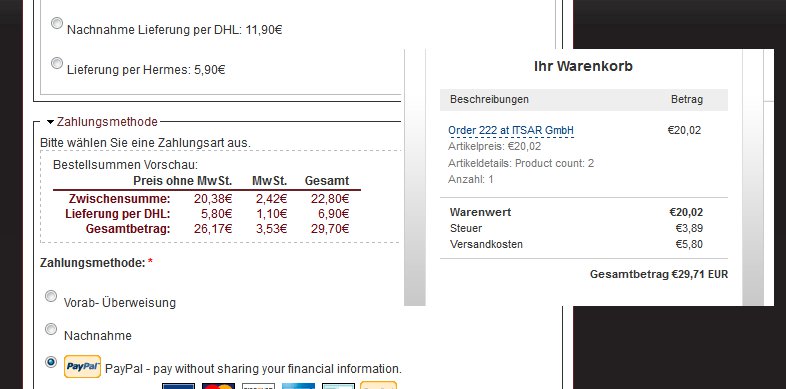
I noticed a further problem. On the payment, by Paypal the tax is still wrong and the total sum is one cent to high.
Why is there shown so much information on the paypal page? I think it should be enough to show the total sum, which the customer wants to pay. Is this possible?
Comment #30
mandreato commentedSubscribe
Comment #31
jan_ver commented@WebsiteJo
I had the same problem and I believe this is because of differences in de precicion of prices excluding VAT calculated in 'Ubercart 2 VAT support' and the prices sent to paypal.
Let's say you want your price including vat to be 10€ with a VAT rate of 21% then you would enter (10/121)*100 = 8.26446
8.26446 * 0.21= 1.7355366 VAT + 8.26446 = 9.9999966 => Rounded to a precision of 2 after the comma this will be 10€
But paypal only gets 8.27 which is the amount excluding VAT rounded to 2 after the comma.
8.27 * 0.21 = 1.74 VAT + 8.27 = 10.01€
What I do is I enter my prices excluding VAT with less precision so I have the same result in ubercart as in paypal.
You could also change the payment method setting in /admin/store/settings/payment/edit/methods and select "Submit the whole order as a single line item." for the "PayPal cart submission method"
www.AffordIT.be
Comment #32
WebsiteJo commented@ jan_ver
Take a look at the attached files above. I think, the main problem is not the difference of 1cent.
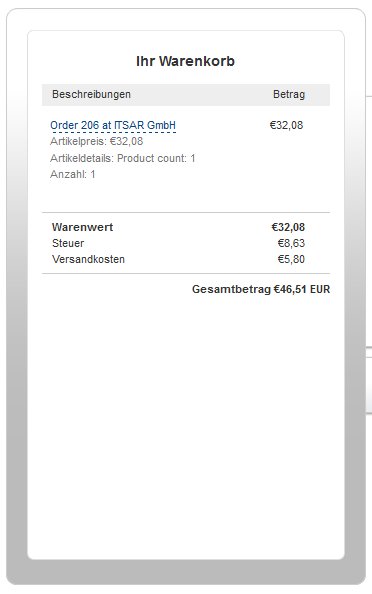
The two amounts (32,08 and 8,36) are totally wrong.
I used the setting "Submit the whole order as a single line item." and got these wrong values on the paypal site.
Comment #33
mkalkbrennerSee #1081130: VAT in invoice calculated on Total not subtotal (ubercart > 2.4)
Comment #34
WebsiteJo commented@mkalkbrenner
I tryed your patch at #1081130. It works fine for customers with roles, which show prices including vat.
On reseller roles (prices shown without vat) this patch doesn´t work at all. The total sum is to low.
I think in my case it is better to use the patch "http://drupal.org/files/issues/tax_amount_fix_attempt-1170992-21.patch" from MegaChriz.
See the attached file reseller.jpg. It works and on paypal page there are correct values.
Roles with shown prices including vat get wrong values on paypal page (see attached file: schowvat.jpg).
Has anyone a idea to solve this problem?
Why is the paypal page themed diffrent in the two cases (reseller values are shown on the top of the page and the other ones on the left side) ?
Comment #35
caw67 commentedi use ubercart verson 2.7 and vat 2.1
with ubercart 2.4 vat/tax works fine!
for ubercart 2.7:
patch http://drupal.org/node/1170992#comment-5062982 doesnt work because there is no function uc_vat_uc_taxes_apply_item_tax!!!!
but the patch at http://drupal.org/files/issues/uc_taxes.module_4.patch seems to work!!
Comment #36
WebsiteJo commented@ caw67
You use the patch at http://drupal.org/files/issues/uc_taxes.module_4.patch,
but which patch do you use for vat module?
Do you have a store on-line in which I can see this functionality?
I only patched vat module (http://drupal.org/node/1170992#comment-5123658) with this patch: http://drupal.org/files/issues/tax_amount_fix_attempt-1170992-21.patch
You can try out my german store at http://www.gourmetarium.com, it works, only the vat, shown on PayPal page is wrong.
Please don´t submit the order finally.
Comment #37
caw67 commentedI use no uc_vat patch.
example: http://www.muenzboxen-muenzkapseln.de/
but there is another problem with the shipping cost. ubercart or the vat module add the shipping cost (without tax) to price with tax an then calcualte the total tax. thats wrong!
Comment #38
WebsiteJo commented@ caw67
I tried to take a look at the shop (http://www.muenzboxen-muenzkapseln.de/), but I couldn´t go to the order review page.
Following message was received:
"Sie müssen die akzeptieren um mit der Bestellung fortfahren zu können!"
There was nothing to accept.
Comment #39
caw67 commented@WebsiteJo
now it works
Comment #40
cjwood555 commentedIs there an accepted solution to this yet? Lots of people above saying 'works for me' - 'not me'....
This is basically crippling the module for UK/EU users. It's of ZERO use.
Chris
Comment #41
wd4t commentedThis is what has worked for us.
We applied the patch #20. This resolved the issue that manifests itself on the checkout/review page. It doesn't resolve the issue associated with invoices and in our particular case, PayPal.
To resolve the incorrect amount of VAT being passed to PayPal we have applied part of the patch at #19 at http://drupal.org/node/1081130. We only applied the first element of the patch as the second is covered by the patch at #20.
These patches have been applied to uc_vat 6.12
We're using Ubercart 6.26
Hope this helps.
Comment #42
WebsiteJo commentedThis is my setup:
- Ubercart v6.x-2.7
-
Ubercart 2 VAT support v6.x-1.2see my attached version- many other modules
- two tax rates (7%; 19%)
- several shipping rates
- prices per role (incl. VAT, reseller: excl. VAT)
See the shop at: http://www.gourmetarium.com
Great! I think it works!
@ wd4t
This was also the solution for me.
@ caw67 #37
I can´t find your described problem.
Comment #43
mandreato commented@WebsiteJo I've tried your uc_vat.module but it has a strange behaviour which I'll explain with an example.
Cart is resuming correctly:
During cart/checkout, I add the shipping quote and all values are fine:
Those two splitted VAT lines are also present on order summary and invoice.
The algebraic sum is correct (2.18-0.24=1.94 out of one rounding cent), but the splitting is not.
Comment #44
WebsiteJo commented@ mandreato
Please, see the attached file. There is only one line with Vat (19%MwSt).
All my values (price/shipping cost) are stored without vat in the database.
I think we use different configurations. How can I help you to figure this out?
Which modules do you use? What are your settings?
Comment #45
mandreato commentedThis is my configuration (developement environment):
Ubercart 2 VAT support 6.x-1.2your uc_vat.moduleComment #46
WebsiteJo commented@ mandreato
This is different to your configuration:
Ubercart 6.x-2.7
I don´t use Ubercart Discount Coupons 6.x-1.7
admin/store/settings/taxes
Name1: 19% MwSt.
Rate1: 19%
Name2: 7% MwSt.
Rate2: 7%
Taxed product types:
Product ....
"Blank line" productTaxed line items:
Shipping
admin/store/settings/taxes/vat
Price display options
Tax name: MwSt.
Add "including IVA" to tax inclusive product prices: yes
Add "price excluding IVA" to tax inclusive product prices: no
Add "no IVA applicable" to zero-rated product prices: no
Add "excluding shipping costs" to shippable product prices and cart displays: yes
Show prices excluding IVA to the superuser: no
Price editing options
List price: no
Cost: no
Sell price: no
Default attribute prices: no
Cart and checkout options
Show IVA amounts in the cart and at checkout: yes
Show IVA amounts in separate columns at checkout: yes
Hide the "Subtotal" line item at checkout: no
Hide IVA exclusive prices and "Subtotal excluding IVA" line item: no
Advanced options
Keep IVA inclusive prices the same after a rate change: no
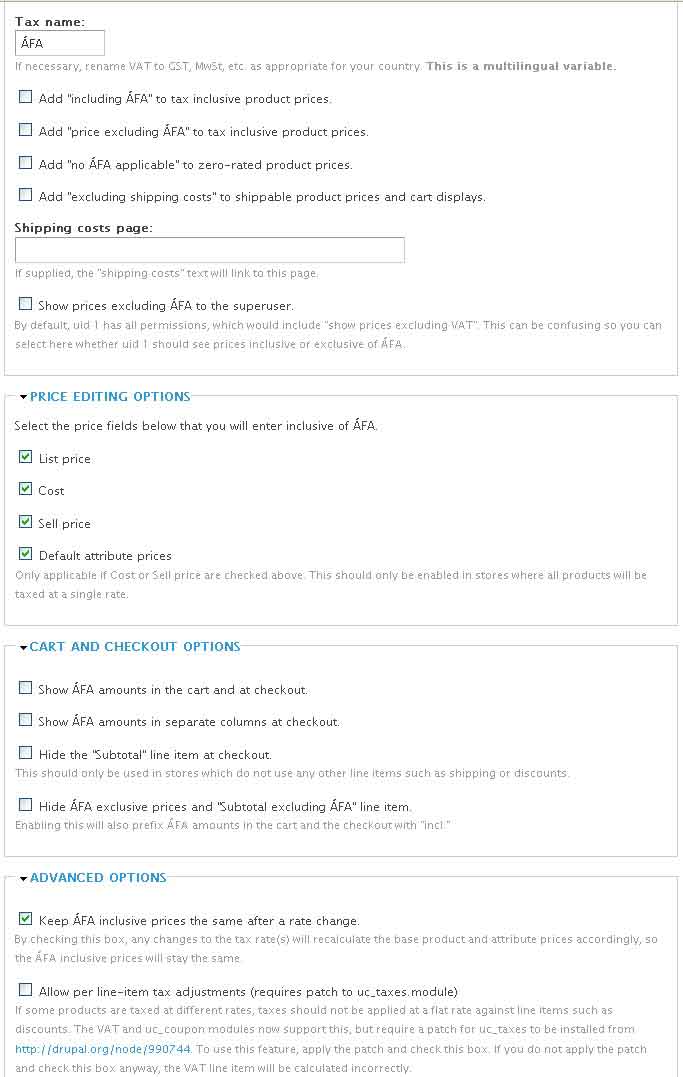
Allow per line-item tax adjustments(requires patch to uc_taxes.module): yes
I think you should check this first!
MwSt. on shipping:
Use shipping line item settings from the tax rate configuration pages: yes
Apply MwSt. at the highest rate used on items in the order: no
Apply MwSt. proportional to rates used on items in the order no
Comment #47
mandreato commentedThat did the trick ! Now the behaviour of vat is correct in every step.
Thank you very much WebsiteJo.
I think that patch #42 should be commited, so changed the state of the issue in the hope of maintainer's help.
Comment #48
essbee commentedpatch #42 also works for me, my case includes discount coupons and shipping rates.
Everything fully functional now.
Comment #49
dorian_ commented#42 also worked for me!
Will it be included in uc_vat 6.x-1.3 ?
Comment #50
grabby commented#42 = the bees knees! Thanks to all of the above for helping to sort this out.
Comment #51
grabby commentedMmm … maybe I spoke too soon. On the order review page I’m getting a line with the VAT that would be applied to the already VAT inclusive price, preceded (or followed) by a line with an adjustment (a negative number) to the VAT bringing it to the correct amount. For example, for a purchase of 800 HUF with a VAT rate of 25% and 0 for shipping it looks like this:
Subtotal 1,000 HUF
Shipping 0
Subtotal excluding VAT 800 HUF
VAT - 50 HUF
VAT 250 HUF
Total 1,000 HUF
I’m configured with the following
Ubercart 6.x-2.7
Ubercart 2 VAT support 6.x-1.2 with mod from #42 above
Ubercart Discount Coupons 6.x-1.7
Ubercart Addresses 6.x-1.0
Ubercart Views 6.x-3.1
Ubercart Webform Checkout Pane 6.x-3.5
I’m attaching my VAT (ÁFA) settings.
The weird thing is sometimes the negative VAT line shows up first, other times the overinflated one. I don’t have the cart showing VAT, and the payment page is fine thanks to #42. Can anyone please help?
Comment #52
megachriz@Grabby
See my post in #23: enable the "Allow per line-item tax adjustments" setting. The patch which is referred in the description of this setting has already been applied to Ubercart. See also #990744: uc_taxes does not respect hook_line_item_data_alter().
Comment #53
grabby commentedThanks @MegaChriz! So, about those bee knees …
Comment #54
promesThanks @MegaChriz! Your solution #42 works for me.
Comment #55
dotidentity commentedIt works, but now I have two lines
One line with the old VAT and one negative VAT.
Can we change this?
Comment #56
dotidentity commentedSettings of #42 and #46 did the trick for me. Thanks
Comment #57
bartezz commentedHad troubles with incorrect taxes as well.
ubercart - 6.x-2.7
uc_vat - 6.x-1.2
Prices are entered without tax so on page admin/store/settings/taxes/vat the only things checked are 'Allow per line-item tax adjustments' and 'Use shipping line item settings from the tax rate config'
Example 1
Added 1 item to basket (at sell price 19.90 ex VAT), shipping flat rate is 6.75 ex VAT...
cart/checkout:
Example2
Added 1 item to basket (at sell price 19.90 ex VAT), shipping flat rate is 6.75 ex VAT...
cart/checkout:
So the calculations in example 2 are correct when using the unpatched modules but using setting 'Show VAT amounts in separate columns'.
My client didn't want this setting. So I've used the patched file from #42 and everything is all good even without 'Show VAT amounts in separate columns '
So please commit #42 ASAP! And make this a critical update as this can cause big problems with the tax man!!!!
Cheers
Comment #58
ju.ri commentedO my god, this is terrible!! I didn't notice this when upgrading. The "patch" in #42 seems to solve the problem for new orders, but not for existing invoices...
Seems that now my invoices and tax reports are a HUGE mess. Stupid me, not enough testing. I guess we have to manually correct all orders, resend invoices and write sorry-emails to ALL customers. This means days of work.
PLEASE put a large warning on the project page as long as this is not in the stable release.
Comment #59
mkalkbrennerIn our case patch #19 at #1081130: VAT in invoice calculated on Total not subtotal (ubercart > 2.4) solved the issue for new and existing orders. But it's known not to work with all payment methods.
Comment #60
fonant commentedI'm not going mad!
I too get correct numbers if I check "Show VAT amounts in separate columns at checkout", but completely wrong ones if I don't check this. The wrong numbers appear in "Order total preview:" for "Subtotal excluding VAT:" and "VAT:" lines.
I can confirm that patched file from #42 fixes the problem for me (ubercart 6.x-2.7, uc_vat 6.x-1.2).
UPDATE: nearly, anyway. It looks fine on the Checkout page, but the Order Preview page has two VAT lines, one negative :( But at least the numbers add up properly!
UPDATE: The patch at #19 in #1081130-19: VAT in invoice calculated on Total not subtotal (ubercart > 2.4) seems to have the same effect
UPDATE: My patch at #35 in #1081130-35: VAT in invoice calculated on Total not subtotal (ubercart > 2.4) fixes the problem without adding another line item. Should work for all payment systems, too.
Comment #61
Arie van Dijk commentedThanks Fonant,
The combination of those 2 patches solved the problem for me (ubercart 6.x-2.7, uc_vat 6.x-1.2).
All vat numbers are correctly calculated. Finally.....
Great!
Comment #62
yannickooYou should give your patches a better name next time. See Submitting patches.
Thanks
Yannick
Comment #63
remco75 commented#42 works for me!
Some comments: please provide this as a patch in the future instead of a txt file.
@the maintainers of the uc_vat module: please reveiw your module and commit a fix, this way the module is useless for it's purpose.
Or at least mention the problems at the project page. It seems like many people have been searching for days, this won't help the popularity of ubercart / drupal to say the least.
Nice work everybody who has been working on this!
Comment #64
muschpusch commentedCould this please be commited. I just spend three hours on debugging this...
Comment #65
alexanderpas commentedRolled as an actual patch so it can easily be committed.
Comment #66
aoturoa commentedApplied the patch to version 6.x-1.2.
Using Ubercart 6.x-2.9 I get a double VAT line on the review page and invoice.
Checkout page goes well, but review and invoice displays are incorrect:
Help and corrected patch would be very appreciated.Enable the option: "Allow per line-item tax adjustments(requires patch to uc_taxes.module): yes" as instructed bij #42 fixes the problem.
You won't have to apply the uc_taxes.module patch as said by the fields' instruction because patch is already applied in Ubercart 6.x-2.9!
Excuses for re-opening the issue.
Comment #67
woll-flea commentedHi, would someone be able to submit a ready patched uc_vat module? Many thanks!
Comment #68
Strompf commentedJust FYI: Patch #65 didn't work for me.
First a WSOD, and by a second try, the admin page didn't load anymore. When I removed the patched file uc_vat.module, the site worked again as before - http://www.slijpmachines-online.nl
Configuration:
* Ubercart 6.x-2.10
* uc_vat 1.2
Good news: #61 worked just fine for me.
Thanks!
Jeroen
Comment #69
jvieille commented#65 works for me
Comment #70
berenddeboer commentedFor all those going nuts: patch #65 is the correct one.
BUT YOU ALSO NEED A SETTING: go to admin/store/settings/taxes/vat and make sure you have:
Allow per line-item tax adjustments(requires patch to uc_taxes.module): yes
(else you get 2 vat lines, one negative).
After doing that, you need to cart/checkout, reload and then continue to see the right tax updates everywhere. Reloading cart/checkout/review after patching and doing the setting won't work.
One thing that can be improved with #65 is a check the proper setting is set, or given that we absolutely need this setting, I've created another patch that ignores this setting, it simply assumes it is always set, as it must always be set else VAT isn't calculated correctly anyway.
Comment #71
berenddeboer commentedSetting to critical, uc_vat module is completely broken without this.
Comment #72
alan d. commentedThis module still has 2000 users, so I wonder if this is globally broken and no one has noticed, or if it only effects some users... we were only notified after the accountant doing the end of year accounting noticed that the tax on postage was being added twice.
Anyways, thanks to everyone that worked on this. Happy with my preliminary testing, but it will take hours to completely test this site (role discounts, multiple shipping modules, ...) but will give feedback after the store owner has blessed this too.
Side note, system weight of uc_taxes has been changed from 0 to 10, hoping that this doesn't also come into play too. Currently testing using the uc_taxes update 6003 that increased this weight setting.
Comment #73
longwaveI have committed some of the fixes in this issue to uc_vat, can someone test the -dev version from git (or the .tar.gz when it updates) and confirm that the double tax issue is solved?
Comment #74
alan d. commentedPatch in #10 appears to have worked for me, but not sure about dev. The clients have found even more obscure bugs when testing, but at least the prices are fine :)
Comment #76
warbital commentedPatch in #10 works for me.
Comment #77
lpalgarvio commentedcan you give commit credit to the people who helped build the patch please?
Comment #78
alan d. commentedThis is too late now.
I guess that you mean adding this to the commit (assuming that this was the code added)
--author="berend "
and turning the commit message to
-m "Issue #1170992 by ggalante, berend, et al: Preventing double VAT calculation."
Comment #79
lpalgarvio commentedactually, it is possible to change past commits.
http://makandracards.com/makandra/868-change-commit-messages-of-past-git...
https://stackoverflow.com/questions/1186535/how-to-modify-a-specified-co...
https://stackoverflow.com/questions/3042437/change-commit-author-at-one-...
https://stackoverflow.com/questions/750172/change-the-author-of-a-commit...
http://git-scm.com/book/en/Git-Tools-Rewriting-History
the first url illustrates how to quickly.
tells us that the last commit was this commit in question. so it's even easier.
to fix this last commit:
or in case we wanted to go to an older commit:
btw, git is telling me the commit message is "Fix double taxation issue at checkout."
please see it through, thanks
Comment #80
alan d. commentedSerious? Wouldn't it be better for the maintainer to spend their time fixing bugs / issues! ;)
Comment #81
lpalgarvio commentedIt is of great importance to have authors credited. That's a way of getting people interested in continuing your work, using it, promoting it and improving it. It's part of the Drupal community and FOSS spirit - giving credit to others.
By not giving credit you are promoting people not to contribute to your work.
Comment #82
longwavegit push --forceis disabled on the Drupal.org git server; it is not possible to rewrite history.I apologise for not giving commit credit at the time,on more recent commits in other projects I now always try to give credit where it is due.
Comment #83
lpalgarvio commentedThank you.
Cheers!