First of all thanks for a great module and your work. Appreciated.
My case:
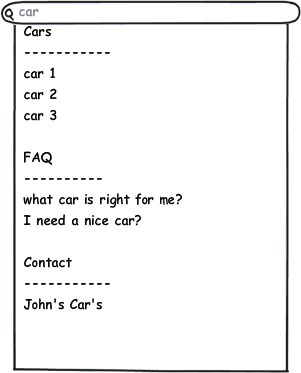
I am using a "views finder" with which I want to show categorized results when autocomplete is doing it's work. The results are categorized already by "content-type". What I would like to do is show the name of the "content-type" as a header above the content types result. So like (cars, faq, contact) as shown in the attachment.
My question
- what's the best practice to implement this feauture? what's the best place to implement this?
Thanks for your support in advance
Undersound


Comments
Comment #1
danielb commentedI'm not really sure what the best way to do that is. The array of autocomplete data is composed in the function finder_autocomplete_autocomplete() but you wouldn't want to really be inserting a new 'suggestion' as the heading. It's more like you'd want to prefix the first option in the group with a heading, and then use css trickery to make it look right. You could try adding that by overriding theme_finder_autocomplete_suggestion().
You could use a static variable to track what the current content type is, and when the function is called you check the option against the content type, if it's a new content type then add the heading.
Comment #2
danielb commentedCan't really give much more advice that that, I haven't done this myself, so you're the guinea pig for this idea.
Comment #3
undersound3 commentedThanks for your reply.
This information is very helpful and I will give it a go this week.
I will post back any progress here.
Comment #4
undersound3 commentedI have my theme_finder_autocomplete_suggestion() setup in template.php but am not sure how to properly debug this $option variable. Normaly I would use print_r ($option) but that's not working in this case.
Thanks for any advice
Comment #5
danielb commentedUse the devel module's dsm() function. The debug output will appear on the next page load.
Comment #7
undersound3 commentedComment #8
undersound3 commentedThanks debugging with dsm() function works and the output I receive on the next page load show's what I want to accomplish. That is:
Cars
car1
car2
car3
FAQ
faq1
faq2
Thing is that it's not showing up that way while doing a "live" search. As you can see it's missing the second content type "FAQ".
Cars
car1
car2
car3
faq1
faq2
My function at the moment:
What is it I'm doing wrong in this function?
Thanks in advance
Comment #9
danielb commentedI would start with something more like this
I'm just going based off your code, and haven't checked the API or tested this or anything.
I don't know why your code didn't show the FAQ title though.
Comment #10
Anonymous (not verified) commentedYour base code worked pretty after a little bit of tweaking, however if we are displaying multiple content types as listed above, is there any way to weight/order them using this system?
Comment #11
danielb commentedNo, you have to set the ordering in Views, assuming it's a Views Finder. Can't really do it in a Node/User finder unless you hook in and hack the SQL or the results arrays.
Comment #12
danielb commentedI will be in a better position to make these features available if we stop using drupal core's autocomplete.
#1151136: Finder Autocomplete Revolution