

 Come together with the global Drupal community in Rotterdam, 28 Sept – 1 Oct 2026. Sessions, contribution, connection, and Early Bird savings until 8 June.
when i'm trying to create a new panels, in content : i'm trying to configure new New custon content and i'm not able to use the editors functions ; when i try the text area zone desapear ...
| Comment | File | Size | Author |
|---|---|---|---|
| #23 | modal.png | 25.78 KB | merlinofchaos |
| #22 | panels-custom-content-ui-enhancements.png | 107.72 KB | asb |


Comments
Comment #1
highfellow commentedI have this problem (or similar). When I do 'create new custom content', I just get an empty overlay window.
Comment #2
Anonymous (not verified) commentedSame problem here!
Comment #3
Anonymous (not verified) commentedHeh.
Make sure you enable the content pane module that comes with CTools! It's always the simple stuff huh?
Comment #4
merlinofchaos commentedThough I thought I fixed the bug that caused that ages ago, so the -dev version shouldn't have that issue.
Comment #5
gphilippe commentedit's seems working, we have right now a frame to edit the texts but we don't have, like before, the rich functions of the editors..we can put FULL EDITOR, FILTERED EDITOR, PLAINT TEXT or PHP CODE, it's the same thing no buttons for rich editors
Comment #6
Anonymous (not verified) commented@gphilippe
Do you have CKEditor or something comparable installed? That will result in some issues.
Comment #7
gphilippe commentedyes i have; it's not the problem; these editors are working well in all others places, articles, blog etc ... but not in this case; it's specific to this function of panels
Comment #8
Anonymous (not verified) commentedRight and it always has caused issues. To be honest though, if you're trying to use CKEditor to edit content in Panels, you're going about it the wrong way. Disable CKEditor on all Panels/CTools related content and use layout plugins to your advantage. You shouldn't need a rich text editor at all.
Comment #9
gphilippe commentedi can use the edit content panel ( after the last patch) with the ckeditor (or other rich editor) activated but i can't use rich editor with panels. ( no buttons)
I need rich editor with articles and i can't unactivate these .
Do you mean that it's impossible to have rich editor with panels by design ?
In this case why the program suggest we have the choice between FULL HTML, FILTERED HTML and so on ?
Comment #10
Anonymous (not verified) commentedThe choice of input type doesn't really have that much to do with it. Using Panels plugins, you can set up rigid templates with proper CSS classes assigned to them. If CKEditor is anything like it was in D6, you should be able to activate it only on certain fields. Not to come off as rude, but it seems you need to spend a little bit of time reading the Panels/CTools docs and understand how they really work! For a current project I am working on, I'm skipping the concept of nodes almost all together because CTools provides SO much power.
Comment #11
merlinofchaos commentedIt's not by design, at least not by Panels design.
IT's that wysiwyg is VERY complicated javascript, and running javascript in a modal (or any AJAX-only environment) is NOT what the wysiwygs usually expect. Making that work has been tricky at best, and impossible at worst.
Comment #12
gphilippe commentedok right now it's clear
Thanks @merlinofchaos for your work.
Comment #13
bryancasler commentedRelevant? #356480: Lazy-load editors
Comment #14
zilverdistel commentedsubscribing
Comment #15
zilverdistel commentedsubscribing
Comment #16
damienmckennaClosed two other issues as duplicates: #1097728: Edit Custom Content WYSIWYG, #1231056: How to use wysiwyg when I add "new custom content" (panels)
Comment #17
damienmckennaUpdated the title to be more accurate.
Comment #18
merlinofchaos commentedThis would be a CTools issue, not Panels.
Last I understood, Wysiwyg still had some issues. So far as I know, it *should* work normally in D7 using the ajax framework but I don't really understand wysiwyg very well.
Comment #19
damienmckennaBouncing it over to CTools.
@merlinofchaos: I can't get it to work in CTools from 2011-09-17 :( Will try updating CTools, Panels and WYSIWYG.
Comment #20
pbfleetwood commentedComment #21
zilverdistel commented@pbfleetwood: you don't need to do "+1" any more, please use the "follow" button on top-right of an issue. Thank you.
Comment #22
asb commentedTo avoid another issue related to custom content to be cloased as duplicate, I'm adding my request here; I'm suggesting three "simple" and "small" UI enhancements:
Attaching screenshot with markers what exactly I'm refering to.
Thank you for considering these feature requests!
Comment #23
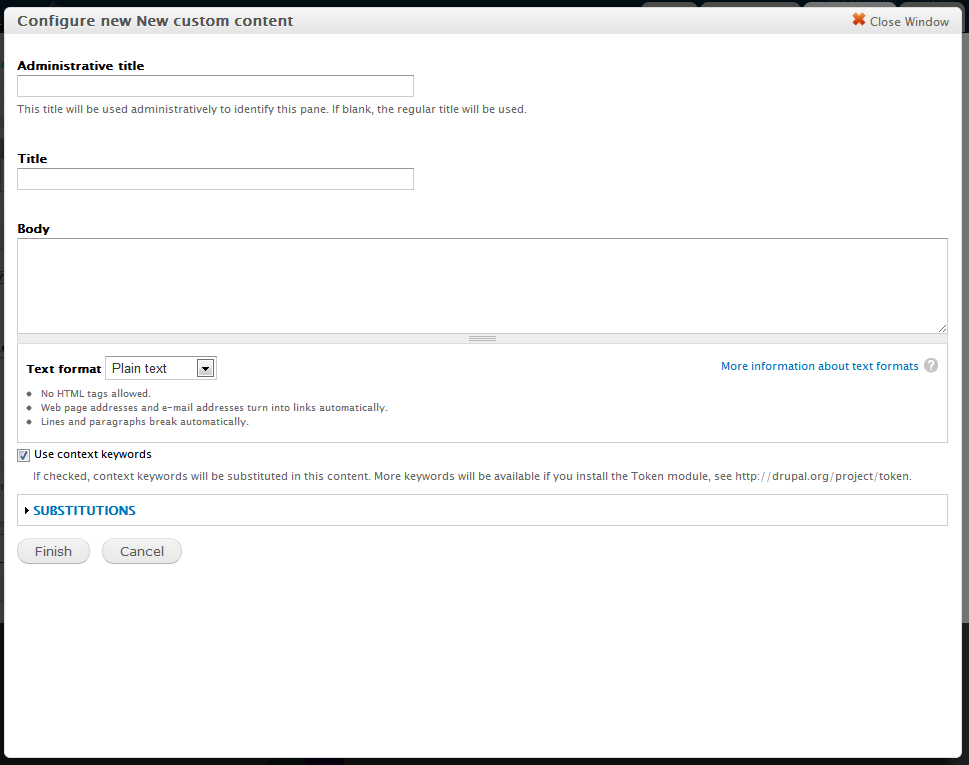
merlinofchaos commented1) The textfield is resizable.
2) That box should be openable.
3) The modal itself is not resizable but under normal conditions it responds to the size of the window. If the browser is resized the modal will resize with it.
The fact that neither of these things are happening for you indicates a javascript crash of some flavor. You'll need to delve into your javascript console logs for more information about what's crashing. Attached is what the modal looks like for me.
AS for wysiwyg itself: I've done everything I can think of to make it possible to work. I don't have the bandwidth to go debug other modules, unfortunately.
Comment #24
merlinofchaos commentedAnd I'm sorry that the CTools modal is not movable, but it's a very very simple modal and adding that kind of code to it just isn't in the list of features I feel are are good uses of my time.
Comment #25
asb commentedThanks for the clarification! Once again I'm totally baffled as I have never seen a dialogue like this on the ~40 own and foreign panels sites I've worked on in the past months. So the feature requests 1 and 2 are irrelevant and a simple "won't fix" for me. The last and least no. 3, well, I still would love to see some creative exchange between you and Markus. However, that's really not my call to make, and bright minds might blind each other.
That leaves the WYSIWYG issue which is not my thing at all, so apologies for hijacking this issue with the other stuff. Modifying the issue's title for the remaining one feature request and hitting the "Unfollow" button. Cheers!
Comment #26
summit commentedMay be this issue can help? http://drupal.org/node/356480
Edit: I see there was already a link to this issue, sorry.
greetings, Martijn
Comment #27
pbfleetwood commented@asb changed this to feature request for his own purposes (see #22); I'm changing it back to the previous state, so it won't be ignored.
Comment #28
adamdicarlo commented@mpoplin (#8, #10), what do you mean by "using layout plugins to your advantage"? I'm really curious. Were you just thinking people are using WYSIWYGs to insert tables to lay out content in a pane?
I can't find any relevant Panels or CTools docs that you mention in #10. I'd LOVE to read them because I think I'm still missing something important with how to use Panels and CTools.
Thanks!
Comment #29
pcdesign commentedsubscribing
Comment #30
louisbabumba commentedThis issues seems to be persisting even with drupal 7.38, CKEditor 7.x-1.16, and Panels 7.x-3.5, all up to date modules apart from drupal 7.38. On researching about this, i found a link somewhere on the drupal forum that mentioned this could be an issue with higher version of jquery Update that is beyond version 1.9 for me. I set this to version 1.5 but still yielded no results. And only succeeded to revive ckeditor for the other custom content on the site apart from panels.
Is there any update on the probable solution to this issue?
Comment #31
louisbabumba commentedHello guys, an update on my findings on this issue. With the details provided above,
I was unable to create custom content with the help of a rich text editor in panels. I opted for WYSIWYG module which is to me a much better alternative to the native CKEditor module. Wysiwyg as we all know requires you to have a text editor library added to sites/all/libraries, which I already had from my CKEditor library. More on how to install and configure this can be found on https://www.drupal.org/node/371459 .
However, during my installation and configuration I met some challenges with library version detection by WYSIWYG that were addressed by reading the wysiwyg FAQ from https://www.drupal.org/node/417166#version-detection
This solved my problem, I can use the CKEditor through its library called by WYSIWYG. I hope this helps you too.
Chao