

Closed (fixed)
Project:
Content Construction Kit (CCK)
Version:
5.x-1.3
Component:
fieldgroup.module
Priority:
Normal
Category:
Bug report
Assigned:
Unassigned
Reporter:
Created:
10 Jan 2007 at 08:11 UTC
Updated:
26 Mar 2007 at 19:30 UTC
Jump to comment: Most recent file


Comments
Comment #1
yched commentedThis Fields overview you're referring to is the "general" overview, allowing you to see what fields belong to which content-types
To access fields settings hou have to "enter" the content type you're interested in :
Go to Admin > content management > content types,
click on the content type name,
go to the "manage fields" tab
Then you have a "configure" link for each field.
I agree it's not perfectly intuitive, but we have to deal with the fact that content types are now managed by core in drupal 5, so there is a large part of the API that we don't manage and can't alter :-)
Comment #2
hectorplus commentedI have gone there, i did it again, and again, i CAN'T see a link under operations, nothing here! I know the configure link suppose to be a here.
I have the groupfield.module installed, i can mange the groups, there's a configure button for my group fields, but not for individual fields! There's an update button, i keep clicking on it, hoping it mite somehow do me a miracle!
Any other ideas?
Comment #3
Permanently Undecided commentedYou mean, the configure link you can see in the attached screenshot doesn't show up for you? What theme and browser are you using? Perhaps it's just a theme or browser issue? With garland theme in Firefox it works.
Comment #4
karens commentedThe path Admin > content management > content types > fields takes you to a fields screen that shows all enabled fields with the content types that use them on the side. Each of those content types names is a link to the Manage Fields screen.
That is different than the path yched gave you, which is Admin > content management > content types > [type name] which is a different way to get there.
I'm changing this to a task to reconsider that tab. The 'Fields' tab is a carryover from the 4.7 version, but I wonder if there's any reason for it in 5.x. It's going to create confusion like this if we leave it in, so I'm kind of inclined to get rid of it. I'm really not even sure it was particularly helpful in the 4.7 version, since you can't do anything from that screen in 4.7 (I made the content type names into links in the 5.x version to try to make it a little more useful).
Comment #5
karens commentedGuess I should change the title, too...
Comment #6
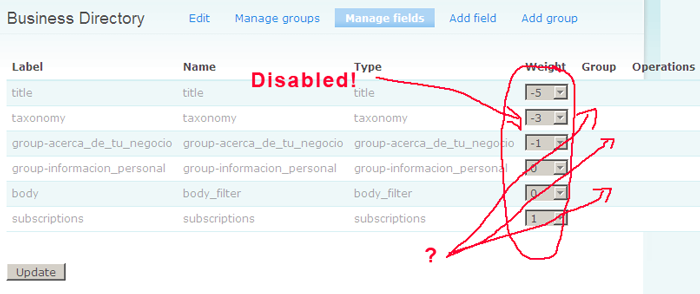
hectorplus commentedOk, here's a screenshot of what i mean. I dont even see the list of fields i created! I am guessing maybe the feildgroup.module is causing the problem, since it groups it and hides it. The field type you see are group names, therefore, my fields are in there. I will disable the fieldgroup.module.
Comment #7
hectorplus commentedWell, it turns out that the fieldgroup.module causes the problem. I have disable it an its all working! I will have to submit this issue to the fieldgroup.module. It's a nice module though.
Thank you all for your help/feedback, you were all very quick to respond!
Comment #8
karens commentedLooking at your screenshot, you have an outdated version of the fieldgroup module installed. It is now a part of CCK core and there is a new release that has the latest version of everything. Update your files (be sure to remove the separate fieldgroup folder if you have one) and visit update.php because you probably will need an update.
After that you should be fine.
Comment #9
karens commentedAlso, you have this marked as 5.x-1.2, which is the latest release. So, if you already have this release installed, you may have the old fieldgroup folder still on your system and that folder needs to be removed since those files are now in the CCK folder. Once you remove them, go back to the modules page and just save it so that your system starts using the new fieldgroup files, then go to update.php and run updates.
Comment #10
inforeto commentedI ran into this problem and removing the old folder solved it (with cck 5.x-1.2).
update.php and resubmitting the modules page was all that was needed.
Comment #11
gracearoha commentedI also have been having a problem with the field group not showing. I am able to add the fieldgroup and then assign it to some of my fields, but then i don't have the ability to edit the fieldgroup nor can i see the fields that i assigned to the fieldgroup in "Manage Fields." Also, the fieldgroup titles do not show up in my page view.
I am using CCK 5x-1.3 and i never loaded the old fieldgroup module.
Also i am using Garland on Firefox.
any ideas?
grace
Comment #12
fagomake sure that there is no other fieldgroup module in the filesystem even if it was never loaded and reactivate the module. Then the manage fields tab should also list existing groups.
Comment #13
gracearoha commentedI have no other fieldgroup module in my file system except for fieldgroup_table (which i assume is necessary.) or should i remove this?
when i open the "manage fields" screen i see a list of my custom fields and there is a drop down list of field groups to choose from. if i assign a group to one of my fields, then the field no longer shows up on the "manage fields" view. It does show up on the "display fields" screen, but there is no way to click on the field to edit it. The only way that i can go in to edit the field is to type in the url in the browser.
I am not able to assign a group to the "title" field.
Also, in my profile form, all the field groups that i have entered appear only under "advanced options." is there a way to move them out of there to stand on their own?
Any help is greatly appreciated.
lost in noobie-land,
grace
Comment #14
fagoI've never tried fieldgroup_table and according to its description its still in alpha state - so try to deactivate this one. If the problem goes away its a bug of fieldgroup_table.
Comment #15
gracearoha commentedokay, i removed the fieldgroup_table but still have the same issues.
But just to understand how this "should" work. Should the "manage fields" screen show a list of my custom fields along with the name of their assigned field groups and should one be able to edit the field groups there?
Also, should i be able to assign a fieldgroup to the "title" field?
Also, in my profile form, all the field groups that i have entered appear only under "advanced options." is there a way to move them out of there to stand on their own?
Thanks so much for the help,
grace
Comment #16
gracearoha commentedAlso, could you please tell me which table(s) the custome fields and field groups are stored in?
Comment #17
gracearoha commentedSorry for all the questions. i find CCK to be a very cool module, but am trying to understand how it works so that i can use it correctly.
I had a very nice profile working with only about 5 fields and was easily able to create a nice view and a search page that searched on the profiles quite nicely. Then i added about 25 more fields and now i see nothing on my search view.
Probably i have added too much of something. This thread http://drupal.org/node/85940
suggests that "indexing won't work with text columns exceeding a certain number of characters." Is this true and if so, what is the limit?
Also are there limits on: the number of values allowed for each text field, the length of the values or the custom fields per node?
thanks again for any insights that folks may have
Comment #18
yched commentedThis is not the way the issue queue works. Please open new threads for support requests that are unrelated to the original thread.
Comment #19
gracearoha commentedSorry. will do.
Comment #20
fagodoes the problem still persist? Could you try updating to the latest -dev release please?
Comment #21
krisna123 commentedhalo i have same problem with this went i use postgresql 8.16 + fedora core 5 + drupal5.1 and postgresql 8.2 + windows +drupal 5.0
i cant delete/edit the field that i create.
i already done update.php and it's still not work. i also already disable fieldgroup.
when i click add field
* warning: pg_query() [function.pg-query]: Query failed: ERROR: null value in column "display_settings" violates not-null constraint in C:\Program Files\xampp\htdocs\drupal\includes\database.pgsql.inc on line 125.
* user warning: query: INSERT INTO node_field_instance (field_name, type_name, weight, label, widget_type, widget_settings, description) VALUES ('field_bbbbb', 'page', 0, 'bbbbb', 'options_select', 'a:0:{}', '') in C:\Program Files\xampp\htdocs\drupal\includes\database.pgsql.inc on line 144.
* Created field bbbbb.
* There are no fields configured for this content type.
when i click manage field and display field its says
- There are no fields configured for this content type.
when i use xampp in windows + mysql + drupal 5.0 the cck and manage group etc and it's work fine.
Comment #22
yched commented@krisna123 : this should be fixed in latest 1.x-dev release. Please update your code.
Comment #23
gracearoha commentedI have the 1.3 version installed. is there a newer version?
Comment #24
karens commented1.3 is the latest official release. There are numerous bugfixes since then, which are in the nightly development snapshot. Find it by opening up the 'Other Releases' link on the project page and look for a file that has '-dev' at the end of it. There is one for each version and one for HEAD. Use the one for 5.x.
I'm marking this fixed. You can reopen if you still have problems when using the development snapshot.
Comment #25
krisna123 commentedfor a while i confuce in searching for where are the other releases because i'm new in here, =(.
i search in cvs, project/cck home, etc.
ow u mean 'view all releases' link.
i miss 2 see the last update date for cck 5.x-1.x-dev. first i think that's the old one and the newer one is 1.3. here i share my story for all, maybe another person like me. ^^. feel fool of my self >.<
cck 5.x-1.x-dev
5.x
KarenS - November 20, 2006 - 12:43
Nightly development snapshot from DRUPAL-5
Download: cck-5.x-1.x-dev.tar.gz
Size: 84.53 KB
md5_file hash: f5e74c91c26b60b0f908566422cb98d0
First released: November 20, 2006 - 12:43
Last updated: March 1, 2007 - 12:03
Nightly development snapshot from 5.x branch
Comment #26
yched commentedFYI, 1.x-dev tarball is always equal or newer than the latest 1.(actual number) release.
It is where development and bugfix are committed. Official 'numbered' releases are generated from it periodically, for instance when new features are deemed stable or important bugs get fixed.
See http://drupal.org/handbook/cvs/branches-and-tags/contributions for more info
Comment #27
gracearoha commentedYeah! finally it works. I updated to the Nightly development snapshot and still received the same results. It was only when i disabled form filter that i finally saw my profile form divided into groups.
That's the good part. But i will miss the form filter as i use it to filter other forms :(
anyway to make the two work together?
Thanks for all the help!
Comment #28
yched commentedglad to hear it works better - see http://drupal.org/node/121385 for Form Filter / form_alter issues
Comment #29
stevenpatzComment #30
yched commentedEr, at least you should elaborate before changing a thread's title.
Comment #31
(not verified) commented