Today I updated to the Feb. 21 release of Imagefield, hoping that it would fix the bug I am experiencing where images are not actually resized to my max-resolution.
I uncompressed it over top of the old version, disabled the module, and then re-enabled it, then ran update.php just in case. After that, I tried to create a "Photoblog" entry, which is custom content type with an Image field. The Image field did not show up in the creation form.
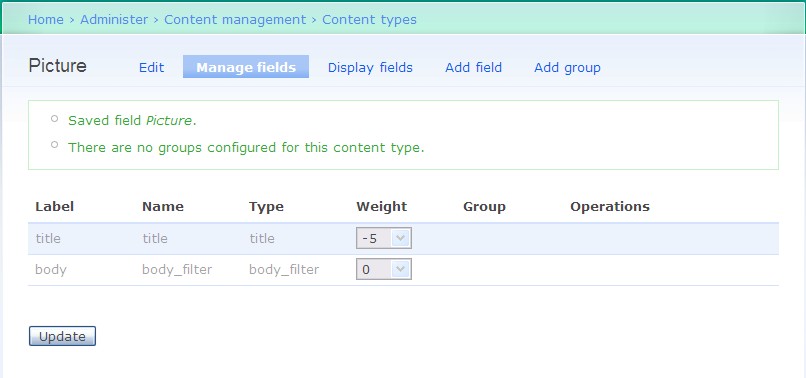
So I went to look at the content type. Image doesn't show up in the "Manage Fields" but DOES show up in the "Display Fields."
Let me know if there is something I am not doing, but this looks like a bug.


Comments
Comment #1
yched commentedalso reported in http://drupal.org/node/121412
Comment #2
dopry commentedThe cck default value handling in the 1.0 release of imagefield wasn't implement. Update to imagefield 5.x-1.1 and empty your cache. thanks.
Comment #3
FarmGrrl commentedI'm sorry, but it did not help the problem. I disabled caching on the site, went into PhpMyAdmin and did 'truncate cache', extracted the new imagefield over the old one, disabled and re-enabled the module. I then created a new content type and added an 'Image' field to it. Still the field does not show up in:
* The Manage Fields dialog
* The 'Fields' section of the main "Content Types" dialog
* When posting the new content type
I have included a screen shot of what it looks like right after I add the Image field to my content type.
Comment #4
dopry commentedI can't reproduce with cck 1.3 + imagefield 1.1 for drupal 5.x. Can you verify your versions and make sure you don't have two copies of imagefield in your modules tree?
Comment #5
vanguys commentedI had and now have this issue again. For me, the Image Field does appear in my Display Fields list and is function in my Page Types no matter what. However, it was not available in Manage Fields in version 1.0. I updated to 1.1 and it was visible, but shortly thereafter it was gone again. This is on a new install of Drupal 5.1 so I am turning on and off a few modules to get this how I want it, so perhaps it's a conflict with another module. I'll do some experimenting and see what I can come up with. I have cleared my cache, reuploaded and cleared the module, etc. and that didn't help.
Comment #6
vanguys commentedOk that was fairly easy to find, this appears to be a conflict with the FormFilter module. When the FormFilter module is enabled, the Imagefield module is not visible in Manage Fields. Perhaps there's additional conflicts with other modules that are causing other folks to have more severe problems? I hope this helps out, but keep up the good work because this is still module is still a great help in CCK!
Comment #7
yched commentedThe field overview tab internally builds a node edit form in order to list the fields, pseudo-fields (title, body, terms..) and fieldgroups.
So yes, there will definitely be a conflict with Formfilter, and probably any additional form_alter - and this is not specific to image fields...
Comment #8
yched commentedhttp://drupal.org/node/122401 has been marked a duplicate of this
Comment #9
karens commentedI was curious what formfilter was doing that was such a problem and it is actually moving cck fields to a different spot on the form. Form_alter() is not a problem itself if it is being used to add additional fields to the form since that's exactly what we're trying to detect. The problem is that in this case form_alter is being used to move our CCK fields somewhere else in the form, which will completely break the manage fields page which assumes the fields are where the content module put them.
So the question is do we try to figure out which modules are doing things like that and leave them out of the module_invoke, or should we find some way to find the new location of CCK fields on the adjusted form and represent them that way (but it could be quite hard to do that), or ditch the whole idea of trying to provide a way to see what else is on the form (and penalize people not using problematic modules).
Not sure which way we should go here...
Comment #10
FarmGrrl commentedWell, I disabled FormFilter and ActiveEdit, truncated my cache, and re-created the content type with the image in it. I still have the same darn thing. Yes, it is the latest CCK and latest imagefield. Should I make a list of all other modules I am using?
Comment #11
karens commentedTry disabling everything other than the basics -- core, CCK, and imagefield -- and see if that works. If so, add other modules back in until it breaks to see if you can tell what might be causing the problem.
Comment #12
FarmGrrl commentedI was wrong, I could swear I disabled FormFilter, but it was not disabled when I went back and checked. It does indeed solve the problem with the Imagefield.
Comment #13
yched commentedhttp://drupal.org/node/123821 was marked a duplicate of this one
Comment #14
dopry commentedI personally think field grouping should only handle CCK fields, and not worry about the form_alter and what other modules may add or change. Field Grouping would probably need to be implemented as a formAPI construct, not as a part of CCK, to be implemented dependably. It stretches the scope of CCK in strange ways.
Comment #15
yched commentedDopry, while I fully i agree with what you say about fieldgroups and FAPI, the form_alter issue is not related to the fieldgroups per se, but rather to the fact that we want to have non-cck fields (title, body, taxonomies...) listed in the overview ,to allow the user to set the weights on CCK fields accordingly.
The current way of "finding" those fields is to build a dummy node form, and detect non-cck fields. Karen found that, and right now I can't think of any other way to achieve this.
The same trick allows us to grab fieldgroups as well, but I guess if it were only for them, we could build the overview form without the dummy node form stuff...
Comment #16
karens commentedWe could go back to providing no context for the fields, just listing them, but IMO that would be a big step backward, and we'll go back to fielding lots of 'Why is the title now in the middle of the page' issues.
I've been trying to figure out another way. My best idea is to show only title, taxonomy, body, fields, and groups. We can do that much without creating a dummy form, since we know where they are (or should be), hence without any need to call hook_form_alter. It's somewhat less useful, but maybe useful enough.
But hook_form_alter means there is no way to be sure that this representation is anything like what the final form would look like. FormFilter is moving the fields to new and different places, and any number of other modules could be doing that. They could even be changing weights and moving things out of the groups they were put in.
So one way to represent the way the form will *actually* look is to create a complete dummy form, as we're doing now, then drill down through it to find all our fields and groups and see where they ended up, not something I myself have the time or inclination to do.
Or maybe we can add a 'preview' button to the form to make it easier for users to see where things will end up, possibly linked to a preview that displays weights in the way that the devel module does it.
Comment #17
dopry commentedokay... so dont' form_alter youre field into strange places, is our stance... This won't be fixed in D5...