I researched this issue heavily over at the Captcha Issue queue first. However, after trying many of the fixes suggested over there to fix the issue in the Captcha module, I believe the problem actually resides now in the Contact Form Fields module. This is because the Webform module does not conflict with the placement, only Contact Form Fields module. I also came across someone that encountered this same problem when implementing the Contact Form Fields module, yet there's nothing in the issue queue over here.
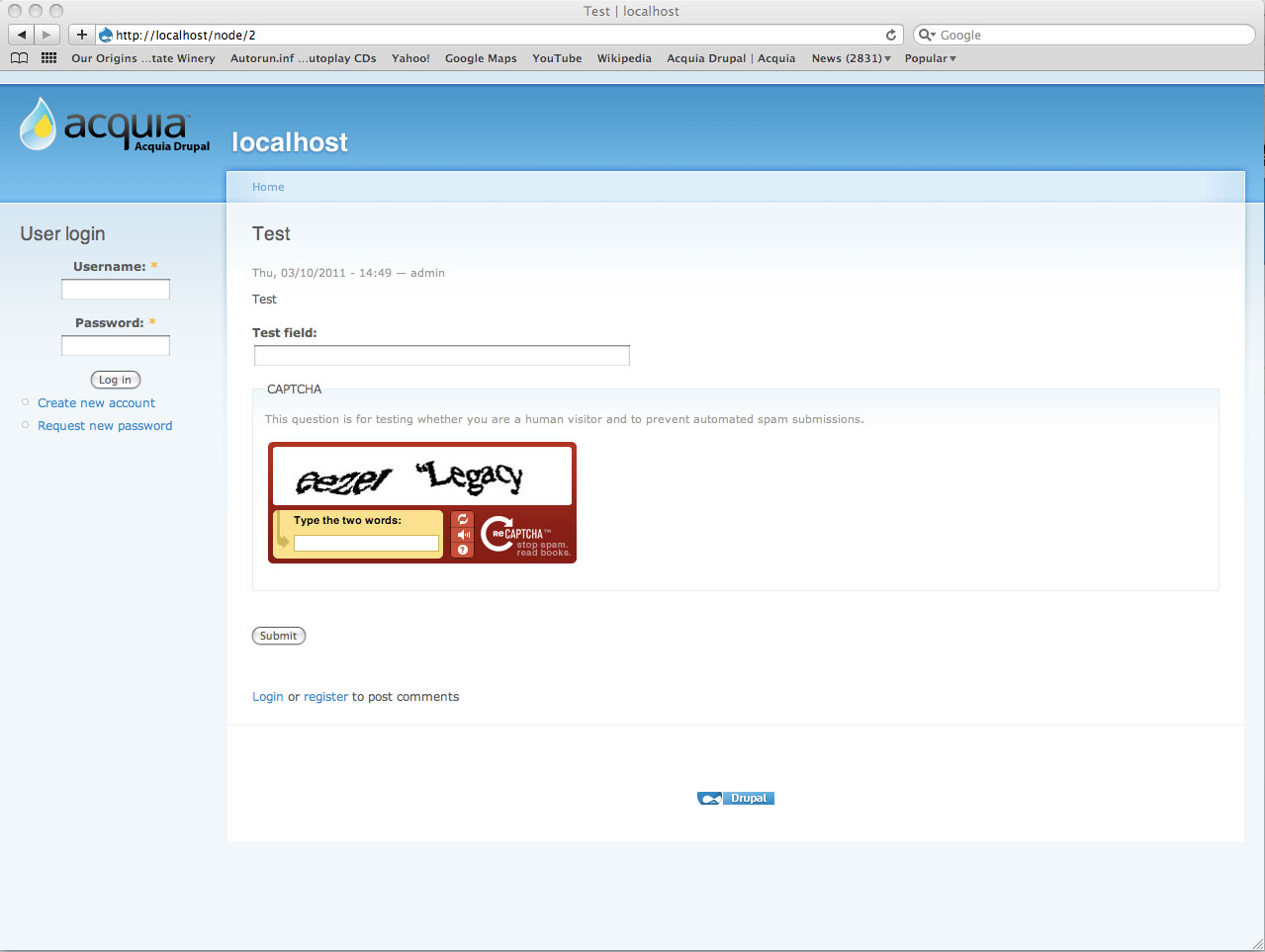
So the problem is that the Captcha field is placed after the "Send e-mail" button on the Contact form. If I de-activate the Contact Form Fields module, the Captcha field goes above the button like it should.
I am currently running:
Contact Form Fields module: 6.x-2.x-dev
Captcha module: Tried 6.x-2.x-dev, 6.x-2.4, and 6.x-2.1.
Any suggested fixes?
Thanks. Nice add-on module to use.




Comments
Comment #1
beautifulmindHello,
Thank you very much raising the issue, this helps me keeping the module bug free.
I really appreciate your concern and wouldl like to know more about your issue. Can you please upload a snapshot of the contact page?
Yes, contact form field modules does changes the weight of the core contact module fields and this process other fields added by other modules may not recognized becuase contact form field modules donesn't know about them. To address this issue, I can change the way contact form field module alters the weight of the fields of core contact module.
Regards.
Comment #2
ejohnson commentedHi beautifulmind,
Thank you for your response. I've attached a screenshot with "Contact fields" module not enabled and one with it enabled, illustrating the problem.
When I have "Contact fields" enabled, I have the 3 additional components enabled - Contact form list field, Contact form radio/checkbox field and Contact form Text field.
Comment #3
beautifulmindYeah, this is an issue with setting wights.
As I mentioned that contact form field does alters the weight of the core contact module fields, and it doesn't know anything about other fields on contact page other than core fields and fields added with contact form fields module. I would also like to take a look at http://joshics.in/contact. You can see the re-captcha is placed nicely over there. If possible, you can communicate using the google wave in real time. You can find the google wave address on the project page. It will be quick.
I really appreciate your concern and using the module.
Regards.
Comment #4
ejohnson commentedI followed your suggestion and installed a fresh version of Drupal locally.
Installed:
- Drupal 6.20
- Captcha 6.x-2.4
- Recaptcha 6.x-1.5
- Contact field 6.x-2.2
First enabled Contact, Recaptcha and Captcha module. Recaptcha was underneath Send E-mail button.
Flushed the "Captcha Placement Cache" and the problem resolved (see screenshot-contact_field_issue.jpg).
Enabled the Contact field module and created a Test Field. Recaptcha was underneath Submit Button again (see contact_field_issue1.jpg).
Flushed the "Captcha Placement Cache" and the problem DID NOT resolve.
Decided to upgrade the Contact field module to version: 6.x-2.x-dev. Run updates. Re-saved the configuration in Contact Manage fields tab. Flushed "Captcha Placement Cache" again. Problem did not resolve.
Decided to upgrade the Recaptcha module to version: 6.x-1.x-dev. Run updates. Re-saved the configuration in Contact Manage fields tab. Flushed "Captcha Placement Cache" again. Problem did not resolve.
Decided to disenable the Contact Fields module. Recaptcha was above the Send E-mail button.
Decided to enable Webforms and create a test form with Recaptcha on the form. Recaptcha was above the Submit button (see webform_recaptcha,jpg).
I'm kind of at a lost for ideas. Definitely seems to be a bug in Contact field module in regards to how weights are being handled and the recognition of other modules I believe. The Webform module kind of illustrates this.
I have no idea why it is working on your own websites, but other people seem to have the same problem. Maybe you need to try a fresh install to better see the problem when you have time?
Thanks for the suggestions to date.
Comment #5
ejohnson commentedAlso, from a clean database, I installed and enable all these modules:
I never created any fields for Contact fields.
See attachment for the results I get.
Comment #6
beautifulmindYou really did hard work! I really appreciate.
I'll fix this issue.
Regards.
Comment #7
ejohnson commentedHi beautifulmind,
Did you have any time to figure out a fix for this?
Thanks.
Comment #8
joetheyeti commentedSubscribe - I'm having the same issue, but I do NOT have the Contact For Fields module installed NOR Rechapcha. I'm using Webform and CAPTCHA modules. This might suggest that it doesn't have to do with Contact Form Fields module or Recaptcha modules, but rather the Webform and/or CAPTCHA modules.
CAPTCHA fields appear below the Send button on some forms and above on others. I can't for the life of me figure out how the forms differ to cause this inconsistency, but I'd love to have a fix.
BTW - I just upgraded to CAPTCHA 2.4 from CAPTCHA 2.3. That's what started my problems.
Comment #9
ejohnson commentedHi joetheyeti,
The issue I reported definitely seemed to be isolated to this module after doing some testing. The Captcha/Recaptcha was placed properly on the Webform nodes I tested.
A possible fix to your solution might be to hit the button "Flush the CAPTCHA placement cache" which is located: /admin/user/captcha/captcha
Comment #10
delty commentedSubscribing - same issue with the Contact Form Fields module.
Comment #11
tchurch commentedsubscribing - I too have this problem. Flush the CAPTCHA placement cache doesn't fix the problem.
Comment #12
beautifulmindHello,
I have also accomodate the field weight of the captcha for contact form. In next release, this issue will be fixed.
Thank you for your concerns and using the module.
Regards.
Comment #13
skyl1ne commentedSubscribing
Comment #14
skulegirl commentedSubscribe.
Comment #15
skulegirl commentedI have a workaround for this issue that is working for me. Issue seems to be that both modules try to determine the weight of their fields in the form_alter hook, but both modules have a weight of zero, so by default captcha's hook executes first, and then contact_field goes and alters the weight of the submit button without knowing about the captcha field.
I just changed the weight of the captcha module to be more than the contact_field module in /admin/build/modules (I changed captcha to 1 and left contact_fields at 0, but reducing contact_fields to -1 might work too). Then I had to clear the placement cache and, voila!, submit button is in the right place.
BTW, you need the util module (http://drupal.org/project/util) installed and then you need to enable the child "module weights" module to be able to change the weight of modules on the admin page.
Comment #16
ofry commentedThis patch should fix this issue.
Comment #18
ofry commentedFixed in dev.