

 The 2026 Drupal Business Survey is open. Your response will help shape the future of the Drupal business ecosystem.
UPDATED: See docs here http://drupal.org/node/1092444
I am having a hell of a time figuring out the flow/relationship and ability to edit File Styles or how they all connect to each other. Now I am not sure if this is a Media, a Styles or a Views issue so I start here for now because this is the core Media module that ties it all together....
While creating a View for a Media Asset I am giving the choice of "formatter" and given some options....But where do those formatting presets come from? Media Module? File Styles module? They "appear" similar in name, but in fact they are not. Adding a custom File Style does not add a preset
In the Styles modules UI also allows me edit or add file styles, which again, give me some presets... I have no idea where they come from....
Is there a paper, a post, and article, a graphic, anything that can help dev's figure out this?
Thanks
| Comment | File | Size | Author |
|---|---|---|---|
| #9 | refX-media-module-flow1.png | 189.6 KB | rickmanelius |
| #9 | refX-media-module-flow2.png | 150.92 KB | rickmanelius |

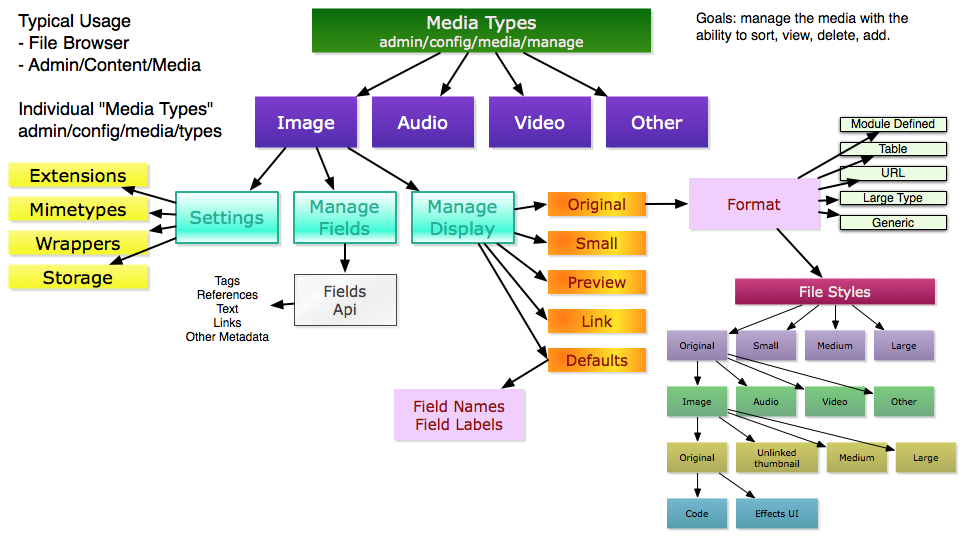
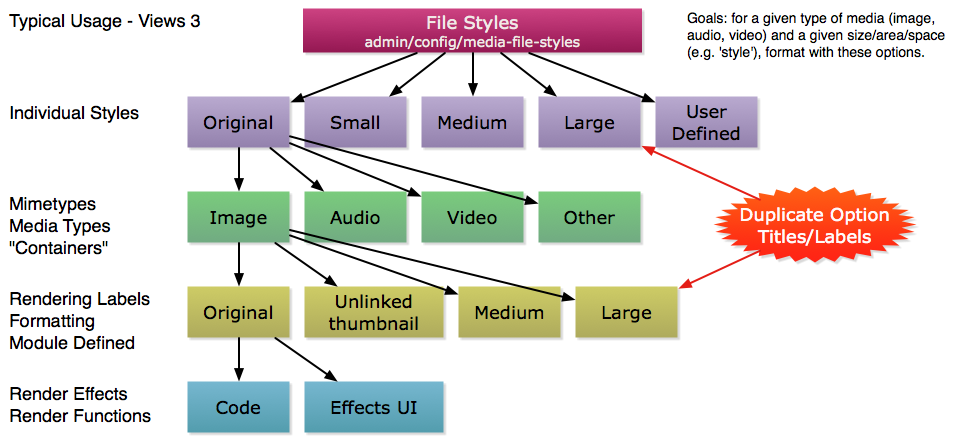
Comments
Comment #1
3rdLOF commentedI guess this was modified recently and I did not see it:
http://drupal.org/node/703336
Comment #2
oxyc commentedThis has been quite confusing for me as well but I've looked at some of the code and maybe I can help with explaining. I'll explain it with term definitions from bottom to top, this is mainly regarding Styles as the documentation you linked covered Media very well.
fileand the Media entity contains afilefield. Here modules can define themselves and hook in their containers, styles and presets. For example node reference can provide their styles for the nodereference field type.styles_default_styles. Once you add a File Style they will be available to select in the view modes of Media Types. Once you select a style in the view mode it will use the preset that was assigned on the File Styles page.styles_default_presets(File styles provide them currently). Currently there is no UI for adding or editing these but judging by the code it's on it's way.So all the stuff listed in the dropdown at Media Types > Image media type settings > Manage Display > View mode are all the styles provided within the field type
file. Therefore some of them are defined by File Styles and some by Media.Hopefully this can help someone.
Updated with effects, and this makes the entire structure a lot clearer
Comment #3
JacobSingh commentedYes, you are absolutely right. This is the worst part of Media. Several people agree here. It's a tough problem to solve.
I'm in a rush right now, hopefully Aaron Winborn (styles author) can help elucidate more, but basically:
Media entities have a file field.
The file field has a formatter, by default that formatter is defined by the file_styles module.
The file_styles module routes that request to format it to different formatters depending on the type of file.
This allows you to use the same formatter for a youtube video and an mp4 on your server. They have totally different formatters, but they are both "video" type media entities.
Styles UI provides a UI for seeing what routing will happen.
Does that help at all? If so, *PLEASE* write some docs for this so until we fix the UX at least it can be explained.
Comment #4
JacobSingh commented@oxyc actually did a great job, I didn't see that comment before replying.
@oxyc: Can you add a doc page to the media docs and paste in what you've got there? Would be a huge help.
Comment #5
3rdLOF commented@oxyc: Thank your very much for taking the time to answer my query. Extremely nice of you, may good karma hit you ten times for it.
@ JacobSingh: Well, that is another problem with these sort of situations: I often find myself wanting to slap together documentation, specially for new to intermediate users, but then I catch myself realizing I have no idea what to say since I do not know. And when I do I am afraid that whatever I may write may end up confusing people more than helping them and catching the scorn of the Sages (that is, you guys, the top devs) for making it worst. But I think this time around I may actually break out some sort of "Guide For Dummies" thing in the groups or maybe my own blog.
Thanks to you for the information as well.
Comment #6
JacobSingh commentedThis Sage does not expect perfection. If he did, he'd be on his own case so much nothing would get done. Something is totally better than nothing. Even if it is just leaving what you know in an issue or a blog post and referencing it from the docs with:
Here's something I figured out, it may be wrong, but it works!: [link].
All the way up to full fledged docs with screenshots and video, etc... It's all good.
Comment #7
oxyc commentedI just added it in the docs.
Should I remove the hook? I dont know how bad of practice it is to include such an ugly fix. Myself I wanted to be able to use my own image styles right away and I'm guessing many are in the same position.
If not I'll be sure to remove it as soon as a cleaner solutions becomes available.
Oh and no problem kannary, glad I could help.
Comment #8
brunodbo@oxyc: Thanks a lot for writing up this page! Concerning the hook, perhaps we should move it to a separate page? That way, the docs page can be a clear Styles docs page, and the code snippet can live elsewhere?
It might also be useful to start a code snippet page in the (currently outdated) media dev docs for pieces of code like this. What do you think?
Comment #9
rickmanelius commentedhttp://drupal.org/node/1091686
I'm also confused and had to spend about a day trying to diagram the entire process out.
I think visually better than text based, so I put together a few diagrams. They may not be 100% accurate, so your mileage may vary. If people find this helpful, I can do another round on them and upload the omni-graffle files so people can further edit (pdf/svg output also available).
Cheers, -Rick
Comment #10
JacobSingh commentedAWESOME!
An effort is underway to re-define this architecture and make it easier to get w/o a diagram like this. However, that doesn't mean these don't belong in the docs.
Added them to the page oxy started: http://drupal.org/node/1092444. Please make changes if required. Also, if you can't make changes contact me - I used the documentation imput format which may not allow users without the documentation role from editing :( I did this so I could add the images inline.
I'm going to mark this as fixed and link to the doc page in the header.
Comment #11
rickmanelius commentedHey Jacob,
I'm glad you liked them :) As I stated, if people need to review/modify, I can provide the source files to extend/change further.
I know documentation by itself should be sufficient, but with so many levels of abstraction, I needed a visual!