

Closed (won't fix)
Project:
Wysiwyg Fields
Version:
6.x-1.x-dev
Component:
Documentation
Priority:
Normal
Category:
Support request
Assigned:
Unassigned
Reporter:
Created:
14 Mar 2011 at 21:33 UTC
Updated:
12 Jun 2015 at 01:32 UTC
Jump to comment: Most recent, Most recent file


Comments
Comment #1
deciphered commentedCan you install the latest Dev and confirm if this is still an issue in the case that it is related to an issue that has already been resolved?
Comment #2
geaseI have installed alpha-2, and this changed nothing.
Comment #3
deciphered commentedCan you try installing via the Drush make file (on the project file) and let me know if that makes a difference?
That should at least narrow down whether it's a configuration issue or a server environment issue.
Comment #4
geaseI don't think so. I'm running the site in a shared hosting environment. I can though provide you any information you may ask for.
Comment #5
deciphered commentedDrush can be installed on shared hosts, or alternatively if you had a local environment you could run Drush make locally then upload the filesystem and database.
You definitely setup a CCK field with the Wysiwyg Field settings?
Do you have firebug? If so, can you check the node creation form for the content type with the Wysiwyg Field and let me know if there are any JavaScript errors?
Can you have a look at the source and see if the Wysiwyg Fields JavaScript files are present?
It's extremely hard to detect the cause of an issue when there doesn't seem to be any errors, but I do appreciate whatever information you can provide me with.
Comment #6
jstollerTry using Devel to empty the cache. That seemed to work for me.
Comment #7
geaseThank you, Struart, for your effort. I appreciate your work and hope to contribute some day. I realize that troubleshooting someone else's issues is hard - generally, I try to track down at least to the source in the code if not to provide patch, but now I'm short on time to do that.
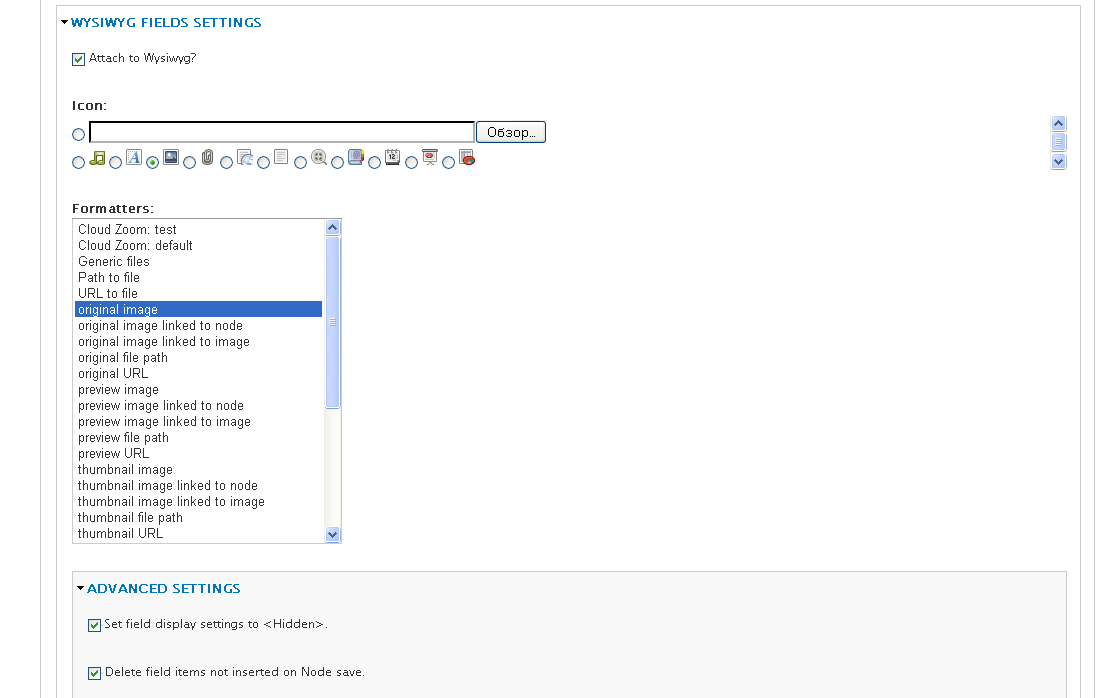
No javascript errors. Files wysiwyg.ckeditor.js and wysiwyg_fields.js are present. Screenshot with field settings attached. Flushing all caches doesn't help.
If I have time, I'll try to run drush make.
Comment #8
geaseI tried to run drush make, but this resulted in errors:
Unable to clone wf_test from git://github.com/Decipher/wf_test.git. [error]
An error occurred at function : drush_drush_make_make [error]
Comment #9
deciphered commentedGease,
Wow, you are having a run of bad luck, seems to be very strange, but possibly a firewall is preventing access to git:// ?
If necessary I can give you a tarball/zip of the filesystem that the drushmake process generates?
In the meantime, can you provide me with a screenshot of the node form that the Wyswyg Field is attached to?
Out of curiosity, if nothing happens, what exactly does the Field with the Wysiwyg Field settings do? Is it visible on the node form or not?
Cheers,
Deciphered.
Comment #10
geaseHi Stuart,
yes, you may put somewhere the output of the drushmake, and I'll try to play around with it.
As reported in my first post, no difference whether Wysiwyg Fields is on or off visible on the node form. That is, standard imagewidget is there.
Comment #11
deciphered commentedHi gease,
You can download a zip of the result of the Drush Make file from: http://dl.dropbox.com/u/1804559/wysiwyg_fields.zip
Once you've run the install.php, simple enable the 'Wysiwyg Fields test' feature (should be at the top of the modules list), that's all you need to enable and it will set everything up for you. Let me know if you are still able to reproduce the issue.
Comment #12
luizcanet commentedI have the same problem.
It seems to be a problem from JavaScript.
I managed to help in something.
Comment #13
deciphered commentedHi Luizcanet,
Given that you got a JavaScript error and gease didn't, it's quite possible that this is a different issue. I will however try to solve it here in the case that it is the same issue.
Can you do some javascript debugging for me?
Before line 13 of wysiwyg_fields.js, can you insert the following and let me know the results:
Flushing your Cache could also help.
Can you also tell me what version of Wysiwyg Fields, Wysiwyg, jQuery UI and TinyMCE you are using?
Also, if you have a chance can you try the Drush Make version and see if it works with that?
Cheers,
Deciphered.
Comment #14
lpalgarvio commentedwith WYSIWYG 2.2/2.3, the way the buttons are shown have changed.
now there is no default layout.
since your module does not add a button to the WYSIWYG button panel, we can't add the button, so we can't use the module.
Comment #15
deciphered commentedLPCA,
I'm not sure what you're saying, Wysiwyg Fields works with Wyswiyg 2.3 perfectly. Your comment/issue also seems to have nothing to do with this issue.
I would like to help with this issue, but it would be better to do so in a new Issue so as not to take away the attention from the original issue here.
Cheers,
Deciphered.
Comment #16
carnau commentedI have the same problem and I've noticed that after clearing the cache, a js is missing.
The error code is:
I'm using de dev version.
Comment #17
deciphered commentedcarnau,
Looks like that issue is related to JS cache, admittedly something that I have not yet tested. Can you (and anyone else in this issue) let me know what you current JS cache settings is on?
Comment #18
deciphered commentedFix for the Caching issue, and hopefully for this whole thread is simple:
Add the following line to
wysiwyg_fields_form_alter_after_build()inwysiwyg_fields.modulebefore$flag = TRUE;:Committed to Dev.
Thanks carnau, your comments where extremely helpful.
Comment #19
carnau commentedGreat!
I'm using Javascript Aggregator, after disable the caching and clear the cache the icon appears in WYSIWYG editor.
Thanks for the supplied patch.
Comment #20
deciphered commentedRe-marking as fixed, assuming was accidentally changed.
Comment #21
carnau commentedOh, an old firefox tab with the wrong 'Status 'does the mistake.
Thanks for fix it.
Comment #22
geaseI've installed the current dev, this didn't help.
Finally, I've got some error report. On field editing screen (/admin/content/node-type/page/fields/field_image) there's an error message:
warning: file_get_contents(sites/all/modules/wysiwyg_fields/plugins/wysiwyg_fields_field_image/wysiwyg_fields_field_image.js) [function.file-get-contents]: failed to open stream: No such file or directory in /var/www/u1421215/data/www/easy.is-it-so.ru/includes/locale.inc on line 1714.
But this message doesn't seem reproducible.
I've installed also the drush make from http://dl.dropbox.com/u/1804559/wysiwyg_fields.zip. First, clean urls don't work with it, which I haven't seen for quite a while and which cannot be server environment problem - I have a number of sites which are all ok.
And when trying to create content of type "Wysiwyg Fields test" text editor is not loaded at all with javascript error "Drupal.wysiwyg.plugins[pluginName] is undefined".
That's it.
Comment #23
zach harkey commentedI installed via the make file without any trouble but when I tried to create a wf-test node the body field was completely blank and firebug was throwing many of the errors mentioned above. Here are a couple things I had to do in order to get everything working properly:
1. Enabling clean urls. After installing via the make file I noticed clean urls were disabled and the option to enable them was greyed out. This is because my dev environment uses mod_rewrite rules to create mass virtual hosts, so for drupal sites I have to uncomment the line in .htaccess to read
RewriteBasebefore I could enable clean urls. Point being, the make file uses the default .htaccess file, if your environment requires any adjustments to .htaccess, be sure to make them.2. Input format settings precedence. The make file also installs the Better Formats module but the roles for the wf-test content type were not in the correct order of precedence - anonymous user was above authenticated user. Anonymous only had access to Filtered HTML. Check that your roles are in the correct order by going to /admin/content/node-type/wf-test and make sure the authenticated user comes before the anonymous user.
Comment #24
deciphered commentedThanks for the note Zach, hopefully that's the cause of the issue, as I've not been able to reproduce the issue myself, but then I have been testing the module primarily as UID 1 on a system that I know is correctly configured.
Can anyone else confirm this is related to the issue, and if not can you let me know in what way you are testing the module?
Comment #25
helenrae commentedI've done a little bit of testing using the provided .make file and think I might have landed on a way to reproduce what I think might be the original issue.
Here are the steps I followed:
1. add the same image field to two node types (I used the existing "Story" content type and one called "test".
2.configure the shared image field for both content types, selecting "Attach to Wysiwyg?" and choosing a different icon for each content type.
3. Visit node/add/story and node/add/test
In my case, the icon chosen for the "test" content type was used for both Story and test, though the per-node-type settings on Story remained as I set them. Changing the icon on test caused the icons on both Story and test to change to the icon chosen for the test content type (though, again, the Story settings remained as set). Changing the icon on Story had no effect on either icon. Deselecting "Attach to Wysiwyg?" on Story did not effect viability on that content type; deselecting "Attach to Wysiwyg?" on test removed the icon (and reveled the fields) on both.
Did the original poster attempt to add Wysiwyg Fields to a field shared across 2 or more content types? If so, could an existing content type's settings (or lack there of) trump those set on the desired node type?
Comment #26
deciphered commented@helenrae,
A fix for that issue has been committed to Dev, let me know if that fixes your issues.
Cheers,
Deciphered.
Comment #27
david3000 commentedsubscribe guys. The "body" field are completely blank. I've done everything described above, but nothing...I test every module related. Please help me ;-)
Comment #28
helenrae commented@Deciphered
Took me a little while to test this, but the dev version solves the described issue brilliantly.
Individual wysiwyg_fields settings on a shared (image) field work entirely as expected in both of my two test content types.
Thanks!
helenrae
Comment #29
deciphered commentedNow I just have to hope that was the original issue, but I doubt it.
Marking this as fixed, and if anyone who was experiencing the original issue ever wants to speak up I would be more than happy to re-open it.
Comment #31
lpalgarvio commentedA) no button shows on editor with wysiwyg_fields-6.x-1.0-alpha2
B) wysiwyg editor vanishes and is replaced by empty spacing with wysiwyg_fields-6.x-1.x-dev
main modules:
- drupal 6.22
- Libraries API 6.x-1.0
- jQuery UI 6.x-1.5 (with jQuery 1.6)
- Content Construction Kit (CCK) 6.x-2.9
- FileField 6.x-3.10
- Better Formats 6.x-1.2
- wysiwyg 2.4
- wysiwyg_fields-6.x-1.0-alpha2
additional modules (all enabled, tried first with just FileField):
- FileField Paths 6.x-1.4
- FileField Sources 6.x-1.4
- FileField UI Extras 6.x-1.0-rc2
- ImageField 6.x-3.10
- AudioField 6.x-1.0
- VideoField 6.x-1.35
same behaviour on B) with jQuery UI 6.x-1.5 (with jQuery 1.7.3) + jQuery Update 2.x
whats wrong?
i was never able to make this module work on my sites.
Comment #32
kevinn commentedStill dosen't work...
I get file not found for /sites/all/modules/wysiwyg_fields/plugins/wysiwyg_fields_field_image/wysiwyg_fields_field_image.js
Comment #33
kevinn commentedI found the problem, the server is trying to get a file when you put a .js to the path and get file not found because well the file doesn't really exists, so i changed line 259 in wysiwyg_fields.module
And changed line 43 in plugins/wysiwyg_fields.inc
And it started to work...
Comment #34
swortis commentedThe issue—I think—has to do with how the server responds to the request for the dynamically created script: /sites/all/modules/wysiwyg_fields/plugins/wysiwyg_fields_field_inline/wysiwyg_fields_[my cck field name].js.
On one server (Apache) (using the dev module as is), the wysiwyg_fields_[cck field name].js is found, with the correct script in it. However on another server (Nginx) I see a 404 when the browser tries to find the dynamically created script.
On the non-functioning server if I manually add /sites/all/modules/wysiwyg_fields/plugins/wysiwyg_fields_field_inline/wysiwyg_fields_[my cck field name].js and use the script printed on the working server, the module sort of works..
In either case the jquery_ui css is not being loaded correctly. (I'm using jQuery_UI 1.7.x with the library in the libraries directory.) The function at line 270 in the module is not working (JQUERY_UI_PATH).
Comment #35
deciphered commentedIf you're using Nginx via Aegir (as I know am for primary development) then the issue is that the default configuration will not pass .js files to Drupal.
To fix this myself I simply changed the following:
To:
Let me know if that solves the issue, and I'll try to figure out a better solution.
Comment #36
deciphered commentedMarking as fixed due to no further information.
Comment #38
deciphered commentedJust an updated config snippet for anyone that needs it:
Comment #39
andrew_mallis commentedI have a D6 site on Pantheon that refuses to behave.
No possibility of accessing nginx config.
Surely there must me a better way to make accessible the js file?
Comment #40
andrew_mallis commentedIssue persists. I've tried #33 and also hacking my local nginx congfig, but no dice. We don't have access to the hosting environment's config.
We are working on a patch here that will generated the js in the files directory instead and will post here.
Comment #41
deciphered commentedJust as a note, this issue has been resolved properly in the 7.x branch, so you would be better of trying to backport those fixes, essentially it's just passing a couple additional parameters for the Wysiwyg plugin definition.
Comment #43
deciphered commentedNo longer supporting the 6.x-1.x releases.