Closed (fixed)
Project:
Date
Version:
6.x-2.7
Component:
Code
Priority:
Normal
Category:
Bug report
Assigned:
Unassigned
Reporter:
Created:
24 Mar 2011 at 21:18 UTC
Updated:
1 Dec 2011 at 13:50 UTC
Jump to comment: Most recent file


I started a site on one server with PHP 5.2.8; installed and configured a site them moved it to a production Server with PHP 5.1.6.
Both use MySQL 5.0.77.
The production site only displays the current date in any date cck date field. In a view or by itself. If you edit the record the edit screen correctly shows the date you set. The database contains the right value.
I've tried to change the type of the cck date filed (date, datestamp, datetime). I've tried clearing caches and remaking the fields but to no avail. All displays of the date field show today.
Core Drupal Systems that show the date do so correctly (such as time stamps on errors).
Does anyone have an idea of why this is?
| Comment | File | Size | Author |
|---|---|---|---|
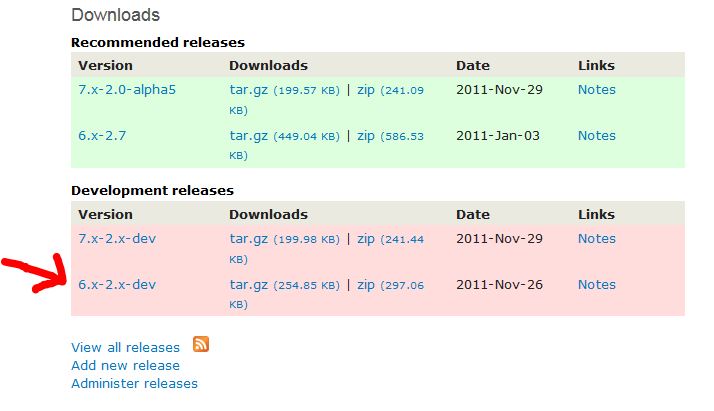
| #16 | dev version.JPG | 41.08 KB | arlinsandbulte |

Comments
Comment #1
kingmanic commentedComment #2
kingmanic commentedComment #3
jshawcfa commentedI see this same error. I also have 6.x-2.7
Comment #4
carnao commentedI have the same problem. Date versione 6.x-2.7, drupal 6.20
Comment #5
jshawcfa commentedReplacing 6.x-2.7 with 6.x-2.7-dev appears to fix the problem.
Comment #6
shanefjordan commentedI have the same issue as this.
Comment #7
CarbonPig commentedsame issue
Comment #8
neorg commentedSame issue here.
Why isn't there any action on this bug?
This is not what I aspect from a important module as this.
Is the developer needs more info please say it.
edit: BTW Perl version info
# php -v
PHP 5.1.6 (cli) (built: Nov 29 2010 16:47:37)
Copyright (c) 1997-2006 The PHP Group
Zend Engine v2.1.0, Copyright (c) 1998-2006 Zend Technologies
Comment #9
mboc commentedReplacing the module with th dev version solved the date problem but not the time problem, the minutes are correctly saved but incorreclty shown. I'm not sure if it's the minutes of the server time that are displaying.
any help apreciated!!
Comment #10
mboc commentedSorry! my mistake! I had the wrong php format I was using d/m/Y H:m instead of d/m/Y H:i .
Comment #11
arlinsandbulte commentedFixed according to #5, #9, & #10...
Comment #13
jitenm commentedI'm experiencing the same in 7.x-2.0-alpha4 and latest 7.x-2.x dev, any more details on the above and how it was resolved? Thanks in advance.
Comment #14
RumpledElf commentedComment #15
willshaman commented#5, #9 and #10 all talk about 6.x-2.7-dev, but I don't see the "dev" version available for download anywhere. The straight 6.x-2.7 version displays the same problem as described, i.e. correct date stored on database but today's date displayed. I read somewhere else this was because of my version of PHP. My ISP only provides PHP 5.1.6, which 6.x-2.7 seems not to work with.
Unfortunately, ISP won't let me update PHP, so I'm using Date 6.x-2.4 (together with Calendar 6.x-2.4). However, Date 6.x-2.4 also pulls the same trick: selected date stored; today's date displayed. Any clues, please?
Thanks in advance.
Comment #16
arlinsandbulte commented@willshaman:
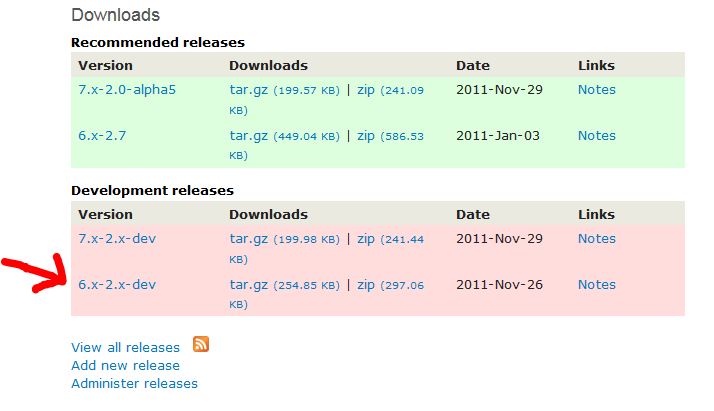
"dev" version can be downloaded right from the project page at http://drupal.org/project/date
Also, according to our info on the project page: "PHP 4, 5.0, & 5.1 are no longer actively supported. If you want dates to work correctly you need to use PHP 5.2 or higher."
If your web host provider cannot/will not update PHP, I would suggest looking for a new provider.
Comment #17
arlinsandbulte commented@jitenm (#13):
Let's leave this issue closed for the 6.x-2.x version of date. If you are having this issue in 7.x-2.x, please create another issue and detail how the problem can be reproduced there.
Include your PHP version.
Comment #18
willshaman commentedAh, thanks arlinsandbulte - I've now got it and I'll give it a go. Extra thanks and a smiley for being so prompt and drawing pictures and everything! :0))
Will