So I have been trying to get Views Slideshow to work on a D7 site but its not working correctly, in the preview of the View, the slideshow jquery works but when I go to the path it shows it in a Table layout next to each other with no jquery. Does anyone know why the jquery would not work in the path view and only in the preview section of the View?
Another question, in my field (image1), I see that everytime I upload a image it shows a thumbnail and I want that to be my pager but when I go to add another field to my view there is no image_thumbnail. How do I get to that thumbnail image to show it as a pager?
If these are bugs of D7 please let me know another way to develop a good Photo gallery that slides through with thumbnails.
I have found video tutorials for Views Slideshow but they all relate to D6 which is hard to follow when using D7, does any know of a D7 video tutorial for this module. Please send link.




Comments
Comment #1
redndahead commentedMore than likely you have the default view using slideshow, but the view for your path is set to table. That's my best guess.
Comment #2
mèche commentedI have exactly the same bug...
Comment #3
matt_harrold commentedI've sunk about 6 hours into trying to get this module to work (D7, latest Views, CTools, etc).
I added all the unmentioned extras: jquery.cycle, json2.js, ran through the tutorials, still nothing but the first image.
Checking the HTML source, all files are being loaded, I'm fully stuck.
Is there some religious incantation required before use?
I know I'm not the only one drawing a big fat blank with this module.
Comment #4
redndahead commentedDo you have a site to look at?
Comment #5
matt_harrold commentedSadly no ... it was a localhost experiment. I didn't mean to jump down anyone's throat .. but in 4 years of using Drupal I've not had such a frustrating roadblock.
I appreciate that CTools and Views are both unstable, and that documentation and tutorials are thin on the ground, but the whole process feels like I've fallen down a rabbit hole and I'm now being taunted by stoned caterpillars.
I tried to find something "constructive" to offer ... an error message ... something that didn't "look right" ... but I drew a blank.
Sorry I vented on this issue/bug report. I'll hold off for a week and try again ... be more methodical in my implementation process and try to isolate the problem ... once I calm down and get out of this damn hole.
Comment #6
flacoman91 commentedHey, I had the same problems and it took me forever to figure out how to get it working too.
After all that frustration, I decided to create a screencast on how to configure and install it. I'm a noob to the drupal world, so it's kind of a long screencast - 10 parts of 5 min each.
Check it out:
Screencast Tutorial videos
Forgive me, the site is in Wordpress but you can view the videos in full screen on on the screenr site. I need to get around to converting my page to drupal.
Here's the final page: http://dinhdesigns.com/slideshowtest/
Can we add this to the instructions somehow?
This work was based off ciril's tutorial at www.brightwebsitedesign.com
Comment #7
Bright Web Design commentedDear Friends,
Please see my updated tutorial with all the latest modules, to create and configure this fantastic module so easily.
You can see it here, How to Create Views Slideshow on Drupal7?also please feel free to write comments and other issues you overcome while creating.
The Screen Cast video of this tutorial is coming on the next Saturday!
Best Wishes.
Comment #8
raulmuroc commentedThere's nothing fixed with the tutorial. It followed it and it didn't work.
In fact, for the case that the problem is to be not using typical type and to try to decipher this enigma, I'm exposing my particular case: I want to Cycle multiple_image_field under Profile2 entity type.
I get exactly the same result as the topic message: the slideshow jquery works but when I go to the path it shows it in a Table layout next to each other with no jquery (expanded pictures).
I attach a screenshot for better understanding of what I and the rest of this issue get as a result.
Comment #9
raulmuroc commentedFinally solved:
1) Go to your Slideshow views.
2) You must have one field for main images and, optionally if you wish an image pager, another field for thumbnails.
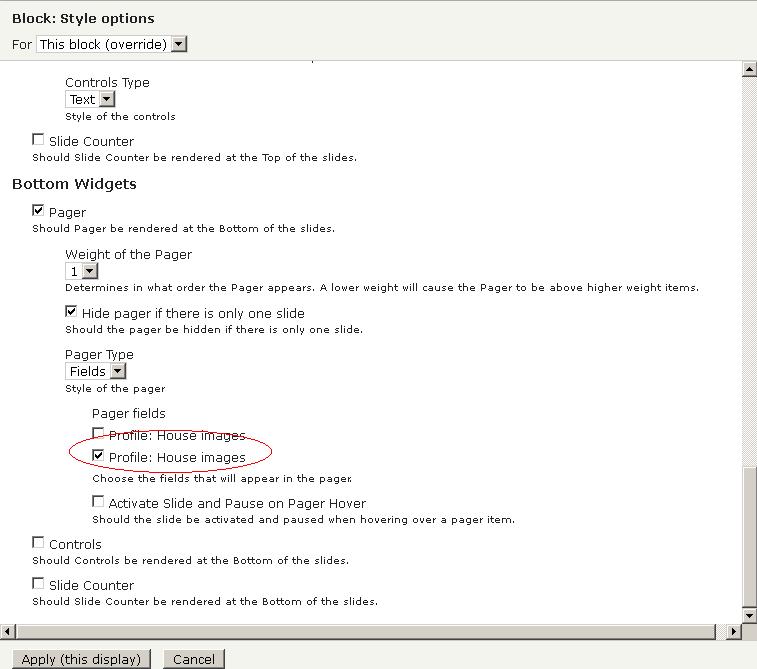
3) Format: Slideshow > Settings
3.1) The same like screenshot.jpg. Take care to thick the thumbnail field, in my case is the last one as seen in the picture.
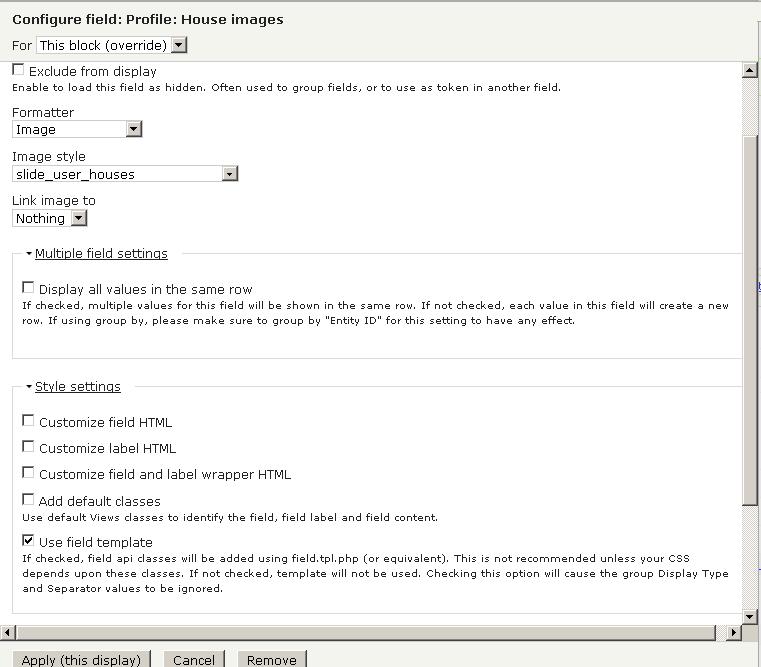
4) For main photos field, follow screenshot2.jpg
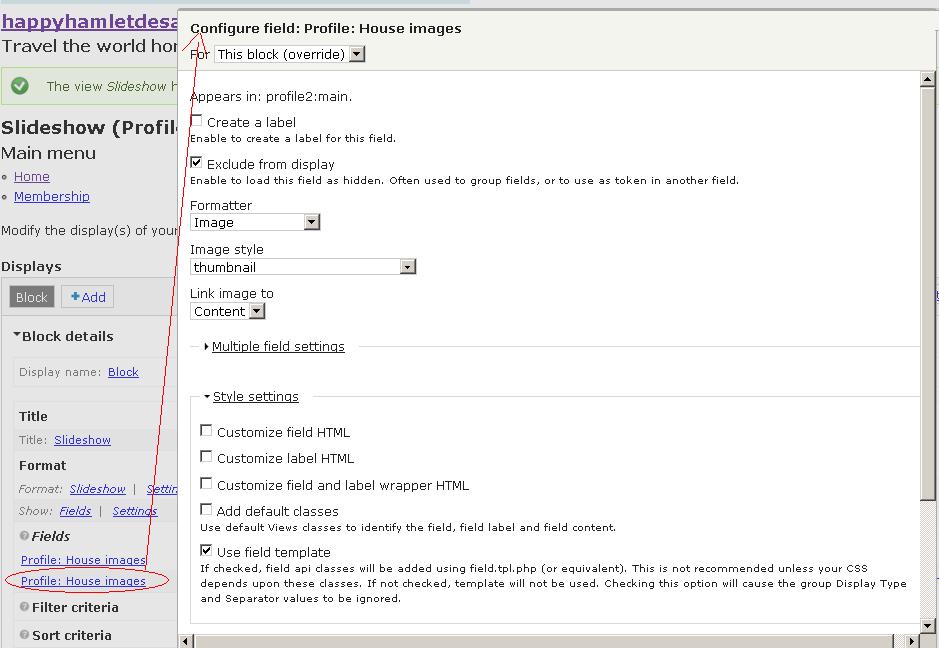
5) For thumbnail photos field, follow screenshot3.jpg.
It works nice :-) as I attach in result.jpg