Active
Project:
Date
Version:
7.x-2.x-dev
Component:
Views Filter
Priority:
Normal
Category:
Bug report
Assigned:
Unassigned
Reporter:
Created:
6 Apr 2011 at 15:03 UTC
Updated:
4 Feb 2013 at 14:41 UTC
Jump to comment: Most recent file


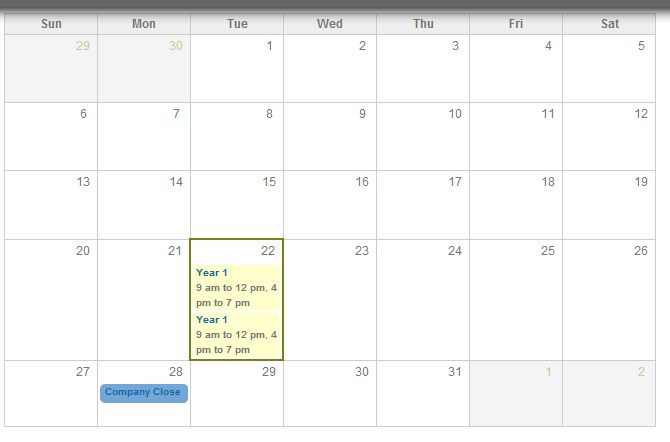
Attached are my settings for a multi value date field.
Even when choosing 'Display all values in the same row' I'm still getting multiple rows of the same node in my view. I thought I saw another issue in the queue about this a few days ago but I'm failing to find it now.
Also in the 'starting from' and 'ending with' options under multiple values it would be really useful to enter relative dates in here like 'now'.
Let me know if I can provide anything else.
Cheers
| Comment | File | Size | Author |
|---|---|---|---|
| #15 | Date View Configuration.png | 30.95 KB | Chris_DWE |
| #14 | Duplicate Values.png | 13.37 KB | Chris_DWE |
| Screen shot 2011-04-06 at 15.50.25.png | 53.95 KB | jdelaune |



Comments
Comment #1
bojanz commentedYou're using Date module functionality, not a Views handler.
(I hope you're using 7.x-2.x and not 7.x-1.x)
Comment #2
jdelaune commentedYeah I am. I guess I'll have a deeper poke around the code to see what the issue is tomorrow.
Comment #3
jdelaune commentedThis is what I assume the correct functionality should be:
If Display all values in the same row is checked then if you have a multi-value date field within your Views display, the entity it belongs to should only get returned once within the display. According to the current description "If checked, multiple values for this field will be shown in the same row. If not checked, each value in this field will create a new row.".
This should also respect the multiple values field, which is currently does.
Comment #4
dotochy commentedYou must set "Multiple value" field to blank, now it's 1 so the view display only 1 value for date field. After that, you disable module "Date Views" and the view will display as you expect.
Comment #5
jdelaune commentedWhat does date_views actually do then? Seems to a bit pointless in having it if it just breaks normal functionality when I haven't seen any 'features' missing.
Thanks
Comment #6
jdelaune commentedOk looking into this further we can't simply disable 'date_views' because it's required throughout the site for Date Views functionality. For example you can't filter dates without it.
Therefore there must be a conflict somewhere within that module.
Comment #7
karens commentedDate Views is alpha code, I'm still working through all the implications of things like multiple values that are grouped together.
Comment #8
dotochy commentedThe date_views actually do is alter data of views by include fields not necessary delta, language, bundle of table field_data_field_event_date in query of views (see function date_views_field_views_data_alter in file date_views.module, at line 233). If this line of code (233) is not run, views module will include necessary filed of table field_data_field_event_date as other table, and that's enough for us. So dont need disable date_views module, but must comment line 233 of file date_views.module for expected result
Comment #9
dotochy commentedThe release 7.x-2.x-dev (April 23rd 2011) is included my patch (comment on line 233 of date_views.module). Thanks Karen.
Comment #10
arlinsandbulte commentedFixed then according to #9?
Comment #12
amogiz commentedCan'y find any way not to have multiple rows when multiple dates for a Node.
Took the last dev version.
Thanx if you can help !!!!!
Comment #13
Tyera commentedI am having this problem as well, and would really appreciate directions toward a fix!
Many thanks
Comment #14
Chris_DWE commentedI am also having this problem, while using 7.x-2.5. None of the previously suggested solutions are possible for me: I cannot disable Date Views as it is required for Calendar. I have tried commenting out line 233 of date_views.module, to no avail.
Comment #15
Chris_DWE commentedKaren, I saw on another thread you were asking someone what their view configuration was. This is mine for my Date field in Calendar View.
Comment #16
srsbl commentedHi,
I was having this problem when listing events on a table, but solved it with the following settings:
Contextual Filters: Choose the field Content:[your_date_field-start date], don't choose the field Date: Date (node), and set it to current date
Fields: Content:[your_date_field], check "Display all values in the same row"
Other: Query setting: Select Distinct
Hope it helps anyone with this problem.
Comment #17
sneyerst commentedI also encountered duplicated records which had multiple dates in views. I just had to remove the sort clause on that same date field. So it's perhaps more of an sorter-issue than filter-issue. I am using 7.x-2.6 by the way.
Comment #18
jentzheng commentedSame in my situation, duplicate rows in views when sort by start_date with multipal date field. My goal is to export an upcoming event block with multipal date_field content type.
Comment #19
jentzheng commentedIn FILTER CRITERIA, I added "Content: Date:delta (= 0)" then seems solved my problem, that means it only sort the first date field value. it's work in my case~
Comment #20
stevendeleus commentedPlease include a patch for commenting out the specified line in version 7.x-2.5. It does not correspond to line 233.
Comment #21
leex commented@19 - It works thanks a bunch, but why does it work?
Edit:
It's filtering to only the first object returned for that multi field element.
Comment #22
fuse commented#19 does not work when date field is allowed to be emty (not required). If you add filter with delta=0 nodes without a date don't get displayed.