Major revamp of the filtering and display control UI
The problem
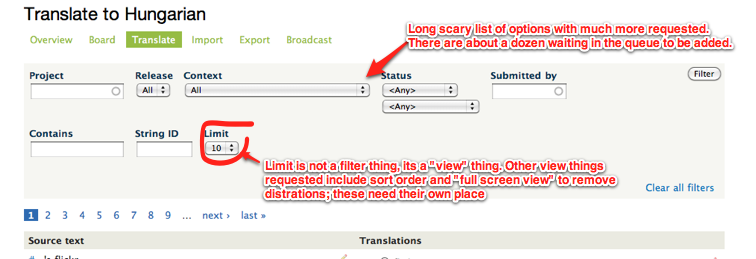
There are various issues in the queue to add more filtering options (not submitted by a certain user, options for the text search, plural lookup, etc.) as well as new view modes, such as options for ordering, and an option to add a full screen view to get rid of theme distractions. Now to be able to add those, I was thinking hard about moving to a more extensible UI pattern for the filters and display modes.
As a start, we now have some filters displaying by default, and then you can choose to display *all* of them at once. If we keep adding more and more, this already intimidating list will just become way too cockpit-level. The filter system also incorporates a display per page counter, which is really not about filtering, its about how it looks/works, and I'd call them display setting (vs. filter settings). So to expand on the filters and the display settings as requested, we should do a better job displaying them.
Filter UI first encounter

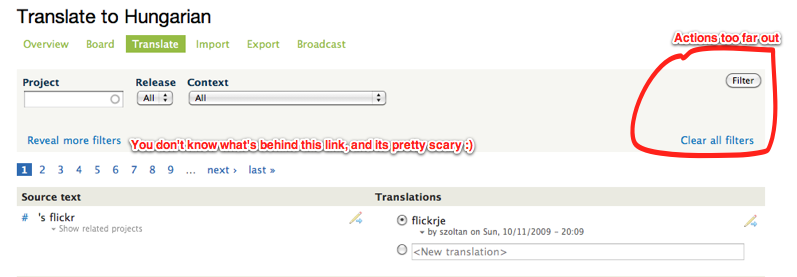
Filter UI after click on "Reveal more filters"

Another problem is that our actions to submit the form and clear the form are way too far out and hard to click. I've seen people using user styles to make the button bigger :)
I was toying with the idea of doing a sentence based solution, where you'd read "Show all text from project Drupal core release 7.0 having no suggestion", but that turned out to be pretty hard to achieve to be readable, translatable and usable. I envisioned Drupal core, release 7.0 and having no suggestion as links which would open up a dropdown, but it was just too many clicks to get stuff configured and then changed. So I ended up with reusing our current form element based system with adjustments.
Proposed solution looking for feedback
I'm proposing implementing a filter bar from http://documentcloud.github.io/visualsearch/, that expands and provide autocompletion for all values, this way we can keep filtering/sorting/display options in the same place.
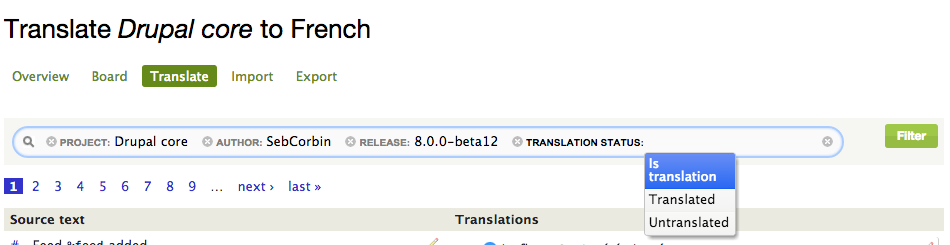
The integration is pretty straightforward for simple values but still allowing ajax requests and complex manipulation.


Comments
Comment #1
gábor hojtsyHere is the patch in progress. I've also sneaked in some new stuff to showcase the Display functionality, 1 per page and 3 per page, as well as a save and continue button (which does not work right yet). That should really showcase how the display options could be great.
Comment #2
gábor hojtsyClosed [#748578] as duplicate.
Referenced the following filter/sort related issues:
#969638: Filter translations on NOT submitted by user
#691790: Advanced search: Case sensitive search
#691800: Separate the source and target strings for "search string"
#691786: Advanced search: Search for complete words
#630436: Add multiple terms, phrases and boolean operator support in "contains" filter
#328963: Filter strings by a submodule / path
#1029512: Filter by more than TWO suggestions
#627838: Add core compatibility version filter
#598898: Sorting in more way
#605294: Add status filter for plural/not plural
#993472: Implement REGEXP search
#222469: Filter translations and suggestions by date
I think these are the ones we have. A pretty big number of new filters being requested, right?
Comment #3
Bojhan commentedJust wondering, after reading this my first thoughts are - why aren't we using faceted search filters? It seems we are bending a interaction to something its not designed to handle. The proposed interaction adds logic, requiring the user to take an extra step and understand the way that filters interconnect. Even without that argument, I am not sure if adding this improves the interaction - because it hides the functionality, making it harder to "just try out".
Do we have some analysis on which filters are currently used? We create a cockpit by adding filters without knowing what there actual usage it, but the most important there is what we should strive for and defer uncommonly used ones to an advanced search page or so.
Comment #4
droplet commentedpretty nice.
adding filter via ajax is better than "advanced search". we can add what we needed anytime instead jump to other page. (advanced search page may show all filters that fill in my half of screen.)
mainly, there has 2 roles in LDO. For my own experience over 1 more year, when I am a....
Admin - almost all filters each time (String ID + Context are less use).
translators - Project, Translation status, Suggestion status filters
maybe ADMIN and translators ratio is 1:1000 but make ADMIN more easy to use LDO is first priority (ADMIN only has ONE way to do their work in LDO.). I think we need to track how many users are really submitting strings via web UI.
Comment #5
gábor hojtsy@Bojhan: the problem is that admins request that many more filters as linked in above. If we add those, the advanced search page will look *horrific*. What we currently do is kind of like that with three filters shown by default and the "reveal more filters" link shows them all. But if we add that many new filters, it will be 3-4 lines of filters shown in that case. Facets could be nice but (a) it would need a drastic reimplementation of the underlying code (faceted search with SQL is very expensive) (b) it would still display a LOT of facets once we add more filters. It might be useful to display some default elements with this new pattern too, as @droplet says, his experience is that project (+ release I guess) and translation and suggestion status filters are commonly used by translators. I don't have quantitative data to back this up, I can definitely try and work on some google analytics fu to measure it (could take a week to find time for it) and then collect data for about 3-4 weeks or so to have a better understanding of what filters people generally use...
Comment #6
Bojhan commented@Gabor I understand, however if you agree to many requests it will inevitably become a cockpit. It's true that facted filters doesn't solve this completely, but it does allow for more space and orientation. It's something we should probally mockup, if it could work.
To be clear, it's not just about having quantitative data to proof a point, but its about having data to make an informed decision about which filters to add and remove in the future.
Comment #7
gábor hojtsyGood news is that we can already produce data about which filters are actually used. With help from Ádám LIppai I figure out how to filtering for specific URL arguments: https://skitch.com/gabor.hojtsy/r26in/top-content-google-analytics I'll come back with data on filters being used later, but definitely sooner then 3 weeks I hope :)
Comment #8
gábor hojtsyOk here is some data for the use of the following filters in the past month based on google analytics reporting (in which about 20903 pages were requested to translate to a language):
- project : 15634 times
- status : 7440 times
- release : 5348 times
- limit : 2802 times
- search : 2796 times
- author : 774 times
- string ID: 477 times
- context : 253 times
My conclusion is that people overwhelmingly focus on a specific project (which is really good btw), then more likely to focus on string status (eg. look for untranslated strings to tackle, string with suggestions to moderate, etc), then to look for a specific release. I'm genuinely surprised the limit is so popular to be set different to the default 10, the distribution of limit changes is as follows:
- 95 page requests chose to limit to 5
- 10599 left it on default 10
- 120 used 20
- 540 used 30
- *nobody* used 40
- 1866 used 50
- I've even found people trying to game the limit, one visitor setting it to 250 :D
So looks like project, status and release filters are used by 25% or more requests, while our current defaults expose project, release and context (uhm :). Reaching status requires revealing all filters (or using a pre-baked URL you saved or got via chat/email). I think this teaches us that we should show the 3 most used filters up front and the rest not so prominent.
I'm still not convinced that creating an advanced search silo is good, and if we keep adding filters like requested, we'll have 2-3 rows of filters pretty quickly on an advanced search screen.
What do you think?
Comment #9
gábor hojtsyLatest version of above patch which still applies.
Comment #10
SebCorbin commentedI agree with Gábor on forecasting the arrival of many more filters expanding our search form to an entire screen. In the meantime Ajax is good but require more clicks (one to select the filter to add, another to focus the select value, and another to apply), I would recommend to keep our top 3 filters (project, release, suggestions status) displayed while others can be added via the UI you suggested first (which is very nice btw, as it avoid clicks).
One thing I would like to be improved : the release search process. For now, I type in the project name, select it via down arrow, (press enter or not) and press tab, then the search begins. When the data comes back, the releases' select is replaced, and focus is lost.
Assuming that the search is on the blur event, could it be possible to bind it to the enter keypress too? That way the releases' select would be replaced while we're still in the project textfield, and pressing tab will change focus to releases as expected.
I'm also a bit annoyed with the limit, I would like to see it stored in a $_SESSION variable (as I am one of the people who likes 50) to not be obliged to set it again every time I visit l.d.o
Hoping to see this new UI (and new filters) soon, keep up the good work!
Comment #11
SebCorbin commentedCan we use this UI ? :p
http://documentcloud.github.com/visualsearch/
Just kidding... This isn't Drupal-friendly :)
Comment #12
gábor hojtsyThat looks slick. I'm wondering how it would cope with multiple possible items where we cannot provide a list of preset answers to choose from. Think that our filters currently have the user name list which would ideally be a progressive autocomplete like it is today (showing a list of all usernames is pretty much a non-option for the sheer size of the list), and we have free form lookups like the "contains" search box. Also, the string ID is something that would take one of a predefined set of numbers but is once again that list is ginormous.
Comment #13
droplet commentedSome ideas on filters
- hope it has "SHOW ALL FILTERS"
- move "APPLY" to the right of filters or right bottom.
- move "X PER PAGE" to pager right or inside filters.
-------------
Another issue, move "SAVE" to the right side
edit strings / admin manage actions are on right side now, so I think move to right is better.
-------------
"Save and continue" is broken.
Comment #14
gábor hojtsyAbove SebCorbin suggested http://documentcloud.github.com/visualsearch/. Now I've just came around http://harvesthq.github.com/chosen/ which on the UI looks like a simplified version of that just for single and multiselect dropdowns. Looks pretty neat. Just recording here as possible future library to use.
Comment #15
SebCorbin commentedI've just thought about doing a proof of concept sandbox with this library. The idea:
Register on hook_field_widget_properties_alter (D7) or alter form element with this snippet (D6) and add JS library + CSS class to the select.
Of course some settings on when (minimum number of items in the select) this would appear and which field to include/exclude would be possible.
Glad you saw it too!
Comment #16
SebCorbin commentedNot quick enough... http://drupal.org/project/chosen
Comment #17
hass commentedCan we get this patch committed, please? Chosen looks cool, but we can follow up later.
Comment #19
SebCorbin commentedOk, so I suppose this UI is the most anticipated feature in D7.
Here's the result for now
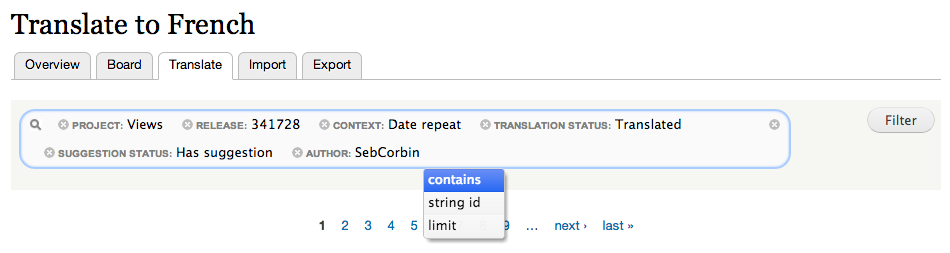
It needs a lot of UX review before being committed but it's a start.
Comment #20
gábor hojtsyI'm not sure how the interaction of this is supposed to work? It is hard to tell from one screenshot :)
Comment #21
SebCorbin commentedUpdated to the latest version (requires jquery_update --dev) set to 1.8
I've set up a sandbox where you can try this http://issue-1118430-localize_7.redesign.devdrupal.org/translate/languag...
And here are some login links for this issue followers
Gabor http://issue-1118430-localize_7.redesign.devdrupal.org/user/reset/1/1380...
hass http://issue-1118430-localize_7.redesign.devdrupal.org/user/reset/292/13...
droplet http://issue-1118430-localize_7.redesign.devdrupal.org/user/reset/1455/1...
Bojhan http://issue-1118430-localize_7.redesign.devdrupal.org/user/reset/340/13...
for the others, contact me via IRC
Comment #23
droplet commentedThanks @SebCorbin.
But it has "Access denied" problem on this page:
http://issue-1118430-localize_7.redesign.devdrupal.org/translate/languag...
(I've logged and joined the group)
Comment #24
hass commentedLink does not work for me. Access denied.
Aside from the UI, can you add a case sensitive search feature, please? I have more and more troubles to find strings without. Mostly results of many thousands of unrelated strings.
Comment #25
gábor hojtsy@hass: the search on existing issues works though :) if none found, please submit new issue.
Comment #26
SebCorbin commentedUpdated OG permissions, tested with droplet's account on test group.
Note that suggestion status and translation status are not working yet. I just need your feedback on the UX to see if I keep going forward :)
Comment #27
MixologicCan somebody please download and re-upload the linked images in the issue summary? I have switched this from full html to filtered html so that users without that input filter can comment.
Comment #28
SebCorbin commentedFixed the problems with translation status and release labels, added dependencies on jQuery update
Tests need to be rewritten.
Maybe I should create a new branch on git and push it to the staging site so that's easier to test?
Comment #30
gábor hojtsyCan you update issue summary with images of the proposed filter?
Comment #31
gábor hojtsyComment #32
SebCorbin commentedComment #33
SebCorbin commentedComment #37
hass commentedWhat jquery_update module branch and what version is required? There is a 2.x and a 3.x branch and as you know if the module has been installed there is a setting where you are able to select a bunch of jquery versions. I think this requires more detailed .info entry and a hook_requirement to make sure the correct setting is configured!?
Here are some other findings. We are also using these libraries in navbar and I have navbar module installed on my translation server:
We should use library API for this.
Same here, Libary API should be used.
Per https://documentcloud.github.io/visualsearch/ it could be jQuery 1.4+, jQuery UI 1.8+, Underscore.js, Backbone.js
Comment #38
hass commentedVisualsearch.js/css also need to be moved into a library.
Navbar module runs with Backbone.js 1.1.2 and Underscore.js 1.7.0. This will cause collision. The only way to prevent these is using library API to add the libs.
The rest looked good in a quick test. One thing was strange. When I loaded the translate tab the first time the visual search was empty. When I reloaded the tab several times the search items appear. This should be consistent I think.