

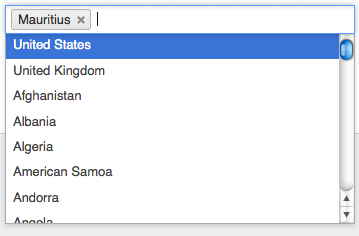
Chosen uses the Chosen javascript library to make your <select> elements more user-friendly.
Usage
By default the module will automatically apply itself to any select elements that have more than 20 options, which is a reasonable default for which having Chosen will be useful. To change or disable this automatic enhancement, you can change the selectors (or remove all selectors) from the Apply Chosen to the following elements field on the Chosen administration page.
The version 5.x uses the noli42/chosen fork of the library, which removes the jQuery dependency, and provides the ability to enable Chosen for mobile devices.
The version 4.x uses the jjj/chosen fork of the library.
The version 3.x uses the original but now abandoned harvesthq/chosen library.
Installation via Composer for Drupal 10-11
If you are using Composer to manage your site's dependencies, then follow the instructions depending on your module version:
For version 5.x:
The README contains all the information for the setup.
For version 4.x:
The README contains all the information for the setup.
For version 3.x:
issue #3102250 comment #47.
Update with Composer for Drupal 10-11
composer require drupal/chosen:[version] -W
for example:
composer require drupal/chosen:5.0.5 -W
Installation via Drush
A Drush command is provided in the latest versions for easy installation of the Chosen plugin.
drush chosenplugin
The command will download the plugin and unpack it in the right folder.
It is possible to add another path as an option to the command, but not
recommended unless you know what you are doing.
Dependencies
The Drupal 10-11 version has no Drupal dependencies.
FAPI #chosen property
For developers, you can force the Chosen plugin to be applied or never applied to your select FAPI element by adding $element['#chosen'] = TRUE; or $element['#chosen'] = FALSE; respectively.
Field UI
You can force enable/disable Chosen for certain field widgets: Select list (for both list and date fields), and Select (or other) list. If you have a field using one of these widgets, in the field settings, you will find a Apply Chosen to the select fields in this widget? option with three values: Apply, Do not apply, or No preference (which will fall back to using the automatic application).
Supporting this module
If this module is useful to you, consider supporting its maintenance through
GitHub Sponsors.
Project information
- Project categories: Administration tools, Content editing experience, Integrations
 49,317 sites report using this module
- Created by shadcn on , updated
 Stable releases for this project are covered by the security advisory policy.
Look for the shield icon below.


