

 The 2026 Drupal Business Survey is open. Your response will help shape the future of the Drupal business ecosystem.
I would like to create my personal site powered by Drupal looks like Single Page Website.
I tried to find prepared solution among existing modules on drupal.org
Searches have not yielded results.
So the module was created, and I puted it to my sandbox:
http://drupal.org/sandbox/vasilyyaremchuk/1131866
This module provide the ability to display the content of all menu items of the menu that you indicate in settings
on the one page 'single_page'. One can set 'single_page' as the front page of the site, thus the site with single landing page will appear.
I want to share my approach with the other people that would like to use Drupal as Back-end of thier single page websites.
The demo of this module you can find on my home page: http://yaremchuk.ru
Thank you!
| Comment | File | Size | Author |
|---|---|---|---|
| #29 | single_page_website.zip | 5.94 KB | yaremchuk |
| #26 | single_page_website.zip | 5.96 KB | yaremchuk |
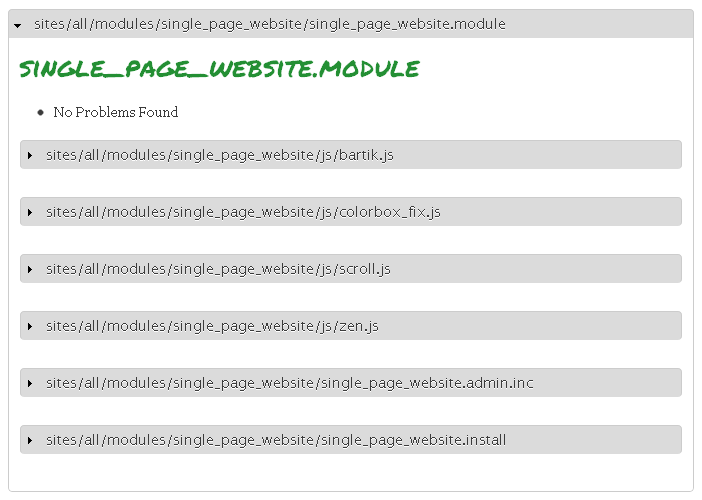
| #26 | coder.png | 13.35 KB | yaremchuk |
| #24 | single_page_website.zip | 5.93 KB | yaremchuk |
| #22 | single_page_website_crop.png | 131.66 KB | fotuzlab |



Comments
Comment #1
rolf vreijdenberger commentedHi Yaremchuck,
you're module meets the coding standards (tested via the coding module).
Can you explain a littlebit more about the module on your site?
How would I configure it etc. I installed it, but had to do too much work on my part to make it work, so I stopped :)
It looks like a nice feature to have, I have not checked it against pre existing work, but I can definitely see the use cases.
nice work.
cheers
Comment #2
yaremchuk commentedFirst of all, thank you for your kind responce!
Really I should writw more about module configuration.
This information was added on the project page
http://drupal.org/sandbox/vasilyyaremchuk/1131866
Also it was duplicate it below:
Configuration
Please, go to the module configuration page:
Configure / System / Single Page Settings
The settings page you can see here.
The default settings is good for the the Bartik theme and the Bartic sub-themes.
If you use another theme you should do changes in the settings.
1. Select menu in that you want to change links to the pages by the links to anchors in the single page. You should input the ID of this menu in the form with settings. This ID you can find for example with FireBug FF plugin (see example).
2. Input the ID of the header and footer elements that should be fixed on your 'single_page'. You can find it via FireBug FF plugin or see 'page.tpl.php' in you theme or parent theme.
3. You should create several real Drupal pages and place the links to this pages in menu that you select in #1 by native Drupal menu managment system.
4. Content that appear on the 'single_page' provided by AJAX requests to the existing Drupal pages. You should defive the DOM element that content you want to see on the page 'single_page'. You should be sure that the content of this element is not containe any IDs of HTML elements, classes only. Please see the example here.
5. Finnaly If you would like to have Single Page Website feature on your front page you should set 'single_page' as the front page of your site:
Configuration > System > Site information > Front page > Default front page
Thanks!
Comment #3
yaremchuk commentedplease see my comment #2 below
For some reason my answer was duplicated,
and I have no delete function for the wrong comment, only edit :-(
Comment #4
rolf vreijdenberger commentedHey Yaremchuck,
I had already installed single_page.
I tried to get it working with a Zen theme, but was not yet sure about wether I did it right.
I then switched to bartik (D7) and uninstalled and then reinstalled. The default values did not reappear, which they should do imo.
I was then able to get them via your attached screenshot, but unfortunately, the page sliding did not work properly, see screenshot attached.
I followed your instructions to the letter.
It seems the module was not able to record height of the nodes properly and there also was some overlap on rows, see other screenshot.
I haven't taken a look at your code yet other than running it through coder, but it seems to me that the functionality should at least work right out of the box as claimed.
I'm willing to help you, so if you can make some more steps we can get this thing on the road :)
Comment #5
yaremchuk commentedHi Rolf,
thank you for the testing of my module.
The screenshots that you sent provide me more understanding how to do the moduel better.
First of all I did not suppose that the content of some pages can have height more that the browser window height.
In the version that you use in this case the content overlaps each other.
In the current version the settings for the behavoir in the overflow case were added.
Also single_page_website.install was added, and during module uninstall all settings will be setted in default.
The version that should works correct in Bartik added to this comment.
But you can wait 2-3 days. I'm going to do some revision and provide independent default settings for each popular them and they sub themes with them auto detecting.
I think we can reach real out of the box solution.
Thanks to your kind help!
Sincerely yours,
Vasily P. Yaremchuk
Comment #6
rolf vreijdenberger commentedthat sounds great, let me know how your work goes.
I'm looking forward to your next version.
cheers
Comment #7
yaremchuk commentedHi Rolf,
please find new revision of the module in attachment.
Now the settings page became more simple,
but the limited list of supported themes appear.
I'm trying to understand is this approach more reasonable?
Thank you!
Sincerely yours,
Vasily P. Yaremchuk
Comment #8
rolf vreijdenberger commentedHi Vasily,
I'm currently not able to review due to time constraints, someone else can pick this up and else I'll take a look early next week!
cheers
Comment #9
yaremchuk commentedRolf,
early next week is OK.
Thanks,
Vasily
Comment #10
fotuzlab commentedDear Yaremchuk
Went through your module demo site, found it really good :) Could not install and test it yet but went through the .module file in quick time.
Here are a few suggestions:
Every function and variable name should be descriptive and start with your module name. This is basically to avoid conflicts and easily differentiate between variables in DB and elsewhere. I find 'single_front_page()', 'single_page_footer' and other variables require change in naming. I suggest something like 'single_page_website_page_footer' should do. Same for the function. See http://drupal.org/coding-standards#naming
It would also be good if you comment all your functions appropriately.(ref function single_front_page())
Would look into more detail soon.
Comment #11
fotuzlab commentedDid you come across
http://drupal.org/project/onepage
It seems abandoned but you may try to contact its maintainer.
Comment #12
yaremchuk commentedHi Arijit,
thank you for your comments about function and variable names,
I will correct them.
And about Onepage project,
I did not find any code on http://drupal.org/node/963910/git-instructions
so I start new project.
But thank you for the idea to contact with Onepage project maintainers,
I will do that!
Sincerely yours,
Vasily
Comment #13
rolf vreijdenberger commentedHi Vasili,
I installed the new version. screenshot attached.
I'm thinking that I might be doing something wrong since I can't seem to get it right :)
I'm with bartik unaltered as default them and changed nothing.
The scrolling is working a little bit but it only moves some pixels the first time.
i also see a scrollbar horizontally.
when I use another radiobutton (the bottom one) i have the same issue, but then without scrollbar
can you give some more explanation about what I should be doing?
I'll try to make some different navigation items.
Also I invite other people (like arjit) to take a look since I don't want to be a limiting factor in getting this module approved.
Does it work for others?
Comment #14
fotuzlab commentedHi Vasili
I installed the module and here is what I did:
-downloaded module from git repository
-extracted and placed it in my D7 fresh installation(minimal)
-enabled module(menu alongside)
-went to the configuration page, Bartik was the only option in the dropdown and selected 'Leave the content as it is, scroll can appear'
-created a content type page and created three posts with menu links(through menu settings in node-edit options)
-three tabs appeared on the top
-went to site information and set the front page as 'single_page'
The front page did not scroll on clicking the tabs for me. I could see tab1 content and could scroll down to see other two nodes.
Cleared the cache but in vain
Tried all the three options one by one.
Nothing worked for me :(
In all the scrolls appeared and disappeared for different options.
Could you please tell me if I missed something in configuration. There is very brief configuration documentation. This was all I could manage.
Your demo site works beautifully. Is it using the same module or has some tweaking done over it?
@rofl would you confirm if you also tried something other than the flow I have listed here. It may help Vasili to gather all the options and procedure we have tried and could not make the module work?
Comment #15
joachim commented> 'title' => 'Single Page Settings',
Use sentence case in page titles.
> $items['single_page'] = array(
> $items['admin/config/system/single-page'] = array(
Standardize paths - the hyphen form is the more usual.
> $items['admin/config/system/single-page'] = array(
I think this belongs under 'appearance' rather than 'config/system'.
> Default theme will be overwriten, by this selection!
This is scary!!!! overwritten how? I don't see code that looks like it does that, but it sounds like it's going to change my files!
I installed the module successfully. It changes the primary links menu, but not the navigation menu, or links inside the content such as the node author.
Comment #16
joachim commentedAlso, having put two items into my primary menu, this appears to work by loading everything and scrolling around.
How scalable is this? I had assumed you'd be using ajax to load pages in as requested -- see http://drupal.org/project/quicktabs for an example of this.
Comment #17
fotuzlab commentedThanx to joachim's comment, I was able to get the module working-added new terms in the main menu by going to the menu add item link instead of adding it through the node edit page. Not a very user friendly thing for a site that uses 4 nodes as all of content.
Second problem I ran into was that I had some long content in the node body and scrolling was not able to recognize it. It left me in between the content on clicking the next link. (edit+)Also the left navigation block moved along with content.
I think the second problem is kind of #priority to look upon before we move further.
@ joachim: I am not sure AJAX as in quicktabs would apply here too as you can see in the demo site that you can manually scroll down the content if you want. Quicktabs operate on blocks or nodes that uses AJAX on changing the tab. Vasily has suggested this module for small websites(like personal portfolio etc) and I think it should be able to handle 5 to 6 tabs easily. Putting a limit to number of tabs could be an option. Thats my personal opinion.
Comment #18
joachim commented> Vasily has suggested this module for small websites(like personal portfolio etc) and I think it should be able to handle 5 to 6 tabs easily.
Ah right. I was under the impression that the idea of this module was to do any kind of site with AJAX, the same way twitter works now.
Comment #19
yaremchuk commentedHi,
thank you for your comments.
It is very helpful to create this module better.
Special thanks to Arijit.
I went through your items and found real issue with my module.
If menu item have a space (several words) the problem appear
due to incorrect anchors with space.
I'm going to fix this issue and implement coding convention.
I let you know when I update module soon!
Geate Thanks!
Vasily
Comment #20
yaremchuk commentedHi Rolf and Arijit,
the main issue that you found was fixed,
you can find the version in attachment or on drupal Git repro.
Also I prepared one quick demo how to use this module:
http://yaremchuk.ru/sites/default/files/single_page_website.swf
I continue working to take into account other comments.
New updates comming soon.
Thanks!
Vasily
Comment #21
rolf vreijdenberger commentedgood job Yaremchuk!
I'm going to check it out.
also thanks to other reviewers for stepping in!
seems there's already some people liking your stuff
Comment #22
fotuzlab commentedHi Vasily
Checked the new version of the module. The scrolling is going right for 'crop text' setting but for the other one, it is still the same(leaves in between the content).
I can now create menu directly from the content edit page and with spaces :)
Another concern I have is the 'crop text' setting. I am attaching a screenshot where you can see it has cropped the line in half :o
Moreover personally I am not very satisfied with this approach. Reason being, once I crop the text I have no link to send the user to the node page to read the full article as the node titles are not clickable by default. The lines cut in half doesn't do any good either.
I suggest to put a read more link there.
A few notes:
A read more link can be ajaxified but then it may land you in same problem of scrolling to the node title.
If it takes you to the node, say node/1, then I noticed that the tabs instead of taking you to the homepage and start their usual scrolling, takes you to respective node pages. eg. go to http://yaremchuk.ru/node/1 and click the tabs. It is not exactly a bug but may be something you would like to pay attention to if you plan implementing read more thing.
Regards
Arijit
Comment #23
yaremchuk commentedHi Arijit,
thank you for your comment about crop issue. I'm not sure that it is quick task, because module get content of other pages by $().load() jquery, so I did not see simple way to cut content accurately. But I will take a look on this issue ASAP.
Thanks!
Vasily
Comment #24
yaremchuk commentedHi Arijit,
The management of behavior was turned off, now user can not get screen shot as you sent in #22, also some changes according to http://drupal.org/coding-standards#naming (your comment #10) were done.
Sincerely yours,
Vasily
Comment #25
fotuzlab commentedDear Vasily
The module is working perfectly now. Must compliment you for making it work so smoothly :)
Here are last few things I found before changing the application status to RTBC:
-You can remove hook_install rather than commenting text in the function
-You forgot to change the variable names in hook_uninstall :)
-Please run your module through coder on minor setting. A few 'trailing spaces' issues are left.
A personal suggestion, you may change the name of the module in the .info file as single page website than single front page...sounds more descriptive :) Also there are some spellings to be corrected in README.txt ->under CUSTOMIZATION and ROADMAP
Regards
Comment #26
yaremchuk commentedHi Arijit,
thank you for your kind review and helpful comments.
Please find an attachment with changes that you ask.
You can find also this updates in GIT repro.
There is only one thing incomprehensible to me.
I use Coder module 7.x-1.0-beta6 and 7.x-1.x-dev but did not see warning about 'trailing spaces'.
Please, advise me, what can I do wrong? See an attached image.
Sincerely yours,
Vasily
Comment #27
yaremchuk commentedComment #28
fotuzlab commentedDid you run coder at minor setting?
Comment #29
yaremchuk commentedNo, I used normal settings only.
But now, when I turned to 'minor' I saw several warnings.
They was fixed, thank you for your advice!
Please find updates in attachment or in GIT.
Thanks,
Vasily
Comment #30
fotuzlab commentedThanx for fixing all the coder warnings Vasily :)
I think the module is now quite stable for use.
Comment #31
yaremchuk commentedThanks Arijit!
What should I do to migrate
Single Page Website (http://drupal.org/sandbox/vasilyyaremchuk/1131866)
from sandbox to full project entity?
Sincerely yours,
Vasily
Comment #32
rolf vreijdenberger commentedHi Vasily,
congrats!
there is a link in your project page that says 'promote to full project status'.
click it and you will be guided through the process
Comment #33
yaremchuk commentedHi Rolf,
i'm sorry but I did not find this link
neither on my Drupal.org dashboard nor on the sandbox project page.
Could you advise more?
Thanks,
Vasily
Comment #34
yaremchuk commentedHi all,
Can someone help me with this?
I found http://drupal.org/node/1068952
But following the instruction I did not see
Promote sub-tab unde Edit tab of my sandbox project.
Thanks,
Vasily
Comment #35
rolf vreijdenberger commentedHi Vasily,
I'm sorry about that, there's another step needed.
the status is now changed to reviewed and tested. Someone with the right permissions will come along and will approve your module so you can then promote it to full project.
This will probably happen in the next few days, so if you can wait a little longer it will be fine.
then the link will show up :)
Comment #36
yaremchuk commentedHi Rolf,
no problems, I'm waiting the approve.
Thanks!
Vasily
Comment #37
fionad commentedHi Vasily
Thanks for coming back to me. I still would like to see this as a module for drupal 6 as well as 7.
Kind Regards
Fiona
Comment #38
yaremchuk commentedHi Fiona,
I'm going to do version for D6 but after approving this issue to the full project state.
What themes would you like to see among supported in the Drupal 6 version of the module?
Sincerely yours,
Vasily
Comment #39
fionad commentedHi Vasily
I am glad to hear that. I can see alot more developers using it, if it has a D6 version. Not everyone is ready to move to D7 in a commercial environment.
I would definitely say zen or fusion, any of the main base themes.
Kind Regards
Fiona
Comment #40
mlncn commentedCongratulations, Yaremchuk! You can now promote sandbox projects to full status ones. When you would like further review for any project please do ask at http://groups.drupal.org/peer-review/requests
Further issues (for D6 branches and anything else!) can be filed on your project issue queue. Thank you for your contribution and i look forward to seeing its refinement and development and your continued involvement in Drupal!
benjamin, agaric
Comment #41
fotuzlab commentedCongrates Vasily :)
It was long pending !!!
Comment #42
yaremchuk commentedThank you very much all who helped me to prepare the module for release!
Now you can see
http://drupal.org/project/single_page_website
Special thanks to Arijit and Rolf!
Comment #43
rolf vreijdenberger commentedcongrats vasily! thanks for your work and contribution :)
Comment #44
dan_metille commentedHi,
First I would like to congratulate everyone and specially Vasily for this great and interesting module. I'm testing it for one of my personal project and it works well, except that some javascript are no more functioning in the single_page view as they do in simple nodes. This is the case for instance with Tipsy (I have tried different types of tooltip scripts too, with same problem).
Could someone explain me why is it such and if a fix can be done?
I have seen that the module has a colorbox fix script. Can something like this be done for Tipsy and others scripts/modules?
Unfortunately, I'm not really a coder and just don't understand what can be done and how.
Thank so much for any help.
Comment #45
fotuzlab commentedSahaj,
This is already a full project now. You may file this issue under support here http://drupal.org/project/issues/single_page_website?status=All&categori...
Comment #46
GemVinny commentedI'm having the same issues as @arijit but struggling with the suggestions that were given to him.
I have set everything up - I click on each menu link - it doesn't scroll to the page, the link doesn't even go into the URL bar. Is there any chance anyone could help me?
Thank you!
Comment #47
GemVinny commentedComment #48
ParisLiakos commentedPlease dont hijack the thread....
open a new issue to the projects issue queue here http://drupal.org/project/issues/single_page_website