

Closed (duplicate)
Project:
Rotating Banner
Version:
7.x-1.x-dev
Component:
Miscellaneous
Priority:
Major
Category:
Bug report
Assigned:
Unassigned
Reporter:
Created:
2 May 2011 at 23:30 UTC
Updated:
30 Mar 2012 at 16:34 UTC
Jump to comment: Most recent, Most recent file

Comments
Comment #1
fmizzell commentedThis patch should fix this problem
Comment #2
damien_vancouver commentedI had this error as well, after having upgraded my Media module. I was unable to configure an existing Rotating Banner block.
fmizzell's patch from #1 fixed the problem. Nice one!
Comment #3
mrsinguyen commentedThis patch work well for me. Thanks
Comment #4
Crossfeed commentedYes, patch also works for me. Hoping for a branch update soon.
Comment #5
tamsoftware commentedworked here too !
thanks!
Comment #6
sapelzin commentedThe patch fixed the undefined function error, but with Media version 7.x-1.0-beta5, my banners don't rotate. Is there an update of the rotating-banner module on the horizon?
Comment #7
davidgaia commentedThe patch does not work, I have loaded it into the rotating banner module on the server run ssh to patch it and it does absolutely nothing, I increasingly find these kinds of issues really frustrating, I have shifted back to the dev version of the Media module in the hope that this will work, I will try one last time with the Media version 7.x-1.0-beta5. If ANYONE can help I would really appreciate it.
Comment #8
Old Man commented@ davidgaia
I applied the patch in #1 manually. It got rid of the error message, and the banner works. Try patching again. I just hope the maintainer hasn't abandoned this module and can put in a permanent fix.
Comment #9
hadi farnoud commentedalso worked for me, thanks
Comment #10
experience76 commentedI need your help: in this link:
http://localhost/drupal/?q=admin/structure/block/manage/rotating_banner/...
when I save the configuration of the loaded image I get a white screen that blocks ant doesn't allow me to go on with the configuration. How can I resolve the problem? Is there any patch and how can I use it?
Thank you
Comment #11
experience76 commentedMany thanks, I was able to use the patch and fix \m/
Comment #12
maciej lukianski commentedPatch in #1 worked for me as well. Thanks a lot.
Comment #13
jibberish commentedPlease could someone upload the patched version of the module? I've tried using tortoisemerge - and I'm completely lost. Patch files do my head in....
Any help - much appreciated - thanks
Jibb
Comment #14
rlmumfordThis patch worked for me. I imagine the maintainer will have to give permission for you to push this to the dev thing.
Comment #15
jibberish commentedIs there no chance someone can just upload the patched module here as an attachment?
Comment #16
jibberish commentedPlease could someone post the patched version of the module file? :-)
Comment #17
need4speed commentedHow do I use the patch can anybody tell me how to install the patch?
Comment #18
benasplentas commented@ need4speed:
1. Download the whole folder for a module to your Desktop (off of the server where you have it running)
2. Create a text file (ending in .patch) using a patch for the respective module (you might have been brought to a web page with lines of code to be copied and pasted from the page into the text file)
3. Save it and place it in the module's folder
4. Open up *Terminal
5. Navigate to the folder (using cd)
6. Run this command: patch -b < file_name.patch
7. Upload the whole folder BACK to it's respective location on the server (and overwrite the original folder there)
voila! :)
by the way - the patch works, you also need to install jQuery Cycle plugin and everything works perfectly.
Comment #19
jibberish commentedOh - please could someone upload the patched module? I'm running windows.
I've tried cygwin and tortoisemerge and neither of these seem to do anything for me and I'm lost. :-)
Comment #20
mrsinguyen commentedYou can manually edit this patch:
1. Go to rotating_banner.module
2. Find
3. Remove two lines
4. Insert
Comment #21
jibberish commented@mrsinguyen
Thank you so, so much!!!! I can't try it till I get home - but thanks in advance.
:-)
Jibb
Comment #22
parkview commentedThis patch fixed my WSOD issue on the configuration page.
As I have a FreeBSD server, I cd'ed into the rotating_banner module directory, then ran:
fetch http://drupal.org/files/issues/rotating_banner-no-media_load-1145092-1.p... to download the file into the directory.
I then installed the patched by running: patch < rotating_banner-no-media_load-1145092-1.patch
The FreeBSD patch cmd backs up the original file for me before applying the patch.
Comment #23
rlmumfordcan whoever the maintainer is put the patch into the corrent dev release?
Comment #24
888michelle888 commentedI have the same problem of not able to configure banners mod. after 1st setting. In fact this error message appeared after i saved my banner setting. What is the format of your pitch file? not .txt right? How could i apply your pitch file? by placing same level of "rotating_banner.module".
Anywhere i could find the steps of pitching in detail? thank you.
Comment #25
888michelle888 commentedCould u kindly share with me in detail how u apply the pitch file?
Thank you
Comment #26
jibberish commented@mrsinguyen
I tried out your suggestion and it worked perfectly. Thanks very much :-)
Jibb
Comment #27
MTC120 commented@mrsinguyen(or anyone who can help)
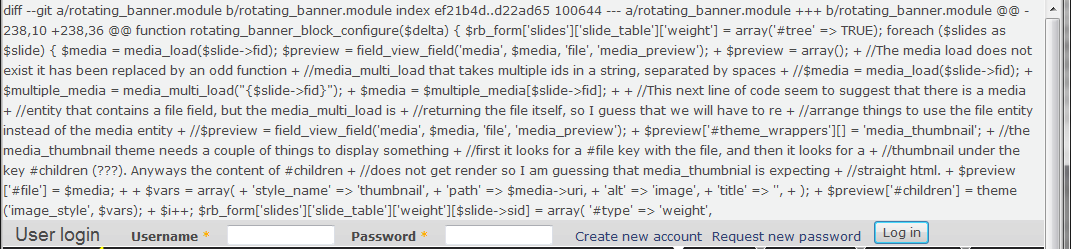
After doing your patch, I see this(see attachment) whenever I pull up a page(any page). Is it because I edited it in Notepad++ and/or because I set Notepad++ to be the "Defult" Open-er via Properties in Win7?
(I am a somewhat newbie, had to register just to post this :/)
@888michelle888
All he did is download it, open it in a Text editor, and then started editing it. After that, he just saved it as "rotating_banner.module", I think. Then again, you might not want to do that for fear of what has happend to meh. :S
@all:
BTW is this the finished product?
(picture is in attachment, the login you see is SUPPOSED to be the top of the page...)
Comment #28
MTC120 commentedAh, (*sigh), sometimes theres a fix I can figure out after I think all hope is lost...and post it here. Heh.
Well, to anyone else having this problemo, heres the fix.
THAT, up there, is NOT the finished product, and I won't post the finished product for it has more than 700 lines of code. That was me editing the .patch file, which was okay, but then the patch file just needed to go inside the .module file, which I didn't understand at the time(and overwrited it :S)
Enough with the jibjab, for you other new guys, heres the simple fix;
1) Find the file "rotating_banner.module"(somewhere in your (hard drive):/.../(site)/sites/all/modules/rotating_banner directory)
2)Open in a text editor, i.e. Notepad++
3)Do what mrsingyuen says.(And I mean EXACTLY what he says!)
Then you should have no problems! :)
NOTICE:
DO NOT do what I did, which is edit the .patch file, for thats only a smigden of the whole file itself as well. The patch file actually only has around 45 lines of code, and thats not very close to greater than 700 lines of code. All the .patch file is is the, well, smidgen of the file that needs to be fixed, and what mrsingyuen did was take the patch, found out where to put it, told us, and took out two lines of code in the process.(a sub fix? Heh.)
Sorry about the commotion peoples, I should've checked twice before charging straight ahead. ;)
(Also, to those dear newbies, if you make a mistake, small or large, manually re-install the whole module. It fixes everything.)
Comment #29
shinz83 commentedpatch works! thanks!
Comment #30
eewing commentedThank you mrsinguyen! Worked great.
Comment #31
Anonymous (not verified) commentedThanks for posting, this did the trick.
Comment #32
jason@iconsolution.info commentedThanks so much.. it works
Comment #33
duilio_1967 commentedThank you, the patch worked fine !
Comment #34
carmelaem commentedAfter I installed the patch, the banner text disappeared and the editor will not allow me to add new banner text. Anyone else having this issue? Any ideas for a fix? Thank you
Comment #35
IanNorton commentedThe patch also worked for me,
Just a general query - what's the status of this project? As it's being used on Drupal gardens I presume it's being updated but it doesn't seem like it is here?
Comment #36
epmD commentedThis worked out really well. Thank you so, so much!!!!
Comment #37
rlmumfordI'm going to set the status back to major and reviewed and tested so that hopefully someone will come along and put the patch in.
Comment #38
ultimateboy commentedDont know why this is "to be ported" it should be "reviewed and tested". Also removing the crazy tag.
This definitely fixes the issue. Thanks.
Comment #39
effulgentsia commentedI'm tempted to mark this a duplicate of #1160786: need update for file_entity changes in media module, but the #1 patch in this issue does more than the patch in the other issue. So, is there anything being fixed in this issue that isn't fixed by the patch in #1160786-1: need update for file_entity changes in media module?
Comment #40
ykhadilkar commentedThanks fmizzell. Patch works.
Comment #41
jandekezel commentedThis patch worked for me too. Thanks!
Comment #42
clouds commentedWorked great for me after I set up NetBeans to apply the patch. Many thanks.
Comment #43
viwetyibilika commentedWorked here too... thanks in particular to mrsinguyeni for the instructions
Comment #44
ttjordan81 commented+1 The patch worked for me!
Comment #45
dave reidThis patch should be using file_load() not media_multi_load().
Comment #46
jsacksick commentedComment #47
jsacksick commentedComment #48
boran commentedThe patch in 46 applied and I could configure the block.
I also get the warning:
Notice: Undefined index: #file in theme_media_thumbnail() (line 288 of .../sites/all/modules/media/includes/media.theme.inc).
Notice: Trying to get property of non-object in theme_media_thumbnail() (line 288 of /.../sites/all/modules/media/includes/media.theme.inc).
Comment #49
eckersley commentedBrilliant. After a whole day messing around with all sorts of options, this is what I wanted: a rotating background banner image slideshow for my landing page with a simple enough front-end so non-technical people can go in and configure it.
The patch worked for me too. The readme file was a bit confusing because the required javascript files were actually available by different names from those mentioned. Still, they worked fine when renamed as requested.
I was wondering what I might do to get the background images to display from the horizontal and vertical centers. I am working with a 'responsive' theme (Omega) and I would like the background images to display from the centers when seen on small-screen devices.
Here's my humble contribution in anticipated trade:
If you want a semi-opaque ribbon over the image for the text as in for example the Marinelli theme, then pop something like this into your override css:
Again, any help on centering the background image would be great.
Comment #50
inventlogic commentedIn Drupal 7 - You need to rebuild the media file types:: Admin Menu::Configuration / Media /Rebuild Type information for Media.
Comment #51
n8j1s commentedPatch #1 seems to bring things up to date with the changes in the media module and fixes the issue. Ready to be committed?
http://drupal.org/node/1145092#comment-4455752
Comment #52
katbailey commentedMarking as a duplicate of #1160786: need update for file_entity changes in media module per Alex's comment in #39. The patch in this issue provides a different workaround, requiring more code, but the patch in the other issue works just fine.