

 The 2026 Drupal Business Survey is open. Your response will help shape the future of the Drupal business ecosystem.
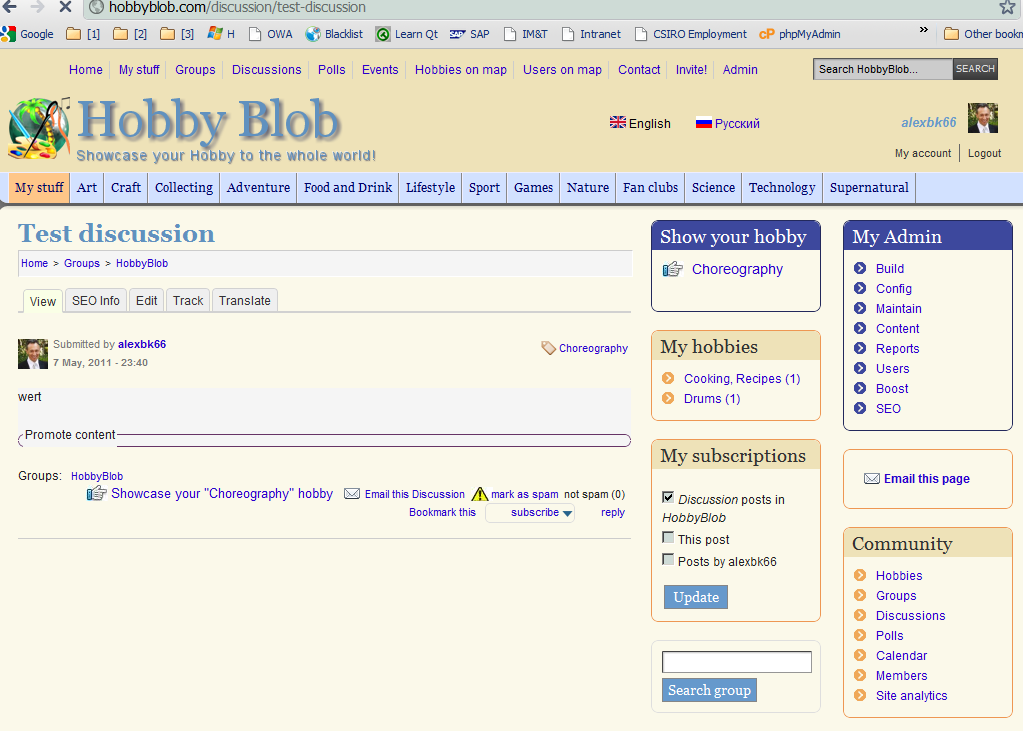
Strange problem. After I create a new 'discussion' - when it loads first it looks ok, but when load completes - page layout changes, see attached advagg1.png and advagg2.png. It looks like it looses my local.css because that's where I customized my layout, so it returns to original theme.
Strange thing is - it happens only with the discussion content type and only in Google Chrome. I can open this page in Firefox, it mostly works. Occasionally it also screws, but page refresh fixes the problem.
I used to get this issue before with other content types, but refresh used to fix it. Which is still an issue, because user will be frustrated anyway. With the discussion even refresh doesn't help.
| Comment | File | Size | Author |
|---|---|---|---|
| #24 | Advagg-js.txt | 144.56 KB | alexbk66- |
| #24 | Advagg-js.jpg | 456.14 KB | alexbk66- |
| #15 | AdvAgg-0-.txt | 57.64 KB | alexbk66- |
| #15 | AdvAgg-1-.txt | 80.18 KB | alexbk66- |
| #15 | AdvAgg-1- loggedout.txt | 80.25 KB | alexbk66- |


Comments
Comment #1
mikeytown2 commentedDisable CSS compression, see if the issue goes away. If not then load the page that is having issues with ?advagg-debug=1 in the URL; then go to the dblog and copy the output to a text file and upload it here.
also see #1122766: CSSTidy - Corrupted CSS background image properties when "Preserve CSS" is disabled
Comment #2
alexbk66- commentedI disabled Compress CSS and Compress Javascript modules, same result. Here's the debug info. Hope it helps.
Additional info: when I open the page as Guest, it's fine. But when I login, it's screwed. May be has something to do with boost.module.
Comment #3
alexbk66- commentedSame problem when I apply an exposed filter in any view. Debug attached.
HobbyBlob.com
Comment #4
mikeytown2 commentedwhat happens when you use
?advagg=0and?advagg=-1.I'm not seeing local.css in any of the CSS arrays. How does local.css get loaded?
Comment #5
alexbk66- commentedUsing both 0 and -1 fixes the problem.
Regarding local.css - I'm using Drupal Commons (DC), I found that DC doesn't register their css files, so they are not included in advagg bundles. I asked the question in DC forums, but there's no reply:
http://commons.acquia.com/discussion/advanced-cssjs-aggregation-and-dc
Comment #6
mikeytown2 commentedIs this the project? http://drupal.org/project/commons
Comment #7
alexbk66- commentedYep
I'll add drupal_add_css call for these 3 css files and see what happens
Comment #8
mikeytown2 commentedOn the theme settings page for fusion, can you disable the "fix_css_limit" setting and see if that fixes the issue?
Created an issue for fusion #1154732: AdvAgg Integration
Comment #9
alexbk66- commentedIf you mean "Avoid IE stylesheet limit" - it's disabled already.
Comment #10
mikeytown2 commentedWhat happens when you do
?nocache=1Comment #11
alexbk66- commentedsame
I wonder why it works if I logout? Or even login as different user?
Which is of course a good thing as only me have this issue :)
Comment #12
alexbk66- commentedI mean it only happens if I create a discussion as user1 and view it as user1.
Comment #13
alexbk66- commentedAnd to be even more precise - only when I view the discussion as user1, even if it was created by another user.
Comment #14
mikeytown2 commentedThis patch will output fusion css theme info.
Use this in combination with
?advagg-debug=1&advagg=0and?advagg-debug=1&advagg=1. If I can get the advagg debug info from watchdog attached that would be very helpful.Comment #15
alexbk66- commentedHi Mike,
Find attached debug files with applied patch, first for good display, second - for bad.
And one more with advagg enabled, but not logged in user, in this case display is good.
And BTW, I've noticed more issues with advagg - I also get #1122766: CSSTidy - Corrupted CSS background image properties when "Preserve CSS" is disabled, also pager buttons are now located vertically (one under another) and DHTML menus are expanded, but with advagg=0 they are collapsed (default setting).
Comment #16
mikeytown2 commentedLooking at the 2 advagg-1 files, the only difference is that the loggedout.txt file has a messages array. Why it's broken for only user 1 is a little strange and I'm starting to run out of ideas.
CSS Embedded Images was recently upgraded; I need to update my patch to match the new code.
I got one idea left. Lets start with the bare minimum and go from there. Only have the core advagg module installed; disable CSS embedded images as well. Do a master reset. See if you get the bug; if not enable one sub module at a time, every time doing a master reset. Hopefully we can track this down. Remove your drupal_add_css tricks for local.css as well so we have a typical install.
Comment #17
alexbk66- commentedHonestly, I tried already disabling modules, including CSS embedded images, but i'll try again.
Thanks for your help.
Comment #18
alexbk66- commentedWell, after disabling all modules and resetting everything and enabling again modules one by one - everything works!
Must be the master reset, also "Rebuild htaccess files", BOOST master reset, something fixed the problem.
By the way, I didn't undo my "drupal_add_css tricks", but for some reason it didn't work anyway - I check the page html, it still downloads the 3 css files separately, I don't know why.
Thanks for your help and time. BTW, should I undo the patch #14?
Comment #19
mikeytown2 commentedGuess I'm going to close this as a cannot reproduce bug. Not ideal, but that's how it goes sometimes.
Yeah go ahead and undo patch #14
Comment #20
alexbk66- commentedMike, thanks for your help, hopefully it doesn't happen again.
HobbyBlob.com
Comment #21
alexbk66- commentedMike, I can reproduce the error, even for guest user.
Go to this page and sort by Author or Title.
http://hobbyblob.com/node/1/content/blogs
If I disable "Advanced Aggregation" problem disappears.
So unfortunately problem is more serious that I thought.
Comment #22
alexbk66- commentedFirebug shows an error:
And IE8:
Comment #23
mikeytown2 commentedThis is a JS error; has to do with the JS in the files getting loaded in the wrong order. Can I get a debug file on the page that this is blowing up on?
?advagg-debug=1
Comment #24
alexbk66- commentedSure, attached.
In Chrome I see some errors
And in attached screenshot the error is between the two Fusion css files and the local.css. So I wonder if it's got something to do with the way Drupal Commons (DC) handle these three css files? I still haven't got any reply for my post in DC forum.
Comment #25
mikeytown2 commentedJust pushed out a fix that I think will take care of this latest issue. If it doesn't let me know!
http://drupalcode.org/project/advagg.git/commitdiff/05a49a3ff6bf38ee78ea...
Comment #26
mikeytown2 commentedgoing to mark this as fixed.
Comment #27
alexbk66- commentedSo far no probs, thank you!
Comment #29
jason.fisher commented#25 - http://drupalcode.org/project/advagg.git/commitdiff/05a49a3ff6bf38ee78ea...
Can someone please review that patch again? It looks like that patch is removing and then adding the same lines back again?
I am seeing CSS aggregation issues with advagg and Fusion. I believe the problem is that advagg may be loading the fusion_core theme CSS after my active theme's CSS? fusion_core's style.css is resetting the ".nested" rule that my theme is setting. All compression and the bundler is disabled.
I can repost this to another ticket .. but it really does seem closely tied to this one, and with the subject being CSS related and that last patch only mentioning JS .. I am not sure what to take from it.
Comment #30
jason.fisher commentedPerhaps this is a profiles issue. I have fusion_core in /profiles/drupal_commons/themes/ -- maybe something with that location is affecting it?
Comment #31
jason.fisher commentedPerhaps this is a profiles issue. I have fusion_core in /profiles/drupal_commons/themes/ -- maybe something with that location is affecting it?
Comment #32
jason.fisher commentedOK .. watching "Network" in a Web Inspector is making things a bit more clear, but I am not sure why they are working this way.
I am seeing the aggregated CSS file load correctly. I believe it is constructed correctly and in the right order. My local theme is loading correctly after ..
But what is odd is that I am seeing all of the normal CSS load via AJAX after the page has completed. This has the effect of causing the page to look correct for a moment .. and then snapping out of whack as CSS files are reloaded and order goes out the window.
Comment #33
jason.fisher commentedFigured it out .. the CSS being loaded after-the-fact is from ajax_load. There are known issues there. With the latest dev of each, I am seeing ajax_load use the aggregated versions of the files .. but it is still loading them several unnecessary times.