There are some good resources on how to theme CCK3 multigroup for Drupal 6. However, there doesn't seem to be that much information for Field Collection.
You can use the following to print out your field collection in your node.tpl.php file:
print render($content['your_field_collection']);
But how do you get to the fields contained within the collection? This discussion recommends using a field_collection_item.tpl.php file. However, that isn't much use if you want to wrap the field elements in a custom DIV.
For example, lets say I had a field collection called 'Block' with a text field and an image field and I wanted to wrap the text & image field in a custom DIV. How would I do that?
Also what happens if you want to theme field collections that are stored within a parent field collection?
This thread gives an example, but it incorporates Drupal's link system and so is quite complex to follow. Does anyone have any simpler field collection theming examples?
Thanks!




Comments
Comment #1
RobW commentedHere's some quick pointers:
If we have something like
Field Collection Field
-Field Collection Item #1
-Collected Field 1
-Collected Field 2
-Collected Field 3
-Field Collection Item #2
-Collected Field 1
-Collected Field 2
-Collected Field 3
To theme "Field Collection Field", which contains all the field collection items, you can use field--your-field-collection-name.tpl.php, just as you would any other Drupal field. You will run into two problems though:
To completely remove the wrapping tags you could use the very dirty
in your content type tpl, and add wrapping code there. Of course you will lose both the wrappers, the add/edit links, and any other functionality added there by Field Collections module. You could also use the entity_load() with foreach statement described in #1107214: Field Collection tpl overrides and accessing field collection field values from node.tpl, but I think that's also a slightly dirty solution involving loading functions when you would prefer to be using theme files. The current best option would be to override the prefix and suffix by altering field_collection_field_formatter_view() and theme_field_collection_view(), which create prefix and suffix, in your template.php, or writing a preprocess function. I have no code samples for that because... well I haven't gotten around to playing with it.
In the future I'd like to see a field-collection.tpl.php that we can alter on a per field collection basis, but that's not available right now.
Theming Field Collection Item #X is much easier. To override them sitewide, use field-collection-item.tpl.php, or check #1100736: Template filename should use dashes not underscores for a per-collection patch.
And to theme Collected Field X, you can use Drupal 7's built in field--your-field.tpl.php.
Theming collections within collections should work pretty much the same. The example I wrote out with entity_load() and foreach statements might have been a little complex - a simplified generic version would be
Hope that makes it easier to understand. I edited the original issue solution as well.
[Edited for typos on 6/8/11]
Comment #2
big_smile commentedThanks! The code you posted is a huge help and makes everything clearer.
Just to double check: Are the double dollar signs in
print render($$a_field_collection_item_object->field_1);a mistake?Also, do you have any pointers you could give on using the code you posted to access fields that are stored in field collections that are children of other field collections. (i.e. accessing field collections that are inside field collections)
I have tried lots of variations of the code you posted to do this, but nothing seems to work.
Thanks!
Comment #3
RobW commentedDouble $ signs were a total mistake. Edited them for future readers (is editing so much ok? I hope so).
I would think you'd need to do another entity load, as field collections inside field collections are probably another entity reference in the field collection entity. Try using the dsm() function provided by the Devel module on your nested collection's field -- something like
dsm($a_field_collection_item_object->your_nested_collection);-- to see where your nested field collection's uri can be found, then use an entity_load(). Good luck.Comment #4
big_smile commentedThanks for your help.
Using
dsm($a_field_collection_item_object->your_nested_collection);only shows array containing a UND with some more numbered arrays.However, using
dsm($node);shows that the children field collections follow the exact same 'ordering' as the parent field collections.Therefore, the following code should work (in theory):
However, it doesn't produce anything. Does anyone have an ideas or pointers?
Comment #5
RobW commentedMy initial thoughts are somewhere in the numbered arrays you get from
dsm($a_field_collection_item_object->your_nested_collection)is the entity uri.The way that field collections work might help you figure this out. Field collection fields aren't really in the node itself; rather each instance of a field collection is a completely separate entity with some fields on it (like a super simplified mini node), and those entities are connected to the node through a reference that contains a field entity uri. It's like how you work with node reference fields, if:
node reference field == field collection
nid == field collection entity uri
node_load() == entity_load()
So what you're looking for is the an integer at the end of an array that represents your desired field collection entity, and then load an array filled with the entity object through entity_load(), and then drill down in that for your content.
Comment #6
big_smile commentedThanks for your continued help.
Do you (Or anyone else) know of any tutorials that explain how to extract arrays and loading them with entity_load?
It sounds quite simple, but after playing around with it for a couple of hours, I think it's just a bit above my skill level!!
Comment #7
RobW commentedAny time you're dealing with a Drupal function, the best place to start is the Drupal API reference: http://api.drupal.org/api/drupal. It will give you the parameters the function takes, along with various levels of explanation depending on the people who wrote the docs. There are often comments at the bottom that highlight specific problems and caveats.
Information on entity_load() is here: http://api.drupal.org/api/drupal/includes--common.inc/function/entity_lo...
One thing that's kind of a pain with entity_load() is it returns an array, containing an object keyed as the entity uri, containing an array containing the actual field information. That's why I have the extra foreach up there, to get past the ever-changing entity uri that is the object key.
Of course all of this requires a little bit of php familiarity. I am a relative novice too, so there may be better ways to do some of these tasks.
Comment #8
WilliamB commentedHello and thanks for the pointer.
However after applying the patch and succesfuly theming a collection, i still can't theme a field within a collection.
You wrote And to theme Collected Field X, you can use Drupal 7's built in your-field--field.tpl.php.
But for me it always was field--field_your_field_name.tpl.php. Out of the field collection field work fine with their respective template but i can't find how to set a template for the field within the collection.
My fist field inside the collection is field_chap_picto.
I've tried field field--field_chap_pic.tpl.php, field--field-chap-pic.tpl.php, field_chap_pic--field.tpl.php and field-chap-pic--field.tpl.php.
I would be grateful if you could help me there.
Thanks in advance.
Edit: actualy i noticed that both the collection field and the field inside it are themed by the same template.
Let say my collection field is called field_col_test.
When i edit field--field_col_test it ll affect both the collection and every single field inside it...
What i am looking to do is apply different template to the collectionfield and the field isnide it...
At moment i'm just using a switch case on $element['#field_name'] and it works but i would like to find out why i cant theme indivudal field.
Comment #9
RobW commentedyour-field--field.tpl.php was a typo, you are correct that the theme override is field--your-field.tpl.php.
If you create a field--your-field-collection.tpl, it will apply to all of the fields inside of your collection -- this is a bug that hasn't been addressed yet. But if you have no field--your-field-collection.tpl, and you use
print render()inside your field-collection-item tpl, I believe you can use specific, field--your-field templates for your collected fields. At least it's working for me.It seems the two ways to get around any ambiguity is by entity_load() directly in the node.tpl, or by printing values or markup from $element or $item in the field-collection-item.tpl, as you are currently doing.
Comment #10
tchopshop commentedThis might be a views templating issue, but I'm having trouble removing the wrapper div from a field collection view. The markup I want to remove is:
<div class="field-collection-view clearfix field-collection-view-final">I've tried every view template -- and I was able to remove the other wrappers from all other fields using views templates and style options. But this is a stubborn wrapper.
I tried the suggestion in #1 to unset the wrapper in a quick and dirty way by putting that code in a node--my-content-type.tpl.php but that didn't work either, perhaps I didn't do it the right way.
Any suggestions?
Comment #11
RobW commentedLooks like Drupal.org filtered out your code example -- could you wrap it in
<code>tags so we can see it?Comment #12
lukusI have a field collection which includes two text fields. The field collection is repeatable an infinite number of times.
I wanted to have all the mark-up available in two arrays, so I could have as much flexibility as possible when rendering my node using a (.tpl.php) template file.
I've found the following works well for me. Including it here in case it helps anyone else.
This fills two arrays .. $field1, and $field2 which can be inserted into a template file wherever they're needed.
Comment #13
tim.plunkettFor #10, please see http://drupal.org/node/1249894. I agree that the addition of clearfix is heavyhanded, there is no easy way to get around it without hacking the module.
See http://drupalcode.org/project/field_collection.git/blob/refs/heads/7.x-1... for the relevant code.
Otherwise, I consider this issue fixed.
Comment #14
Cray Flatline commentedI have a field collection field_recipe_steps with two fields field_recipe_steps_image and field_recipe_steps_description.
I tried example with entity_load(), and print_r() shows me that everything is loaded correctly (seems to :)), but
print render($a_field_collection_item_object->field_recipe_steps_image);
print render($a_field_collection_item_object->field_recipe_steps_description);
doesn't output anything even though print_r($a_field_collection_item_object->field_recipe_steps_image) contains information about image.
Please help me find a correct way to render it. Thanks in advance!
Comment #16
topdawg commentedThis may be too basic a question but can you explain how to interpret the following into my situation?
in your code-
'field_YOUR_FC_LABEL' - 'field_collection_item' - 'field_field1'
in my field collection, the following:
'my_field_collection' - 'field_collection_item'
what is the last 'field_field1' ?
by YOUR_FC_LABEL I am assuming it is 'my_field_collection' prefixed as 'field_my_field_collection'
Comment #17
lukus@topdawg;
In my example I'm retrieving a set of two fields that are defined in a field collection with the machine-name 'field_YOUR_FC_LABEL'.
You need to change this to match the field name that you're using to contain your field collection reference.
field_collection_item is a standard part of the data structure that field_collection module makes available. You don't need to change this.
field_field1 and field_field2 are totally dependent on the fields that you've defined within your referenced field collection. You need to alter these references to match the fields you've defined in via the field collection admin interface.
Hope this helps.
Comment #18
topdawg commentedThe way I style is as follows, after of course determining what print_r loads in the node.
dsm(print_r($variables);<div class="my-class-for-label">Description - <span class="my-class-for-field"><?php print render($content['field_collection_item_object']['#items'][0]['value']); ?></span></div>Comment #19
kovalsky commentedHi,
It's probably a stupid question, but I don't understand, how you fill the $content, can someone explain me this point? (I'v probably miss something, but this doesn't works for me and I really need to theme my field collection).
Comment #20
Blue commentedComment #21
Anonymous (not verified) commentedThanks lukus for #12.
This worked perfectly for me when placing it in a "node.tpl.php" override and having the content dump into the appropriate HTML elements structure by JQueryUI Tabs.
Example
Comment #22
Zahak commentedHave been working a bit with field collection, and manage to get the job done, but not really happy. There have to be a better way of doing this?
* Short description. Wrapping fields from a field collection, where field 1 and 2 are wrapped together, and field 3 is wrapped separately.
Ps. I'm really new to Drupal, so happy for any tip!
Comment #23
Neltharian commentedHi to all! I've had the same problem - i have field collection with 4 text fields, which i need print seperatly. I've tried solutions printed in this thread but i didn't found them usefull, exept #22 but for ex.
<?php print $field_collection_object->field_ingredient_volume['und'][0]['value']['name']; ?>print all values in field.So I found another solution. You need Devel module instaled. When you view a node with field collection you want to theme go to "Devel" tab. There you will find 3 tab - Load, Token and Render. You need last one.
There you will see field_collectionname - go to this.
As final (in my case) I received a code:
<?php print render($content['field_contpass'][0]['entity']['field_collection_item'][1]['field_cname'][0]['#markup']);?>As follows, I printed value from field_cname that located in first field collection.
Hope this will help.
Comment #24
tim.plunkettThanks for the added info, but this issue has been closed.
Comment #25
simon.fryer commentedSorry to post in here, but it's the most relevant thread i've found.
I refuse to believe that to theme a field collection
- Which i class as a collection of fields to aid formatting, for example (div, h1, image, link - repeat)
I need to do this in node.tpl.php;
print $field_collection_object->field_ingredient_volume['und'][0]['value']['name'];Or similary in field--COLLECTION_NAME.tpl.php;
$array[1]['entity']['field_collection_item'][1]['field_title']['#object']['field']
To get to an individual field?
Now, i can't imagine that the module would of made such a massive over sight and google is still not helping 3 hours on after playing with various file names and functions - so how does one properly style a field collection that doesn't involve traversing a 7 dimension array?
Comment #26
Zahak commentedDepending on what you want to do, field group may be a better module.
http://drupal.org/project/field_group
Comment #27
MickL commentedto print a certain field of a field collection in a node.tpl.php do:
Comment #28
rgchi commentedIs there any reason why not to use Field Collection Views?
Comment #29
kevishie commentedYou should be able to do entity--bundle.tpl.php
Works for me.
Example field-collection-item--field-name.tpl.php
Comment #30
adamelleston commentedWhat @kevishie says in #29 is the same as how I theme field collections.
If you want to theme fields in field collections I do the follow (based on a field collection called "field_statistics" with a field in it called "field_statistics_context")
field-collection-item--field-statistics.tpl.php
field--field_statistics_context--field_statistics.tpl.php
So theming the field in a field collection is field--field_name--field_collection_name.tpl.php
Comment #31
creando sensaciones commentedAnalizing the content object I just managed to render single field collection items in node.tpl.php that way:
Single value field:
Multi value field:
Comment #32
head commentedWrite the full instructions.
Spend a lot of time searching for information.
I tried to use:
but multi-fields are not displayed.
To get all the multi field I need to check the array.
The record will look like this:
Tell me how to do it correctly.
translate.google
Comment #33
hoff331 commentedI need help with this too. This solution does not iterate through multiple field collections.
I have a node that has "Items for Sale" field collections (FC) attached.
Each "Item for Sale" FC has the following fields:
"Item for Sale Name"
"Item for Sale Price"
"Item for Sale Description"
"Item for Sale Image"
(actual field names are as expected, ex. "field_item_for_sale_image")
I am trying to spit out the fields in the following HTML:
I have the following php:
Unfortunately, I have no idea how to loop through the multiple field collections.
Comment #34
kevinquillen commentedHow do you simply call the view() of a FieldCollectionItemEntity as if it were about to be rendered to the page? I am trying to create a precaching method that loads field collections for custom entities via drush and renders them, which creates a static HTML cache of them in the database... I tried:
But this throws a fatal error:
Argument 1 passed to entity_key_array_by_property() must be an array, object givenComment #35
kevinquillen commentedgot it
Comment #36
spencerthayer commentedComment #37
hoff331 commented@spencerthayer
Does this loop through each of your field collections? If so, what is the difference between your code and #33?
Comment #38
kevinquillen commentedIf you are referring to mine, yes. I had to load the host entity and loop and build the content. I wish there were a faster way. But that is somewhat niche.
Why are you guys doing this manually and not using View Modes on each Field Collection? Seems like an easier approach. You can add arbitrary container divs with the Fieldgroup module inside a VIew Mode display to get your divs, and use something like the Fences module to wrap one like 'title' with an h3.
Comment #39
head commentedTwo levels.
1

2

How to get a field from the second level?
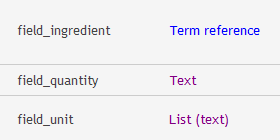
How to set the name of the function by using preprocess for my case?
Read http://drupal.org/node/1137024 and still does not work.
I would like to see a working example.
thanks
Comment #40
head commentedComment #41
head commentedComment #42
hoff331 commented@kevinquillen
How would you implement a hook_theme_preprocess in order to style the field collection entities?
Comment #43
markabur commented#31 was helpful, thanks.
Comment #44
jeffglenn commentedNot sure if this would help anyone out but I wanted to post it just in case.
The main thing I wanted to do was to change the 'Prefix' and 'Suffix' Field Collections spit out. Instead of having a 'div' with field_collection classes, I wanted to create an unordered list. I tried a few different things in the template.php file, and since I don't really know my way around, they didn't work.
Here is my solution:
<div class="field-collection-container">&<div class="field-collection-view">and I was left with only the fields.<?php print render($content['field_name']); ?>etc. and then wrapped everything within an<li>.hide($content['field_collection_name']);then printed the rest of my content and printed the Field Collection afterward wrapped in a<ul>.This may have been obvious to some and may not be what most need but it worked for me and now I have a clean
<ul><li></li></ul>structure.Comment #45
RobW commented@jeffglenn: To better handle the prefix/suffix problems, check out #1157794: Move markup to template files and improve theming in new 2.x branch.
Comment #46
jeffglenn commented@RobW: Very nice! Glad to see this is getting worked on. I'll jump over there and see if I can help.
Comment #47
jack-pl commentedTheming multiple field collection with template file
For example:
Field collection name: boxes
Template file: field--field-boxes.tpl.php
Each collection contain:
First I need to build an array with all field collecion items and put this array into my custom field template file (field--field-boxes.tpl.php).
template.php
field--field-boxes.tpl.php
Use this file for theming. All your field collection items are now in $boxes variable, which is an array of results.
Let's say the field collection contain three boxes, so our new added variable will look as follows:
and you can print all these results using the foreach loop
Comment #48
J0keR commented1. Count the field_collection_item
$page_counter = count($node->field_collection_item['und']);
2. Do the for loop limit in count item .
for($item_count=0;$item_count<$page_counter;$item_count++){
Your code here
Comment #49
pinder commentedAnyone have any luck using field_view_field() instead of
['und'][0]['value']?Comment #50
Trias2013 commentednone of the above worked for me, here is my code:
render values of a field collection in a content type:
Please provide reliable .tpl files for theming, so custom code like this isn't necessary.
Comment #51
jack-pl commented@pinder You can grab raw values from your collection field in that way:
* in this example all txt fields within field collection should be stored as a plain text, even if they are in html format, otherwise $item_wrapper->field_example->value() will return array
@Trias2013 This should work if you are using proper template file
For example:
If your field collection has a name "field_image_boxes" then your field template file should be: "field--field-image-boxes.tpl.php". This is the way of theming the field with field template file, not field collection template file.
Comment #52
danny englanderDid you have a look at this issue and comment, it provides some insight to the templating system. For example, I have a field collection called Video Collection with a machine name of
field_video_collectionso my custom template is calledfield-collection-item--field_video_collection.tpl.php.I then can treat it as I would a node template by rendering individual field collection items within that template, e.g.
etc...
The only extra thing you may need to do is some exclusions within the matching node template for the content type e.g.
... but I am not actually sure if that's necessary, I am still learning how to do all this. Now if I could only get this worked out: #1966732: Trying to create a variable for and render the File ID [FID] of a Field Collection filefield item
Comment #53
jack-pl commented@highrockmedia Yes I have, and you're right, it should be done in field-collection-item--[field collection name].tpl.php file, but what about multi collections? Let say, I have a field collection with 3 items:
It is a multiple field collection and would contain for example 2 values:
I'd like to theme this field collection in one template file, so I need to get all these values one by one, and it should be possible to do that in foreach loop, but if you will try to do that in field-collection-item--field_name.tpl.php file, for example:
then you will get as many arrays as collections, in this example each collection will be created twice, because field has two collections, something like this:
but if you do that as I mentioned in post #51 then you will get all field collections with the values in one array, e.g:
Maybe I miss something, because I'm sure it should be possible to do that in field-collection-item--[field collection name].tpl.php
Comment #54
danny englander@ jack-pl - Yes, you can render all the fields of a collection in one template (and if there are multiple collection items within one node.)
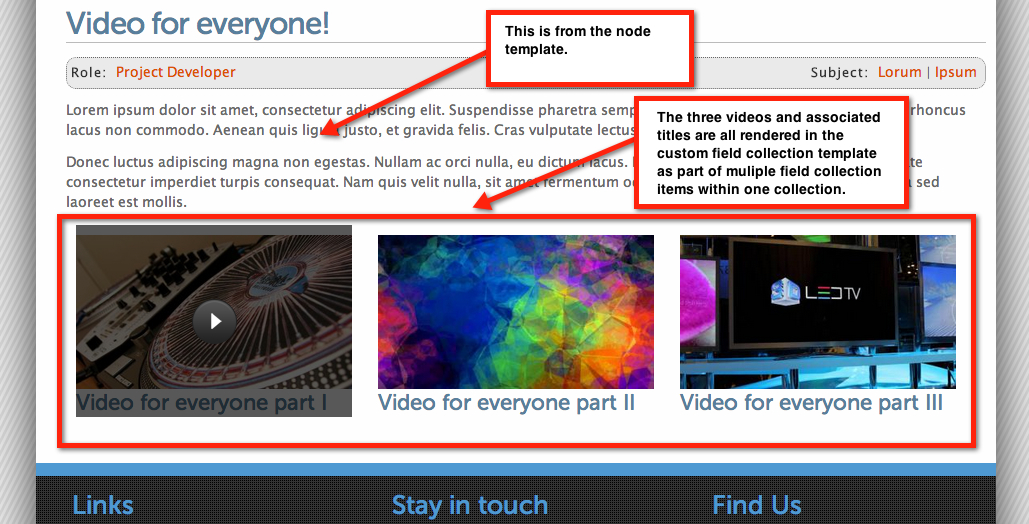
For example, I have three videos, associated images and titles but I did not need to use any loop code, it seems the template already does the loop for you (see my screen capture), I think it's similar to multiple items for one field in a custom Views template.
So perhaps
field-collection-item--field_name.tpl.phpis misleading, it should probably be plural but I guess that would be a change in the module code itself.Comment #55
jack-pl commented@ highrockmedia - Yes, you're right - and that's the point. Field template (not field collection template) already does the loop. If someone need to custom the field collection with his own loop, then he can do that only in field--[field collection name].tpl.php file.
Also there is a possibility to to theme field collection with node object.
Comment #56
jack-pl commentedNotice: There is no "['und']['0'][value]"
Comment #57
Pimmy commentedI am sorry to ask such a basic question - but would anyone be able to suggest why my $content variable is totally empty in my field--field_payment_request.tpl.php file (the field collection is called 'field_payment_request')?
If I use $items, is set and returns all the fields of the field collection:
However if I use $content['field_payment_request'], it is empty not allowing me to loop through the field collections and theme them:
I must be missing something very obvious..
(Ultimately I want to create a table with columns the field collection fields, and rows for each field collection.)
Comment #58
jack-pl commentedYour tpl file name should contain hyphens instead underscores:
change the name of the file from:
field--field_payment_request.tpl.phptofield--field-payment-request.tpl.phpComment #59
Pimmy commentedThanks for the tip - I've changed the filename from using underscores to hyphens but it doesnt seem to make any difference. I had to clear the cache after the change in the filename, but after clearing the cache, the behaviour is exactly the same - $content is not set.
The piece of code which I play around with is this:
and the output is:
Comment #60
jack-pl commentedsorry, i forgot that is the field collection file, so the name should be:
field-collection-item--field-payment-request.tpl.phpComment #61
Pimmy commentedThanks Jack,
That did it, however I could not workout the $content parsing - it just never worked. I have tried one of the examples in your earlier posts using $items in field_payment_request.tpl.php.
That created a nice table listing all the collections in rows.
Cheers,
Pimmy
Comment #62
jack-pl commentedIt would be better if you will keep away the logic from .tpl files.
You can put this logic to preprocess_field function in your template.php file:
Then, in the field--field-payment-request.tpl.php :
Comment #63
tying200 commentedi want to theme the profile2 type eidt.tpl.php
i build a page--porfile-resume.tpl.php and fix the code for copying the page.tpl.page,
How to do next?
i need the field-collection-item--eidt.tpl.php but no page
this table is very troublesome, how to fix theme only div+css
Comment #64
derKonrad commentedHi,
i tried solution [#47] and it kinda worked. The only issue:
only returns a number of the selected item (its a radio button). How can I access the actual value?
Thanks!
Comment #65
derKonrad commentedsolution for radio buttons (and all other kinds):
file: field--[name-of-your-field-collection-field].tpl.php
Comment #66
MickL commentedIm still not able to remove the wrappers. The #2 unset method sounds very nice, but i dont get it to work. What do you mean with "content type tpl" ? I tried it inside of my node.tpl and page.tpl but it doesnt work.
Comment #67
bjuncosa commentedYup. The only difference is that the entity type is "field_collection_item" instead of "node" or "user" (as the documentation lists).
Comment #68
bjuncosa commented@pinder (#49)
It's possible to theme a field in a field collection using field_view_field().
The only difference is that the entity type is "field_collection_item" instead of "node" or "user" (as the documentation lists).
Comment #69
a77icu5 commentedIn the example, using entity_load render($a_field_collection_item_object->field_1) doesn't render anything because the content is not a renderable array.
Comment #70
Denise_0523 commentedI tried all the solutions above, but none is for me , I have a field collection field_productnav with 2 items field_title and field_body, that is
field_productnav
field_title
field_body
there are many values in field_title, I want to get all the values in field_title, now I can get all the values as a string
but i want get every value into a array, how should i do?
if i use following code, i just get ['und'][0]['value'],
but about ['und'][1]['value'], ['und'][1]['value']....? i don't know how to use loop to get them
Comment #71
aucovic commentedAfter 10 loooong hours of banging my head against the wall trying to theme my collection field, I finally came up with solution that works.
First of off all, none of above's examples work, so this is what I've done:
1. used
field-collection-item--[your-collection-field].tpl.php2. wrote something simple as this:
(Note that
your_field_1,your_field_2, etc.. are subfields of your field collection)3. Since I'm using views to redner this field I setup 3 things in UI field settings:
3.1. Formatter > Fields only
3.2 MULTIPLE FIELD SETTINGS > Display all values in the same row
3.3 MULTIPLE FIELD SETTINGS > Simple separator > Leave this empty if you do not want additional markup nor wrappers around each collection set.
4. Had a LARGE beer!
Comment #72
Aljullu commented#71 It worked for me. Thank you!
#10 It's not the best way, but I could remove it modifying the module code. You have to delete this line (in my case it was line 1214):
$element[$delta]['#theme_wrappers'] = array('field_collection_view');from field_collection.module.
Comment #73
gusantor commentedI just need to add a class to field collection item (FCI), so reach here but found no easy way to do it
looking around I came accross with template_preprocess_entity (or which I think it is mytheme_preprocess_entity)
using this function at template.php I was able to add a class for each item using
cheers !
Comment #74
delta commentedTry inline_entity_display module to control the fields of your field collection directly on the parent entity bundle manage display form.
Comment #75
priyanka12chavan commented#71 worked for me for adding custom classes to field collection. Thanks!
Comment #76
sijuwi commented#71 works...but it does not output text formats associated with that field.
Comment #77
jmlavarenne commentedThis will make a render array for each field in your field collection.
In your template file you can do this:
Comment #78
flyke commentedI needed to remove unwanted wrappers created by field collections.
I ended up creating a patch that removes them from field_collection.module.
This was the easiest way.
Comment #79
nadeeke commentedhow to set metatag image field with fieldcollection image [field_collection_item:field-main-image]
Comment #80
jdleonardI'm not sure, but the Field Collection List Formatter module might be helpful for anyone still looking.
Comment #81
karimiehsan1819 commentedhi , i want hide or remove label and border of field collection , how can i do them?
Comment #82
iamkirkbater commentedLooks like this hasn't been said yet. Simple way to override the default cascading, if you're not using the bundle.tpl.php files:
Comment #83
misikir commented#31 is working for me in node.tpl.php
Comment #84
jomarocas commented#71 today no working i rename the file in 5 times, with various name
the field collection name is field_item
sorry wrong template
this is the form to call tpl in field collection
field-collection-item--field-items.tpl.php
Comment #85
jeffglenn commented@jomarocas If I'm understanding correctly you'll need to have your template named:
field-collection-item--field_item.tpl.phpIn that file you'll be able to print the individual fields associated with the Field Collection using:
<?php print render($content['field_name']); ?>Be sure and flush your cache so Drupal recognizes the new template. Hope this helps!
Comment #86
Katy Jockelson commented#50 works well for me to print all the items in a field collection in a node template file. And easily add extra html to affect layout etc. Thanks @Trias2013!
I'm also printing a wrapper div that has a class showing which number item this is (0,1, 2 etc) using the value of $i.
I'm wondering if there's a simple line of logic I could add in to this to give me an integer for the total number of items in the field collection - so I can then add that as an overall class to a wrapper around the lot (for CSS purposes). Any help greatly appreciated. And in plain English please, I'm not a php coder :)
Comment #87
jmlavarenne commentedThis should do it for you. $total will hold the number of items in your field collection, so you can do this in you template:
Comment #88
mattjbondi commentedTaking bits and pieces from above - I have got this to work for images in a field collection in the main .tpl file for the node that contains the field collection:
Comment #89
andyanderso commentedThanks for the summary mattjbondi - That was super helpful and works great for me!
Comment #90
khurrami commented#52 helped me
Thanks a lot