

 The 2026 Drupal Business Survey is open. Your response will help shape the future of the Drupal business ecosystem.
At present RDF UI has to hack every entity UI to sneak in its tab in (fresh example: #905340: RDF UI doesn't work when mapping Taxonomy). If such third party UI changes, then we have to catch up with these changes (not the case with core so much, but likely to happen with contrib). Some module providing entities might not ship with a UI, so there is no place for us to stick our RDF UI form. Wouldn't it make more sense and make our life easier if we had one place to alter these mappings? (with maybe a link in the field editing forms).
#1106484: Provide overview of all mappings for all bundles is related, though it is purposely kept simple read only for now. Creating new issue so we can start discussing the editing aspect of RDF UI.
| Comment | File | Size | Author |
|---|---|---|---|
| #4 | 1159104-manage-display.png | 24.09 KB | scor |


Comments
Comment #1
scor commentedThis is another issue where the entity API module could help by providing us with a list of fields and other non-field attributes, we would just have to load/save the RDF mappings using the core RDF mapping API.
Comment #2
scor commentedThe entity module can provide a UI for entities which are setup for it. This would be an improvement over what we have, but it would not support entities which do not have this UI enabled.
Comment #3
Anonymous (not verified) commentedI think that we would be covered with the combination of:
Should this issue be to add Write to the UI in #1106484: Provide overview of all mappings for all bundles?
Comment #4
scor commentedfrom the RDF call, 2 options to allow editing in place:
1. overlay (in overlay) à la Views.
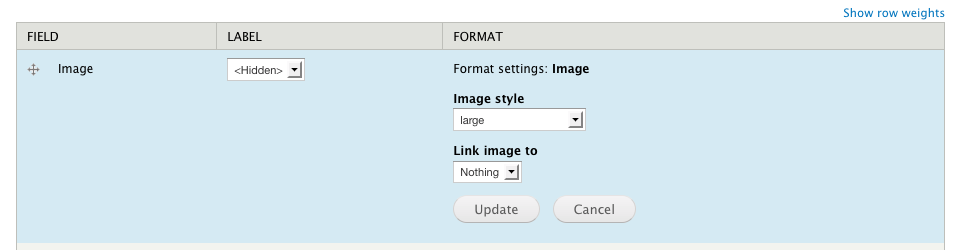
2. in place form elements, like in the content type "manage display" form in core, where the form elements for altering the config are displayed inline:
Comment #5
milesw commentedJust to clarify, the idea here is to first come up with generic standalone form for adding/editing/deleting a single mapping.
This form could then be integrated with various UIs, such as the admin UI offered by the Entity API module.
The thought in #4 is that we could dynamically add the form to the mappings overview tables (#1106484: Provide overview of all mappings for all bundles), effectively making the mappings overview page a one-stop-shop for editing all RDF mappings for the site.
By using this new generic form we should have good UI coverage for RDF mapping (between Entity API and mappings overview page), eliminating the need for the sneaky workarounds mentioned in the original issue description.
If someone is willing to give the initial form a shot, I'd happy to work on integration with the mappings overview page.
Comment #6
scor commentedI think it's good to remove the RDF mapping tab from content type admin page, but I wonder if we should keep the individual fieldsets on each field settings and on the content type edit form? I'm not sure we decided on that particular aspect during the call. Do people use these, or find it handy to have the RDF settings when setting up content types and fields? see screenshot at #1166066-1: Make the distinction between RDF Type and title predicate mappings in content type edit form.
Comment #7
clayball commentedI use these. Personally, I think it's a must have feature when defining a content type and fields.
Having everything in one place when creating/editing content types seems highly desirable.
Comment #8
scor commentedClay, so you're voting to have it in both places?
Comment #9
clayball commentedscor: At first glance, yes, but I'll give this a good second look. I know that when I create a new content type or add a new field to an existing content type that I def. like being able to set everything on one page or at least within that one work flow. As opposed to, say, adding a new field and then being required to go over to RDF publishing settings in order to set the RDF properties. Unless I'm missing something :)
Comment #10
Anonymous (not verified) commentedI just added a UI for microdata that uses CTools as part of #1321976: Create mapping UI. It isn't super pretty (ui-wise or code-wise), but I think it's reasonably effective. The basic concept could be applied to RDFx as well.