Problem/Motivation
Color events based on the date field used by the event.
An entity can contain several date fields. The normal color workflow will add the same classes to each event for the same entity (based on node types, taxonomy, ...).
This makes it hard to color events with multiple date fields in the same entity
Proposed resolution
Add a class, based on the date field used, to each event. Now each event of the same entity will have a unique classname. This classname can be used to color the events.
Remaining tasks
Nothing patch in 8 is al we need.
User interface changes
Only the source code gained some bits ;)
API changes
No API changes, more like a class addition.
Original report by santam
Hi,
First of all thanks for the nice module. I used this to create a listing of upcoming conferences for a radiation oncology focused website. The said content type has three date fields:
1. Last Date of Abstract submission
2. Last Date of Registration
3. Date conference will run from to date when it will end.
The view calendar display displays the content on the three separate dates as intended. I want that the three date types should have three seperate colors so that it can be easily distinguished that the date being referred to for the content is the last date of abstract submission or last date of registration or dates the conference will run from to its end. I am attaching a screenshot to better explain what I am looking for.


Comments
Comment #1
aspilicious commentedAdd a taxonomy term to the content type (checkbook) and color by taxonomy
Comment #2
santam commentedThanks for the fast reply.
Here is what I did.
1. Created a vocabulary with 3 terms : Date of abstract submission , date of registration and date of confernence.
2. Created a term reference field of type check box and attached it the above vocabulary/
3. In the content type added the three dates and checked the three terms in the term reference field
5. Added the field term reference in the full calendar view for the event. (the field type is full calendar fields and the format is full calendar.)
4. Now in the calendar the events are duplicated rather triplicated.
I dont know how to color by taxonomy so I would be obliged for a more detailed explanation. Please note that I am using the 3 date fields in the same content type and I dont know of any way to attach the taxonomy term to a single date field.
Comment #3
aspilicious commentedYou can't do that... You have to make a custom module that implements the color hook and stuff.
Comment #4
santam commentedThanks I am not a developer so I am not certain I will be able to do that. But its not such a big deal so I will mark this issue as closed then.
Comment #5
tim.plunkettActually, I like this idea. I'll think it over as a possible feature.
Comment #6
santam commentedThanks that would be great.. will look forward to it.
Comment #7
aspilicious commentedOk I have a working patch.
1) The attached patch needs to be included in fullcalendar core. That way each event will get one extra class.
Structured like this: 'fc-event-field-[field_name]'
So if you create a new date field and you call it: field_date.
The class will look like 'fc-event-field-field_date'.
2) I created a new module called: 'fullcalendar_colors_extension'. You can find the sandbox here: http://drupal.org/sandbox/aspilicious/1175528 . Hopefully I can create a project page soon. This module will hold some extra color goodies not included into the core fullcalendar module.
This module provides a new tab in the UI where you can link any fullcalendar event classname to a color. So if you add 'fc-event-field-[field_name]' you can give it a custom color.
Comment #8
aspilicious commentedComment #9
santam commentedThanks I will try it on this evening and let you know of the results.
Comment #10
santam commentedI tried out both the patch and the sandbox module. The patch worked like a charm and the classes were generated for the date fields. However the coloring module did not work. I added the appropriate class for the date types (3 types as i mentioned above) in settings page under the full calendar configuration and choose three different colors. However the colors were not seen. Checking the output with firebug shows that the node type color is over riding the event class color. Copying the overridden code from firebug into my css stylesheet changed the color.
I have again added some screenshots to explain what I mean:
1. Screenshot 1: Shows the full calendar for a single event. As two date types are being used the same event gets displayed twice .. the top one is the dates for the conference. and the bottom one the last date of registration for the conference.
2. Screenshot 2: Shows how the event classes are being added but being overridden by the node colors. Colors chosen in the color selection module are not getting displayed.
3. Screenshot 3: Overridden CSS copied in to the theme css file as it is.
4. Screenshot 4: Same page same event now shows the colors have changed.
Thank you once again for the excellent work. I cant believe that it took just 3 lines to make this change in the theme file. Hats off to you.
Comment #11
aspilicious commentedsantam Yeah I noticed the same thats why I made the module even slicker today :D.
You need to apply the patch in http://drupal.org/node/1178258 and update the module I wrote :). (I just pushed a new settings page)
1) In the settings page you change the processing order. You need the drag the fullcalendar colors extension to the bottom of the list.
2) In the classname list you should delete the fc-event-default color as it will overide the content type color if there are no date-field-classnames added (after you did step 1).
I hope this makes sense...
Comment #12
santam commentedThree words: "works as designed"!!!
Thank you very much.
Comment #13
izmeez commentedsubscribe
Comment #14
aspilicious commentedI have thought about this some more and I reworked parts of the extension module.
Some images
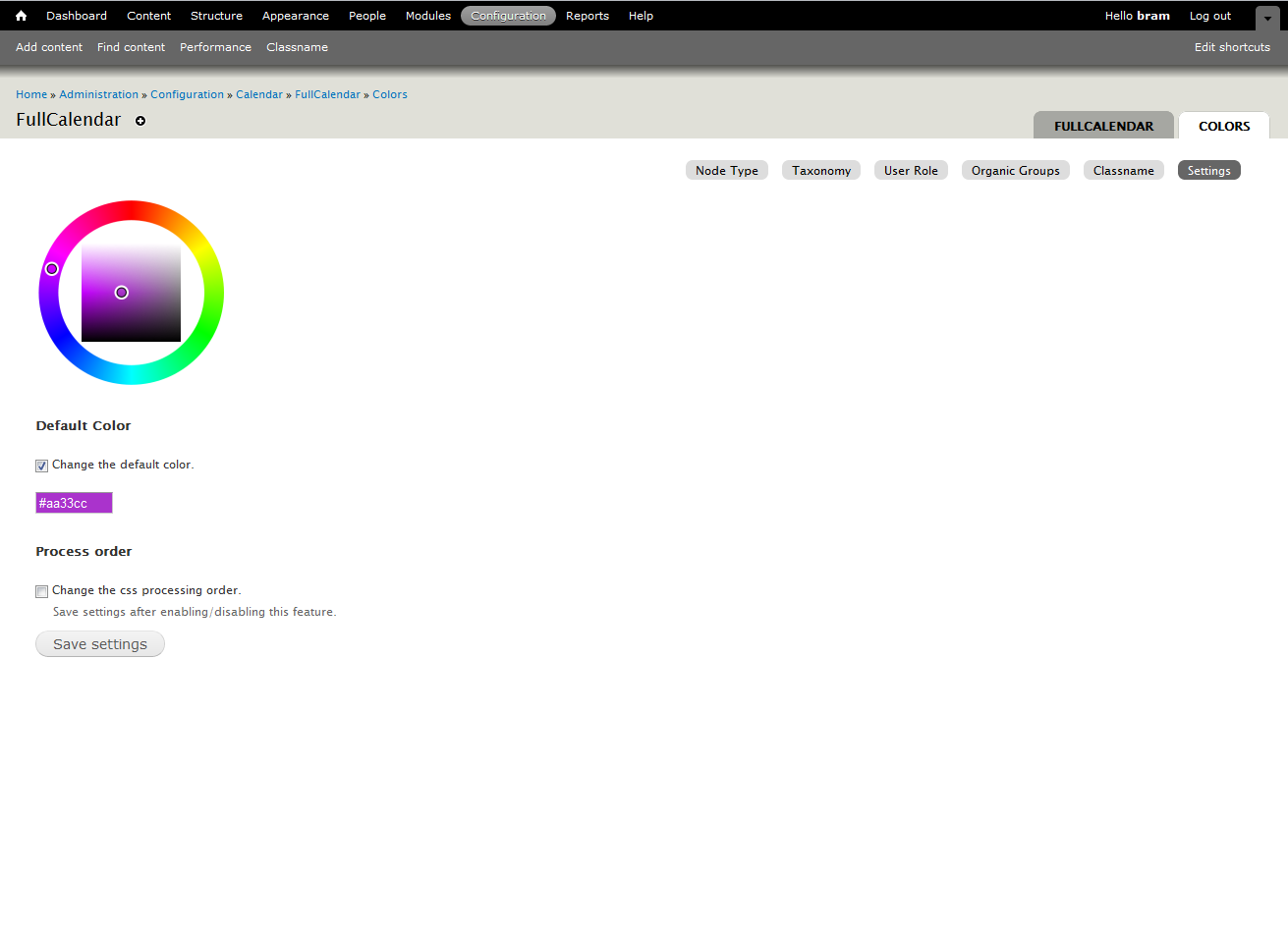
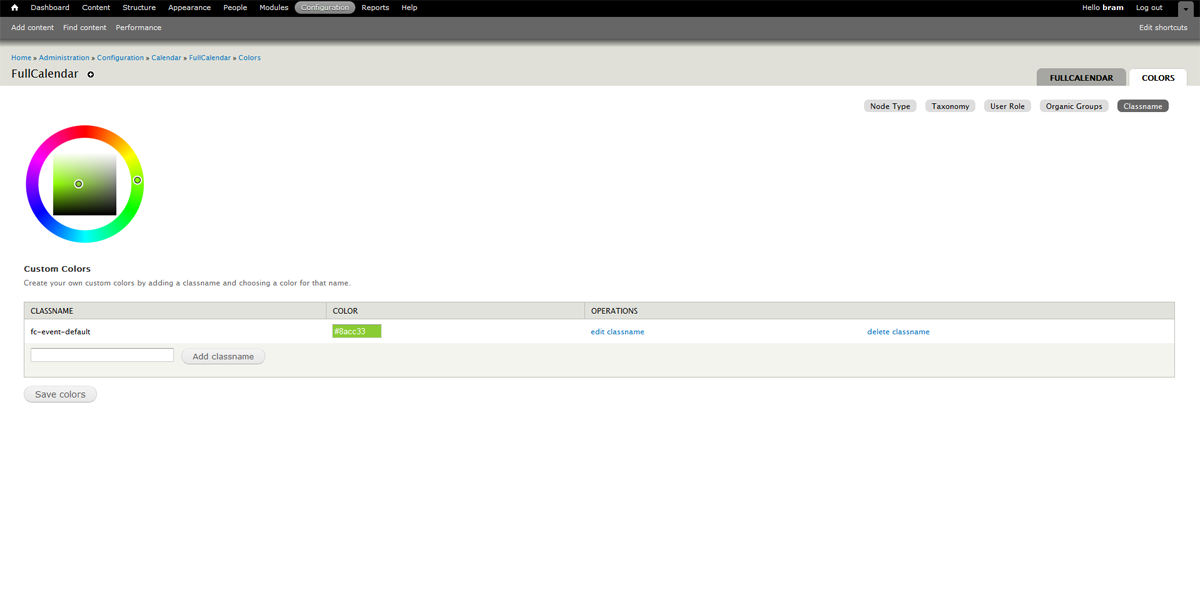
This now give you the flexibility to:
- color fields
- color gcal
- color default
- color node
- color user
- color taxonomy
All at the same time.
If you wonna try this and installed the module before, please uninstall first as I used a different table name.
Comment #15
santam commentedHi I have been trying to uninstall the color extension module in order to install the new version as you have said. After disabling the module however attempting to uninstall fails
The error that occurs is :
Comment #16
aspilicious commentedThats because I made a mistake with the uninstall hook.
1) Copy the new files (before uninstalling)
2) Uninstall
3) Remove any "fullcalendar_colors_*" tables from the phpmyadmin (if still present)
4) Install again.
I'm srry, still learning ;)
Comment #17
santam commentedYes following the steps work and the new settings page does look better. Thanks once again.
Comment #18
tim.plunkettWe completely broke this stuff this week.
Comment #19
aspilicious commentedPatch in #8 still applies.
Comment #20
aspilicious commentedUpdated the summary
Comment #21
hyperglide commentedI believe this enhancement is something we are looking for on our site. We installed fullcalendar today but did not see these options for classes.
Can you confirm if this is committed to the module or still in dev status?
Our scenario is we have river cruises. So for each ship we have the up river dates as 1 field and the down river as another field.
We want to put these date in one calendar view using 2 different colors.
Thanks for the great module!
Comment #22
aspilicious commentedThis is NOT yet commited, it's up to tim when he has the time to review this.
And yes this is the patch you need.
The classes option will be avalaible in a submodule fullcalendar_classnames (or fullcalendar_classes, not sure yet).
Won't be rdy before the end of septembre for a number of reasons.
BUT if this patch gets in you can add the color css code manually to your theme. See point 3 in the drupal 6 section of http://drupal.org/node/1237784 for an example.
Comment #23
hyperglide commentedMuch thanks for the reply and help!
Comment #24
aspilicious commentedPatch in #8 is rdy for 3 months. I tested it with 2 small localhost test sites. It just add a class.
Marking this rtbc so it don't get lost again ;)
Comment #25
aspilicious commentedMoving to tim
Comment #26
tim.plunkettWhy the extra variable? Couldn't the initial
$entity->classremain, and further down do$entity->class .= ' fc-event-field-' . $field['field_name'];?Comment #27
aspilicious commentedYes you're right. I'll make another patch if you want that.
Comment #28
aspilicious commentedEven smaller patch. Didn't test this one.
Comment #29
tim.plunkettFor fear of breaking the ajax patches, I will commit this right AFTER I merge those in. Which should be soon.
Comment #30
tim.plunketthttp://drupalcode.org/project/fullcalendar.git/commit/c8c2cd4
Comment #32
hyperglide commentedApologies if this is off topic.
I installed the updated FullCalendar Module -- Thanks Tim.
When I goto
admin/config/calendar/fullcalendar/colorsI do not observe the extra color choices as noted in this image. #14http://drupal.org/files/issues/fullcalendar_color_extension_0.png
I have attached a screen image to show that I have "node" "taxonomy" and "user".
My goal is to theme 2 date fields within the same node 2 different colors and then display on the calendar. All is set up now and ready to add the colors.
Thank you!
Comment #33
hyperglide commentedAny suggestions on if this is a bug or feature request? Thanks!
Comment #34
aspilicious commentedThis is a "feature request" there is one patch left that needs to get in. Afterwards I'll make a video how to color on date fields :).
Comment #35
hyperglide commented@aspilicious thank you sir. Need help to test the patch? Any eta?
Cheers!
Comment #36
aspilicious commentedFeel free to investigate and reply on this issue ==> http://drupal.org/node/1218488
I'm going to close this one.
Comment #37
koglinjg commentedHere is a remake of the patch in #8 that applies to 7.x-2.0-beta3. Some of the code has changed since then but with a little digging I was able to get that patch working again. Hope this helps someone else.
Comment #37.0
koglinjg commentedUpdated summary