

 The 2026 Drupal Business Survey is open. Your response will help shape the future of the Drupal business ecosystem.
http://drupal.org/sandbox/wesnick/1168872
DESCRIPTION
--------------
Timefield is a Field API field that stores a time value, with an optional to time.
The values are stored in the database as integer offsets from 12AM. If the second value
continues into the next day, i.e. 8PM - 2AM, the second value is stored as an offset +1 day.
The real goal of this field is to provide a taxonomy capable of encapsulating date-agnostic
time values, like "Morning", "Mid-morning" with autotagging capabilities. This is achieved
through the timefield_taxonomy module.
USAGE
-------
Timefield module provides a field type 'timefield' with a default JQuery widget.
The timefield can have an optional 'to time' and various input formats, depending on your
preference. While this field is multi-value capable, I am not really sure about a use-case
for this. There are a two display formatters, time and duration. You can configure various output
formats in the format settings dialog option on the "Manage Display" section of the Field API UI.
| Comment | File | Size | Author |
|---|---|---|---|
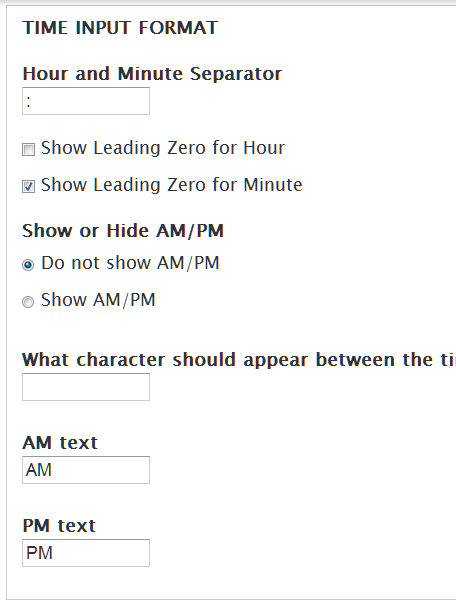
| #14 | time-settings.png | 25.26 KB | rudiedirkx |
| #14 | time-form.png | 10.97 KB | rudiedirkx |
| #12 | drupalcs-result.txt | 15.76 KB | klausi |
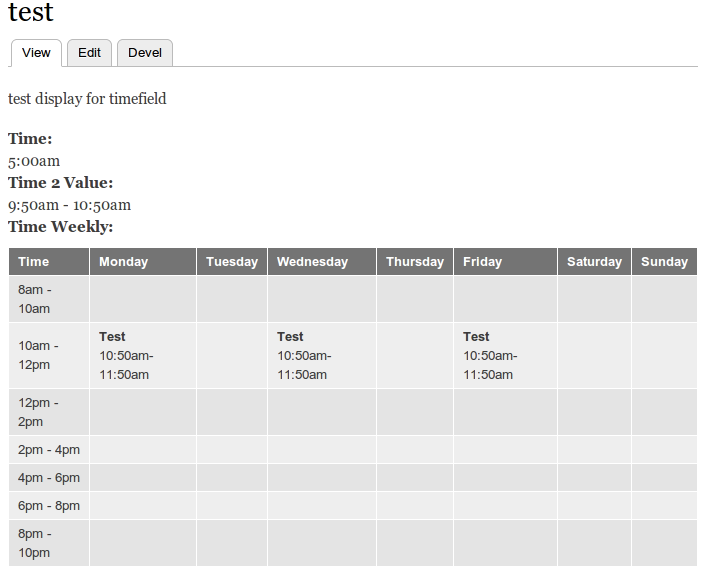
| #8 | Selection_001.png | 25.01 KB | wesnick |


Comments
Comment #1
wesnick commentedsorry, bad link to my sandbox
http://drupal.org/sandbox/wesnick/1168872
Comment #2
joachim commentedCan you explain what this does that can't be done with date module, and why a new module is necessary rather than making changes to date?
Comment #3
wesnick commentedYes, Date field is capable of storing Time data, and I tried to clarify the difference on my project page; this is the excerpt from the actual project page of my sandbox project:
So, to answer you question, yes, the entirety of the core timefield module's functionality is available via date api and its fields. For some of the edge cases that I needed date field for, for values that don't need year/month/day granularity, date field is more complex than what I wanted.
Comment #4
wesnick commentedforgot to mark as 'needs review'
Comment #5
svendecabooterMarking as critical as per http://drupal.org/node/894256
Sorry for the long wait.
Comment #6
wesnick commentedThanks for marking this critical. At this point, I have been using Rules a little more and am thinking a rules workflow might be more suitable for the auto-tagging feature of this module. However, there is still no field (as far as I can find) that encapsulates the time datatype that most databases support. It still seems to me to use a Date datatype to mimic a Time datatype as a little hackish.
At any rate, any feedback welcome, and I have no problem refactoring or scuttling altogether in favor of more a Drupalish solution.
Comment #7
wesnick commentedYeah, okay, I think this functionality can be implemented better with Date/Rules. Scuttling.
Comment #8
wesnick commentedI have found that I have continued to use this module on my own projects since my clients find Date Repeat input widget baffling. Also, people have been using this module in my sandbox. I have added some features and improved the code. I feel this module is suitable for development use and would like to see it promoted to a full project.
Attached latest screenshot of the various field outputs.
Comment #9
patrickd commentedIt appears you are working in the "master" branch in git. You should really be working in a version specific branch. The most direct documentation on this is Moving from a master branch to a version branch. For additional resources please see the documentation about release naming conventions and creating a branch in git.
Review of the master branch:
This automated report was generated with PAReview.sh, your friendly project application review script. Go and review some other project applications, so we can get back to yours sooner.
Source: http://ventral.org/pareview - PAReview.sh online service
Comment #10
joachim commentedI just spotted a potential duplicate at http://drupal.org/project/cck_time
(Admittedly this proposal has the better module name now CCK is obsolete on D7...)
Comment #11
wesnick commentedcck_time module is just a select element as textfield which stores times as a string in the database. This module does many more things, and as it stores times as integers, views filters and sorting becomes possible, so currently I would say there is no functionality overlap.
Comment #12
klausiReview of the 7.x-1.x branch:
This automated report was generated with PAReview.sh, your friendly project application review script. You can also use the online version to check your project. Go and review some other project applications, so we can get back to yours sooner.
manual review:
Otherwise I think this is nearly ready.
Comment #13
wesnick commentedThanks @klausi for the review.
I have attended to everything you pointed out, as well as adding drush support for automatic downloading of the library.
Code Sniffer runs a tight ship, only wish the plugin fully worked on my Eclipse.
Comment #14
rudiedirkx commentedThere's still a few imperfections: http://ventral.org/pareview/httpgitdrupalorgsandboxwesnick1168872git
And something I consider a bug:
(which is acceptable, but incorrect IMO)
Comment #15
rudiedirkx commentedComment #16
wesnick commented@rudiedirkx, yes it was a bug, the "options" FAPI element turned these boolean values into strings and so were being added as "0" or "1" instead of true or false to js settings. Fixed in commit #24039a.
Also clarified what these input options are for with inline descriptions.
Added additional options supported by the timepicker widget. If you are updating from a previous version you will have to edit instance settings and save new options, lest you get undefined index errors. This will not happen on initial install since field_info has sensible defaults set.
Ran the code through coder, pareview, DrupalCodingStandards.
Comment #17
rudiedirkx commented1. A few notices when I edit the node or time field instance, but they're gone after saving the field instance settings. (You added the closeButton etc options.)
2. But the problem persists: when I enter "14:00" in the field instance's Default Value textfield, I get "2:00pm" when I reload that page, and also when I edit or add a node with that field. "Show AM/PM Label" is unchecked (verified after saving).
3. The first sentence in your README is a little unclear: "Timefield is a Field API field that stores a time value, with an optional to time." Quotes around "to time" or renaming it to "end time" (like some other places) would help.
It's an obvious addition though. Three date fields in the date module, but no decent time fields. Good options too.
Comment #18
rudiedirkx commentedI've only now tried the included Timefield Taxonomy module. There's definitely not enough information, because I don't get it =)
And now what?
Can you make a list of steps the user has to follow to get the taxonomy part working? First step is enabling the module. Last step is adding or editing content.
Comment #19
wesnick commented@rudiedirkx,
#17 -1: addressed in my previous post If you are updating from a previous version you will have to edit instance settings and save new options, lest you get undefined index errors. This will not happen on initial install since field_info has sensible defaults set.
#17 -2: I have synchronized input formats. Indeed there was a discrepancy between PHP date formatting and the jQuery plugin formatting; I was using the "display format" for default or previously existing values, which resulted in the anomaly you were experiencing. Now there exists an "input format" and a "display format" which are separate and consistent.
#17-3: Clarified readme file.
#18: I have removed the timefield_taxonomy module as I am not prepared to dive into bugfixing or extensive documentation for this yet. It works, but you are correct that I have to document it better. It is on a branch "timefield_taxonomy" if you wish to continue to experiment with it.
Comment #20
rudiedirkx commentedJust one more thing:
Where do I get the jQuery plugin? A message after install or a constant warning or something like that might be nice to let the user know he's not quite done yet.
Comment #21
rudiedirkx commentedAnd then you're done IMO. Good module.
Comment #22
wesnick commentedIt was showing up in the status reports section: admin/reports/status
If it is not installed there is a link to the site to install it.
However, I have added detailed instruction to the readme file.
Comment #23
wesnick commented**DOUBLE POST**
Comment #24
rudiedirkx commentedExcellent.
You have committed a backup file
README.txt~. You can set up you GIT so that it ignores all~files: http://help.github.com/ignore-files/Comment #25
wesnick commentedThanks for the heads-up, gedit leaves me these presents everywhere, it has been removed now.
Comment #26
klausimanual review:
"_timefield_display_format_form('column_format', "Column Time Settings", $settings);": all user facing text should run through t() for translation. Also elsewhere.
But that is just a minor issue, so ...
Thanks for your contribution, wesnick! Welcome to the community of project contributors on drupal.org.
I've granted you the git vetted user role which will let you promote this to a full project and also create new projects as either sandbox or "full" projects depending on which you feel is best.
Thanks, also, for your patience with the review process. Anyone is welcome to participate in the review process. Please consider reviewing other projects that are pending review. I encourage you to learn more about that process and join the group of reviewers.
As you continue to work on your module, keep in mind: Commit messages - providing history and credit and Release naming conventions.
Comment #27
joachim commentedCongratulations!
(I've just hit your issue queue with a ton of minor bugs...! :D)
Comment #28.0
(not verified) commentedUpdated issue summary.