

 The 2026 Drupal Business Survey is open. Your response will help shape the future of the Drupal business ecosystem.
By bacchus101 on
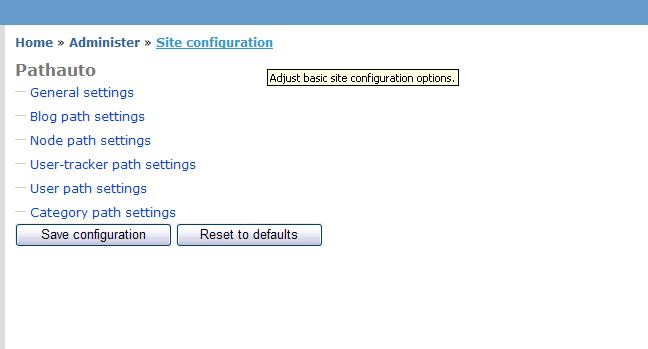
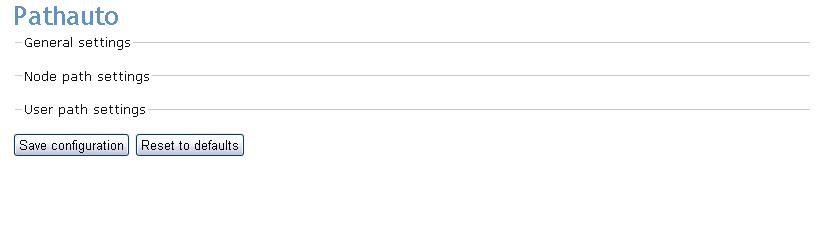
I am experiencing an issue with some administration menus in which they will not expand and are not clickable. At first I thought this was an issue with pathauto as that is where it was manifesting itself but now I notice that there are a few other modules that are experiencing the same behavior.
I have created a new Drupal 5.1 installation using the original database and removed all modules except pathauto and the problem is still there. I removed pathauto and moved in the send module and it to was giving me a menu that was not clickable. This makes me believe that certain modules had menus that are affected and other module menus are different?
I tired switching between themes. Same issue. I tried it in IE and Firefox with the same results (I cleared the cache on both.)
When I view the page source I can see that the menus are listed and there is a class=" collapsible collapsed" ;Below that the menus are all listed with the data from the sub menus. So I have to assume this is an issue where the browser is being told to not render the menus.
There are some screenshots: http://drupal.org/files/issues/pathauto.JPG and http://drupal.org/files/issues/path2.JPG
I have been battling this for hours on end. Any thoughts on this issue would be appreciated!
Thanks.

Comments
JavaScript
Basic question: do you have JavaScript turned off in your browser(s)?
I've seen this error before when the collapse.js file fails to load (or loads slowly).
I've also seen issues when modules load collapse.js a second time. So check the output HTML (view source) to see if the file is being loaded twice.
See http://drupal.org/node/87402
--
http://ken.blufftontoday.com/
http://new.savannahnow.com/user/2
Search first, ask good questions later.
Loading twice
I do have javascript enabled. Yes, it is loading twice!
The link to a patch for this issue seems to be only for 4.7.3 (I am running 5.1)
I see on another thread to comment out: drupal_add_js('misc/collapse.js', 'core'); in the module itself to defeat this behavior.
Not sure on what is the best way to proceed. I am going to dig through pathauto.module for that line of code while I wait for someone smarter the I to come along ;)
Didn't fix the problem, worked around it.
I found a solution to get to the menus and that will have to do unless there is a better way,
$form["general"] = array('#type' => 'fieldset', '#weight' => $group_weight,

    '#title' => t('General settings'), '#collapsible' => TRUE,

    '#collapsed' => True);
I just changed '#collapsed' => True); to '#collapsed' => FALSE); and now I can see the settings that I need.
Thanks for pointing me in the right direction!
Not quite
The solution is to file an issue with the module.
Should be:
Doing so will prevent the module from loading .js files more than once, since drupal_add_js() keeps track.
I had this issue with the MySite module when I ported from 4.7 to 5. It has to do with a change in the API.
Tell the module's developer (through a bug report) to see http://api.drupal.org/api/5/function/drupal_add_js
--
http://ken.blufftontoday.com/
http://new.savannahnow.com/user/2
Search first, ask good questions later.
not quite (again)
In this case pathauto doesn't even make a call to drupal_add_js:
http://cvs.drupal.org/viewcvs/drupal/contributions/modules/pathauto/path...
There's nothing with a "js" in it on the page :(
Any ideas on other possible causes?
Greg
--
Knaddison Family | mmm Beta Burritos
--
Morris Animal Foundation
I saw that too
pathauto does have some .inc files as well, that get included by different menu callbacks. I started to look at them all and then stopped.
Could be another module that you're using.
And, technically, I don't think this is a core bug -- the other issue treats it as such. I think it's misuse of the drupal_add_js(). So the question is which module is doing it.
--
http://ken.blufftontoday.com/
http://new.savannahnow.com/user/2
Search first, ask good questions later.
modules
I have tested this where I remove every non core module but pathauto and I still have this issue (on an otherwise clean install with the original database.)
That is what really gets me.
I also had this problem with the send module and had to edit send.inc to not collapse menus as well. All other admin menus do not as of yet show this behavior.
I am sure I will eventually figure out the issue........for now hacking the collapse.js in the inc and module files of the add-ons affected will do.
a search for drupal_add_js
Well, fwiw it's worth I did a
grep -R js *in a pathauto folder on the trunk and the DRUPAL-5 branches and didn't get any results. So, I don't think it's improper use of the drupal_add_js. I would completely believe that I'm doing something wrong with the form api, but I just don't know.
Thanks to both of you for your help in troubleshooting this.
--
Knaddison Family | mmm Beta Burritos
--
Morris Animal Foundation
Maybe not
Maybe not from pathauto, but likely from somewhere. You might grep your installed code for add_js(.
--
http://ken.blufftontoday.com/
http://new.savannahnow.com/user/2
Search first, ask good questions later.
bacchus101?
bacchus101? can you do that?
--
Knaddison Family | mmm Beta Burritos
--
Morris Animal Foundation
Issue
My current host package does not allow me to ssh to my root dir and I can't use grep over FTP. I did grab the module folder and from my desktop I did:
Is that what you are looking for? If not just say exactly what you need me to do and I will.
The same issue, with a couple of scripts, non-deterministic
I have the same issue, but it is not restrained to the non-expanable menus only. Extactly the same mechanism (I call it "non-initializing javascripts") happens sometimes to javascripts in at least:
- vote-up-down
- autocomplete
- collapse
May be more, but these are very easy to notice when they happen.
I observe that both with IE and FF, but it is not deterministic. Sometines it is enough to refresh the page, sometimes it would not help at all (even CTRL-F5, would not work).
I had suspicions that the problem may be with jQuery, but I think I ruled that out.
I have no double script loadings on my page. Unfortunately, it seems (as I would have the solution, after reading your comments above) :)
The one thing that helped me (in a sense that it decreased the chance of the problem, not removing it completely) was hacking the scripts from the modules above in such a way, that the initialization was delayed on a timer, for instance instead of:
$(document).ready(Drupal.voteUpDownAutoAttach);
i put:
$(document).ready(function() {window.setTimeout(Drupal.voteUpDownAutoAttach, 1);});
But frankly, I do not have a good justification why it makes any difference at all..
Any ideas how I could attack the issue?
Thanks in advance.
I had the same problem...
... due to an overzealous designer monkeying with the way ajax_vote_up_down.js outputs the vote link text. Sigh.
i had that on IE6
i've got that problem cuz i was using FCK EDITOR, but it was only on IE6, on other brownsers it was ok.
Lucas Boaventura
Contact: sanlucas@triang.com.br
I disable my Firewall and
I disable my Firewall and everything start to work.
Sound stupid, but could be a solution.
:P
not recommended
Rather than disabling your firewall completely you might want to use a port sniffer utility to determine and open the port responsible for the flow of data.
$scripts in your page.tpl.php
As of drupal5 there is now a drupal_add_js which requires that page.tpl.php prints out the $scripts variable. If you have a page.tpl.php that doesn't include this variable, you will have a variety of problems. Please confirm your theme's page.tpl.php as a possible source of this problem.
--
Knaddison Family | mmm Free Range Burritos
--
Morris Animal Foundation
Similar but not exactly the same...
I have similar but not exactly the same problem with you.
The menu also won't expand on my browser (FF). After investigating it out, seems like it was because I changed the "User-Agent" string to another one.
Browser incompatibility certainly can cause problems.
Just my $0.02.
collapsed menus on all modules cannot be opened
Has this issue been resolved as I to am having it (all collapsed menus on all modules cannot be opened). I've added
drupal_add_js($data = NULL, $type = 'module', $scope = 'header', $defer = FALSE, $cache = TRUE)into the header of the page template of the theme (garland) but no difference
At the moment this makes Drupal simply unusable.
Still not working?
I had this issue after upgrading my 4.7.7 installation to 5.2. I thought it was an issue with the upgrade, so i did a clean install of 5.2 and this issue still exists.
No collapsible menus on the entire site work at all, they are not clickable.
has anyone resolved this issue?
cache?
This is probably a "javascript cache" problem - just do a full browser refresh and it should be fixed. In firefox that's a "control key + refresh", or clicking refresh on the menu bar, or a "shit key + refresh".
Greg
--
Knaddisons Denver Life | mmm Chipotle Log
--
Morris Animal Foundation
Thanks
Thanks a lot this fixed the problem for me. I have pulling my hair out for a week trying to figure it out.
No expandable menus after upgrading from 4.7 to 5.2
Yes, I have had the same problem. This is a site that started off on 4.6 --> 4.7 --> 5.2.
Everything looked ok, until I went to edit an existing page. I noticed that all of the 'Input Format' through to 'Publishing Options' menus where just plain text, and not hyper linked, so I could not click on them to expand a section out.
My fix was to turn off the 'Path' module. I then noticed that upon refreshing my edit page, that all the links now showed. The good news is that after re-enabling the 'Path' module, that the links are still present.
I think there is a bug in the upgrade.php script, in that it's skipping/missing something that checks a Path option in the mysql path DB.
Whew!
Probably cache
It seems more likely that saving changes to the modules page cleared the cache.
Do you have any proof that the Path module was the cause?
--
http://ken.blufftontoday.com/
http://new.savannahnow.com/user/2
Search first, ask good questions later.
standard js cache issue
This sounds like a standard js cache issue to me. javascript is cached by the browser for a while - you generally have to do a page refresh to get it to clear that cache.
The path module is probably a red herring.
--
Knaddisons Denver Life | mmm Chipotle Log
--
Morris Animal Foundation
Multi Language caused my problem.
I figured out that the collapsed fieldset is not clickable if I try to edit in the not default language. I have two languages active. EN and NL. Everything works fine in EN (the standard language) while in NL I can't open the collapsed fieldset because the are not clickable.
MY SOLUTION
Switch to standard language
See also: http://drupal.org/node/530614
There's always a little something left.
Views Slideshow: SingleFrame
I found that the problem had to to with the Views Slideshow: SingleFrame module. Once I uninstalled it it worked. I saw this solution mentioned here on April 14, 2010: http://drupal.org/node/770950
May God bless you
Solution!
My solution was that I had dev versions of modules (lightbox 2 in my case) that were causing the problem. Just find which dev module it is and disable it. Refresh your page by clearing the browser cache and ctrl=f5
Solved: Avoid Ghostery web-bug protection
I've just had this problem too - it's taken me hours to get to the bottom of it, but I found it was because all my Firefox browsers have Ghostery installed (with web-bug protection enabled). I turned this off, and now all is well. My solution might be more obscure than most, but might help someone out.