I have tweaked the 7.x-1.x branch to allow for fields with more than one image (multi-value fields)! I changed it so that the display settings formatter now shows 3 presets in the following order: "Thumbnail -> Outer Image (main) -> Inner Image (zoomed)".
Unfortunately, it makes the list very long, but this seems like the right way to implement it.
On display it will render the first image (by delta) as the outer image, and all images (including the first one so that it can be reselected) as thumbnails below. I did not modify the css in this version.
This is my first patch commit, so if I can do anything differently please let me know. I just followed the documentation to get this far. I hope it helps someone out!




Comments
Comment #1
ranx commentedThanks a lot! It works very well.
The only problem I found is that the image title displayed on top of the zoomed image does not change. It always displays the tile of the first image.
Comment #2
thechanceg commentedHey ranx,
Thanks for checking it out. That should be an easy fix, I don't use titles in my implementation so I didn't even notice! I try to post a new patch this week.
Comment #3
-otto- commentedHi ranx & thechanceg,
looks like this patch will come in right on time for me.
I've been trying to implement just this functionality for a commerce project.
Any chance you could add this patch to latest dev-version?
Thx.
Comment #4
-otto- commentedHi guys,
I've discovered another issue with the module. Actually it's more a general Javascript issue.
After applying your patch, The cloudZoom with multiple images worked just fine.
However, since I am trying to implement this on a commerce website, things got a little weird when I change an attribute for the product.
Commerce reloads the images when you change an attribute (in my case, change the color for a t-shirt product) .
After that, the cloudzoom.js did not load, so I got the simple list of images with links to the big (uploaded) image instead of the nice zoomcloud functionality.
I am no Javascript expert, but after some fiddling I found a workaround (which I don't think is the cleanest solution).
This is working for me now.
I would like a cleaner solution (maybe add the 'behavior in the module'), so I'll keep digging some more, but maybe you have beter js skills and know just what to do to clean this up.
Thx,
eddib
Comment #5
-otto- commentedHi guys,
I found a better, cleaner solution for the issue (Cloud Zoom stopped working when new images were loaded via Ajax, eg. on changing a color in commerce).
I fixed it with some javascript that I added to the module. It may not be perfect (as I said before, I'm no js expert), but it works fine without interfering with other js and without any errors or warnings in firebug.
I added a line of code in your module that calls another js (cloudzoom.js in a js-folder in the root of your module). This js-file contains a behavior that calls the cloudzoom function when it sees the correct class.
Please find attached the modified files. If you like what you see, feel free to add it to the module.
PS: I have another suggestion for this module, where you have some config for the image formatter, instead of generating this enormous list of possible formats in the display settings. But I'm quite short on time right now, so I'll keep it in mind.
Comment #6
-otto- commented... and a patch for this
Comment #7
grossmann commentedI tested the patch on the current -dev Version and it works.
For better theming I would like to see that the thumbnail images are wrapped in a ul>li list and are separted from the zoom image. Right now (bartik theme) the zoom image and the first thumbnail are inside a div.field-item and the next thumbnails each in a separate div.field-item tag. So its not easy to theme the thumbnails as a separate element (a kind of horizontal/vertical gallery).
Edit for this additional thoughts:
Comment #8
-otto- commentedHi there,
I have been working some more on the issues (I also needed a few more changes/features).
Here's what I came up with:
You can now select the image style for each of the formats individually;
The thumbs are now in a list (in a different div than the actual zoom box), so easier theming :)
Another fix: I added a unique ID to each cloudzoom, so now you should be able to have multiple cloudzooms on the same page.
This is very untested, but works for my setup (with multiple images). Please take a look at it.
I'll also check if I can add a setting to not display the thumbs when there is only one image. A simple checkbox in the module's settings should suffice.
For now, you can just download the attached zip for testing purposes, patch will follow.
Regards,
eddib
EDIT: cloud zoom stops working after switching color (i'm using this on a commerce product). use the old JS I added in the previous patch to make it work.
Comment #9
grossmann commentedHi eddib
I tested the new version an it looks good. Each of the cloud-zoom.js files worked for me.
and this
With one image only there is no thumb (great) but also no zooming (not so great ;-)). The cloud-zoom.js did not get loaded if there is only a single image.
Btw the configuration of the image styles now rocks.
The problem with the overlaying image in edit mode is still there.
Thanks for your effords to make this a very neat module.
Comment #10
thechanceg commentedNice changes eddib,
I'm finally getting a minute to review this and your updates look great. Thanks for adding more comments too. All of my image fields have more than one image so I can't confirm grossmann-mcs' issue. Have you heard from the maintainer? I never heard anything on the first patch I rolled. I would be happy to do another one with your code, if it is going to be used.
One question, if you use a timestamp as the div-id, won't it constantly be changing? Wouldn't it be more useful if the id was consistent? Sorry, maybe I am just not understanding correctly.
Comment #11
-otto- commentedHi thechanceg,
thx for your nice words on my changes :)
About the timestamp: I used this so multiple cloudzooms on the same page wouldn't interfere with one another. This is not intended to be used for styling with css, which can be done using parent divs or so.
I haven't had time to look at the remaining issues or extra features that I would like.
For now, I just added some stuff to your patch to make it do what I needed for a project. Some more config options; like the colorbox module does would be nice... I hope I find some time soon to take another look at this, because I like this cloudzoom effect.
PS: I haven't heard from the maintainer in since my first post here.
Grts,
eddib
Comment #12
grossmann commented@eddib
can you give me a hint where in the code did you check if there is only one image. I would like to have the zoom effect even for one image but without the thumbs. But I can't figure it out (I am not that good in coding).
Thanks much, grossmann-mcs
Comment #13
-otto- commented@grossmann-mcs
sorry for the late reply.
is how my patch works, so no change needed there.
Comment #14
grossmann commented@eddib
Sadly it is not working for me with just one image. I attached an image for demonstration (left on zooming on mouse over, right zooming on mouseover if more than one picture) with firebug output. Version is the one of #8 with the cloud_zoom.js of #5.
Greetings grossmann-mcs
Comment #15
Starminder commentedwill you be rolling any of the above into a dev release anytime soon? Thanks
Comment #16
thechanceg commentedHi Starminder,
I think I speak for eddib when I say that we would like to add it to the dev release but neither of us are maintainers on the project. That being said, the .zip file in #8 basically is a dev release if you want to check it out. Best.
Comment #17
Starminder commentedThanks!
I must have missed something in the config, still not working for me. Using #8 version, now getting:
Notice: Undefined index: thumb_preset in theme_cloud_zoom_image() (line 205 of /home/hoslot5/public_html/sites/all/modules/cloud_zoom/cloud_zoom.module).
Notice: Undefined index: id in theme_cloud_zoom_image() (line 209 of /home/hoslot5/public_html/sites/all/modules/cloud_zoom/cloud_zoom.module).
Notice: Undefined index: type in theme_cloud_zoom_image() (line 212 of /home/hoslot5/public_html/sites/all/modules/cloud_zoom/cloud_zoom.module).
Notice: Undefined index: type in theme_cloud_zoom_image() (line 239 of /home/hoslot5/public_html/sites/all/modules/cloud_zoom/cloud_zoom.module).
Comment #18
-otto- commentedHi Starminder,
I would very much like to extend and update this module to something more stable (as thechanceg stated in #16), but unfortunately, no time.
I hope things will cool down at work a bit in the next couple of weeks, so I can take a look at this again.
PS: your error appears in the theming function, so it might have something to do with your theme (do you overwrite the $variables array somewhere?). I'm sorry I can't help you out right now.
Regards.
Comment #19
Starminder commentedHi - Understand completely, no worries. This was occurring using the Bartik theme.
Comment #20
jm.federico commented@Starminder
try refreshing cache, if that doesn't solve your problem, uninstall and reinstall the module.
The problem is with the hook_theme, it changes.
Cheers
Comment #21
jm.federico commentedI did some code clean up and also changed the logic quite a bit.
This patch still doesn't solve the ajax image issue.
Hope it helps
Comment #22
chriscdk commentedHi guys - sorry for posting a bit of a noob question here - but it is what I am!
I have done a bit of Googling and YouTubing but without success. Basically I am trying to implement the Cloud Zoom module onto a site of mine using Drupal 7 - I am also trying to get the thumbnails which are the basis of this thread. I am not too sure though about what to do with the patch.
Do I need to append it to the cloud_zoom.module file? Or is it a full copy and replace of that file?
Aslo a very quick one - using Drupal 7 I should not need image_cache or any other module for this to work is that right as it should all be in the core? Thanks for any help!
Comment #23
jackhutton commentedI used the download in #8 and got it all to work well; copied the js/cloud-zoom.js to cloud-zoom/cloud-zoom.js and thumbnail functionality worked.
chrisckdk - I made backups of the original..then moved the newer version in place.. and tinkered a bit..but it works nicely..
the image overlay issue when using the edit overlay is still there.. but looks great ..thanks for all of the work in this module and the modifications (thx eddib for the posting ) The image management of three individual selections for display is a nice improvement. -- I did not (yet) apply jm.fedrico's patch in #21
again. thanks for this.. very useful..
Comment #24
chriscdk commented@eggonbeagle - Thanks! That was the step in the direction I needed! I have now got several images with zooming capabilities! Now to play with the styling a little bit.
Comment #25
jackhutton commentedgood, chriscdk..
still working on this as well.. and as noted in post @14 by grossmann-mcs , I too, have an issue when a single image is posted vs. multiple images. -- the js zoom doesn't render.. any feed back on how to address this would be great..
also, zoomed images are persistent atop the overlay in the admin section on d7 ..
thanks again for the work on this..its very useful..
Comment #26
jm.federico commentedHi Guys
It would be great if you could take this new patch for a spin. I believe it effectively cleans things up.
Fixes:
Among what I changed
I played with the library a bit, and I think it needs some work to make it 100% compatible with Drupal.
Among the problems it has:
Which makes it incompatible with Drupal attachBehaviors()
I'm attaching a new patch which not only modifies the module, but attaches the library.
We are allowed to distribute it. And I think it makes sense since it now is different from the original one. It was mod to be Drupal friendly.
Cheers
Comment #27
grossmann commented@jm.federico
I tried to use the patch but I can't figure out againts which version should I run it against.
The official 7.x-1.x-dev? -> Gives an error with something like hunk #1.
The zip. version of # 8? -> Gives five errors with hunk #1-4
I am a little conused right now. Can you give me a hint how to apply the latest patch?
If the original maintainer has abandoned the project (which seems so cause there are no comments from him) is there a way another may to take over the maintainance? This would be great to get things in the official dev release and get rid of these patch on patch on zip on whatever stuff.
grossmann-mcs
Comment #28
jm.federico commentedHum I created it against dev, but it was dev a while ago, dunno what has changed.
Can you try a manual patch? Bit busy right now (sorry)
Comment #29
grossmann commentedHere is the rejected code against dev (obviously from the .info file).
Why should
- files[] = cloud_zoom.modulebe deleted?Thanks for your quick comment. Take your time, I will try to figure it out.
grossmann-mcs
Comment #30
aristeides commentedany chance of this patch working with views?
Comment #31
grossmann commented@jm.federico
There seems to be a problem in passing parameters (like
showTitle: 'true') to the script. I added them in a separate js file (loaded with a preprocesse or in the .info makes no difference) and thea id="cloud-zoom"gets the right rel parameters. But there is no reaction to that. Maybe it is broken cause you changed something on the original cloud_zoom.js library?Another problem is that the mouse cursor in the edit overlay is still visible if hovering over the (overlayed) image. This prevents editing content in the image area (edit: this can be fixed by setting z-index of the mouse trap to 100 in the cloud_zoom.js or overwrite it in an .css with
.mousetrap { z-index: 100 !important;})grossmann-mcs
Comment #32
jm.federico commentedHello!
I did change some things in the original cloud-zoom
Basically we should never use document.ready() with Drupal, and we should IN in any JS) always keep track of the elements we've attached to. Cloud Zoom uses has the document.ready() hardcoded and doesn't keep track of elements already parsed, which means when loading content via ajax things do not work nicely, cloud zoom will re-attach itself to the elements. (bad boy)
the reason I removed .mode form the info is there are no classes being defined there, no real need to add it.
My view is cloud-zoom library should be included with the mods made to have it following the Drupal of doing things (Drupal.behaviors)
I'll re patch and send again in a few days (not home right now)
Cheers
Comment #33
grossmann commentedHi,
i agree with the opinion to customize the original JS library in favor of getting a Drupal compatible JS even if we loose the possibility of simple updates to future versions of cloud zoom.
There seems to be a bug in the new JS because custom added parameters on the rel attribute are ignored in nodes with single images. In nodes with multi images the new parameters get recognized. As soon as I click on an thumnail image (maybe this is a loading order issue).
I did not get the title to display (title :'true' is set). I checked but there is no title attribute on the image to be display.
I am looking forward to test the new patch.
Greetings
Comment #34
jm.federico commentedDUP post, see next one.
Comment #35
jm.federico commentedHello PPL
I have here a patch against DEV that does 2 things:
I know I'm suppose to create a patch for each mod that is to be done, but I'm a bit busy to go through the changes I've made to the module. So I just created a big patch.
cloud-zoom library has already been modified to work with Drupal
It works with single and multiple images
Please let me know
Comment #36
grossmann commentedHi,
trying to set the width and height gives this error:
If they are not set you get this drupal error:
Notice: Undefined index: cloudzoom_width in cloud_zoom_field_formatter_view() (line 168 of /var/www/web/drupal7/sites/all/modules/cloud_zoom/cloud_zoom.module).(Disappears after cleaning cache).
Because I am unable to set a width and height the zoom window is pretty small (0px ?). On multi image nodes if I click on any of the thumbs the zoom window get the presets defined in
$.fn.CloudZoom.defaults. This seems to be the same error as stated in #33 not to get the "rel= "-settings for the first loaded image.grossmann-mcs
Comment #37
grossmann commentedTest update: I commented out the error function
dpm($element);(line106). Now I was able to set the width and height. But they are only applied to the first load image. If I click on a thumb than the default settings are user (auto).I hope this bug reports help.
grossmann-mcs
Comment #38
Anonymous (not verified) commentedchriscdk: assuming you are on a Windows workstation, please look at http://drupal.org/node/620014 for instructions on how to apply a patch.
Comment #39
Anonymous (not verified) commentedAccording to the module page, the maintenance status is unknown & the developer is seeking co-maintainers. I just posted on his FB wall that ya'll might like to help out, so maybe we'll hear from him.
Comment #40
Anonymous (not verified) commentedTried patch from #35 & got errors -- see screen cap.
Comment #41
liupascal commentedhello guys,
Thanks for the awesome work,
I also would like to have this feature to work with multiple field images in Drupal commerce (for products image with ajax loading).
Is there any advancement / plans to have this committed to the module ?
Many thanks
Comment #42
liupascal commentedI successfully applied patch from #26 on a clean cloud_zoom install - but you have to manually remove all the duplicated files (some js and css, git will tell you when a file already exist, simply delete it).
I works without problem except for the "loading" that appears when the image gets loaded, it's not framed in the original image div.
Comment #43
arnotixe commentedI applied the original patch, and it's working great after this little adjustment:
I was using the cloud-zoom.1.0.2.min.js, not cloud-zoom.1.0.2.js
So the "are the files present" checker tripped on the cloud-zoom.1.0.2.js not being present. And later on, the loader function of course loaded the wrong file too.
Now it's working just great here :D
Just have to figure out how to horizontally stack the thumbnails under the image...
best
Arno
Comment #44
IckZ commentedHey there,
i got the same error... If you have multiple images on the page the first one is displaed in in the zoombox with the size which is set up in the backend.. But if you hit any other image the zoombox gets the auto size back..
but great work so far!!
Comment #45
jm.federico commentedHi Guys
Yes, I'm experiencing the same error, haven't has time to check why, will try to spend som time on it tomorrow!
Cheers
Comment #46
IckZ commentedHey jm.federico!
That would be great! Thanks!
Comment #47
jm.federico commentedRight, so a new patch against 7.x-1.x-dev
This fixes the issue were image galleries wouldn't keep width/height set via admin interface
a quick recap of all the changes:
1. Include cloud-zoom library in the module (license allows it, and needed because original is not compatible with Drupal.behaviors)
2. Execute cloudZoom method using drupal behaviors and not document.ready
3. Allow for width/height of zoom window to be set using field settings
4. Mod cloud-zoom.js to use global options and not only options from rel attribute for multiple images (line 375 in new file)
If you have questions let me know
Cheers
Comment #48
sibany commented#8 eddib Worked great using ubercart ! cheers! :D
if the loading get stuck ! check your image Format settings in the node display! :)
Comment #49
FranCarstens commented#47 looks exactly like what I'm looking for. Where can I download this? It appears the DEV version is still and older version.
Comment #50
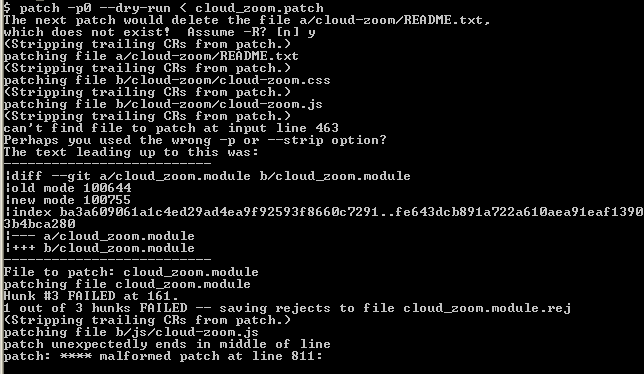
FranCarstens commentedTried applying the patch in #47, I got the following:
Machine:cloud_zoom User$ patch < /Users/User/Downloads/cloud_zoom/cloud_zoom-multiple_images-1195864-47.diff
The next patch would delete the file README.txt,
which does not exist! Assume -R? [n] y
patching file README.txt
patching file cloud-zoom.css
patching file cloud-zoom.js
patching file cloud_zoom.info
Hunk #1 FAILED at 4.
1 out of 1 hunk FAILED -- saving rejects to file cloud_zoom.info.rej
patching file cloud_zoom.module
The next patch would create the file cloud-zoom.js,
which already exists! Assume -R? [n] y
patching file cloud-zoom.js
Hunk #1 FAILED at 1.
File cloud-zoom.js is not empty after patch, as expected
1 out of 1 hunk FAILED -- saving rejects to file cloud-zoom.js.rej
Machine:cloud_zoom User$
Comment #51
jm.federico commentedThe patch was made with GIT.
If you want to apply againts dev downloaded from project page use:
patch -p1 < cloud_zoom-multiple_images-1195864-47.diff
This will case one chunck to fail (from .info file) but everything else works fine
Cheers
Comment #52
FranCarstens commentedPerfect, thanks! I've been playing with this and it works great.
Update: I'm having the same issue as #14 (http://drupal.org/node/1195864#comment-4947498) - it's not activating for a single image. Was the patch #35 included in the diff from #47?
Comment #53
FranCarstens commentedOkay, I've run the patch in #47 as well as updated the JS one more time to include support for touch devices (see this post: http://drupal.org/node/1568270), like the iPad. I'm not sure how to create a patch, so I'm uploading my module version to this post.
This version of the module does the following:
This version uses zoom "inside", there is no setting for this in "manage > nodetype > display" at the moment, but you can edit the JS on line #409 to change it from " position: 'inside', " to "position: 'right',
I hope someone finds this helpful, and that the module owner could possible use this to role a new dev version or patch?
Comment #54
grossmann commented@FranCarstens Could the setting like "position: 'inside' " be set with an separate JS file and how can this be done? i tried this (see #31) but with no success. It would be great to be able to set customized parameters via a separte JS file and leave the original file untouched.
grossmann-mcs
Comment #55
FranCarstens commented@grossmann-mcs Unfortunately my javascript knowledge is next to nothing. I would tend to agree that being able to set any and all parameters through the Admin area would be preferable to hard coding, but I won't even know where to start doing that. :(
Fran.
Comment #56
nicholasthompsonThere are a lot of changed to 7.x-1.x-dev... What do I need to apply to dev to fix this issue, rather than a massive patch which looks like it rewrites pretty much the entire module?
Dev supports multiple images + gallery mode now..
Comment #57
lsolesen commentedDoes any of the contributors to this issue need anything committed to the latest dev? Or what is the status of this issue?
Comment #58
gonssalThe patches in this issue include the 1.0.2 version of the plugin, a lot of not-really-necessary css, most of the things are already in the current dev version and it would need to be rebased. For instance, the module currently uses the libraries module to get the plugin, so this issue is outdated and I think should be closed.
The only thing that could be salvaged is the touch support, but there are other issues about it.