

Active
Project:
RDF Extensions
Version:
7.x-2.x-dev
Component:
Code
Priority:
Normal
Category:
Support request
Assigned:
Unassigned
Issue tags:
Reporter:
Created:
1 Jul 2011 at 07:53 UTC
Updated:
7 Jan 2015 at 21:27 UTC
Jump to comment: Most recent, Most recent file


Comments
Comment #1
Anonymous (not verified) commentedIt sounds like the rdf_mapping table was deleted manually, so it needs to be created again. Try completely uninstalling the rdf module and then reinstalling it.
Comment #2
Higarigh commentedHow can I reinstall this module? I mean it's in the core... xD Do you maybe know which update creates this table? I made an upgrade from Drupel 6.14 to 7.2 and in the Database from the 6.14 version there is no table called "rdf_mapping".
Regards
Philip
Comment #3
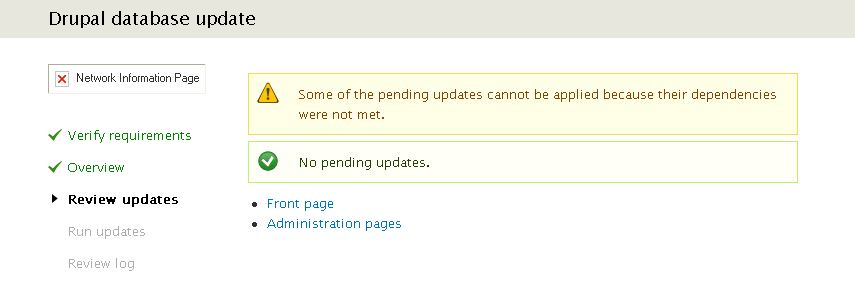
Higarigh commentededit: attachment: screen of my /update.php result.
Comment #4
Anonymous (not verified) commentedYou can uninstall core modules in the same way you uninstall contrib modules.
I tested this out on my local copy and I would recommend also deleting the rdf module entry from the system table. In system, search for name='rdf' and then delete the row. Then when you enable rdf module, it will create the table.
Comment #5
Higarigh commentedThank you very much! This was the solution xD
Regards
Philip
Comment #6
scor commented@Higarigh can you confirm that you had the contributed rdf module installed in Drupal 6 before upgrading to Drupal 7?
Comment #7
maddentim commentedI had the contrib module installed and got this issue. in addition to manually deleting the module from the system table, I also had to manually empty the cache and the cache_bootstrap tables to get past this error...
Comment #8
jgreidy commentedI had the rdf module installed in a Drupal 6 site, upgraded the site to Drupal 7, and ran into this problem when I tried to install the schema.org module which requires rdf . I was able to get the site working again by removing the rdf module directory from the Drupal 7 core modules directory, and removing the rdf row from the system table as suggested here. Thanks! After that I got another copy of the rdf module, placed it in the core modules directory, and turned on the rdf module again, and everything is working again. Yes joy.
Comment #9
guypaddock commentedPossibly related:
#2403535: module_enable() exposes module hooks before the module's schema is installed
Comment #10
guypaddock commented