Splitting this off from #1072450: Upgrade from 6.20 to 7.2 - Update #7003 still fails.
Original issue #164532: Improve table indices for common queries.
Prescient comment from chx: http://drupal.org/node/164532#comment-672261
If a site upgraded from Drupal 5 to Drupal 6, then the update will only throw an error that the the key could not be added.
However in the upgrade from Drupal 6 to Drupal 7, it is trying to insert data into there - which is a PDO Exception, and that halts the entire update.
It would be good to get confirmation from @texis that they originally started with Drupal 5, but otherwise this looks like a valid bug to me, albeit one that was festering since Drupal 5 or earlier until it finally came 'round to bite us in the arse now.
I would suggest that in filter_update_7000(), we check if the index exists, if it doesn't, we check for duplicates and delete one of them, then add the index again.
If @texis did not originally start on Drupal 5 (or a D6 release candidate), then this may not be major since it'd be a theoretical issue for now - although likely the fix would help there anyway.


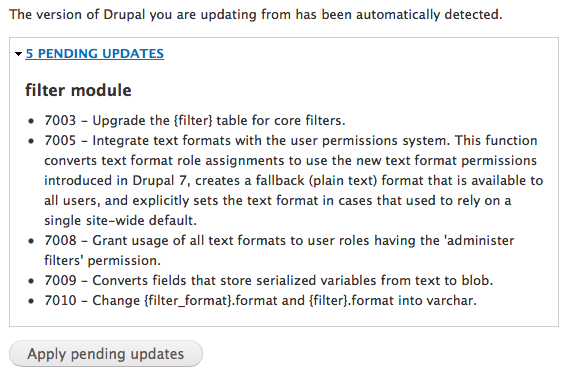
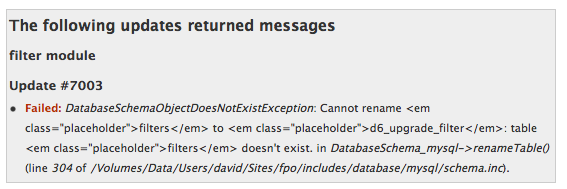
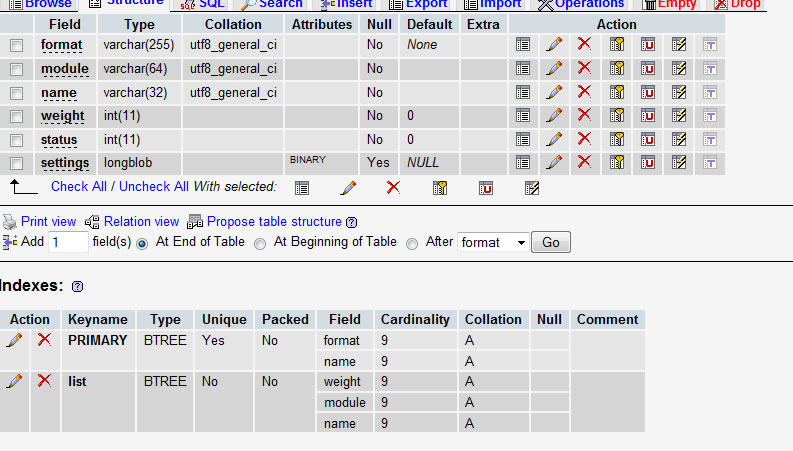
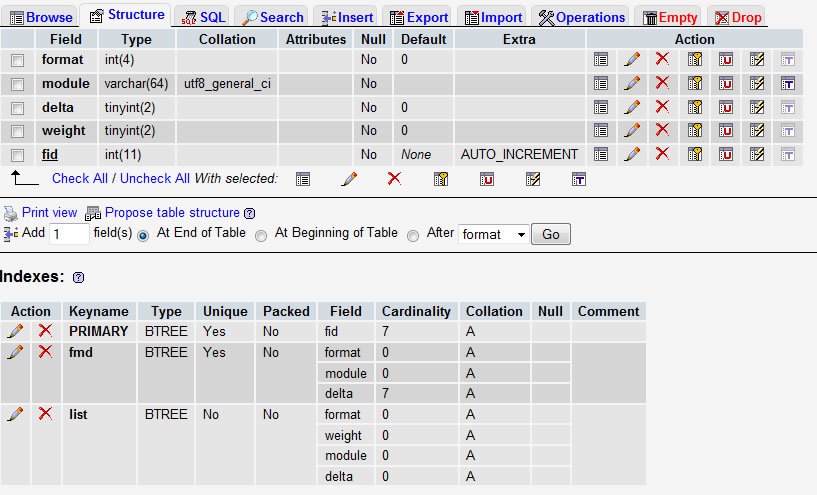
Comments
Comment #1
sunouch.
Comment #2
catchtexis confirmed on the other issue that they started with Drupal 5.
So I haven't run through these, but here's what happened IMO:
- Drupal 5 site. Ends up with duplicate data in {fiters} because we didn't have very good indexes and didn't enforce in PHP either.
- Upgrade to Drupal 6, there'll be an (I think) MySQL error - but only a PHP warning, not any kind of fatal, that the unique index failed on duplicate key. However the upgrade will continue through to the end, just without that index being added.
- Drupal 6 ........ - still no unique index because it failed the first time.
- Drupal 7 - filter update needs to insert data into the table with the unique index on update. Booom!!!
Thinking about this, that was not the only unique index added in that original issue (although we did remove some), and there are at least 10,000 sites running Drupal 5 (probably many times that in reality due to update module being contrib in D5) - and Drupal 5 is no longer supported, which means they should be upgrading soon, and in some cases may do so all the way to Drupal 7. That does not include all the D6 sites that are around, which used to be on Drupal 5 at some point in the past and will also eventually need to upgrade.
Any number of those sites could have this issue, or a variation on it, and the only way around it would be to hack their Drupal 6 database with ALTER IGNORE to add the index and delete duplicates prior to upgrade (or some kind of other manual intervention).
So this is not every Drupal 5 - 6- 7 upgrade, but it could be a lot, feels like a critical issue, so bumping status.
ALTER IGNORE is the simplest way to do this, but is a MySQL-specific extension (and as far as I can see no equivalent for postgres or sqlite from a quick google). Did we support postgres at all in Drupal 5?
Comment #3
catchTrying to come up with a better title to make it clear this isn't really a Drupal 6 issue - we support upgrading from any Drupal 6 version released at the same time as Drupal 7 RC1 or earlier, so D7 needs a solution, whether we then try to fix it in D6 I don't know.
Comment #4
texis commented@catch - Can you please describe me more detailed what has to be done to "solve" this? You've mentioned ALTER IGNORE but I don't now when, where and how I should use this.
Thanks
Comment #5
texis commentedOK I found out what to do so now I did upgrade without failures - of course nothing is perfect - another issues has been found like:
The specified file temporary://filenkJq1g could not be copied, because the destination directory is not properly configuredor
Notice: Undefined index: distribution_name in drupal_install_profile_distribution_name() (line 202 ofBut I think that filter problem is gone ;-) Anyway - I am not sure if it was a drupal 6 issue with the missing unique key 'fmd' - as I am quite lazy, maybe I skipped or ignore something during 5 to 6 upgrade process.
T.
Comment #6
tlangston commented@Texis - could you share what you did? I'm still struggling here. So interesting that it came from migrating 5>6>7. I imagine there are quite a few people who will hit this. I had no errors in the upgrade from 5>6.
Comment #7
Brian_Moon commentedI am trying to do a similar thing as Texis and am encountering similar issues. I am at 5.10, going to 5.23 (no updates seem required there), then going to 6.22 where System Update 6043 fails when creating a new index on tables blocks and filters due to duplicate entries. I was able to get around this with the following:
So now, I am upgrading from 6.22 to 7.4 and System Update 7007 is causing the upgrade to terminate with the following:
Comment #8
texis commentedHm, it's hard to say because I run that site quite long. I just checked another site which I recently moved from Drupal 5 to Drupal 6.22 and it contains correct unique key in the filters table.
So it probably happened during minor updates within Drupal 6 releases or (what I still think) it was due to my fault as I sometimes do updates without offline mode or simply "do not follow READMEs" :)
Texis
Comment #10
franzI'll try to update a live site from 5 to 7 in the next weeks (of course, I'll work on a copy first). I'll updated with details in case I find anything.
Comment #11
matmasr commentedOK .. I have been having trouble updating a site from D5 to D7. The update from D5 to D6 went relatively smooth. I can't recall if there were errors or not not during the upgrade, but for sure no FATAL errors.
First I updated all my D5 modules to the latest published versions including D5 core to D5.23.
Next, I completed the updated from D5.23 to D6.22. Like I said the upgrade completed with no FATAL errors. I should have paid close attentions to other error messages - maybe I can retest that workflow again to capture any other errors like those mentioned above by catch http://drupal.org/node/1211796#comment-4705562.
Now, going to my D7.4 update, that is when I got a fatal error that I have reported here #1220602: Call to undefined function _update_7000_field_read_fields() during Forum update 7003 Call to undefined function _update_7000_field_read_fields() during forum update
But in addition that error on the Forum module, I have several other errors that are similar to those repeorted here above. Here is a list of the errors I got.
I guess this confirms that the same scenario generates similar fatal errors. Any thoughts on this ?
I would be willing to restart the whole update process from D5 to D6 if needed to capture specific issues related to the D5 to D6 update that causes the fatal error from D6 to D7 update. It is clear, however, that the database is getting corrupt.
Comment #12
catchIf you're able to run the D5-D6 upgrade and record errors that might be helpful here. In fact even if there are no errors that would help to narrow things down a bit.
Comment #13
matmasr commentedI am in the process of repeating the update from D5 to D6.
Here is the first of the errors
UPDATE: The errors that I am posting are not showing on Drupal site ???
I dumped all the errors in this txt file.
http://www.peoriaparent.com/files/error_log.txt
Comment #14
matmasr commentedDrupal asks to run update again with the following messsage
Nothing serious there.
And finally, here is a log of what was updated. I apologize for the long information dump.
I will rerun the update again based on the message and report on what I find.
Comment #15
matmasr commentedDid final update.php (D5 to D6) Here is update log.
Nothing alarming here ?
Comment #16
catchOK your issue looks different to the one here, thanks for running the steps again but it looks like the Drupal 6 upgrade process is not in itself complaining about your data set.
Back to the D7 updates:
I missed this first time around, but that means you filters table did not even exist at the point you ran the upgrade - please confirm you're trying each upgrade from scratch and not re-attempting on a partially updated database.
Again please confirm this was a completely fresh attempt, not a re-attempt on the same site. If you can reproduce this running an update from your D6 database again, please open a new (probably critical) issue - ideally dump the contents of your roles/permissions tables to a .txt file and attach it to the issue.
General note - it's much easier to deal with these long error messages and logs if they're posted as .txt attachments instead of pasted into the issue.
Comment #17
matmasr commentedI attempted to do a D7 update and now all I get is a white screen as soon as I type in update.php.
Comment #18
matmasr commentedSome updated information. I still couldn't get the new upgrade from D5 to D6 to actually upgrade to D7 as shown above due to a white screen.
I looked at your comment about the role and permission table in the original attempt workflow. The partially updated D7 database tables for roles had duplicate roles with new PID. I have three roles on my site, but the table showed 5. Rows 4 and 5 were duplicates of 1 and 2. So I deleted rows 4 and 5 and reran the update.php. This time, I did not get any FATAL errors ! I still have one error that I am listing below, but at the least the D7 site is now functioning.
Any thoughts ?
Comment #19
matmasr commentedRegarding the filter table in the database. I checked the D7 database and the "filter" table DOES exist. So I am not sure where that error is coming from ?
Comment #20
catch@matsamar: you are trying to re-run a Drupal 7 upgrade after it was already partially completed, that is not supported.
Please try the upgrade process again with a clean Drupal 6 database.
You are hitting the error because that code is trying to rename {filters} to {filter} - but this was already done the last time you ran the upgrade.
If you then hit the duplicate key error, you will need to dump the contents of your Drupal 6 filters table and attach that here.
You could also try truncating that table in a copy of your D6 database and running the upgrade without any data in it, to see if the upgrade successfully completes apart from this.
Comment #21
matmasr commented@catch. Thanks for the notes. My initial attempt was an update from a fresh D6 database. My second attempt to redo the D6 to D7 failed due to a white screen error.
For the intial update, I did, however do what you suggested. I deleted the filer and d6_filters table from the D7 database. Copied the filters table from D6 into D7 database, then re ran the update.php script.
This time the error was gone, and the updated D7 {filter} table was created.
I am not sure about the success of this process. I still have one issue left.
1- Displaying the content of fields in my custom content, although the "manage fields" and display fields" in the custom content edit page shows that the fields do exist and are available. The only thing I see when I go to a custom node is the title field
Comment #22
catchThat's because you need to recreate your filter settings on the upgraded site.
There is nothing we can fix here without a dump of your D6 filters table, you can get that via mysqldump or phpmyadmin. Marking needs more info until that is provided.
Comment #23
matmasr commentedHere is the sql dump for the D6 {filters} table in pdf and an image of the structure. Does the {filters} table affect how content is displayed ?
I really appreciate your help on this.
Comment #24
matmasr commentedHere is how the {filters} table was converted to the {filter} table in D7.
Comment #25
catchCould you upload an actual SQL dump of the D6 table as a .txt?
Comment #26
matmasr commentedHere is the D6 filters table sql dump text file
Comment #27
franzMarked #1084866: Update #7003 - Filter module - Failed as a duplicate of this.
Comment #28
matmasr commented@catch.
I wanted to let you know that I reran the update process all over again from D5 to D6 to D7. This time I has NO fatal errors at all. There were several errors that I can post here later if you are interested, but none were show stoppers.
I looked at my content, and as far as I can tell, the integrity of the data looks good. All stories, pages and custom content show fine ???? Very strange.
Anyway, the only problem is with a custom content that I had that had a custom DATE field is not showing in my calendar view. I am getting a SQL error when the view is displayed. I am not sure if this is realted to an improper update or something else.
I want to know what information you would like me to provide to help diagnose and close this current open issue?
Comment #29
chx commentedComment #30
catchSince the original reporter managed to resolve this issue themselves, I'm moving this back to needs more info and demoting from critical.
Comment #31
kairoer commentedHi Guys,
the past two days I have been trying to upgrade from 5 to 7, getting similar issues like in this thread.
Am following the ReadMe to the point (after several failed attempts, I decided to try something new ;) )
Step 5.23->6.22 is ok, with no errors.
6.22->7.8 does not work at all.
Last attempt, is giving this error:
Warning: Cannot use a scalar value as an array in /www/.../docs/k1/modules/locale/locale.module on line 680
(the error seems to be PHP, not Drupal)
When continuing the upgrade, Drupal gives:
(RED) Notice: Undefined property: stdClass::$javascript in _locale_rebuild_js() (line 1893 of /www/.../docs/k1/includes/locale.inc).
(Yellow) Some user time zones have been emptied and need to be set to the correct values. Use the new time zone options to choose whether to remind users at login to set the correct time zone. The default time zone has been set to Europe/Paris. Check the date and time configuration page to configure it correctly.
I have backups of both the 5 SQL and the 6.22 tables. Can post if needed.
And. As I continued Upgrade, this time it actually worked. Beats me. Don't know how many times I have deleted, uploaded, restored database etc today and yesterday. Wish I knew what happend.
K
Comment #32
kairoer commentedUpdate: When updating the modules (Views, antispam, Webform), the following error comes:
(RED) Notice: Undefined property: stdClass::$javascript in _locale_rebuild_js() (line 1893 of /www/katarinahjemmet/docs/k1/includes/locale.inc).
Then the status:
The following updates returned messages
webform module
Update #7314
Failed: DatabaseSchemaObjectExistsException: Table webform_last_download already exists. in DatabaseSchema->createTable() (line 652 of /www/katarinahjemmet/docs/k1/includes/database/schema.inc).
FIX: I just droped the table before re-running the update.
Comment #33
lionel.a commentedHi,
As kairoer wrote on post #32, the problem seems having an issue around other modules than about upgrading from D5 (Views, antispam, Webform)
I face the same message when I try to create a new webform under D7:
PDOException: SQLSTATE[23000]: Integrity constraint violation: 1048 Column 'confirmation_format' cannot be null: INSERT INTO {webform} (nid, confirmation, confirmation_format, redirect_url, status, block, teaser, allow_draft, auto_save, submit_notice, submit_text, submit_limit, submit_interval) VALUES (:db_insert_placeholder_0, :db_insert_placeholder_1, :db_insert_placeholder_2, :db_insert_placeholder_3, :db_insert_placeholder_4, :db_insert_placeholder_5, :db_insert_placeholder_6, :db_insert_placeholder_7, :db_insert_placeholder_8, :db_insert_placeholder_9, :db_insert_placeholder_10, :db_insert_placeholder_11, :db_insert_placeholder_12); Array ( [:db_insert_placeholder_0] => 21 [:db_insert_placeholder_1] => [:db_insert_placeholder_2] => [:db_insert_placeholder_3] => <confirmation> [:db_insert_placeholder_4] => 1 [:db_insert_placeholder_5] => 0 [:db_insert_placeholder_6] => 0 [:db_insert_placeholder_7] => 0 [:db_insert_placeholder_8] => 0 [:db_insert_placeholder_9] => 1 [:db_insert_placeholder_10] => [:db_insert_placeholder_11] => -1 [:db_insert_placeholder_12] => -1 ) in drupal_write_record() (line 6868 of /xxx/includes/common.inc).I had some problems when upgrading, but at the end I hadn't any error message (while update.php).
Also, another strange issue : I have multisites. But the problem with webform creation occurs only on one of my sites, and not on another one... I compared both MySql structure, and they are similar (empty).
Thanks if you have any idea...
Comment #34
holeepassion commentedAfter issues upgrading in drupal 6, just how stable and supported by additional module drupal 7 is. What are the disadvantages of not upgrading ?
Thank you
Cheers
Comment #35
dddave commentedClosing old, stale issues. Re-open if your problem persists.
Comment #36
tknospdr commentedI just ran an D5 to D6 to D7 upgrade and am having issues as described above. I really know nothing about MySQL so everyone that says they fixed their issue but didn't post step by step instructions, that's not very helpful.
I've attached a few screenshots to show my problems...
All help appreciated
David
Comment #37
varkenshand commentedThis bug (again) cost me six hours of my weekend. The D5 heritage. Long story short:
- Start with D6 site
- Prepare for update (usual way: backup files and database)
- Upload D7 files but do not update yet.
- Go to (D6) database using PhpMyAdmin
- Find the 'Filters' row
- Empty this row (so /not/ delete it)
- Happy proceedings.
In the long run the Migrate module will solve this. I hope.
Comment #38
chx commentedThrowing away your filters table is an extremely foolish thing to do but to each on their own. #36 has nothing to do with this issue , #37 did not include any error messages or anything to help with reproducing this.
Comment #39
varkenshand commentedIt was the original filters-filter problem. Totally agree about the foolishness but I simply followed catch's advise in #20:
"You could also try truncating that [filters] table in a copy of your D6 database and running the upgrade without any data in it, to see if the upgrade successfully completes apart from this."
Comment #40
guusbosman commentedI also ran into this error "SQLSTATE[23000]: Integrity constraint violation: 1062 Duplicate entry[error] '1-filter_autop' for key 'PRIMARY'" -- and used a ALTER IGNORE statement suggested in #2 above to fix it.
I ran this on my D6 database:
and found that there was a duplicate entry in this result set. As recommended by https://www.drupal.org/node/333494 I then ran this:
After which the database upgrade completed beautifully.
Comment #41
dddave commented