

Closed (duplicate)
Project:
Display Suite
Version:
7.x-2.x-dev
Component:
Field UI
Priority:
Major
Category:
Bug report
Assigned:
Reporter:
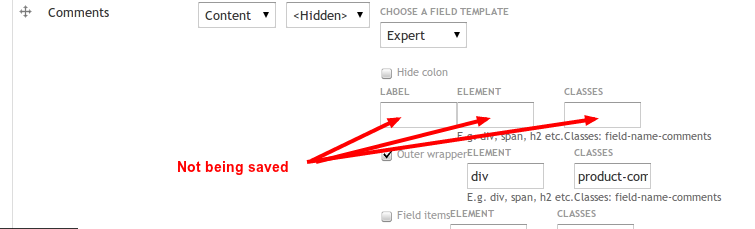
Created:
12 Aug 2011 at 11:30 UTC
Updated:
9 Apr 2012 at 09:28 UTC
Jump to comment: Most recent file



Comments
Comment #1
swentel commentedWell, I have around 30 simpletests which tests this, so it surely should work, things you should check
- have you click update after changing something on a field
- have you toggled the checkbox on the left if you want to change a wrapper - if you don't, that setting won't be saved
- do you have an override of the theme_field function in your theme
I need better steps to reproduce this, otherwhise I'm just guessing which is not easy.
Comment #2
Tony Finlay commentedAll of those steps you have suggested I've tried.
I've cleared all Caches, ran the site in incognito mode and I've definitely nothing intercepting the theme_field function.
I have views enabled on the site but surely this wouldn't intercept a non-view page?
Here's a link to a screen-shot which shows my 'Manage Display' page.
http://awesomescreenshot.com/0aaihce29
Comment #3
swentel commentedAre you only trying this on that field alone ? Also, is this the link field that you're trying that on ? Maybe it's only related to that one.
Comment #4
swentel commentedAlso, check theme_ds_field() in ds_extras to see if this function is called at all. If not, than there is a theming function taking over I'm afraid.
- edit - did tests with the latest dev version of link and that works, so there's nothing wrong with that module.
Comment #5
swentel commentedI'm beginning to think that omega has todo something with this - although not sure, see #1254794: remove h2 tag from Tags Field and #1255562: field reset expert not working
Comment #6
swentel commentedOk, seems like even omega isn't causing this
Comment #7
Tony Finlay commentedI start a new build on Tuesday, I'll install DS first and then as I enable modules I'll see if any of them cause a conflict
Comment #8
swentel commented@dirtyharry - ooh, that would be so great! thanks for that!
Comment #9
swentel commentedNote that #1265920: The theme's field.tpl.php should be used unless field display settings exist when "Default" option is selected also went in - but I'm not sure if this would interfere.
Comment #10
veleiro commentedI am also experiencing this problem. The Theme that I am running is Corporate Clean. Ive tried it several times on several content types, I save my results and its as if nothing has been applied.
Comment #11
Tony Finlay commentedHi Swentel, sorry for not getting back sooner on this but the client started to move the goalposts and therefore put the build back a few weeks.
You may already have this fixed but I though I'd let you know either way
----------------------------------------------------------------------------------------------------------------------------
The good news is I am currently using the Field Display Options successfully, I have reset the label and used 'Expert' to remove the colon and wrap the label in an H2 tag.
I've attached a link below to a screenshot of modules I've installed thus far without issue.
I am using Drupal core 7.8 and the 2011-Sep-12 developer release of Display Suite.
----------------------------------------------------------------------------------------------------------------------------
Installed Modules Screenshot - http://awesomescreenshot.com/06fkbu9c1
Comment #12
aquila commentedHi all,
I'm experiencing the exact same issue: reset options are not saved.
I am not sure whether it has worked before (same DS version etc), I think it worked once before, but I am not sure.
I'm using a custom subtheme of the ninesixty theme.
If you need any debug information, let me know. I'll try to give you everything necessary.
Comment #13
aquila commentedUpdate: I've checked this with both Chrome (latest) and Firefox (3.x) and similar behaviour arises:
change expert settings, hit update
notice the label being replaced by the expert label, everything seems alright
hit save
all expert settings are gone
Comment #14
Tony Finlay commentedHave you tried using the latest developer release?
Comment #15
aquila commentedI did not try that yet, as this would update my database too. I'll try installing a test website to give the dev version a try.
Comment #16
pcworxnet commentedI also have this problem trying to format the field display of a price. Im running D7.8 and uc3 with corporate clean theme + the latest developer release of Display Suite:
http://pc-worx.net/desktops/HPPavilionG5460uk
I'm simply trying to add a h2 header to my price field but no matter where I place it in field display (with the checkbox selected) I cant get the h2 to display.
I have flushed caches, run updates, the lot and I still see no change...when I view the source code of the page I can see the h2 does not appear
I'm quite new to drupal and ubercart and can just about manage to get about, but I get the impression ubercart or the theme prints the field and ignores field display settings totally.
Would an alternative be to just seek out what css sheet to add/edit class="product-info sell-price" or class="uc-price-label"?
Comment #17
pcworxnet commentedI also have this problem trying to format the field display of a price. Im running D7.8 and uc3 with corporate clean theme + the latest developer release of Display Suite:
http://pc-worx.net/desktops/HPPavilionG5460uk
I'm simply trying to add a h2 header to my price field but no matter where I place it in field display (with the checkbox selected) I cant get the h2 to display.
I have flushed caches, run updates, the lot and I still see no change...when I view the source code of the page I can see the h2 does not appear
I'm quite new to drupal and ubercart and can just about manage to get about, but I get the impression ubercart or the theme prints the field and ignores field display settings totally.
Would an alternative be to just seek out what css sheet to add/edit class="product-info sell-price" or class="uc-price-label"?
Comment #18
aquila commentedStrange, today I noticed that this partially works (in the stable release): defining an outer or inner element or label works, only changing the "general" field settings does not work.
Comment #19
swentel commentedI guess the root of the problem is that not all (display) fields pass through theme_field() which makes the field templates not working fine, so I guess the clue here will be that I'd have to remove the 'field templates' option for (display) fields that are rendered differently.
Comment #20
arcane commentedSubscribing
Comment #21
TimG1 commentedSubscribing...
Comment #22
jstollerI seem to be experiencing this same problem, but just with custom DS fields. Specifically, I have two preprocess fields I've created and all field display options are being ignored on these fields. The label also fails to display.
I'm using the latest DS dev release, with a custom theme and I have not overridden theme_field(). I've set the default field template to "Full Reset", but use "Expert" on select fields to add custom markup.
Comment #23
marcoka commentedhere is what i discovered.
i added a block field and added a test view there, outputting some sample images.
then i went to the article display and moved things around in the default display and added that "block field to the content".
the block field is never displayed when visiting a sample article.
it is displayed if i enable Full content and do everything there.
Comment #24
luco commentedI've updated to the latest DEV and it still doesn't work.
I can change Field Templates from
DefaulttoExpertand even wrap them in custom tags, but it's impossible to change their labels.Comment #25
Tony Finlay commentedHave you made sure the labels are not hidden first?
Comment #26
luco commented@Tony Finlay actually I saved the settings and double-checked them... after saving the label is still empty.
empty label -> enter some text -> save -> label still empty.
Comment #27
Tony Finlay commentedWhat about update? Did you hit the update button then save?
Any chance you could post a screen-shot to see what you're getting?
Comment #28
bleen commentedI've just noticed that I am seeing this issue as well, but only on the comments title field ("Full Comment") ...
Comment #29
ralf.strobel commentedI have the same problem, exactly as described by #13. In my case on an author field of a node. Some info does get stored, obviously, like the classes in expert mode. But the most important one, the label, does not.
Comment #30
jeffschulerField display settings are, for me, only saving on the Default view mode. For Teaser and a custom mode when I set the template, change the label and options, and Update, the field updates in the form, but after saving or reloading those changes are gone.
In Default view mode, though, it works as expected.
Comment #31
vacilando commentedSame problem here. Using a simple subtheme of Bartik. Using the latest dev.
Comment #32
milos.kroulik commentedI believe we are talking about different issues here. For example, I have problem with label (doesn't save), but other settings are saved. So I would suggest renaming this issue to something "Field label isn't saved when using field templates", as it reflects reality better. Is it OK for you?
Comment #33
dooug commentedworking with ds 7x.1.x-dev. I changed this issue to Major because these bugs inhibit the use of the ds_extras module.
I can reproduce the original issue & many of the following issues:
I confirmed that happens on multiple different fields (comment, title, post date) and multiple different Field Display settings (Expert, minimum, reset).
image_bug_2: somehow when I was testing the checkbox disappeared, I am not sure the steps to reproduce.
[Sidenote, I also find it confusing that the select dropdown changes when you click on 'Field Display'. For example: on my image (http://drupal.org/files/ds_extras_field_settings_form_bug_3.png) the post date dropdown says 'Medium' but when I click 'Field Display' that disappears and becomes the Select dropdown (Default, Expert, Minimum, Field reset). This is not a clear UI, but that maybe should be another issue. ]
I am abandoning ds_extras in favor of writing my own ds layout templates... this seems to have caused frustration for lots of people, hopefully it gets fixed soon.
Comment #34
mrfelton commentedAlso confirming the problem - I've added a preprocess field to a content type, and I can't get get it's label does show up in Full node display. I tried setting it with the extras module/settings, and it doesn't show.
Comment #35
swentel commentedBasically, anything that is a preprocess or ignore field, these settings won't have affect on the rendering of the field, we'll remove the ability to even set the options in the UI.
Comment #36
swentel commentedmarked #1521096: Don't duplicate field settings in the UI. as dupe (title field must be ignored as well)
Comment #37
swentel commentedMarking dupe of #1519916: Field templates, field refresh and cogwheel problems
The 7.x-1.x branch won't have that rewrite as that's going to have a huge impact.