

Needs work
Project:
Date
Version:
7.x-2.x-dev
Component:
User interface
Priority:
Normal
Category:
Feature request
Assigned:
Unassigned
Reporter:
Created:
14 Aug 2011 at 04:43 UTC
Updated:
10 Jun 2019 at 20:19 UTC
Jump to comment: Most recent, Most recent file





Comments
Comment #1
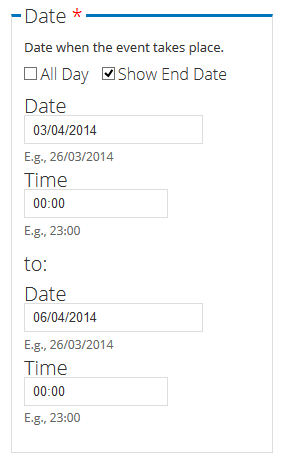
dboulet commentedAgreed, either that or add in labels for each date to establish that the first date is the start date and the second is the end date.
Comment #2
dboulet commentedI opened another issue to help figure out what to do with required field markers if we go with the idea presented above instead of re-instating the labels. See #1248786: Fix appearance of marker for required date fields.
Comment #3
karens commentedI have tried at different times to float the start and end dates next to each other, and when you have select widgets with all those elements it gets ungainly very quickly. Plus I had problems getting the right things to float without running into other css problems (like floating elements that escape their containers in some browsers). So while it seems nice when using small elements (like the popup dates, especially if they don't have any time), it gets ungainly for large ones plus the cross-browser issues begin to get dicey. I'm not sure what is the best answer.
Comment #4
mvonfrie commentedI have the same problem and added following CSS to my theme. I haven't added this to the
date_api/date.cssbecause it should be only added to admin / content edit pages but not to the front-end. I have not evaluated if these selectors would have any effect on fronot-end UI, neither if they work with Date Repeat API and Date Repeat Field.The parts are arranged a bit different than suggested by arlinsandbulte but if it is not ok it should be easy to change.
It is responsive too and nicely wraps on smaller screens and mobiles:
Comment #5
Zavs commentedComment #6
Zavs commentedComment #7
pobster commentedI had a UX improvement request to make this inline, felt like this was an appropriate ticket to attach it to (even though it's only semi-related).
Comment #8
labboy0276 commentedI know this is an old issue, but if people ever come back and try and do this, this solution is a slight improvement on the css in #4.
I added a hook in a custom module as follows:
And then I added this css to the date-range.css file (adjust the breakpoint as you deem necessary for your setup:
Comment #9
darrell_ulm commented#8 works well for me.