Closed (fixed)
Project:
Date
Version:
7.x-2.x-dev
Component:
Code
Priority:
Normal
Category:
Bug report
Assigned:
Unassigned
Reporter:
Created:
19 Aug 2011 at 19:33 UTC
Updated:
16 Feb 2012 at 17:07 UTC
Jump to comment: Most recent file


When you create 'additions' to repeating dates, they should get the same times as the original dates, instead they are getting set to midnight. The problem is some inconsistency in the code that is treating expections and additions slightly differently, plus a need to take the addition (which has no time) and adjust it to use the same time as the original date.
| Comment | File | Size | Author |
|---|---|---|---|
| #13 | date-repeat-settings.png | 72.93 KB | yan |
| #13 | date-repeat-result.png | 7.93 KB | yan |
| #4 | date_repeat_additions_have_wrong_time-1254582-6.x.patch | 1.17 KB | jerdavis |


Comments
Comment #1
karens commentedThis should now be fixed.
Comment #3
Shai commentedThe same problem exists for the D6 version.
I tried manually applying the commit to D7 from August 19 but it didn't work. Upon submitting I got the error:
Fatal error: Class 'dateObject' not found in /home/saj/public_html/sites/all/modules/date/date_repeat/date_repeat_calc.inc on line 343.What would be involved in backporting this solution to D6? I see that 143K sites are still using the D6 version.
Thanks much for your amazing efforts on this module,
Shai Gluskin
Comment #4
jerdavisThis patch should work for the Drupal 6.x-2.x branch.
Comment #5
Shai commented@jerdavis,
What are you patching onto?
The current dev version of Date 6.x-2.x already seems to include your patch.
And it doesn't work.
Shai
Comment #6
Shai commentedI'm changing this back to "closed, fixed" because this issue was meant for the D7 version.
I have an issue open for the D6 version at: http://drupal.org/node/1300274
I'm still confused by @jerdavis comment because the latest Dev version of date includes that patch but doesn't fix the problem.
Shai
Comment #7
Shai commentedWoohoo! Mystery solved.
@jerdavis did indeed have a solution that works. The problem was with his patch, which was reversed... the lines that were "+" needed to be deleted and the lines with "-" needed to be added.
I'll try to find some time to correct the patch and place it in the active queue for this issue.
Shai
Comment #8
Shai commentedI've posted the fixed patch for D6 in its queue: http://drupal.org/node/1300274#comment-5095210.
Comment #9
yan commentedThis still happens in latest 7.x-2.x-dev. Repeat dates always show "00:00".
Comment #10
karens commentedUnable to reproduce any problem in the latest version of the code. If you are still seeing this be sure you actually have the latest code. If so and the problem persists I need details about how you have configured your date field, what kind of widget, what kind of field, what all the field and widget settings are, and what value you input into the field.
Comment #11
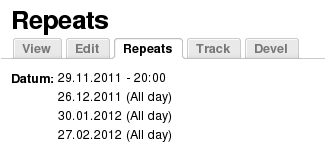
yan commentedI just updated to the latest version (Date 7.x-2.x-dev (2011-Nov-25)) and the problem stays the same. It happens only with the advanced repeat options, for example when I use repeat every last monday. In that case, when I click on the date reapeats tab, I get a list of all the dates with the first one showing the correct time and all repeats showing "all day". This does not happen if I just use repeat "every months" without the advanced options.
Comment #12
karens commentedThis issue is about problems using the 'Additions', not advanced repeat options. However I tried the example in #11 with and without additions and everything works fine.
Be sure you have the very latest dev code. If you still see a problem then I need to know what version of PHP you are using and exactly how the field is configured and all the options you chose on the date form.
Comment #13
yan commentedThanks for your answer KArenS. Attached you can find the date repeat settings and the result. It's actually the "advanced" option, not the additions.
PHP version is 5.3.8. I am using the dev code from yesterday (November 25th).
Comment #14
karens commentedAs noted above, you have posted something that is a different problem than the original issue, which makes it really hard to manage the issue queue. Each issue is about a specific problem, which can be fixed and then closed. And other people that have the same problem can find it to see what's going on with that problem. When you switch in a new issue it can never be closed and it's not about anything in particular, it's just a collection of different issues that might or might not have any relationship to each other.
I can't reproduce your problem using PHP 5.3.5 and we've had reports that some versions of PHP are interpreting things differently, so this may be one of those. Please open a new issue for clarity that is about that specific problem with a title like 'Advanced repeat options have the wrong time using PHP 5.3.8'. I don't have that version available, so if you could do some testing to see exactly which settings produce the wrong results we'll have something we can use to dig into the problem.
I'll leave this open until you do that, then please close this issue since the original issue is fixed.
Comment #15
yan commentedSorry KarenS, I think I wasn't aware of the difference between repeat additions and advanced options when I saw this issue the first time. Later I didn't re-read it and thought it was the same problem. I opened a seperate issue:
#1353488: Advanced repeat options have the wrong time using PHP 5.3.6 and higher
Comment #17
brandy.brown commentedI am using the latest version of calendar and date. I am having the same problem as the original issue.
Comment #18
karens commentedRC is not the latest version. The dev version is the latest version. Using the dev version I see no problem, additions all have the same time as the original dates.
If you see a problem in the latest dev version I need more information about exactly how the fields are configured (what kind of field, what kind of widget, what timezone settings) and also it might help to know what version of PHP you are using.
Comment #19
brandy.brown commentedI will go back and try the dev version. RC1 is the latest stable release. This is still a bug that should be patched.
Comment #20
karens commentedDev is where patches go. Stable releases are not altered once they are tagged. The patch is in the dev version and will be in the next stable release.
Comment #21
brandy.brown commented? I still have this problem with the dev version.
The widget is pop-up calendar the field is of type date the time zone handling is "site's timezone"
Comment #22
karens commentedI cannot replicate any problem in the latest code. You will have to provide complete steps to reproduce -- exactly how you set up the field, what date you entered as the start date, what options you chose in the repeating values. And also what timezone your site is using and what version of PHP.
Comment #23
brandy.brown commentedWell unfortunately I am unable to add or edit any nodes with a repeating date option right now so I can't provide any more detailed information. I will come back when http://drupal.org/node/1418858 is fixed.
Comment #24
brandy.brown commentedI went ahead and closed this since I found out that I am running Drupal 7.2!! I am sure an upgrade will solve my issues.
Comment #25
brandy.brown commentedOK I have updated to Drupal 7.12 and am using the current DEV version of date. I am still having the trouble that the times are not correct on the calendar view ... when I pull the field into a view in a block, the time given is correct. I am also running the latest dev version of calendar.
I am using PHP 5.3.6
Comment #26
brandy.brown commentedOK I got it working ... the module didn't update correctly the first time around. Thanks for all your help!