

 The 2026 Drupal Business Survey is open. Your response will help shape the future of the Drupal business ecosystem.
Updated: Comment #60
Problem/Motivation
The only determining factor for whether an addressfield is considered empty or not is the value of the country column.
Proposed resolution
The factors considered when determining whether or not an addressfield is empty should be configurable on a per field instance basis via the field instance settings form.
Requirements
- Any changes made should be at the field level and not just at the widget level
- Ability to specify which columns are required for the field to be considered "non-empty"
- Ability to specify if "all" or "one or more (any)" of the columns are required for the field to be considered "non-empty"
-
Integrates nicely with the fields default state
Does not save a row in the database if the field has not changed from the default state -
Integrates nicely with the required flag
Fails validation and displays relevant errors if an address field is not required, does not match the default state (some user input is submitted), but does not satisfy the "not empty" requirements - Uses existing UX patterns for required fields
Code chagnes
- Created a new addressfield element with new custom properties (satisfies requirement one)
- Additional settings have been added to the field instance (satisfies requirements one and two)
- Help text is dynamically added to the field alerting the user to the non-empty requirements.
- Improved the hook_field_is_empty() to account for default values (satisfies requirement three)
- Implemented validation hook on the new addressfield element (satisfies requirements four and five)
Logic for possible scenarios
-
If the address field is required
-
If the form is not valid (one or more fields are required and no required fields are filled in or all fields are required and not all fields are filled in)
- Set a form error with appropriate message
-
Else the field is valid
- Field data is saved to DB
-
If the form is not valid (one or more fields are required and no required fields are filled in or all fields are required and not all fields are filled in)
-
Else the address field is not required
-
If the field is not valid and it is not in its default state (user attempted to populate the address field)
- Set a form error with appropriate message
-
Else the field is valid or it is in its default state
- Field data is either saved to the database or ignored
-
If the field is not valid and it is not in its default state (user attempted to populate the address field)
Remaining tasks
Need reviews
User interface changes
- Adds new settings for field instances
- Adds new help text when viewing the field form
- Adds new error messages if requirements are not met
API changes
- Adds new "addressfield" element
-
Adds the "#non_empty_fields" property to the addressfield element
This is an array of addressfield column keys required for the field to be considered non-empty -
Adds a "#non_empty_fields_op" property to the addressfield element
This is a string with one of two values ('and' or 'or') which determines if "all" or "one or more (any)" of the columns are required for the field to be considered non-empty


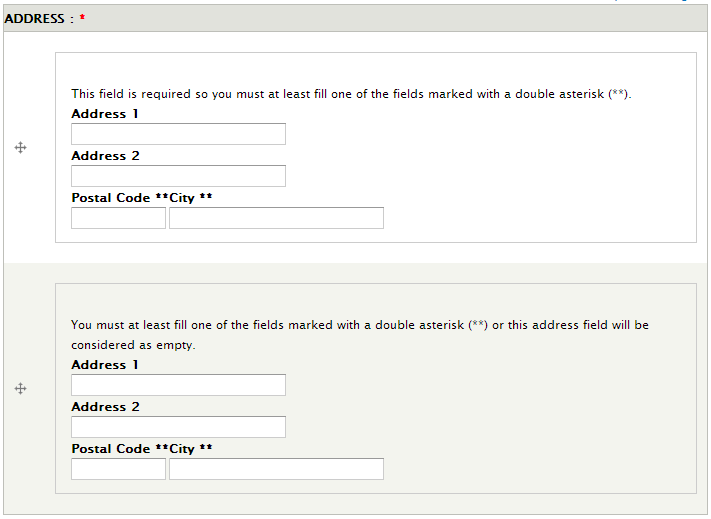


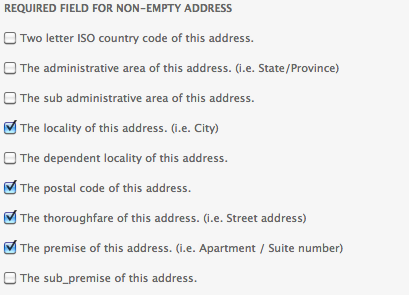
Comments
Comment #1
pbuyle commentedHere is a patch to implement this.
Comment #2
pbuyle commentedComment #3
pbuyle commentedsThe previous patch has a typo, use this one.
Comment #4
nagiek commentedThat looks pretty good. Should the validate function be changed as well to set a better error message?
Comment #5
michaelfavia commentedSubscribe. Patch applied cleanly and functioned asexpected.
Comment #6
damien tournoud commentedThanks for the patch. I think it's a nice addition to the module.
The patch in #3 seems to be missing a default value for the setting in hook_field_info().
Comment #7
michaelfavia commentedAfter looking at this again i dont think this patch was functioning properly because both arrays (item and field[settings][non_empty] were fully populated with 0 values.
I just added an array_filter() on the $non_empty_fields setting and it works like it should because that removes the unused array items.
Comment #8
michaelfavia commentedDefault settings arent necessary iirc. _field_info_collate_fields() takes care of setting them as empty for fields, widgets and formatters i think.
http://api.drupal.org/api/drupal/modules--field--field.api.php/function/...
If you would like to add them do you just want to use address_field_default_values()?
Comment #9
les limJust confirming that #7 applies cleanly and appears to work. Not commenting on #8.
Comment #10
TimelessDomain commented#7 works great. it fixed #984788: Add "Remove" button to clear out values in a multi-value address field widget & #1358084: Multi-value field with default value keep adding new addresses for me! thanks
Comment #11
BarisW commentedGood work. Please commit!
Comment #12
marty2081 commentedI can confirm that the patch in #7 works perfect for us. Please commit.
Comment #13
adam_b commentedPatch #7 applies, and I see the new interface - but it doesn't seem to do anything for me.
If I have only the default country set for a node, and in order for it to be non-empty I have only the Street Address ticked, I would expect the address to register as empty, and therefore not be displayed when the node is viewed. But I still have "Afghanistan" showing. Am I doing something wrong?
Comment #14
les lim@13: I think it works upon saving a node, not simply on displaying it.
Comment #15
les limMarking #1436222: Editing profile adds new address entry with default values as a duplicate of this issue.
Comment #16
amarcus commentedAs an even simpler fix, you can test for the default conditions. For instance:
Comment #17
dob_ commentedI tested the modifications from amarcus #16 on my installation. It works. Empty fields are now interpreted correctly and drupal is not craeating new fields after pressing save.I created a patchfile.
When creating a new node, it always creates two fields.
Comment #18
TimG1 commentedHi All,
#7 patch by michaelfavia on -dev (2011-Dec-13) worked for me. One thing I noticed is I can no longer set a default State though. In field settings if I set a default State then hit save, then go back to edit my field settings the default state is still set to -- (nothing).
However, if I type in a city and choose a default state they both are saved.
Screenshot of new settings from the patch are attached as well as "what_I_want.png" and "what_happens_when_I_save.png"
Thanks for reading,
-Tim
Comment #19
klucid commentedAfter patching the module, I don't have the option to specify the country when creating a node. Am I missing something?
Comment #20
letrotteur commentedTried patch at #17 and it works great with the country field, but other fields with default values doesn't seems to be considered default value and are still printed out. So a field with default country Canada and all empty fields will not be displayed but a field with default country Canada and default state Quebec will be rendered
It seems that addressfield_default_values() only retrieves the default country. Or maybe there's something I don't get about this function.
Am I the only one experiencing this behavior?
Comment #21
fago#17 cannot work, as the default value is stored in $instance, but $instance is unfortunately not available in hook_field_is_empty(). Also see #1489484: Add $instance parameter to hook_field_is_empty().
Thus, I think the original issue feature-request is the best way to solve this issue now in addressfield. Thus, I took the patch from #7 and added the default for the setting hook_field_info() + tried to improve the labels and descriptions a bit, so it's clear how that works.
Patch attached.
Comment #22
fagoops, wrong default value. fixed that.
Comment #23
sokrplare commented#22 worked beautifully for me! Had "Unlimited" values and "Hide the country when only one is available" chosen so multiple addresses were being created with only the country set on each node save. Switched to require administrative area and locality instead and the country-only ones have been stripped out. Thanks @fago and @michaelfavia!
Comment #24
fago*replied to wrong issue*
Comment #25
fagoComment #26
jpsalter commented#16 worked for us after a cache-clear-all. Patch in #22 did not work for us.
Comment #27
fago>Patch in #22 did not work for us.
How that? Did you configure suiting required fields for being non-empty?
Comment #28
bunthorne commentedI'm confused by this issue. It seems to overlap http://drupal.org/node/968112, which asks for the ability to have no country. It seems to me that what we need is a true "no address" condition that has no country.
Comment #29
boabjohn commentedApologies: the patch from #22 is against the latest dev (2011-Dec-11) not the latest release (2012-May-29) correct?
In any event, I've tried applying the patch to either version and get three fails:
The patch file itself is loaded at the module's root (ie, right next to addressfield.module)...clues happily (and humbly) received!
Comment #30
les limboabjohn: you'll need to use "patch -p1" for patch files with git prefixes (which are the "a/" and "b/" bits before the file names).
Comment #31
boabjohn commentedHey Les Lim, thank you so much! I recall this instruction now...had blanked on it earlier.
One more tho: usual practice is to patch against dev...but in this case we've got the official release 5 months ahead of dev...so that's a bit weird?
Can you (or others) just clarify that we're actually still patching the Dec 2011 dev?
Thanks heaps,
JB
Comment #32
les limExcept for some meta-information from packaging, both should be the same. Dev almost always reflects the last commit on the branch. The release doesn't contain any changes since the last dev commit 5 months prior.
Comment #33
duaelfr#22 applies well on last dev version but seems not working.
I configured my field to be non-empty only if country, zip code and city are set but when I leave my form untouched, an entry is created in the database and my field is shown in front office.
I tried with an existing node and with a new one without difference. I also tried with and without #1316788: Do not display country in address block if only one country option is available to avoid potential side effects.
Any idea ?
Comment #34
duaelfrAfter digging a bit into the code I realized I had misread the field description.
Using #22 the address is non-empty if ANY of the checked fields have a value.
What I need is that ALL of these fields have a value for the address to be non-empty.
Here is a patch which add to #22 an operator field to choose which of the two process you want.
Comment #35
fago>Using #22 the address is non-empty if ANY of the checked fields have a value.
That's usually covered by validation then, not? But the question is when validation should apply, with #22 this is as soon as one of the values has been entered.
Comment #36
duaelfrI just propose an improvement of #22, not a fix.
In my case I need my users to be forced to fill country, zipcode and city if they choose to input an address, but they can also leave it empty if there is no address needed on the node.
Comment #37
hass commentedWhat I need myself too and how I understood the case summary is a way to set up e.g. Firstname and Lastname field are required, but all others not so that every individual field can be selected as required. I have the need to use addressfield to be flexible for future, but for now for privacy reasons I need to be able to make all optional except the Firstname and Lastname.
Is this something that this patch addresses, too?
Comment #38
chaseonthewebThis issue doesn't address making fields required vs. non-required. This issue solves the question, "which fields have to be filled out in order for this address to be considered non-empty?" Since the empty criteria is currently that the country field is empty, and there is no way to set an empty value on the country field, the problem is that there is currently no way of saving an entity without an address row in the database.
Requiring certain fields to be provided on an address seems like something that can be accomplished with a custom validator via hook_form_alter. The problem in this issue is not as easily solved because the hook that determines if a field is empty is only called on the module that provides the field.
We've been running #22 without problem for the last couple days. It solves our problem better than #968112: Allow addressfield to be optional, because it allows us to continue to use the "Hide country if only one is available" functionality.
Comment #39
hass commentedIsn't this not the same on the end of the day? If I enable street, house number, city and country and the few others country specific can be skipped/left empty I have the same; if I require Firstname/Lastname only. Than the form validation wines only on empty Firstname/Lastname, isn't it?
Comment #40
Mołot commentedPatch from http://drupal.org/node/1263316#comment-6448340 was reviewed and tested by me and team I'm part of now. It basically does it's job, we applied it and are going to use it as a standard unless anything better will be shown up here. Untill then I strongly insist to apply this patch - maybe it's not perfect, but it's way better than the current state of "any single field will do".
Comment #41
obrienmd commentedIMHO, this still needs work from a UX perspective:
1) If the address field is not required, I fill out some fields, but my address does not meet the requirement for 'not empty', field is saved as empty without any warning / validation. Expected behavior would be if any fields are filled out (i.e. different from default) and the address does not meet 'not empty' requirements, to fail validation even if the field is not required, as user clearly was attempting to input an address.
2) If country field is hidden and forced to default, a field not meeting the criteria for 'not empty' is still populated with the country.
I'd be interested in sponsoring work to fix these issues.
Comment #42
duaelfrI think it should be possible to fix these behaviors.
Feel free to contact me to discuss about the details of this sponsoring.
PS : I am not an official maintainer but I can provde well formed patches.
Comment #43
duaelfrHere is a patch to answer #41 cases and to generally improve this module UX.
As I am not english native speaker, the descriptions and error messages that I choosed to provide some help to the users may not be perfect. You will find a list at the end of this post, feel free to propose something better and maybe more consistent with other messages in Drupal in general.
Test contextes
Common to all contextes
Context 1
Context 2
Context 3
Context 4
Test cases
Common to all cases
We assume that "Delta 0" is the first delta and "Delta 1" the second. Reorder the two fields in drag and drop cannot change the described behavior.
Case 1
Delta 0 : Leave empty
Delta 1 : Leave empty
Case 2
Delta 0 : Fill the zipcode field only
Delta 1 : Fill the zipcode field only
Case 3
Delta 0 : Fill the zipcode and city fields only
Delta 1 : Fill the zipcode and city fields only
Case 4
Delta 0 : Fill the address1 field only
Delta 1 : Fill the address1 field only
Case 5
Delta 0 : Fill the zipcode and address1 fields only
Delta 1 : Fill the zipcode and address1 fields only
Results
Error messages
Results table
Contextes
Delta 1 : No error
Delta 1 : Error#Custom3
Delta 1 : No error
Delta 1 : Error#Custom3
Delta 1 : Error#Custom3
Delta 1 : No error
Delta 1 : No error
Delta 1 : No error
Delta 1 : Error#Custom4
Delta 1 : No error
Delta 1 : No error
Delta 1 : Error#Custom3
Delta 1 : No error
Delta 1 : Error#Custom3
Delta 1 : Error#Custom3
Delta 1 : No error
Delta 1 : No error
Delta 1 : No error
Delta 1 : Error#Custom4
Delta 1 : No error
Improvable strings
As said in the introductions, here are all the strings I added to acheive a better UX. Feel free to propose better ones.
Descriptions
Errors
Sponsor
This patch has been sponsored by obrienmd. Thank him !
Comment #44
obrienmd commentedWow DuaelFr! I hope to get this reviewed today, but this looks super thorough :)
Comment #45
adam_b commentedLooks like exactly what I need - thank you very much :)
Comment #46
hass commentedThere are some strings with missing t() lik All, Any. Additional % placeholder is already checkplained automatically. Double check_plain need to be removed.
Comment #47
duaelfrThanks hass for your advices.
Comment #48
hass commentedI strongly suggest o change the All and Any string to a longer string that is selfspeaking. Otherwise translators may not able to translate correctly.
Comment #49
duaelfrI am not a native english speaker so could you please suggest better sentences for these items ?
Comment #50
jantoine commentedSo I updated the patch making the following changes:
- Moved the field settings into the instance
- Implemented an addressfield element for validation purposes
- Got rid of double asterisks and used built-in required properties
- Cleaned up messages
Here is how the settings work:
- if field is required
- if field op is or
- one or more non-empty fields are required
- else op is and
- all non-empty fields are required
else field is not required
- if field op is or
- one or more non-empty fields are required for field to be considered non-empty
- else op is and
- all non-empty fields are required for field to be considered non-empty
Comment #51
obrienmd commentedSo, the original patch as sponsored in #43 solved a UX issue our users were having, in that it provided validation for a non-required field missing required elements, rather than zeroing it out.
If a user accidentally forgets to add postal code to a non-required address, but otherwise completes the address, they clearly meant to add that address - that should fail validation with a message that postal code is required. Using patch in #50, it just saves that field instance as empty. This confuses users, who don't know why the data they just entered is now missing.
There's a bit of a wrinkle in that county can be hidden if only one is available, so the logic should be as follows:
If any visible field is filled in an address, then should fail validation if non-empty requirement logic is not satisfied.
Else, save address as null/zero/whatever (no data, not even hidden country).
Comment #52
jantoine commentedThanks for the additional information @obrienmd. We should be able to detect if the user was attempting to populate the address if individual field values are not equal to their respective default values. I will roll a new patch in the next couple days.
Comment #53
obrienmd commentedCool! I hacked something together, but it's not really patch-worthy :)
Comment #54
jantoine commentedI have updated the patch from #50 to set a form error if any address element field has a value other than the default value, checking if the user attempted to populate the address field.
Here is how the logic works:
There are two problems I have come across, but I think these should be handled in separate issues:
Comment #55
ericmulder1980 commentedIt seems to me the patch in #54 has some issues.
When you have a field within the address field which is not required and does not have it's default state it will throw the form error because the valid state is set to FALSE by default.
Let's go trough the code step by step.
1. On line 452 the default value for $valid is set to FALSE
2. In the foreach loop on line 461 the condition for
if($field[#required])returns false so $valid will never be set to TRUE.3. If the last child field in the address field does not have it's default value the $default variable will be set to FALSE.
4. On line 482 both $default and $valid are set to false resulting in a form error to be set.
The entire $valid and $default check needs work. However when you set the default value for $valid to TRUE when
$element['#non_empty_fields_op'] == 'or'results in TRUE at least you can save your node.So in other words, changing
$valid = $element['#non_empty_fields_op'] == 'or' ? FALSE : TRUE;to
$valid = $element['#non_empty_fields_op'] == 'or' ? TRUE : FALSE;will at least enable you to save the node.
Comment #56
jantoine commentedAttached is an updated patch that fixes a bug where checking if the address was empty was returning TRUE in cases where it was in fact not empty.
@ericmulder1980
Per your comment at #55:
1. The valid state is only set to FALSE by default when the operator is set to OR
2. We do not need to set $valid to TRUE. As long as $default is TRUE, no errors will be thrown
3. If a single field is not in a default state, default should be set to FALSE. Position is not important
4. This should trigger an error
If you are populating a field non-required field and are not populating at least one required field with the operator set to OR, this will trigger an error because you are not meeting the minimum requirements you set.
Comment #57
Anonymous (not verified) commentedApplying that patch, I have the following errors:
Notice : Undefined index: non_empty_fields dans addressfield_generate() (ligne 132 dans sites/all/modules/addressfield/addressfield.module).
Notice : Undefined index: non_empty_fields_op dans addressfield_generate() (ligne 133 dans sites/all/modules/addressfield/addressfield.module).
Notice : Undefined index: non_empty_fields dans addressfield_field_widget_form() (ligne 694 dans sites/all/modules/addressfield/addressfield.module).
Notice : Undefined index: non_empty_fields_op dans addressfield_field_widget_form() (ligne 695 dans sites/all/modules/addressfield/addressfield.module).
Notice : Undefined index: non_empty_fields dans addressfield_generate() (ligne 132 dans sites/all/modules/addressfield/addressfield.module).
Notice : Undefined index: non_empty_fields_op dans addressfield_generate() (ligne 133 dans sites/all/modules/addressfield/addressfield.module).
Notice : Undefined index: non_empty_fields dans addressfield_field_widget_form() (ligne 694 dans sites/all/modules/addressfield/addressfield.module).
Notice : Undefined index: non_empty_fields_op dans addressfield_field_widget_form() (ligne 695 dans sites/all/modules/addressfield/addressfield.module).
Can you help me ?
Comment #58
hongpong commentedFor what it's worth this still appears to be a significant problem with addressfield module, making it untenable to use the 'Unlimited' values option. Also noticed there is not an easy way to remove these zombie value entries either (shouldn't there be a remove button somewhere?).
Comment #59
johnv@HongPong, try one of the solutions in #1844846: Make Addressfield optional, (even if country is required)
Comment #60
jantoine commentedUpdated the patch from #56 against the latest 7.x-1.x-dev.
Comment #61
matthijsI had some validation issues with the previous patch, an updated version is attached.
Comment #62
smerth commentedAfter applying this patch I get the following warnings.
Notice: Undefined index: name_line in addressfield_element_addressfield_validate()
Comment #63
tien.xuan.vo commentedThis patch fix these errors:
1. No error message if the required field is empty.
2. Addressfield isn't saved.
3. Notice: Undefined index: ... in addressfield_element_addressfield_validate().
4. Add break to for loop to increase performance.
Comment #64
tien.xuan.vo commentedMake the #63's patch compatible with #79's patch from #970048: Define and use addressfield as a form element type
If you don't want to apply the #79's patch from #970048: Define and use addressfield as a form element type, use the #63's patch instead.
How to use: Apply #79's patch from #970048: Define and use addressfield as a form element type before apply this patch
Sorry for my English!
Comment #65
tien.xuan.vo commentedUpdate addressfield_element_addressfield_validate since #63 and #64
Comment #66
artusamakI think that your patch implementation is really complex for the validation, the fact that you want to consider a field populated or not is also not a good idea in my opinion.
The behavior for validation of this field type should be working like the Link module does, validating mandatory fields and if the values are multiple only starting the validation if the fields have been populated (but if all the required fields are required, force the user to fill them).
The last point was about the default value & the empty value, using the "none" country was considering the field as a new entry, i don't think that it should.
Based on your patch and with a simplification of the validation logic here is a new patch fixing the new empty entries and validation "à la carte" of the address components.
Of course this patch has to be applied with #970048: Define and use addressfield as a form element type #79 first.
Comment #67
jkingsnorth commentedThe patch in #66, combined with #970048: Define and use addressfield as a form element type #79 has fixed my issue. (Problems when adding multiple addresses to an address field, lots of 'blank' addresses are stored because even though only the country is stored this is seen as a completed address).
Comment #68
jkingsnorth commentedActually, I am getting a PHP notice when I add a new address field now:
Notice: Undefined index: non_empty_fields in addressfield_generate() (line 138 of ***sites/all/modules/addressfield/addressfield.module).
Comment #69
semanthis commentedOk this problem is driving me nuts. As mentioned in #67 the patch solves the mentioned problem. Patching the module just works if all instances of the addressfield is deleted before patching the module, this way you can avoid #68 . But anyway the patch creates another problem already issued at #984788: Add "Remove" button to clear out values in a multi-value address field widget. The proposed solution to set the country to -none- is not possible because the -none- option does not exist if the country is "required". So to delete a address-entry the values from the other fields have to be cleared an then the country value has to be set back to the default value. This is crazy. To solve this it looks like I gone have to write a javascript to do this job for my customers.
I assume that there is a solution for all of that, but reading throu all issues for hours did not let me find the right combinations of patches which would do the job. Why has none of this patches dealing with that issue ever been commited? Commiting those would at least give people the chance to commit new patches adressing the still existing problems.
Any help would be highly appreciated.
Comment #70
artusamakI believe that the maintainers are not really watching closely the issue queue.
I agree with the fact that the remove button is a blocker but would stick to the process to solve this is:
1/ Convert to element_info()
2/ Fix the validation & multivalue process
3/ Bring the remove button possibility.
I should have time tomorrow to try to work on the remove button, i can try to give it a shot.
Comment #71
klonos@Artusamak: That would be great Julien.
Comment #72
artusamakA small update that only brings (for now) a fix for the integration with Drupal commerce.
Comment #73
hass commentedI can only fully support this.
Maintainers are ignoring this case for unknown reasons. And posting permanently new patches for unrelated issues don't help getting things in. Maybe we should take over the project.
Comment #74
deanflory commentedHappy Belated 2nd Birthday to this issue!
Comment #75
tien.xuan.vo commented@Artusamak I tested your patches but its didn't solve the problems in my case. So I'll maintain my patches.
These patches correct the pointer of the stack.
Sorry for my English!
Comment #75.0
tien.xuan.vo commentedProperly filled out the issue summary including all concerns raised through comment #60.
Comment #76
klonos...moved related issues to their respective, dedicated metadata section ;)
Comment #77
dddbbb commented#66 (along with the other patch mentioned in #66) works fine for me but now I'm getting the following warning:
Warning: Invalid argument supplied for foreach() in addressfield_element_addressfield_validate() (line 456 of /Volumes/Data/Sites/somesite/sites/all/modules/contrib/addressfield/addressfield.module).Comment #78
gmclelland commented@Artusamak - fyi your patch in #72 no longer applies
Comment #79
gmclelland commented@tien.xuan.vo - fyi your patch in #75 no longer applies to the latest dev
https://drupal.org/files/addressfield-configurable_empty_fields-1263316-...
Comment #80
robert castelo commentedHere's a solution for the specific user case where an address should not be created if only the country has a value, something that happens often if a default country is selected:
Address Empty module
Comment #81
mxt@Robert Castelo: thank you for your module, but it doesn't work at 100%.
I've tried it and, ok, empty (= only country has a value) address are not saved, but still new "empty" address are always added in node edit.
I'm using a multivalue address field (a node can have multiple address): could be this the reason? Does your module take in consideration a multivalue addresfield?
Thank you very much in any case
Comment #82
klonos@MXT: I think it would be better if you filed this as an issue over to that project.
Comment #83
klonosRelated D8 core issue.
Comment #84
klonosI recently came across Field Suppress. I haven't actually used the module, so I don't know in what shape it is, but from its description:
I'm not sure if or how, but the
field_suppress_blankfield setting seems that might prove useful if we used it for our cause.PS: cross-posting this to the other related issues for those that don't follow here.
Comment #85
letrotteur commentedTried patch at #75 and I can't reedit the field settings once I checked some required fields because some validation is done for the default value form in the same page. I get an error like Address 1 field is required. So for now saving the settings is like a one shot deal... Anybody noticed something similar?
On the same note, I can't delete the value of a required for non-empty adress field once a value as been saved. I get the same error.
Comment #86
ergophobe commentedHere's a reroll of the patch from #75 that should apply cleanly to beta5 or the current dev.
This patch still has a basic problem in that if you select fields as "required to be considered non-empty" you're basically making the field itself required. This is a no-go in my use case, but even if it weren't, since it runs the form validation on the field UI settings form, you can't actually change the default value for one component without having a all required components set to a default value.
Steps to reproduce:
1. set the default country and nothing else
2. mark several other fields but not country as required to consider the field non-empty
3. select the OR operator
4. save
Result: It fails form validation because it says I'm trying to save an address but I have required fields that are left empty.
I've fixed the above in the attached patch that just adds a check for 'field_ui_field_edit_form'. The bigger issue for me, though, is the problem of effectively making the field required. I see a few use cases
1. Address required, some fields not required. That's the case this issue deals with. You want to require the address field, but allow users to omit the country or the postal code or something like that.
2. Field is not required but you want to provide default values for some components. This might be where you sell in France, but make a few sales in Belgium or something, so you want to default the country to France. So a form that has values that are nothing but default values should be considered an empty field and ignored (no data saved). That's the case dealt with in #968112: Allow addressfield to be optional. I have an updated patch there, but ideally these patches would be combined and provide solutions to problems 1 and 2.
Comment #87
ergophobe commentedComment #88
fagoComing back to the same problem 2 years later, I'm not sure why the patch has become so more complex meanwhile. I still think #22 is reasonable simple approach.
Testing #22 now, I ran into the situation of the default value being treated as empty as well. Therefore, I added a small work-a-round that ensures that the default-value is never treated empty, even if it matches the empty-value conditions.
Given that, having a default country plus only non-country fields triggering non-empty values works fine for me.
Comment #89
fagoComment #90
seanrRegarding #86 point 2, wouldn't the best solution for that case be to not display the address form if it is not required and only show an "add address" button? Then when you click that, you get the form with the default values (as well as a remove button).
Comment #91
joelstein commented#88 works great for me...
Comment #92
marabak commentedI'm suscribing to what seanr suggested. Just like with the inline entity form, an "add address" button would definitely close this issue. And the main form would be much more simple.
Comment #93
deanflory commented@ergophobe, your two patches fail when attempting to apply them both to either of the releases on the project page, not sure what version you developed those against.
addressfield-configurable_empty_fields-1263316-86.patch
addressfield-nocountry-option-968112-158.patch.txt
I wouldn't mind an "add address" button/link, but it all boils down to whether geofield requires an address or not without throwing an error. Too many long-unresolved issues with this module.
Comment #94
jkingsnorth commentedI too think that an 'add address' button as proposed in #90 would be a good, simple solution to this long-standing problem!
Comment #95
held69 commentedWith patch #88 i tried to make the postalcode required, however with no result.
Patch #86 set a red asterisk however didnt make it required as in
i could leave the postalcode field empty and save the page.
Comment #96
ergophobe commenteddeanflory - those are fairly old at this point and were intended to apply against a git pull of HEAD at the time
Comment #97
gbyte#88 is a simple and working solution in terms of saving the data, however if we mark the country as not required and don't save it, when going back and edit the node, all the address fields are empty on the node edit form (even though they are saved).
Steps to reproduce:
- apply patch #88
- add address field to content type
- in 'format handlers' only leave 'Name (single line)' checked
- in 'Required fields for non-empty address' (option from this patch) only leave 'Contents of a primary NameLine element in the xNL XML' checked
- save content type
- create node, adding a name in the address field - yey data gets saved!
- edit node - you will find the name we added (address field) to be empty on the node edit form (probably because we didn't save the country) :(
Comment #98
gbyteThis is a slightly changed patch from #88 to fix the issue I reported in the last comment.
Now if we mark the country as not required and save other address info (like name), when going back to the node edit form, the saved data is displayed in the form edit fields.
Comment #99
gmclelland commentedWill any of these patches work with Panels?
I tested the patch in #88 and #98 and the label will still print on the page even if the address field is empty. I think this is because the addressfield module still stores a row in the database even if the field is empty because it still considers the default country as a filled in address. I even tried https://www.drupal.org/project/address_empty but it didn't work as well.
Comment #100
sgdev commentedThe patch in #98 works for me. However, I think there needs to be some further consideration for fields not required but have default values, or at least provide additional information for those configuring this option.
I believe the basic issue is alluded to by ergophobe in #86. As an example, we have a situation where "New York, NY" is configured as the default city/state address fields, since these are the values entered by users in 80% of the cases. Most of the remaining 20% are full addresses outside of New York, with street, postal code, etc. However there are a few rare situations where users enter a city/state combination with no street or postal code, such as "Albany, NY."
If we use the #98 patch to handle city/state/country as empties, this works for 80+% of our cases, but does not handle those occasional situations where users want "Albany, NY" as a single item on the map.
The only way to have this patch work with 100% certainty is to have no default address values.
Another option (outside of an "add address" button) would be to add an extra checkbox field that allows users to set if the address should be treated as "empty" or "not empty" -- regardless of whether or not it has a value. Technically, this could be done right now by adding a boolean field on a content type, then using Field Formatter Settings (https://www.drupal.org/project/field_formatter_settings) and Field Formatter Conditions to control if the address is displayed.
Comment #101
seanrI almost wonder if maybe this should go in as is and then #100 be spun off into its own issues - unless someone can find a way to quickly incorporate it into this patch? This seems to crop up rather often and it'd be nice to get the 80% case solved sooner rather than later.
Comment #102
sgdev commentedSean, I think it would be worthwhile to get the 80% solved sooner rather than later, although there needs to be some very clear information describing how the functionality works. I could see a lot of situations where people might think it's going to resolve issues that are not possible to solve.
I would like to see a message something like the following: "If the address field has default values, careful consideration should be given to which fields are required for non-empty addresses. A common approach would be to not select any field in the above list that has a default value."
A different approach would be to reformat the functionaliity as a table, where each row allows for selection of required fields for non-empty address and whether or not to ignore defaults, as follows:
I think this is slightly better because it allows "New York, NY" to be set as default, and ignores the value as being non-empty unless it is changed to something else, such as "Albany, NY." Or, the module code could be patched directly to ensure default values are ignored -- maybe that's a better approach?
As a broader issue, it's impossible to assume we know the exact user expectations when filling in an address. What about the one situation where the user wants New York, NY (with no other address info) as the address point to be displayed on a map, but in all other situations it should be treated as empty?
To fully resolve this, there probably needs to be a checkbox displayed to users when creating content. I'm thinking it would shown only in the case where default values have been set, and those same fields are selected as required for non-empty addresses. In such a scenario, the user might see a checkbox that says, "Allow default value as an address."
As an example, if our default address was "100 Main St, New York, NY," the checkbox could look like this:
[X] Allow default value as an address (100 Main St, New York, NY)
Only select when no other address information has been added, and the field should be displayed as a valid address.
Could even take it one step further and use jQuery to disable the checkbox if the address field has been modified from default values. The checkbox would not be shown unless the above criteria is met.
Thoughts?
Comment #103
sgdev commentedWell, #98 is not working quite as I'd expect. We have street, city, and postal code marked as required fields for non-empty address. State/province is not selected, and New York is the default state value.
When creating a new post, the end result is "NY" displayed as the address. I would have expected it to be not shown since we have said only street, city, and postal code can trigger a non-empty address. A record was stored database with the default state, and the page renders this value.
I think for now we're just going to focus on the original comment I made in #100, which is the patch in #98 can work if there are no default values. The statements I made in #102 would require additional work.
Comment #104
bojanz commentedThis issue proposes an over-engineered for the problem of optional addressfields (which is something that the module was never designed to do).
Since there are over 200 comments in 3 issues detailing wildly different solutions to wildly different problems, I'm going to narrow it down:
Every address, at minimum MUST have a country. But, the addressfield SHOULD not need to be required.
Therefore, if the addressfield is optional, a "- None -" option should exist for the Country.
While "- None -" is selected, no other field is rendered, and nothing is entered into the database.
Once a country is selected, the rest of the widget is rendered.
Please join me in #968112: Allow addressfield to be optional where I will implement this.
Comment #105
gbyteI don't think closing this issue is productive, as this thread is trying to solve the flexibility issue with address field.
For example address field provides the 'name' or 'company name' and the module should be configurable in a way that it can only display the 'name' field and save the user provided 'name' value into the database without the rest of the address or the country. The patches submitted here are close to resolving this problem.
Won't reopen this issue as I don't feel I have the authority.
Comment #106
bojanz commentedEdge cases like that are better served with independent fields, in my opinion. Disable the name line in addressfield and create a name field separately.
In any case, such tweaks are as simple as https://www.drupal.org/node/2282817#comment-9422245 so I don't feel that adding additional complexity is justified.
Comment #107
sgdev commentedbojanz, I understand your point of view. I would like to offer further feedback to the comment you made in #104:
Yes, I agree that every address should have a country. I also agree that addressfield should not be required. However I disagree with the remainder of your points on the grounds of good user interface design. A technical decision has been made here, when we should be considering what is easiest for the user.
The idea that a user must toggle from "- None -" to a country every time he or she wants to enter an address as a way to support addressfield as optional is not good user design. We have many US-based clients with two use cases:
1) Allow for a product to be posted with a US-based address.
2) Allow for a product to be posted with no address.
It would not be overly difficult to add an option that if country has been selected and no other address field has been entered, consider the address to be empty. Not all businesses are international (in fact many in the United States are not), and having this simple option would make the lives of many order management teams much easier. I would think there are many in the US that would agree with me.
We'll probably just hook node_presave right now and add our own logic to clear the address in this situation, unless you have a better suggestion. However I think this is a common enough use case that it should be considered. Thanks.
Comment #108
ckngAgreed with #107, it is rather common use case.
Since so many optional addressfield suggestions are not accepted, would like advice on how to solve this except hook_node_persave() or on form submit:
I've only one country enabled and if I checked 'Hide the country when only one is available' there is practically no way to remove or save the entity.
- Even if I unchecked the 'Hide the country when only one is available'
-- on every save, the empty addressfield needs to be set to "-None-", which is seriously bad in term of UX
- Hide the country via CSS
-- won't work as entity cannot be saved unless making all fields not compulsory which leads to new issue of empty addressfield being created
- Set default to "-None-"
-- work but still can't hide the only country + bad UX
Comment #109
bojanz commentedIt's the best solution we have for D7.
This issue was never about UX, it was about introducing a code workaround that wasn't optimal.
So let's discuss UX improvements in another issue. If we can figure out the ideal UX, it could be implemented for D8 (or for D7 in another module).
Comment #110
kristi wachter commentedWhile this discussion is going on, I just want to make sure readers are aware of the related thread Add an option for allowing incomplete data to be saved, and specifically the patch in comment #17, which may be helpful to some folks while this is being worked out.
Comment #111
aaronbaumanConveying a respectful tone is sometimes difficult in this forum, so let me start with this:
I appreciate the work of all the maintainers and committers for this module who volunteer their time and slog through the issue queue to keep it pruned. I maintain a couple of much much lesser-used modules, and I can barely find the time to keep up with those. It's a lot of work, and I respect the time that you all have dedicated to this project and to Drupal in general. I want to be clear that this comment is not meant to diminish your work in any way.
I would like to object to this notion:
as being a reason to "won't fix" this request.
Any field should be optional. Addressfield may not have been designed that way, but that doesn't really matter because it can be marked optional now.
Maybe Drupal should allow contrib modules to provide an alternative implementation of hook_field_is_empty().
Unfortunately that's never going to get into feature-frozen Drupal 7.
Further, let's grant this premise:
In fact, #98 allows admins to make addressfield requirements MORE strict.
Let's grant that "country" should be the bare minimum to save an address: that doesn't mean we want to fill up our database with addresses that are "country" only.
I should be able to say that, e.g. city, state, AND country are required to save an address. Or name and country, or whatever.
The proposed feature is an elegant solution for something that addresses a very hot topic - thousands of comments across many different threads as Bojan noted above. Maybe patch #98 needs work, but I think it deserves another look.
Comment #112
azinck commentedComment 80 references it, but I'll mention it again: the Address Empty module solves this problem for many use-cases by considering addresses that only have a country "empty". It's working very well for me.
It's an incredibly simple module, so it also provides a template for you to write a custom module if you have slightly different requirements for what you consider "empty".
Comment #113
sgdev commented@azinck, I appreciate the feedback and the suggestion. I have not tested the module, although from #81 it seems there might be use cases where it does not work as expected. Also the module owner directly references this thread:
I think we need to include some real world practicality into these types of decisions. If there are plenty of people who feel the functionality should exist, why should it be necessary to add a 40-line module that incurs another call during bootstrap? Seems more reasonable to include the functionality in the foundational module.
Comment #114
azinck commentedComment 81 was from a long time ago. I believe the bugs have been worked out of Address Empty. As I said, it's been working well for me.
Why isn't this functionality in the Address Field module itself? Well, read through this issue to see all of the back and forth. In a nutshell: there are people who feel that the assumptions made by Address Empty aren't appropriate for all of the use-cases Address Field is meant to serve.
But speaking of practical solutions: I just wanted to point out that there are probably a great many people for whom Address Empty would alleviate a lot of pain *today*, while this broader approach continues to get sorted out.
Comment #115
sgdev commentedThe same can also be said for the suggestion I made in #107 of adding
hook_node_presaveand writing your own logic for any possible use case.