

Closed (fixed)
Project:
Rooms - Drupal Booking for Hotels, B&Bs and Vacation Rentals
Version:
7.x-1.0
Component:
Rooms Pricing
Priority:
Major
Category:
Feature request
Assigned:
Reporter:
Created:
31 Aug 2011 at 09:50 UTC
Updated:
14 May 2015 at 14:54 UTC
Jump to comment: Most recent, Most recent file



Comments
Comment #1
ronald_istos commentedInteresting idea and I definitely see a use case for things. Partially links to the already suggested idea of a minimum period use case. Hopefully we can get back to this soon.
Comment #2
ronald_istos commentedchanged title to make it clearer
Comment #3
donquixote commentedThis is actually three things:
1) minimum duration to stay
2) Make weekends more expensive than weekdays
3) fixed day of the week for arrival / departure. E.g. you can only book from Saturday to next Saturday. This would split the year in weeks instead of days.
(just noticed that the other issue is closed as duplicate, #1496286: A minimum booking period)
My own use case is number (3), I am building for a chalet where people can book a week Sat-Sat, but not just a day.
Comment #4
artatac commentedpatxh attached for adding the features as described above - please consider rolling into module
Comment #5
1an_m commentedFantastic! This solves one issue for me, my use case requires specifying a minimum 7 night stay for high season.
When I apply the patch, I get an error message that the hunk patching rooms_unit.info failed, but the patch seems to work anyway. (I can specify a minimum 7 night stay under bookings settings, and update the availability of rooms for a specified time frame to "available for minimum stay")
Any chance you could make a patch for one of the other components mentioned immediately above the post with your patch?
3) fixed day of the week for arrival / departure. E.g. you can only book from Saturday to next Saturday.I am far from having the skills to do it myself, and note that it took ~44 weeks from the time that you posted the original feature request, to posting the patch to implement it.
Ian
Comment #6
codesmithI installed the patch to get the minimum number of nights. Mixed results.
1) Got an error while install patching but seemed to still work ok.
2) Under Booking Settings I set minimum length to 2 days and under "Valid Availability States" checked only "Rooms marked as available with inimum stay" (Note misspelling)
3) Did a search for rooms and no rooms were available - for any combo of dates. If I also select the "Valid Availability State" of "Rooms marked as available" then I get results.
Comment #7
hooligangel commentedMy use case is (3) above: fixed day of the week for arrival / departure, plus 7 day stay period.
The clients arrive on Saturday (Sunday) afternoon and leave on next Saturday (Sunday) morning (7 night stay). Another option - monthly rentals that splits the year in months.
I applied the patch on the clean installation on a windows localhost
(1) where should I put the price for the week?
(2) If the first day is Saturday, Rooms calculates 7 nights but I have to make "minimum stay" as 6 days to make it work from Saturday to Saturday. Then there is a price calculation problem, because the system calculates the stay "Arrival 15-09-2012 departure 22-09-2012" as 6 nights instead of 7 nights.
Comment #8
1an_m commentedHave made a few minor edits to artatac's minimum stay patch from reply #4
Still reading and learning to try and come up with a solution to the fixed day of week for arrival!
@hooligangel
Part ii) Calaculation issue where 7 night stay is calculated as 6 nights (eg in 2nd page of booking cart), I think is a rooms module issue, which seems to have been fixed in the current beta4 version (works for me, anyway!)
Comment #9
donquixote commented#8
Probably if you have a week option and a day option, you want the Saturday - Saturday week price to be cheaper than 7x day price.
Comment #10
acrollet commentedI'd like to review this patch, but it's pretty out of date at this point. Please re-roll against the latest 7.x-1.x-dev, thanks!!
Comment #11
1an_m commentedI have re-rolled the patch against 7.x-1.x-dev as requested.
All works as expected on my test site.
1an_m
Comment #12
acrollet commented@1an_m: thanks much for re-rolling! I'm attaching an updated patch with a wording change and some formatting fixes, but overall the patch works for me and meets the basic use case. I'd really like to see the ability to set different minimum stay lengths for different units/time periods, but I don't know if that should be a reason not to get this in now - assigning to Ronald for review/comment.
Comment #13
1an_m commentedI agree that a more flexible approach as you suggested would be good.
I am currently working on adding fixed day of the week for arrival to the patch as it stands, but thought it would be worth discussing the possible use cases before going too far down that road.
For my own use case, adding the fixed arrival day of week to the current patch would be fine (I need to be able to specify min stay 7 days, Saturday to Saturday, and apply to all units for a given time period). Doing this should be fairly straightforward
However I'm not sure if there is a use case for a more complex /flexible application of the fixed arrival day of week. ie do we need to allow for
Comment #14
roman_pro commentedAny updates on this? Particularly I'm interested in the fixed day of arrival feature and may help with implementation.
Comment #15
mabo1972 commentedI applied the patch #12 but the "minimum stay" feature does not work.
In the Booking Settings i configure a minimum stay for 7 days.
but I still can book all rooms for 2 or less than 7 days
Comment #16
junkbox commentedTried applying this patch and got many HUNK errors, is this patch valid against the current release candidate (rc2) or the newest dev build? I currently have rc2 installed but will migrate to dev if the patch is actually valid it against it still. If neither of those are true, then is there any intention of re-rolling to be compatible with either dev or current release candidate?
I'm trying to diff them in an IDE and not having much luck as it looks like there's been some structural changes in rooms_availability and rooms_booking and there's a few HUNKS that no longer seem to appear in the files they were previously in when the patch in #12 was re-rolled namely:
HUNK 6: \modules\rooms_booking_manager\rooms_booking_manager.module
HUNK 7: \modules\rooms_booking\includes\rooms_booking.availability_agent.inc
HUNK 8: \modules\rooms_availability\includes\rooms_availability.booking_event.inc
HUNK 15: \modules\rooms_availability\rooms_availability.module
Comment #17
junkbox commentedSo, for the most part the patch in #12 can be gone through Hunk by hunk and applied OK. The only bit that has changed drastically seems to be this (in modules/rooms_booking_manager/rooms_booking_manager.module):
Can anyone familiar with the above function lead me in the right direction? I'm confused as to the changes made between the patch in #12 and the current Release Candidate (rc2). With a little help I'd be happy to test the implementation against rc2 and Diff out a re-roll to be current. Like I said the above is the only part I can't wrap my skull around.
Comment #18
eebanos commentedPatch http://drupal.org/files/rooms-minimumstay-1265276-12.patch doesn´t work on the last dev version.
Comment #19
artatac commentedHi Ronald
Is this a candidate for inclusion as a base feature? please. could it be a priority
Comment #20
junkbox commented@artatac, curious as well did this feature make it into 7.x-1.0 I'm still able to assist but have to roll this thing out without it for now on rc3(with the dev fixes).
Comment #21
PN1 commentedThanks for Rooms!
Please integrate to
the minimum amoung of days/nights
function as standard. Will be great.
Comment #22
PN1 commentedI installed the patch "rooms-minimumstay-1265276-12.patch via
Patch Manager (Info about Patch Manager module patch_manager)
In Rooms administration
can´t see the field for minimum days restriction and the reservation process still allows to order one night.
I am patch newbie but please how to let the patch work?
URL to patch: www.testuj-to.cz/sites/default/files/patches/rooms-minimumstay-1265276-12.patch
folder atributes are on: default 555 (tried too 777),files 777,patches 775, rooms-minimumstay-1265276-12.patch 775 (tried too 777)
URL to node shows only in german language mutation (patch): http://www.testuj-to.cz/node/340
Comment #23
artatac commentedhere is a revised patch that works with 7.x-1.0-rc3.1+22-dev
try it out at http://bookpitches.co.uk/ by booking a less than 4 days 20-31 oct
Comment #24
PN1 commentedHello artatac,
thanks for your reply and link!

But I tried to make reservation for just 1 night and provided it on http://bookpitches.co.uk/ without any problems...
So the patch is unfortunately not working.
Comment #25
1an_m commentedPN1
The test website does work as advised! If you look carefully in your screenshot at the dates you chose, you will notice that they are in November, not in October (20-31) when the minimum stay requirement is set.
artatac
Thanks for the updated patch. It doesn't apply cleanly against the current dev version (but that is because of a typo in modules/rooms_unit/rooms_unit.admin.inc line 383 unites =/ unit, and not your patch). I also noticed that in the Bookings Settings page (site_url/admin/rooms/config/bookings) there is something not quite right about the underlying code, since the color settings for "Room available with mimimum stay" appears outside the box that contains the rest of the Calendar color codes. I haven't had a chance to look into this yet.
Comment #26
artatac commentedInteresting
I no longer have access to my programmer so if (you/someone) has a chance to upload a patch that will work with the latest dev, we can ensure that this feature is not lost
Comment #27
PN1 commentedhello 1an_m,

thanks for your reaction!
Yes you right, I overlooked the right term.
I tried to make reservation in the right term (from 21-31 October) for just 2 nights and the system
doesn´t allow to provide it on http://bookpitches.co.uk/ So its working right.
I downloaded the patch https://drupal.org/files/minimum-stay-1265276-thing.patch
an will try it again.
Comment #28
1an_m commented@artatac
Do you have an approximate date for that the patch was first applied successfully on your test site? I am trying to reroll the patch against current dev version, but need to find a commit for which the patch applied cleanly. From the info that you provided ("works with 7.x-1.0-rc3.1+22-dev") it looks like it is around 19 Apr 2013, but a more accurate date would help to identify the correct start date for rerolling the patch.
Comment #29
artatac commentedSure the patch was created on the 29th July. if there is info/timestamp within the Drupal site that would help more then let me know. Also I have zipped a working test site with the db file on the root and placed it at http://bookpitches.co.uk/aapitches05.zip
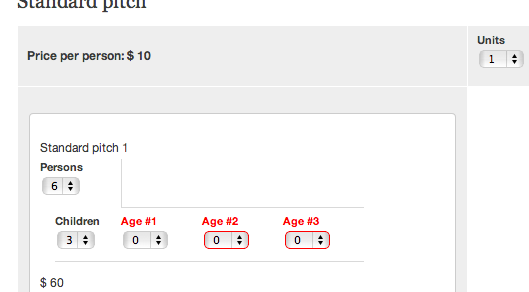
Also in the spirit of community helping each other I was hoping that you could point me to someone who could fix the fact that the availability search is not used to populate the booking>person/children e.g.: http://bookpitches.co.uk/demo/booking for say "Group size 3 Children 1" > Search for availability
If you then chose 1 unit the Persons default to the max (6)
and children to 0
these should inherit from the availability search or users have to reinput the details. Happy to pay for this change if required
Comment #30
summit commentedHi,
@artatac, hopefully you keep updating your site in the open. Would love to see this evolve! I think drupal has lots of ingredients to get this working, if this booking dialog becomes stable!
Greetings, Martijn
Comment #31
artatac commentedHi just seeing if your revised patch is working with the latest dev and if I could have it. I am trying to get another issue patched https://drupal.org/node/2113209 but would like to get it patched against latest dev rather than my rooms version that works for me
Comment #32
1an_m commented@artatac
Here is the revised patch. Sorry it took a while (I have a real job also!).
Thanks very much for your info and the zipped copy of your test site, which enabled me to sort out the issues.
I removed some whitespace errors, and moved the minimum stay options on Bookings Settings page [siteurladmin/rooms/config/bookings] to be within the drop-down menu "Calendar Color Codes & Labels".
There was also a change affecting rooms_unit_admin.inc, which I removed. see #1990710: possible typo in rooms_unit_admin.inc. This is fixed in 7.x-1.0 and also master, but not yet in 7.x-1.x (dev) for some reason.
Anyway, I have tested the patch and it seems to work for me, let me know ...
Comment #33
artatac commentedHi
I have tried it and at e.g. http://bookpitches.co.uk/demo3/booking/2013-11-18/2013-11-19/1?rooms_gro... (set Nov 8-31 min booking 3 days)
All settings seem correct but booking is allowed to go ahead without warning. Zip of patched latest rooms dev FYI
Regards
Joe
ps also created css to tidy look when adding children/age (screenshot attached)
Comment #34
artatac commentedoops screen shot
Comment #35
1an_m commentedHi artatac,
I can't tell why minimum stay is not being enforced on your test site in the date range you have set. Without admin access I can't check if availability for all your "rooms" is set to minimum stay over this date range. Also wondering how you updated rooms project to current dev? (rooms.info still has version = "7.x-1.0-rc3.1+22-dev")
It does work on my own test site (rooms project dev version obtained with git clone, then patch applied with git apply).
Comment #36
artatac commentedRetried using git and now working well. Thank you
Comment #37
1an_m commentedUploaded new version of patch.
Functionality the same, corrected a few typos
@ronald_istos
could this be considered for inclusion please
Comment #38
1an_m commentedRe-rolled patch for latest dev
Comment #39
1an_m commentedAccidentally re-introduced change made in recent commit on dev. Attached rerolled patch without this error.
Comment #40
akanbiabubakar commentedWas anyone able to solve item 3 on this post?:
This is actually three things:
1) minimum duration to stay
2) Make weekends more expensive than weekdays
3) fixed day of the week for arrival / departure. E.g. you can only book from Saturday to next Saturday. This would split the year in weeks instead of days.
I had to solve it crudely, works for me, but I believe you guys would do a better job of it.
Comment #41
ronald_istos commentedMoving this to a feature request - we will be working on this in the next couple of weeks.
Comment #42
1an_m commentedpatch at #39 (minimum_stay-1265276-39.patch) is stale, needs reroll
Comment #43
kevster commentedWould br great to get a re-roll on #39 to work with the new stable rooms 1.2 - I did try to apply the patch but it only partially applie ddue I suspect to code changes. I would do this myself but apologies for not having the skills to do this.
Im happy to test any re-rolls. Many thx - Kevin
Comment #44
1an_m commentedHave been working on a re-roll. Almost complete: as it stands,
Let me know if you find other issues
@ronald_istos: any update on when/if this feature might be added?
Comment #45
ronald_istos commentedHi - we've been working on a more generalised "Constraints" module that integrates with both Unit Types and Units. You can check out progress on our Github repository - https://github.com/BluesparkLabs/DrupalRoomsModule.
The idea is that you activate this extra module to get this functionality since it may not be something everyone needs.
Comment #46
1an_m commentedThanks,
The new "Constraints" module looks great. Looking forward to being able to set
for a range of dates
for a unit or all units
This will satisfy the requirements outlined in the first few comments, in a very configurable way.
Looks like the admin settings for this not yet exposed to site administrator, but appears that some of the existing patch may be helpful in this regard.
Comment #47
kevster commentedGreat - many thx @1an_m I will test that as keen to get a project live asap and great news @ronald_istos look forward to that contrib module!
Comment #48
kevster commentedHi @1an_m,
I just applied the patch #44 against rooms 1.2 and had to manually patch rooms_booking_manager.module and rooms_ui.module as it only partially applied. Once I worked out that I had to set the bookable units to "availability for min stay" it all seems to work fine.
I also set Valid availability states under booking settings to "Units marked as available with minimum stay". Many thx!
Comment #49
acrollet commentedPlease have a look at https://www.drupal.org/project/rooms_availability_constraints for this functionality.
Comment #50
googletorp commented