

Closed (fixed)
Project:
Acidfree Albums
Version:
master
Component:
Code
Priority:
Normal
Category:
Bug report
Assigned:
Unassigned
Reporter:
Created:
12 Mar 2007 at 11:33 UTC
Updated:
9 Apr 2007 at 13:50 UTC
Jump to comment: Most recent file



Comments
Comment #1
janosch commented>I have the same problem.. i have the bluebreeze theme.
Comment #2
vhmauery commentedthis is fixed in the latest HEAD snapshot.
Comment #3
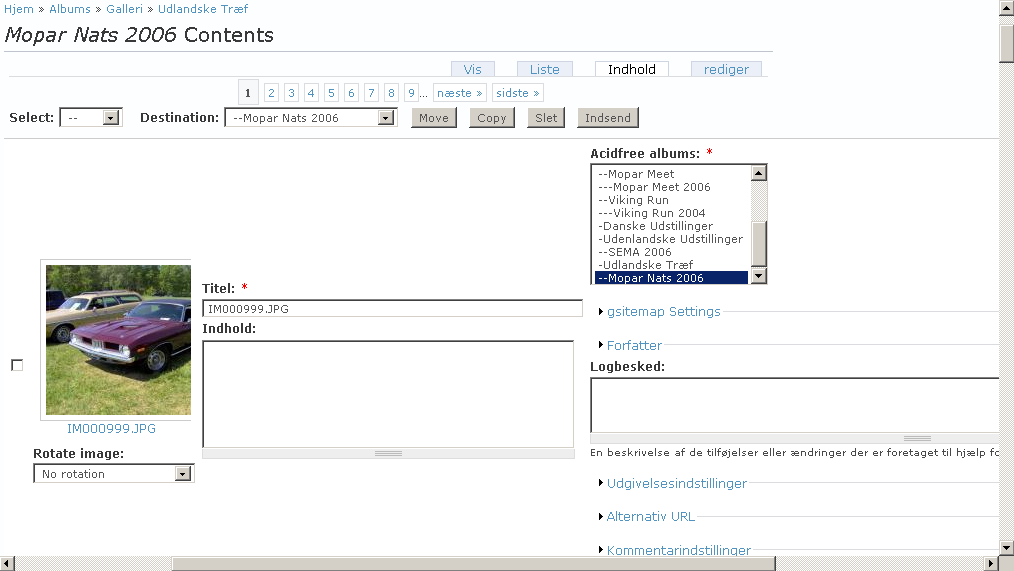
janosch commentedHi i tried the latest HEAD version and i still have a messed up view under contents. Look at attached picture
Comment #4
vhmauery commentedIt works fine for me with Firefox, Opera, and Konqueror all rendering the default drupal 5 theme. I don't have any other browsers available to me. If this is an IE problem, you will have to fix it yourself (while not breaking the previously mentioned browsers) and supply the patch.
Comment #5
nancydruI see this problem in FF2 with the Garland theme.
Comment #6
nancydruI also see it with Netscape 8, but it is not happening with IE6.
Comment #7
vhmauery commentedOops. Sorry. It turns out that the change from my development repository got reverted from the drupal CVS repository. I just re-committed it.
Comment #8
janosch commentedHello again :)
I don't quite know if you want the picture to show in a column by itself, or it should be in the same column as the rest of the settings. Well it did get a little better but still looks strange to me (screenshot).
Could you maybe post a sceenshot of how it looks by you?
It's the same in FF2 and IE7 for me.
Comment #9
vhmauery commentedYes, it does look strange. That is because there is so much CRAP to fit into a little tiny window. It wasn't really meant to be a great looking page; it was designed as an administration interface. Part of the problem is that everyone wants to have their little add-on module's fields to show up, when all I want is picture, title and parent album. I don't know where to put all the other stuff. maybe in an invisible div. :)
Either way, this bug is closed. Your screenshot looks just like mine, which is how it was intended to look. I am open to ideas though. If you really want to change the look of it, you can file a feature request. But I really doubt this will change much in the short term unless somebody else finds the time to implement the changes.