

Closed (fixed)
Project:
Fivestar
Version:
7.x-2.0-alpha1
Component:
Code
Priority:
Normal
Category:
Bug report
Assigned:
Unassigned
Issue tags:
Reporter:
Created:
20 Sep 2011 at 18:38 UTC
Updated:
16 Mar 2012 at 04:05 UTC
Jump to comment: Most recent file

Comments
Comment #1
ericduran commentedYea, we should be pre-fixing the names with fivestar.
Comment #2
andrenoronha commentedsame here.
Comment #3
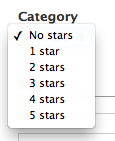
BrockBoland commentedSeeing the same thing. Screenshot attached to demonstrate:
Comment #4
BrockBoland commentedConfirmed that the proposed solutions works, and created the attached patch for it. If one of you can confirm this patch applies cleanly, I think it'll be ready for RTBC.
Comment #5
ericduran commentedThis is also going to review an update hook.
Comment #6
bigjim commented+1 for patch in #4, needed to clear the cache.
Comment #7
ericduran commentedYea, this can't go in without an update hook. It'll break everyones else site.
Comment #8
BrockBoland commentedI can't for the life of me replicate this bug now, using Fivestar 7.x-2.x (commit 88f430) and Drupal 7.10. Was this fixed in the course of other bug fixes?
Comment #9
ericduran commentedI've personally never been able to replicate this issue. The number of people having this issue seems pretty low as I would imagine if this issue was real it would have a lot more people having this issue.
But I do think prefixing the widget with fivestar would be a good idea. But I won't commit this with out an update hook.
Comment #10
BrockBoland commentedAgreed. I'm happy to write it, but I'm not really clear where in the DB it would need to be updated. Can you point me in the right direction?
Comment #11
bigjim commentedThe database fix is in the field_config _instance table's data field ( field_config_instance.data ). The issue will be it's a serialized array, I know PIA. I think it would be something like $instance['widget'] if $instance is the array form the data field. You can get the list of fivestar fields form the field_config table.
For me this is easy to reproduce, I simply have to add a term reference field to a node an voila, it's showing the fivestar option list.
Comment #12
ericduran commented@jalama are you on the latest dev version?
Comment #13
bigjim commentedWhen I applied the patch I was working in an older version, I'll have to look tomorrow (it was at work), though it would have been a version from Nov/Dec. It's worth noting we are on a site that migrated form D6->D7 and we have tons of fields that are using the select widget provided by the Select module in fields.
Comment #14
digibrill commentedI am receiving the same error. I have a list of terms called Site Section and the drop down is showing Fiverstar ratings.
Comment #15
digibrill commentedAlso, the module is greyed out on the module page, so I cannot disable it and uninstall normally. Next to Fivestar on the module page is also "Required by: Drupal (Field type(s) in use - see Field list)" Something has its wires crossed. I just updated to the most recent dev version. Do I have to change DB tables manually or? This is a test site where we moved from D6 to D7.
Comment #16
ikke commentedSame issue here - 2.x-dev doesnt fix it. I also upgrade a 6 to 7 site. Patch work for me.
Comment #17
ericduran commentedThanks BrockBoland for the initial patch.
I added an update hook to update any old "select" widget to fivestar_select.
This is now fixed on the latest dev.
Thanks.
--
http://drupalcode.org/project/fivestar.git/commit/a46866c
Comment #18
InTheLyonsDen commentedUpon downloading and updating the database for the latest dev version all of my votes were hosed. The data was in the voting table but I could not get the votes to appear or recalculate. I tried changing Voting API to calc on cron, flushing caches, etc. I ended up reverting to a pre-update backup.
Comment #19
BrockBoland commentedThat's probably no good. Did you keep a copy of the hosed DB? If not, would you be willing to re-do it on a dev site? It will probably help identify what went wrong if someone (probably ericduran) can review the DB contents.
Comment #20
ericduran commentedOh really? That doesn't sound good.
Are we sure the db got hosed from this update? I'll do some testing to check.
Comment #21
InTheLyonsDen commentedI'll need to set up a dev copy and run it again. I took a gamble on a production update to attempt to fix a problem I was having similar to #1393812: AJAX / SQL error - one solution. Was thankful to do a SQL dump first. Oddly, the code did seem to fix the "PDOException: SQLSTATE[21S01]: Insert value list does not match column list" issue but all votes/stars went to zero. The site is an inhouse project that we launched this week. http://socdir.com - With the revert I'm now stuck with the PDOException issue. I should have some time to work on it tonight. Thanks!
Comment #22
InTheLyonsDen commentedGood news / Bad News. I went through the process of updating the database and newest version and noticed that the widget types had changed in the content types for the two content types I was using. I changed these widgets back to 'display stars" and wallah all the voting was back! So it appears it was just a post-update configuration reset.
The bad news... Users are not able to vote due to the PDOException error #1393812: AJAX / SQL error - one solution. I'll take that cause up on another thread. Thanks!
Comment #23
BrockBoland commentedericduran: I see the problem. In the change you made in the install file:
Should be a double ==, because right now, it's resetting all Fivestar fields to use the select method.
Comment #24
ericduran commentedDoh, I see that. Thanks. Fixing asap now.
Comment #25
ericduran commentedThanks for that @BrockBoland I was also sure to give you both credit on the commit message and on the git author attribution :)
This is now fixed with this commit: http://drupal.org/commitlog/commit/2490/fbdfd17b6ffb677501a2eb9071313835...
Ok now this is really fixed.
Comment #26
ericduran commentedActually I also decided to make a tiny change. There really is no reason to change the instance if it's not a select widget so I changed this:
to this:
Comment #27
BrockBoland commentedThat makes sense. Thanks again ericduran!
Comment #29
digibrill commentedStill not fixed for me. I uninstalled Fivestar because of this conflict.
Comment #30
andrenoronha commentedIs this fix in the dev version of 14th march?
Comment #31
andrenoronha commentedYeah, I installed the last dev version and it's working fine.