

Closed (fixed)
Project:
Fivestar
Version:
6.x-1.19
Component:
Code
Priority:
Normal
Category:
Support request
Assigned:
Unassigned
Reporter:
Anonymous (not verified)
Created:
17 Mar 2007 at 22:06 UTC
Updated:
23 Feb 2017 at 18:13 UTC
Jump to comment: Most recent, Most recent file


Comments
Comment #1
Politosphere commentedHi,
Sorry I don't have a solution to your problem, but I'm interested, because I was wondering the same thing: it would be nice to rate comments also.
Did you figure out how to do it on your own, or are you still looking for assistance?
Comment #2
quicksketchYou're close :)
A fivestar type form element requires some additional support, as without javascript or css it is, as you said, just radio buttons. Try:
Just typing this makes me realize that Fivestar needs to provide some kind of utility to do this code for you (or do it automatically). I'm marking this as a feature request :)
Comment #3
Anonymous (not verified) commentedI ended up coding a custom module that did this and a few other things. My problem was that I needed to allow people to add a rating of the original article when they submitted a comment on that article, and I needed to have some validation that would not allow them to submit a comment without a rating. As a side note, this turned out to be a fascinating journey into the guts of Drupal's API, and I'm glad I took the trip. I feel like a real Drupal developer now :-) I'm happy to share the code with anyone who wants it. I doubt that it will ever find it's way into the contributed modules.
Comment #4
lzy commentedduggoff, I will really appreciate it if you could share the code. Been looking for the answer for quite some time already. :)
Comment #5
Leeteq commentedSecond that. interesting feature.
Do you mind sharing the module?
Comment #6
Anonymous (not verified) commentedHere's the solution I came up with. I'm learning more every day about the forms API so I'm not sure if this is really the right way to do it.
You need to create a module with this code in it:
And you need to make a modification to the 5 Star module:
Comment #7
quicksketchI've moved the javascript and CSS calls around so adding a fivestar element is much easier:
Take a look at the fivestar_form() function for more implementation details.
Comment #8
(not verified) commentedComment #9
ChristianVK commentedHi there,
i hope i am on the right place here to ask.
Ive got the following problem:
My users are writing reviews (node-type = review) for products. They write a text about the quality of the product and then should be able to rate the product by fivestars on the same form.
This review should only be rateable by the user who wrote it (the author) and nobody else.
Others Users can then read the review of the Author and see the fivestar-rating beneath the review, but cant manipulate this vote.
So i have the following steps to accomplish:
Step 1:
Show the fivestar-rating inside the form, when creating a new node (of type "review")
Step 2:
Statically show the rating under the review for other users to see on the website.
Here are my solutions so far:
Step 1: Ok! I inserted the code from above into an own module with the hook_form_alter
Done! The fivestar-rating will show up on creating a new node of the type "review".
I fill in my review text and then I click on the fivestar-rating to vote inside the form and then submit the form.
Heres a screenshot:
Step 2: not ok
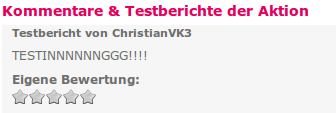
The created review looks fine in the public view, but the Stars are still set to nothing (like i never voted)
Screenshot:
Does somebody have a hint for me, how i can make this rating possible?
I think the problem is, that im only showing the fivestar-rating on node-creation but it runs no functionality when i submit the form to create the review.