

Closed (fixed)
Project:
Media Gallery
Version:
7.x-1.0-beta7
Component:
Miscellaneous
Priority:
Normal
Category:
Bug report
Assigned:
Unassigned
Reporter:
Created:
18 Oct 2011 at 08:39 UTC
Updated:
5 Jan 2012 at 07:10 UTC
Jump to comment: Most recent file

Comments
Comment #1
wipeout_dude commentedJust an update.. Adding the jquery.colorbox-min.js file to the library directory under sites/all/libraries/colorbox/colorbox/jquery.colorbox-min.js breaks the gallery and images aren't shown when clicked..
Comment #2
moloc commentedFirst, the colorbox library is required by the media_gallery module. So you should install it an the errors will be gone.
README.txt
What do you mean by "breaks the gallery"?
And "images aren't shown when clicked", is this related to #1358244: Incompatible with jQuery Update - Lightbox does not show any picture?
Comment #3
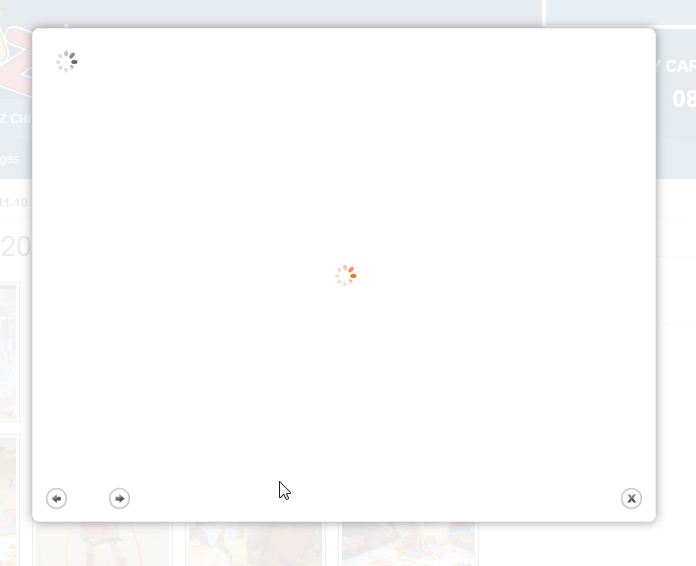
wipeout_dude commentedWhat I mean by "breaks the galley" is that when the colorbox library IS available in sites/all/libraries/colorbox/colorbox/jquery.colorbox-min.js, when I click on the first picture in the gallery it never loads.. All I see is the attached.. Clicking the "next" image button will show me the next image..
If I delete the library from sites/all/libraries/colorbox/colorbox/jquery.colorbox-min.js the first image clicked shows but a warning is logged..
Warning: file_get_contents(sites/all/libraries/colorbox/colorbox/jquery.colorbox-min.js): failed to open stream: No such file or directory in drupal_build_js_cache() (line 4766 of /home/www.domain.com/public_html/includes/common.inc).
Currently testing latest version just downloaded - colorbox-1.3.19.
Comment #4
moloc commentedJust testet colorbox-1.3.19. This version works fine.
If colorbox is not available, you don't see the colorbox. Then you are directed to the detail page of the image. So make the library available again. Clear the cache.
1. If you click the "next" button in the colorbox, is there still a loading icon, or do you see the second image in the colorbox?
2. Go to a detail-image page (the url is like ?q=media-gallery/detail/%/% Note: % in my example is a paceholder for a number). Replace the "detail" word with "lightbox" and open the page. What do you see?
Comment #5
wipeout_dude commentedHmmm... Then thats interesting.. media-gallery must be picking up the colorbox .js file from another module or something because without the library available the image still shows in a colorbox when clicked.. This may be where the issue is..
To answer your questions..
1) I see the second image in the colorbox when clicking the "next" button.. I can click "back" and see the first image in the colorbox as well.. Just doesn't show on the first execution when clicking an image from the thumbnails page..
2) Changing the URL to "lightbox" simply shows the image on its own in the browser, clicking the image takes me back to the "detail" page.. Is this correct?
Comment #6
moloc commentedMaybe you are right. When i first had a look on your screenshot, i was wondering, why there are two loading icons.
- Do you have colorbox elsewhere (not media_gallery) (on your site) in use?
- Search for colorbox with your Operating System in your Drupal installation.
- Disable Javascript Aggregation in Configuration-Performance, clear cache, goto the gallery page and open the HTML-Source. Search for colorbox.
Comment #7
wipeout_dude commentedYes, looks like this may be part or all of the issue..
I have another module that was created specifically for this site that uses colorbox.. The line in the .module file is..
drupal_add_js($module_path . '/js/jquery.colorbox-min.js', 'file'); //colorbox script
..and its loading this version and the one in the library directory..
My guess is that this should be using the library colorbox .js file so that it only has the one version loaded..
Would this make a difference? What would be the correct way to load the correct file in the custom module so that only one file is loaded and they don't conflict?
Comment #8
moloc commentedYes, your custom module should use the libraries colorbox. So each module, which requires colorbox, can use the same library and there should be no conflict.
There are different solutions:
1. using a direct path to the libraries (instead of your module-path)
2. a better solution (in my opinion) is using the Libraries API with a fallback to 1. if the module does not exist.
3. if you like to customize the colorbox, maybe the Colorbox module is something for you. (Then - i think - you just need to set a dependency in the .info file)
Comment #9
wipeout_dude commentedThanks Moloc.. That's what the issue was.. Obviously the two .js files were not playing well together..
I am not really much of a coder but the libraries API documentation page gave a simple example that I used to pull up the colorbox .js file from the libraries directory.. This appears to have solved the problem and all is now working with no apparent errors.. I think its still using the css from the custom module even for the gallery images but that's fine as it's consistent..
Comment #10
moloc commentedAs everything is now solved, i flag this issue as fixed.