Hi all,
So in all my feeds, I'm getting html characters messing things up.
for example:
<title>It's National Animal Safety and Protection Month!</title>
<description><p>Pet care tips and helpful info for animal lovers</p></description>
I've tried changing views_rss_views_fields.theme.inc line 88 from $row .= "<$key>". check_plain(htmlspecialchars_decode($value)) ."\n";}
to
$row .= "<$key>". check_plain(htmlspecialchars_decode($value, ENT_QUOTES)) ."\n";}
But there is no effect.
I do have php 5.2.11, so htmlspecialchars_decode() should work, and I did test the code by entering in a little character before the . The character did show up in the correct places. Does anyone have any idea what's wrong?
Thanks so much,
Evan


Comments
Comment #1
juc1 commentedThis problem is also mentioned in the views issues queue =
http://drupal.org/node/559056#comment-4349908
Comment #2
maciej.zgadzaj commentedWell, how I see it (at least in theory, haven't run any tests on it yet) is that this line should look like:
No
htmlspecialchars_decode()here, nocheck_plain()either (note thatcheck_plain()also callshtmlspecialchars(), hence some characters get double-encoded - see issue mentioned by Juc1).Generally, I believe that output should be formatted in the way set up in view definition only, we shouldn't probably force any additional formatting here...
Comment #3
juc1 commented@ maciej - I tried something that didn't work so can you please clarify where your code in post #2 is supposed to go?
Also is this problem related to my problem ie html not being rendered in the feed?
Thank you
Comment #4
maciej.zgadzaj commented@Juc1 - as mentioned in issue description, this is a change to
views/views_rss_views_fields.theme.incfile, in functiontemplate_preprocess_views_rss_fields_item()- see attached patch.And yes, I'd say this is related to your problem too. However I suspect that in your case there could be even more to it, would need to see your original feed first though (how it looks before passing it through FeedBurner - would it be possible?)
Haven't released new dev version yet, as first I would want to play with it a little more and compare results of different configurations/outputs with other feeds (and validators), was a bit short on time recently though... Also, would be great to see how this patch works you as well?
Comment #5
juc1 commented@ Maciej, thanks for your reply. Here is a clone of the feed without feedburner = I don't think feedburner is causing the problem. I will report back re the result of the patch.
Thanks
Comment #6
juc1 commented@ Maciej
OK please see attached screen shot of the patched file =
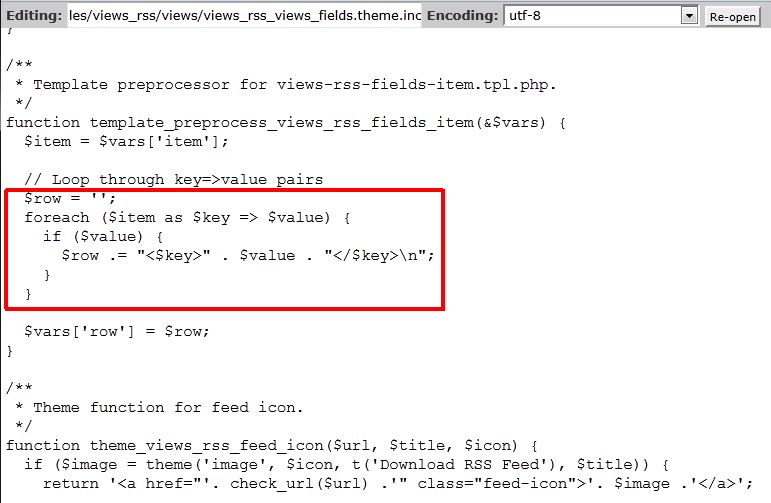
Maybe I have done something wrong but a feed after this patch looks like this
http://jurim.info/podcast/feedpatched
Thanks
Comment #7
juc1 commentedview =
Comment #8
maciej.zgadzaj commentedThanks Juc1. Actually, I wasn't suspecting FeedBurner to mess things up, I just wanted to check how the link is configured in your original feed.
Essentially, you shouldn't have any html links (
<a href=""></a>) in thetitleelement - link should be automatically generated by feed reader based on<link>element. So for example your most recent<item>should look something like this:And links to MP3 files (or any other attachments) should go into
<enclosure>element.Re empty feed - looks strange. Patch works fine for me here, just tested it again. Example feed
<item>element before patching:and after:
Caches cleared? No other changes anywhere else? Have you checked if you still have everything ok in "Field usage" in in feed's "Style options"?
Comment #9
juc1 commentedOk sorry, it was a "field usage" thing. The bad news is that the patched feed doesn't seem to fix the html problem (re apostrophes etc) in Chrome = http://jurim.info/podcast/feedpatched.
In firefox and IE the feed won't display at all ("Internet Explorer cannot display this feed. This feed contains code errors.") I am not sure yet whether this is a separate problem.
Thanks...
Comment #10
maciej.zgadzaj commentedOk, scratch the previous patch. Had a quick look at RSS spec, and actually HTML entities should be there (well, in
<description>element only, other elements should not contain any HTML in them).New patch attached, I have also set up a simple test feed to check its results, and it seems to go fine through W3 validator (apart from namespace, but there is another issue for this), displays ok in Chrome/FF/IE, looks good in GReader and FeedBurner... so far so good.
Comment #11
juc1 commentedOK thanks, with the new patch I can see that the apostrophe etc html problem is fixed in your feed and mine in IE and Firefox (although not in the xml = Chrome - but maybe that is normal??)
There is still the problem of my title links saying "a href=" http://jurim.info/podcast/feedpatched but if necessary I think one way to fix this is to just remove the link in 'link field to node'.
But there is another problem - the xml (chrome) correctly outputs my MP3 files, but in IE and firefox, the MP3 field is missing.
Any suggestions please?
Thank you
Comment #12
maciej.zgadzaj commentedWhere do you see a problem with apostrophe in Chrome? Looking at it right now and looks ok to me...
Re title links - yes, that's what I said above - no HTML in any elements besides description.
Also,
<link>element should point to article URL, not MP3 file. Any attached files should be put in<enclosure>tag, which is not supported by current version of the module I'm afraid - although there is already an issue for this with a patch available (haven't checked it yet though).And well, we've gone through all of this only to just realize that I have already applied this change following on issue check_plain runs twice on title - so it's already in dev version for over a month... doh!
Comment #13
juc1 commented@ maciej, oh boy, sorry about the dev thing!
It seems that feedburner can take care of the enclosures for me =
http://feeds.feedburner.com/historyofphilosophy
3 fields = node title, node teaser, MP3 field - no problem with html thanks to your patch.
clone without feedburner =
http://historyofphilosophy.net/podcast/feed4nofb
My node titles link to the MP3 file rather than to the node - any suggestions for how to fix this please?
Thanks for your help...
Comment #14
maciej.zgadzaj commentedIt's ok, it's my fault actually, I should have remembered doing this - but it was just a patch then, not a process like here, so it slipped my mind...
Anyway, re links - you cannot really change it right now if you want to keep your FireBurner's enclosures. I have already started (slowly) looking into categories and enclosures, so it will be there, sooner or later - just bear with me please...
Comment #15
juc1 commentedok thanks again for your help...
Comment #15.0
juc1 commentedphp version pointed